1. บทนำ
This manual provides detailed instructions for the setup, operation, and maintenance of your Rii Mini i8 2.4GHz Wireless Keyboard with Touchpad. This device combines a full QWERTY keyboard with a multi-touch touchpad, designed for convenient control of various devices such as PCs, Smart TVs, Android TV Boxes, and game consoles.

ภาพ: มุมเอียง view of the Rii Mini i8 Wireless Keyboard, showcasinด้วยดีไซน์ที่กะทัดรัดและการจัดวางปุ่มกดที่ลงตัว
2. เนื้อหาบรรจุภัณฑ์
กรุณาตรวจสอบเนื้อหาในแพ็คเกจเพื่อให้แน่ใจว่ามีสินค้าครบทั้งหมด:
- Rii Mini i8 Wireless Keyboard with Touchpad
- USB Receiver (stored inside the battery compartment)
- สายชาร์จ USB
- คู่มือการใช้งาน (เอกสารนี้)
3. การตั้งค่า
- ค้นหาตัวรับ USB: Open the battery compartment cover on the back of the keyboard. The USB receiver is stored inside.
- เสียบตัวรับสัญญาณ USB: Plug the USB receiver into an available USB port on your device (PC, Smart TV, Android TV Box, etc.).
- เปิดใช้งานคีย์บอร์ด: Locate the ON/OFF switch on the side of the keyboard and slide it to the "ON" position.
- การเชื่อมต่ออัตโนมัติ: แป้นพิมพ์จะเชื่อมต่อกับอุปกรณ์ของคุณโดยอัตโนมัติ โดยปกติแล้วไม่จำเป็นต้องติดตั้งไดรเวอร์เพิ่มเติม

ภาพ: ด้านหลัง view of the Rii Mini i8 keyboard, showing the battery compartment and the USB receiver stored within.

ภาพ: ด้านหลัง view of the Rii Mini i8 keyboard with the battery cover open, illustrating the location of the removable USB receiver.
4. คู่มือการใช้งาน
Once connected, the Rii Mini i8 functions as a standard keyboard and mouse.
- การพิมพ์: Use the QWERTY keyboard layout for text input.
- ฟังก์ชันของเมาส์: The central touchpad allows for cursor control.
- คีย์มัลติมีเดีย: Dedicated keys for volume control, play/pause, and other media functions are located on the left side.
- ปุ่มฟังก์ชัน (Fn): กดปุ่มค้างไว้ Fn key (bottom left) and then press a key with a blue icon to access its secondary function (e.g., Fn+F1 for email).

Image: A user holding the Rii Mini i8 keyboard, demonstrating its use for controlling a television display.
5. Keyboard Layout and Functions
The Rii Mini i8 features a compact QWERTY layout with additional function and multimedia keys.

ภาพ: จากบนลงล่าง view of the Rii Mini i8 Wireless Keyboard, clearly showing the full QWERTY layout, touchpad, and dedicated function keys.
- QWERTY Keys: Standard alphanumeric keys for typing.
- ปุ่มฟังก์ชั่น (F1-F12): เข้าถึงได้โดยการกด Fn + corresponding key.
- Multimedia Control Keys: Volume up/down, mute, play/pause, next/previous track.
- แผ่นทิศทาง: Located on the right side for navigation.
- ปุ่มเมาส์ซ้าย/ขวา: Dedicated buttons below the touchpad.
6. ฟังก์ชันทัชแพด
The integrated touchpad supports multi-touch gestures for intuitive navigation.
- แตะนิ้วเดียว: ทำหน้าที่เป็นการคลิกเมาส์ซ้าย
- แตะด้วยสองนิ้ว: ทำหน้าที่เหมือนการคลิกขวาของเมาส์
- Two Finger Drag (Vertical): Scrolls up or down.
- การลากด้วยนิ้วเดียว: เลื่อนเคอร์เซอร์
7. การชาร์จอุปกรณ์
The Rii Mini i8 keyboard is powered by a rechargeable Lithium Metal battery.
- เชื่อมต่อสายชาร์จ: Plug the small end of the included USB charging cable into the mini-USB port on the top edge of the keyboard.
- เชื่อมต่อกับแหล่งพลังงาน: Plug the standard USB end of the cable into a USB port on your computer, a USB wall adapter, or a power bank.
- ไฟแสดงสถานะการชาร์จ: A charging indicator light (usually red) will illuminate during charging and turn off or change color when fully charged.
- อายุการใช้งานแบตเตอรี่: The keyboard is designed for extended use on a single charge.

Image: The included USB charging cable, showing the mini-USB connector for the keyboard and the standard USB connector for a power source.
8. การบำรุงรักษา
- การทำความสะอาด: Use a soft, dry cloth to clean the surface of the keyboard. For stubborn dirt, a slightly damp สามารถใช้ผ้าเช็ดทำความสะอาดได้ เพื่อป้องกันไม่ให้ของเหลวเข้าไปในอุปกรณ์
- พื้นที่จัดเก็บ: When not in use for extended periods, turn off the keyboard to conserve battery life. Store in a cool, dry place.
- การดูแลแบตเตอรี่ ควรหลีกเลี่ยงการปล่อยให้แบตเตอรี่หมดเกลี้ยงบ่อยๆ ชาร์จอุปกรณ์เป็นประจำเพื่อรักษาอายุการใช้งานของแบตเตอรี่
9 การแก้ไขปัญหา
| ปัญหา | วิธีแก้ปัญหาที่เป็นไปได้ |
|---|---|
| แป้นพิมพ์ไม่ตอบสนอง |
|
| การเคลื่อนที่ของเคอร์เซอร์ผิดปกติหรือช้า |
|
| กุญแจไม่ทำงาน |
|
10. ข้อมูลจำเพาะ
Key technical specifications for the Rii Mini i8 Wireless Keyboard:
- แบบอย่าง: RT-MWK08RF
- การเชื่อมต่อ: ไร้สาย 2.4GHz (ผ่าน USB Dongle)
- อินเทอร์เฟซฮาร์ดแวร์: ความถี่วิทยุ
- ปฏิบัติการฉบับที่tage: 3.3 โวลต์
- แหล่งพลังงาน: Battery Powered (Lithium Metal, included)
- ขนาดสินค้า : 5.79 x 0.75 x 3.86 ซม. (ประมาณ 147 x 18 x 97 มม.)
- น้ำหนักสินค้า: 110 กรัม
- คุณสมบัติพิเศษ: ไร้สาย, ทัชแพด
- เทคโนโลยีการตรวจจับการเคลื่อนไหว: Optical (for touchpad)
- คำอธิบายแป้นพิมพ์: ในร่ม
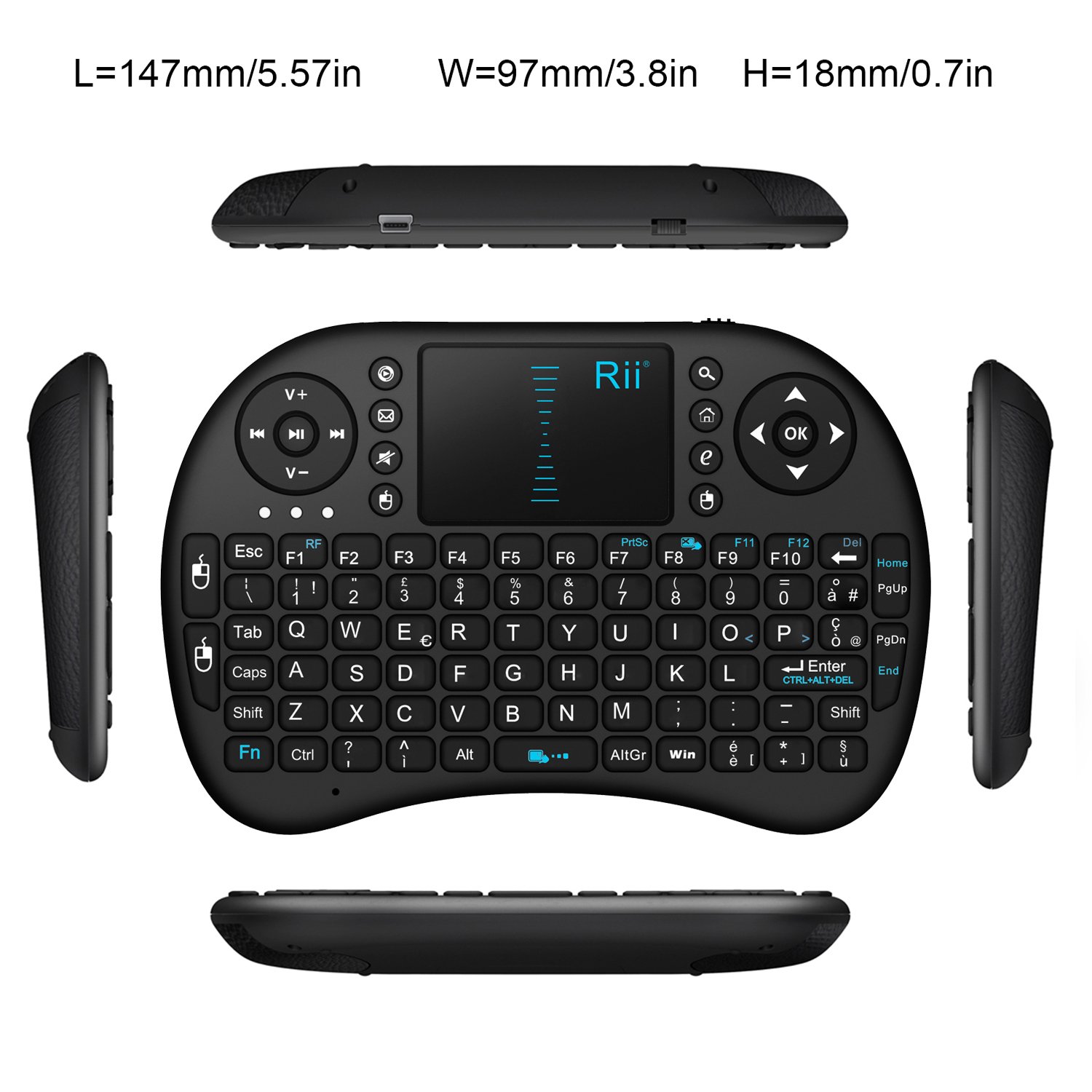
ภาพ: จากบนลงล่าง view of the Rii Mini i8 keyboard with its dimensions (length, width, height) indicated in millimeters and inches.
11. การรับประกันและการสนับสนุน
สำหรับข้อมูลการรับประกันและการสนับสนุนทางเทคนิค โปรดดูที่เว็บไซต์อย่างเป็นทางการของผู้ผลิต webหรือติดต่อผู้ค้าปลีกของคุณ เก็บใบเสร็จรับเงินไว้เพื่อใช้ในการเคลมประกัน


