1. บทนำ
This manual provides instructions for the safe and effective use of your UpBright 4-Pin DIN 12V AC/DC Adapter. This power supply is designed to provide stable 12V DC power to compatible Sanyo LCD TV Monitors, specifically models such as CLT2054, CLT1554, and others listed in the compatibility section. Please read this manual thoroughly before use.
2. ข้อมูลด้านความปลอดภัย
To ensure safe operation and prevent damage to the adapter or connected devices, observe the following precautions:
- อินพุต Voltage: อะแดปเตอร์รองรับปริมาณอินพุตทั่วโลกtage range of 100-240VAC, 50/60Hz. Ensure your wall outlet voltage อยู่ในช่วงนี้
- ความเข้ากันได้ของเอาต์พุต: This adapter provides 12V DC output with a 4-pin DIN connector. Verify that your device requires 12V DC power and has a matching 4-pin DIN input port. Do not use with devices requiring 19.5V or other voltagใช่
- คุณสมบัติการป้องกัน: The adapter is equipped with Over Voltage Output Protection (OVP), Over Current Output Protection (OCP), and Short Circuit Output Protection (SCP) to safeguard your devices.
- สิ่งแวดล้อม: Use the adapter in a dry environment. Avoid exposure to water, moisture, or extreme temperatures.
- การระบายอากาศ : Ensure adequate ventilation around the adapter during operation to prevent overheating.
- การจัดการ: Do not drop, disassemble, or attempt to repair the adapter. Refer servicing to qualified personnel.
3. การตั้งค่าและการเชื่อมต่อ
Follow these steps to connect your UpBright AC/DC adapter to your Sanyo LCD TV Monitor:
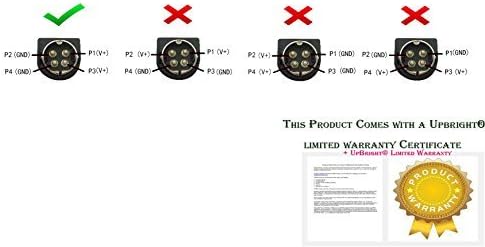
- ตรวจสอบประเภทตัวเชื่อมต่อ: Confirm that your device requires a 4-pin DIN connector. This adapter is specifically designed for this type of connection. Refer to the image below for visual confirmation of the correct connector type.
- เชื่อมต่อกับอุปกรณ์: Carefully align the 4-pin DIN connector of the adapter's output cable with the corresponding input port on your Sanyo LCD TV Monitor. Insert the connector firmly but gently.
- เชื่อมต่อกับเต้ารับไฟฟ้า: Plug the AC input cord of the adapter into a standard wall power outlet (100-240VAC).
- เปิดเครื่อง: Once connected, your Sanyo LCD TV Monitor should receive power. Turn on your device as usual.

Figure 3.1: Correct 4-Pin DIN Connector (right) vs. Incorrect Connector Types (left).

Figure 3.2: UpBright AC/DC Adapter with 4-Pin DIN Connector.
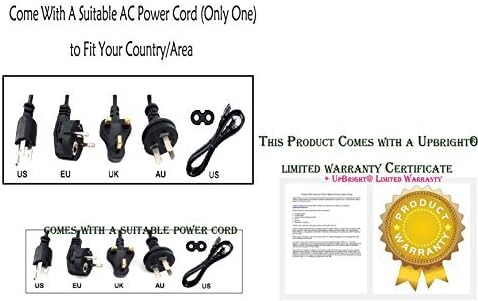
รูปที่ 3.3: อดีตample of various AC power cord types that may be supplied.
หมายเหตุความเข้ากันได้ที่สำคัญ: This adapter is compatible with Sanyo CLT2054, CLT2054-02, CLT1554, JD-12050-2C, JS-12050-2C, 1LB4U11B00400, 1LB4U11B00600, 1AV4U11B30100, EADP-60EB A LCD TV Monitors. It is ไม่ for 19.5V versions or other devices like Cricut Imagine, POS systems, DVR units, camera systems, mixers, or hard drives. Always confirm your device's power requirements and connector type before use.
4. คู่มือการใช้งาน
The UpBright AC/DC adapter operates automatically once connected to a power source and a compatible device. No user intervention is required for its basic function.
- Ensure all connections are secure before powering on your device.
- If your device has a power switch, use it to turn the device on or off. The adapter will continuously supply power when plugged into an active outlet.
- Unplug the adapter from the wall outlet when not in use for extended periods.
5. การบำรุงรักษา
To ensure the longevity and proper functioning of your adapter:
- การทำความสะอาด: Disconnect the adapter from power and device before cleaning. Use a soft, dry cloth to wipe the exterior. Do not use liquid cleaners or solvents.
- พื้นที่จัดเก็บ: Store the adapter in a cool, dry place when not in use. Avoid wrapping the cables too tightly.
- การตรวจสอบ: Periodically inspect the adapter and cables for any signs of damage, such as frayed wires or cracked casing. If damage is found, discontinue use and replace the adapter.
6 การแก้ไขปัญหา
If your device is not powering on or functioning correctly with the adapter, consider the following:
- ไม่มีไฟฟ้า:
- ตรวจสอบให้แน่ใจว่าอะแดปเตอร์เสียบเข้ากับเต้ารับไฟฟ้าที่ผนังอย่างแน่นหนา
- Verify the 4-pin DIN connector is fully inserted into your device's power input.
- ตรวจสอบว่าปลั๊กไฟใช้งานได้หรือไม่โดยลองเสียบอุปกรณ์อื่นเข้าไป
- อุปกรณ์ไม่รองรับ:
- Double-check your device's power requirements (voltage, amperage, connector type) against the adapter's specifications. This adapter is for 12V DC devices with a 4-pin DIN connector.
- Confirm your device is one of the compatible Sanyo models listed in this manual.
- อะแดปเตอร์ร้อนเกินไป:
- Unplug the adapter immediately.
- Ensure it is not covered or placed in an enclosed space that restricts airflow.
- หากยังคงเกิดความร้อนสูงเกินไป ให้หยุดใช้งานและติดต่อฝ่ายสนับสนุน
หากขั้นตอนการแก้ไขปัญหาข้างต้นไม่สามารถแก้ปัญหาได้ โปรดดูส่วนการรับประกันและการสนับสนุน
7. ข้อมูลจำเพาะ
| ยี่ห้อ | UPBRIGHT |
| หมายเลขรุ่น | Sanyo CLT2054 02 CLT1554 12V Power (Compatible) |
| อินพุต Voltage | 100-240VAC, 50/60เฮิรตซ์ |
| ปริมาณการส่งออกtage | กระแสตรง 12 โวลต์ |
| กระแสไฟขาออก | 3.4A - 5A (Max 5 Amps) |
| วัดtage | 40W - 60W (Max 60 watts) |
| ประเภทขั้วต่อ | ขั้วต่อ DIN 4 พิน |
| คุณสมบัติการป้องกัน | OVP, OCP, SCP |
| ขนาดสินค้า | 6 x 3 x 2 นิ้ว |
| น้ำหนักสินค้า | 12 ออนซ์ |
| การรับรอง | ซีอี, ยูแอล |
8. การรับประกันและการสนับสนุน
Your UpBright AC/DC Adapter comes with the following warranty and support:
- นโยบายการคืนเงิน: UpBright offers a 30-day refund policy from the date of purchase.
- นโยบายการแลกเปลี่ยน: A 24-month exchange policy is provided for defective units.
- ใบรับประกัน: This product includes a UpBright Limited Warranty Certificate.
รูปที่ 8.1: อดีตample of UpBright Limited Warranty Certificate.
For warranty claims or technical assistance, please contact the retailer or UpBright customer service through their official channels. Please have your purchase details and product model information ready.


