1. สินค้าหมดview
The Lexmark MS812DN is a high-performance monochrome laser printer designed for demanding work environments. It offers fast printing speeds, high-resolution output, and robust features to keep your office productive.
คุณสมบัติหลัก:
- Faster processing: Efficiently handles complex print jobs.
- Reliable High performance: Built for consistent, high-volume printing.
- Keep jobs moving: Designed to minimize interruptions and maximize uptime.
- Spend less time waiting: Achieves print speeds of up to 70 pages per minute.
- Print on a wide range of media: Supports various paper types including card stock, envelopes, labels, and transparencies.

Figure 1: Lexmark MS812DN Monochrome Laser Printer.
2. คู่มือการติดตั้ง
Follow these steps to set up your Lexmark MS812DN printer.
2.1 การแกะกล่องเครื่องพิมพ์
- นำเครื่องพิมพ์ออกจากบรรจุภัณฑ์อย่างระมัดระวัง
- นำวัสดุบรรจุภัณฑ์ เทปกาว และฟิล์มป้องกันทั้งหมดออกจากเครื่องพิมพ์
- Ensure all included components (workgroup printer, black toner cartridge) are present.
2.2 การเชื่อมต่อเครื่องพิมพ์
- วางเครื่องพิมพ์บนพื้นผิวที่มั่นคงและเรียบเสมอกัน
- เชื่อมต่อสายไฟเข้ากับเครื่องพิมพ์ แล้วจึงเสียบเข้ากับเต้ารับไฟฟ้าที่มีสายดิน
- For network connectivity, connect an Ethernet cable from your network router/switch to the printer's Ethernet port.
- Alternatively, for direct connection, use a USB cable to connect the printer to your computer's USB port.
2.3 การติดตั้งตลับหมึก
- เปิดฝาด้านหน้าของเครื่องพิมพ์
- Unpack the black toner cartridge.
- Gently shake the cartridge to distribute the toner evenly.
- Insert the toner cartridge into its designated slot until it clicks into place.
- ปิดประตูทางเข้าด้านหน้า
2.4 กำลังโหลดกระดาษ
- ดึงถาดกระดาษออก
- ปรับตัวกั้นกระดาษให้พอดีกับขนาดของกระดาษที่คุณกำลังใส่เข้าไป
- Load the paper stack into the tray, ensuring it is flat and within the guides.
- Push the paper tray back into the printer until it locks.
2.5 การติดตั้งไดรเวอร์
After connecting the printer, install the necessary drivers on your computer. Drivers and user guides are available from the official Lexmark webงาน. เยี่ยม www.lexmark.com for the latest software downloads compatible with PC, Mac, and Unix systems.

รูปที่ 2 : ด้านหน้า view of the Lexmark MS812DN printer, showing the paper tray and control panel.
3. การดำเนินการ
This section covers the basic operation of your Lexmark MS812DN printer.
3.1 การพิมพ์ขั้นพื้นฐาน
- ตรวจสอบให้แน่ใจว่าเครื่องพิมพ์เปิดอยู่และเชื่อมต่อกับคอมพิวเตอร์หรือเครือข่ายของคุณแล้ว
- เปิดเอกสารที่คุณต้องการพิมพ์บนคอมพิวเตอร์ของคุณ
- เลือก File > พิมพ์ (หรือคำสั่งที่เทียบเท่าในแอปพลิเคชันของคุณ)
- Choose the Lexmark MS812DN from the list of available printers.
- ปรับการตั้งค่าการพิมพ์ตามต้องการ (เช่น จำนวนสำเนา ขนาดกระดาษ คุณภาพการพิมพ์)
- คลิก พิมพ์.
3.2 การพิมพ์สองด้าน (Duplex Printing)
The MS812DN supports automatic duplex printing.
- In your application's print dialog, look for options related to การพิมพ์สองด้าน or การพิมพ์สองหน้า.
- เลือกตัวเลือกการพิมพ์สองด้านที่ต้องการ (เช่น การพิมพ์ด้านยาว การพิมพ์ด้านสั้น)
- ดำเนินการพิมพ์ตามปกติ
3.3 การใช้แผงควบคุม
The printer features an e-Task touch screen for direct control. Use the touch screen to:
- View printer status and error messages.
- Access printer settings and network configurations.
- Initiate copy, scan, and fax functions directly from the device.
3.4 Copy, Scan, and Fax Functions
The Lexmark MS812DN is a multifunction device capable of copying, scanning, and faxing.
- สำเนา: Place documents on the scanner glass or in the Automatic Document Feeder (ADF). Use the control panel to select copy options and start the process.
- สแกน: Scan documents to a computer, network folder, or email. Configure scan destinations via the control panel or your computer's scanning software.
- โทรสาร: Connect a phone line to the printer's fax port. Use the control panel to dial numbers and send faxes.
4. การบำรุงรักษา
การบำรุงรักษาตามปกติจะช่วยให้เครื่องพิมพ์ของคุณมีอายุการใช้งานยาวนานและมีประสิทธิภาพเหมาะสมที่สุด
4.1 การเปลี่ยนตลับหมึก
When the toner is low, the printer will display a message on the control panel. To replace:
- Open the front access door.
- Remove the old toner cartridge by pulling it out.
- แกะตลับหมึกใหม่ออกจากบรรจุภัณฑ์แล้วเขย่าเบาๆ
- ใส่ตลับหมึกใหม่เข้าไปจนกระทั่งได้ยินเสียงคลิกเข้าที่
- ปิดประตูทางเข้าด้านหน้า
4.2 การทำความสะอาดเครื่องพิมพ์
- ภายนอก: เช็ดภายนอกเครื่องพิมพ์ด้วยผ้านุ่มๆampใช้ผ้าที่ไม่เป็นขุยเช็ด ห้ามใช้สารทำความสะอาดที่มีฤทธิ์กัดกร่อนหรือตัวทำละลาย
- กระจกสแกนเนอร์: เช็ดทำความสะอาดกระจกสแกนเนอร์ด้วยผ้าเนื้อนุ่มชุบน้ำยาทำความสะอาดกระจก
- ส่วนประกอบภายใน: Refer to the detailed user guide (available on Lexmark's website) for instructions on cleaning internal components like rollers and the fuser.
4.3 การแก้ไขปัญหากระดาษติด
If a paper jam occurs, the printer's control panel will display an error message indicating the location of the jam. Follow the on-screen instructions or consult the full user manual for specific steps to clear the jam from various access points.
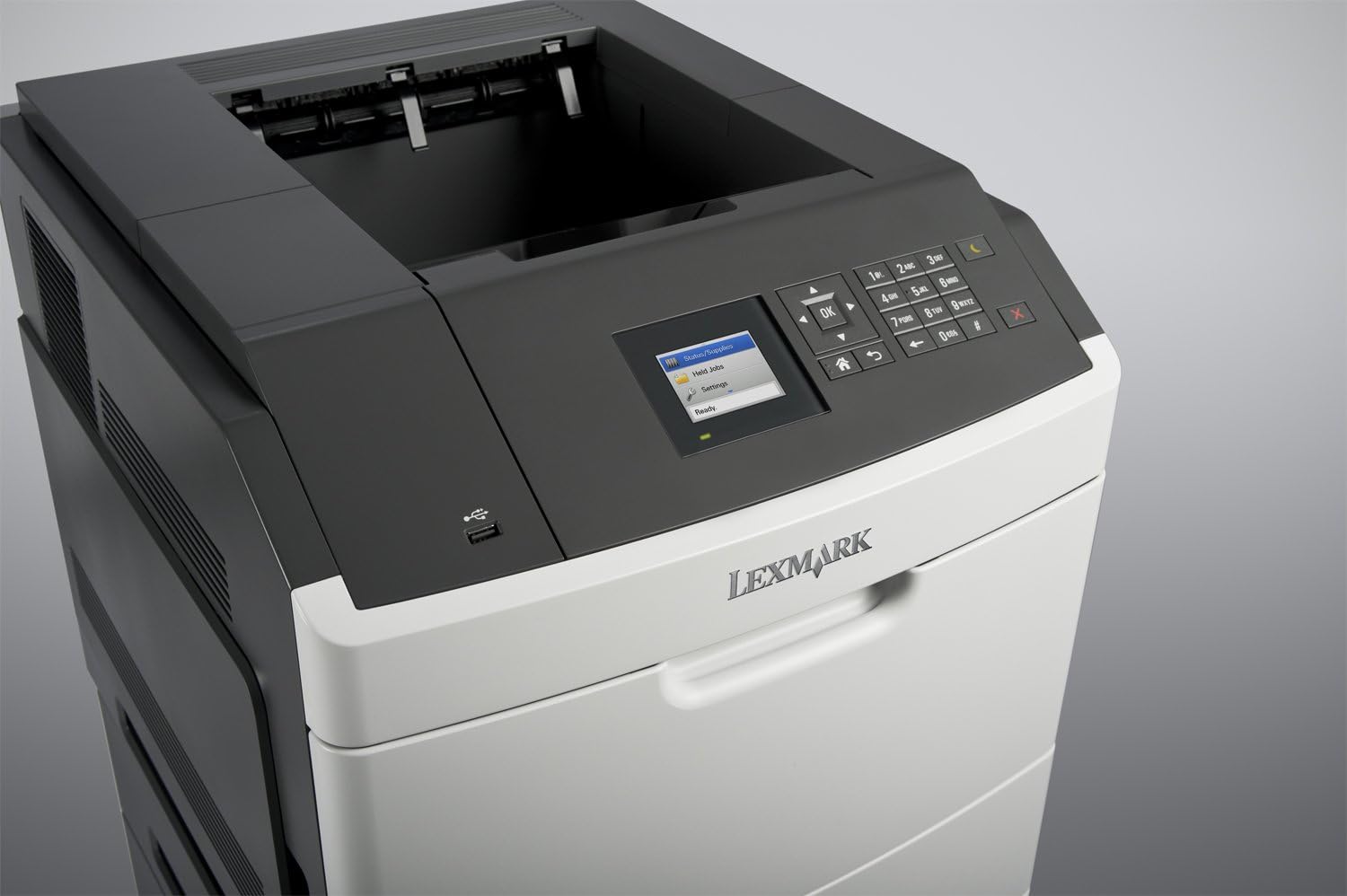
รูปที่ 3: ด้านข้าง view of the Lexmark MS812DN printer, showing access points for maintenance.
5 การแก้ไขปัญหา
หัวข้อนี้ให้แนวทางแก้ไขปัญหาทั่วไปที่คุณอาจพบเจอ
5.1 เครื่องพิมพ์ไม่ตอบสนอง
- ตรวจสอบให้แน่ใจว่าเครื่องพิมพ์เปิดอยู่และสายเคเบิลทั้งหมด (สายไฟ, USB/Ethernet) เชื่อมต่อแน่นหนาดีแล้ว
- Check the printer's control panel for any error messages.
- โปรดรีสตาร์ททั้งเครื่องพิมพ์และคอมพิวเตอร์ของคุณ
- ตรวจสอบให้แน่ใจว่าได้ติดตั้งและเลือกไดรเวอร์เครื่องพิมพ์ที่ถูกต้องบนคอมพิวเตอร์ของคุณแล้ว
5.2 ปัญหาคุณภาพการพิมพ์
- ตรวจสอบระดับหมึกพิมพ์และเปลี่ยนหากเหลือน้อย
- โปรดตรวจสอบให้แน่ใจว่าคุณใช้กระดาษที่เหมาะสมกับงานพิมพ์ของคุณ
- Perform a print quality test from the printer's control panel or driver settings.
- Clean the printer's internal components as per the maintenance section or full user manual.
5.3 กระดาษติด
Refer to Section 4.3 for instructions on clearing paper jams. Always remove jammed paper carefully to avoid tearing.
5.4 ปัญหาการเชื่อมต่อเครือข่าย
- Verify the Ethernet cable is properly connected to both the printer and the network device.
- Check network settings on the printer's control panel to ensure it has a valid IP address.
- Restart your network router/switch.
6. ข้อมูลจำเพาะทางเทคนิค
| คุณสมบัติ | รายละเอียด |
|---|---|
| ยี่ห้อ | เล็กซ์มาร์ก |
| ชื่อรุ่น | MS812DN |
| หมายเลขรุ่นสินค้า | PP7687 |
| เทคโนโลยีการพิมพ์ | เลเซอร์ |
| เอาท์พุตเครื่องพิมพ์ | เอกรงค์ |
| ความเร็วในการพิมพ์สูงสุด ขาวดำ | 70 หน้าต่อนาที |
| ความละเอียดการพิมพ์ขาวดำสูงสุด | 1200 x 1200 จุดต่อนิ้ว |
| การพิมพ์สองด้าน (Duplex) | ใช่ |
| เทคโนโลยีการเชื่อมต่อ | อีเทอร์เน็ต, ยูเอสบี |
| ความจุของหน่วยความจำ | 512MB |
| ความจุแผ่นอินพุตสูงสุด | 4400 |
| สื่อสิ่งพิมพ์ | Card stock, Envelopes, Labels, Paper (plain), Transparencies |
| อุปกรณ์ที่รองรับ | PC, Mac, Unix |
| ขนาดสินค้า (กว้าง x ยาว x สูง) | 21.1 x 24.2 x 22.2 นิ้ว |
| น้ำหนักสินค้า | 27 ปอนด์ |
| ส่วนประกอบที่รวมอยู่ | Workgroup printer, Toner cartridge - black |
| ฟังก์ชันเครื่องพิมพ์เพิ่มเติม | Copy, Fax, Scan |
7. การรับประกันและการสนับสนุน
7.1 ข้อมูลการรับประกัน
This Lexmark MS812DN printer may come with a 90-Day Depot Warranty, particularly for refurbished units. Please refer to your purchase documentation for specific warranty terms and conditions.
7.2 การสนับสนุนลูกค้า
For further assistance, technical support, or to download the latest drivers and full user manuals, please visit the official Lexmark support webเว็บไซต์:
ฝ่ายสนับสนุน Lexmark Webเว็บไซต์
You can also visit the Lexmark Store on Amazon for product information and accessories: Lexmark Store


