การแนะนำ
This manual provides detailed instructions for the assembly, operation, and maintenance of your Titan Osaki OS-4000 Zero Gravity Massage Chair. Please read this manual thoroughly before using the chair to ensure safe and optimal performance. The Osaki OS-4000 features updated upholstery and includes zero gravity, a 30-inch roller stroke, body scan technology, S-track massage robot, full body air massage, seat vibration, and heat therapy for your back.
คุณสมบัติหลัก:
- ปรับเอนด้วยแรงโน้มถ่วงเป็นศูนย์
- Ergonomic S-Track Roller System
- Lower Back Heat Therapy
- Computer Body Scan Technology
- Full Body Air Massages
- การสั่นสะเทือนที่นั่ง
- Automatic Leg Scan & Extension
- Arm, Shoulder, and Hip Massage
- Isolated Pillow Neck Massage
- รีโมทคอนโทรลไร้สาย
สินค้าเกินview วีดีโอ:
วิดีโอนี้ให้ข้อมูลทั่วไปเกี่ยวกับview of the Osaki OS-4000 massage chair's features and design.
การติดตั้งและการตั้งค่า
Carefully unpack all components and ensure you have all necessary parts before beginning assembly. Refer to the video below for a visual guide to the installation process.
คู่มือวิดีโอการติดตั้ง:
This video demonstrates the step-by-step installation of the Osaki OS-4000 massage chair.
Step 1: Attaching Arm Panels
Begin by attaching the left arm panel. Align the connecting arm with the lower bar on the chair. Ensure the arm panel is positioned correctly before proceeding. Connect any hoses located within the arm panel to their corresponding ports on the chair body. Securely fasten the arm panel using the provided flat-head bolts, ensuring they are tightened snugly. Repeat this process for the right arm panel, making sure all hoses are clear before pushing the arm panel down.

ภาพแสดงด้านข้าง view of the massage chair with an arm panel ready for attachment, highlighting the connection area.

ภาพแสดงด้านหน้า view of the massage chair with an arm panel ready for attachment, highlighting the connection area.
ขั้นตอนที่ 2: การติดตั้งพนักพิง
Once both arm panels are securely attached, position the backrest. On the bottom rear of the chair, locate and remove any zip ties, styrofoam, or tape securing the backrest mechanism. These are for shipping protection. Before installing the backrest, remove any plugs from the hose connections. Carefully align the backrest with the chair frame and push it down until it locks into place. Connect the hoses from the backrest to the corresponding ports on the chair. These hoses are typically labeled (e.g., gray and white) for easy matching. Secure the backrest by inserting the pin and cotter pin into the designated holes. Ensure the black lever is moved down to fully secure the backrest.
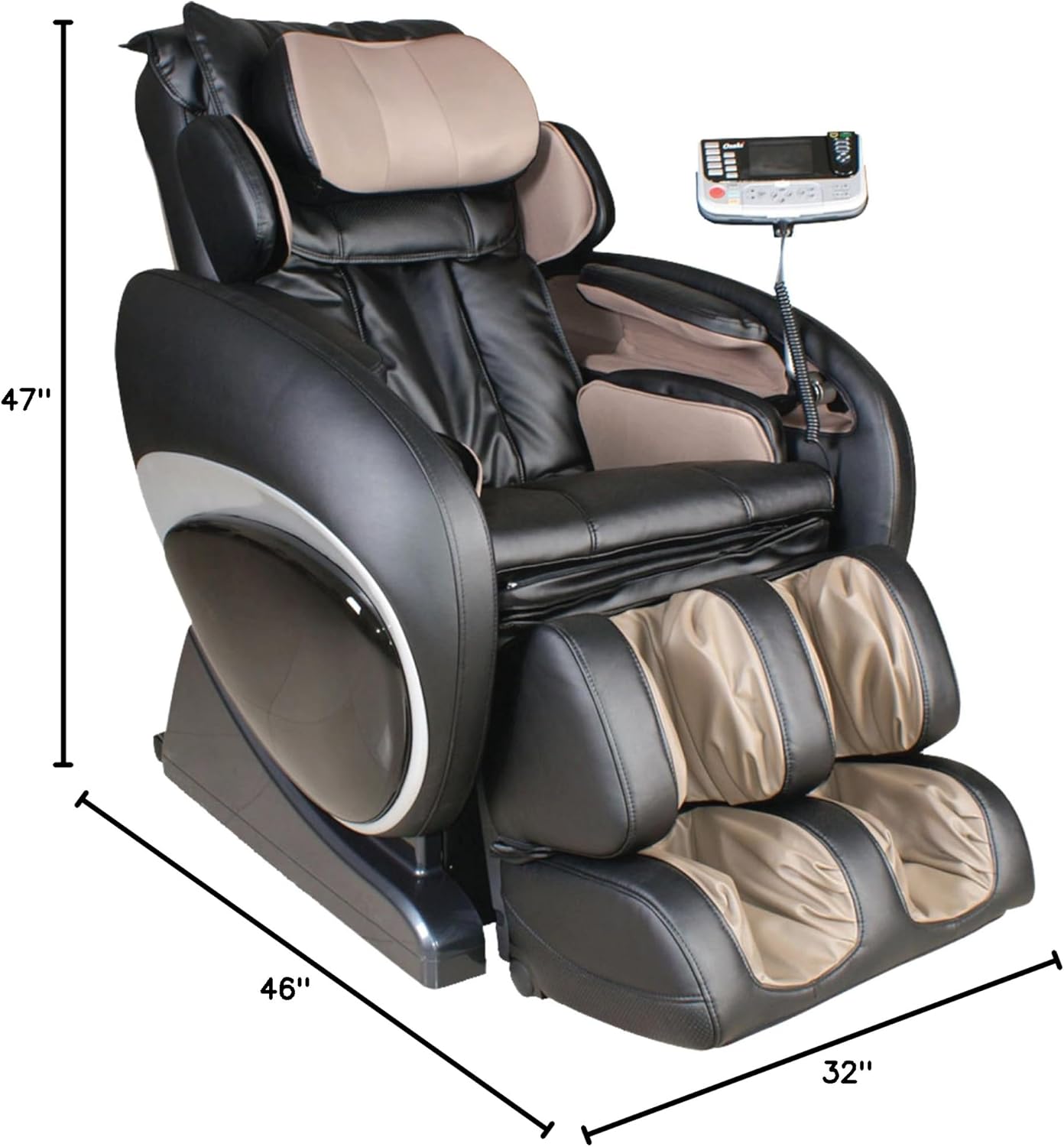
Image displaying the dimensions of the Osaki OS-4000 massage chair, useful for planning placement.
Step 3: Connecting Cords, Cushions & Remote
After the backrest is installed, connect the main power cords. Plug the black wire into the black plug and the gray wire into the gray plug on the chair's base. Plug the power cord into a wall outlet. Locate the on/off switch, usually near the power input. For the remote control, pick it up and locate the bolt on the back. Loosen this bolt, insert the remote into its holder on the armrest, and then tighten the bolt to secure it. Finally, attach the back seat cover, ensuring any black covers are removed first so the Velcro adheres properly. Zip up the back seat cover to complete the assembly.

Image showing the control panel and power connection area of the massage chair.
คำแนะนำการใช้งาน
Your Osaki OS-4000 massage chair is designed for ease of use. Use the wireless remote control to select your desired massage programs and adjust settings. The remote allows you to control features such as:
- ท่าทางไร้แรงโน้มถ่วง: Recline to one of the two zero gravity positions to relieve pressure on your spine and enhance the massage experience.
- Computer Body Scan: The chair will automatically scan your body to customize the massage rollers to your unique body shape.
- S-Track Massage Robot: Experience a massage that follows the natural curvature of your spine.
- นวดตัวด้วยลม: Airbags located throughout the chair provide compression massage to various body parts including arms, shoulders, hips, calves, and feet.
- การบำบัดด้วยความร้อน: Activate the lower back heat function for soothing warmth.
- Manual Massage Modes: Choose from various manual massage techniques and target specific areas.
- Automatic Leg Scan & Extension: The leg rest will automatically adjust to your leg length.
Consult the remote control's display and buttons for specific program selections and intensity adjustments. Always ensure the chair is powered on using the main on/off switch before operating.
การซ่อมบำรุง
To ensure the longevity and optimal performance of your massage chair, follow these simple maintenance guidelines:
- การทำความสะอาด: เช็ดทำความสะอาดพื้นผิวของเก้าอี้ด้วยผ้าเนื้อนุ่มและแห้งamp cloth. Avoid using harsh chemicals or abrasive cleaners, as these can damage the polyurethane finish.
- พื้นที่จัดเก็บ: When not in use for extended periods, store the chair in a cool, dry place away from direct sunlight.
- การตรวจสอบ: ตรวจสอบการเชื่อมต่อและชิ้นส่วนที่เคลื่อนไหวทั้งหมดเป็นระยะๆ เพื่อดูว่ามีสัญญาณการสึกหรอหรือความเสียหายใดๆ หรือไม่
การแก้ไขปัญหา
If you encounter any issues with your Osaki OS-4000 massage chair, please refer to the following common troubleshooting tips:
- เก้าอี้ไม่เปิดใช้งาน: Ensure the power cord is securely plugged into both the chair and a working electrical outlet. Check that the main on/off switch on the chair's base is in the 'On' position.
- รีโมทคอนโทรลไม่ตอบสนอง: Verify that the remote control is properly connected to the chair. Check if the remote's battery needs replacement if it's a wireless model with replaceable batteries.
- ฟังก์ชั่นการนวดไม่ทำงาน: Confirm that all internal connections (hoses, wires) are securely attached as per the installation instructions.
- เสียงที่ผิดปกติ: If you hear unusual noises, immediately turn off the chair and inspect for any obstructions or loose parts. Do not attempt to repair complex internal mechanisms yourself.
For persistent issues or repairs beyond basic troubleshooting, please contact customer support.
ข้อมูลจำเพาะ
| คุณสมบัติ | รายละเอียด |
|---|---|
| ยี่ห้อ | ไททัน |
| ชื่อรุ่น | โอเอส-4000 |
| สี | สีดำ |
| ขนาดสินค้า | ลึก 46 นิ้ว x กว้าง 32 นิ้ว x สูง 47 นิ้ว |
| น้ำหนักสินค้า | 250 ปอนด์ |
| คำแนะนำน้ำหนักสูงสุด | 260 ปอนด์ |
| วัสดุ | Polyurethane, Foam |
| คุณสมบัติพิเศษ | Zero Gravity, Body Scan Technology, S-Track Massage Robot, Full Air Massage, Seat Vibration, Heat Therapy |
| จำนวนตำแหน่งการเอน | 2 |
| คำแนะนำการดูแลผลิตภัณฑ์ | เช็ดทำความสะอาด |
การรับประกันและการสนับสนุน
For any questions, technical assistance, or warranty claims, please contact Titan customer support. Refer to your purchase documentation for specific warranty details and contact information. Always ensure you have your model number (OS-4000) and proof of purchase available when contacting support.
คุณสามารถเยี่ยมชม ร้าน Titan Store บน Amazon สำหรับข้อมูลผลิตภัณฑ์เพิ่มเติมและทรัพยากรสนับสนุน


