การแนะนำ
The AMD FirePro W7000 workstation graphics card is designed to deliver exceptional performance, visual quality, and multi-display capabilities for CAD/CAE professionals. This single-slot solution enhances interactivity with complex 3D models and accelerates design visualization and rendering processes. This manual provides comprehensive instructions for the installation, operation, maintenance, and troubleshooting of your FirePro W7000 graphics card.
ข้อมูลด้านความปลอดภัย
- Always disconnect power from your computer before installing or removing any internal components.
- Handle the graphics card by its edges to avoid touching sensitive components or static discharge.
- ตรวจสอบให้แน่ใจว่าได้ต่อสายดินอย่างถูกต้องเพื่อป้องกันความเสียหายจากไฟฟ้าสถิต (ESD)
- อย่าให้การ์ดถูกความชื้นหรือโดนอุณหภูมิที่สูงหรือสูงเกินไป
- Keep the card away from children.
เนื้อหาแพ็คเกจ
ตรวจสอบว่ามีรายการทั้งหมดอยู่ในแพ็คเกจของคุณ:
- AMD FirePro W7000 Graphics Card
- Driver CD (or link to driver download)
- คู่มือการติดตั้งแบบด่วน
- DisplayPort to DVI Adapters (typically two included)
การตั้งค่า
ความต้องการของระบบ
- PCI Express 3.0 x16 slot (compatible with PCIe 2.0, but 3.0 recommended for full performance).
- Minimum 500W power supply with one 6-pin PCIe power connector.
- Compatible operating system (e.g., Windows 7/8/10 64-bit, Linux).
- Sufficient case ventilation.
การติดตั้งฮาร์ดแวร์
- เตรียมระบบของคุณ: Power off your computer and disconnect the power cord. Open the computer case.
- Locate a PCIe x16 slot: ระบุสล็อต PCI Express x16 ที่พร้อมใช้งานบนเมนบอร์ดของคุณ
- Remove slot cover: Remove the metal slot cover(s) corresponding to the PCIe slot. The FirePro W7000 is a single-slot card.
- ใส่การ์ดจอ: ค่อยๆ จัดตำแหน่งการ์ดกราฟิกให้ตรงกับสล็อต PCIe แล้วกดลงให้แน่นจนกระทั่งเข้าที่ ตรวจสอบให้แน่ใจว่าคลิปยึดบนเมนบอร์ดล็อคเข้าที่
- รักษาความปลอดภัยของบัตร: Fasten the graphics card to the computer case using the screw or latch mechanism.
- เชื่อมต่อพลังงาน: เชื่อมต่อขั้วต่อไฟ PCIe 6 พินจากแหล่งจ่ายไฟของคุณเข้ากับพอร์ตที่สอดคล้องกันบนการ์ดกราฟิก
- Close case and reconnect: ปิดเคสคอมพิวเตอร์ของคุณ ต่อสายเคเบิลทั้งหมดกลับเข้าที่ และเปิดระบบของคุณ

รูปที่ 1 : ด้านหน้า view of the AMD FirePro W7000 Graphics Card, showing the cooling fan and FirePro Graphics branding. This image illustrates the overall design and form factor of the card for installation purposes.
การติดตั้งไดร์เวอร์
- บูตเข้าสู่ระบบปฏิบัติการ: After hardware installation, boot your computer into your operating system.
- จัดหานักขับ: Insert the provided driver CD or download the latest drivers from the official AMD support website. For the AMD FirePro W7000, visit www.amd.com/support.
- ติดตั้งไดรเวอร์: Run the driver installer and follow the on-screen prompts. A system restart may be required after installation.
- ตรวจสอบการติดตั้ง: After restarting, verify that the graphics card is recognized correctly in your operating system's Device Manager.
การดำเนินงาน
กำลังเชื่อมต่อจอภาพ
The AMD FirePro W7000 features four DisplayPort 1.2 outputs, supporting resolutions up to 4096x2160. You can connect up to four displays simultaneously.

Figure 2: Display outputs of the AMD FirePro W7000 Graphics Card, showing four DisplayPort connectors. This image highlights the connectivity options for multiple monitors.
- Connect your DisplayPort monitors directly to the card.
- For DVI monitors, use the included DisplayPort to DVI passive adapters. For more than two DVI monitors or higher resolutions, active adapters may be required.
- For HDMI monitors, active DisplayPort to HDMI adapters are necessary, especially for 4K resolutions.
AMD Eyefinity Technology
Leverage AMD Eyefinity Technology to expand your visual workspace across multiple displays, creating a large, immersive desktop. Configure Eyefinity settings through the AMD Catalyst Pro Control Center (or AMD Radeon Pro Software for newer drivers).
- Open the AMD control panel from your desktop or system tray.
- Navigate to the Eyefinity section to configure display groups and resolutions.
การซ่อมบำรุง
- การกำจัดฝุ่น: Periodically clean dust from the graphics card's fan and heatsink using compressed air. Ensure the system is powered off and unplugged before cleaning.
- การไหลเวียนของอากาศ: Ensure your computer case has adequate airflow to prevent overheating. Keep ventilation openings clear.
- การอัปเดตไดรเวอร์: Regularly check the AMD support webเว็บไซต์สำหรับการอัปเดตไดร์เวอร์ล่าสุดเพื่อให้มั่นใจถึงประสิทธิภาพและความเสถียรที่เหมาะสมที่สุด
การแก้ไขปัญหา
| ปัญหา | สาเหตุที่เป็นไปได้ | สารละลาย |
|---|---|---|
| No display output / Black screen | Card not seated correctly, power cable disconnected, incorrect display input selected, driver issue. | Reseat the card, ensure 6-pin power is connected, check monitor input, reinstall drivers in Safe Mode. |
| ระบบล่มหรือค้าง | Overheating, unstable drivers, insufficient power supply. | Check temperatures, update drivers, ensure PSU meets requirements. |
| Poor performance in applications | Outdated drivers, application not optimized for workstation GPU, incorrect settings. | Update drivers, check application settings, ensure application is using the FirePro card. |
| Display issues (flickering, artifacts) | Faulty cable, driver corruption, hardware defect. | Try a different cable, reinstall drivers, contact support if issue persists. |

รูปที่ 3: ย้อนกลับ view of the AMD FirePro W7000 Graphics Card, showing the PCB and cooling plate. This view can be useful for identifying components during troubleshooting or installation.
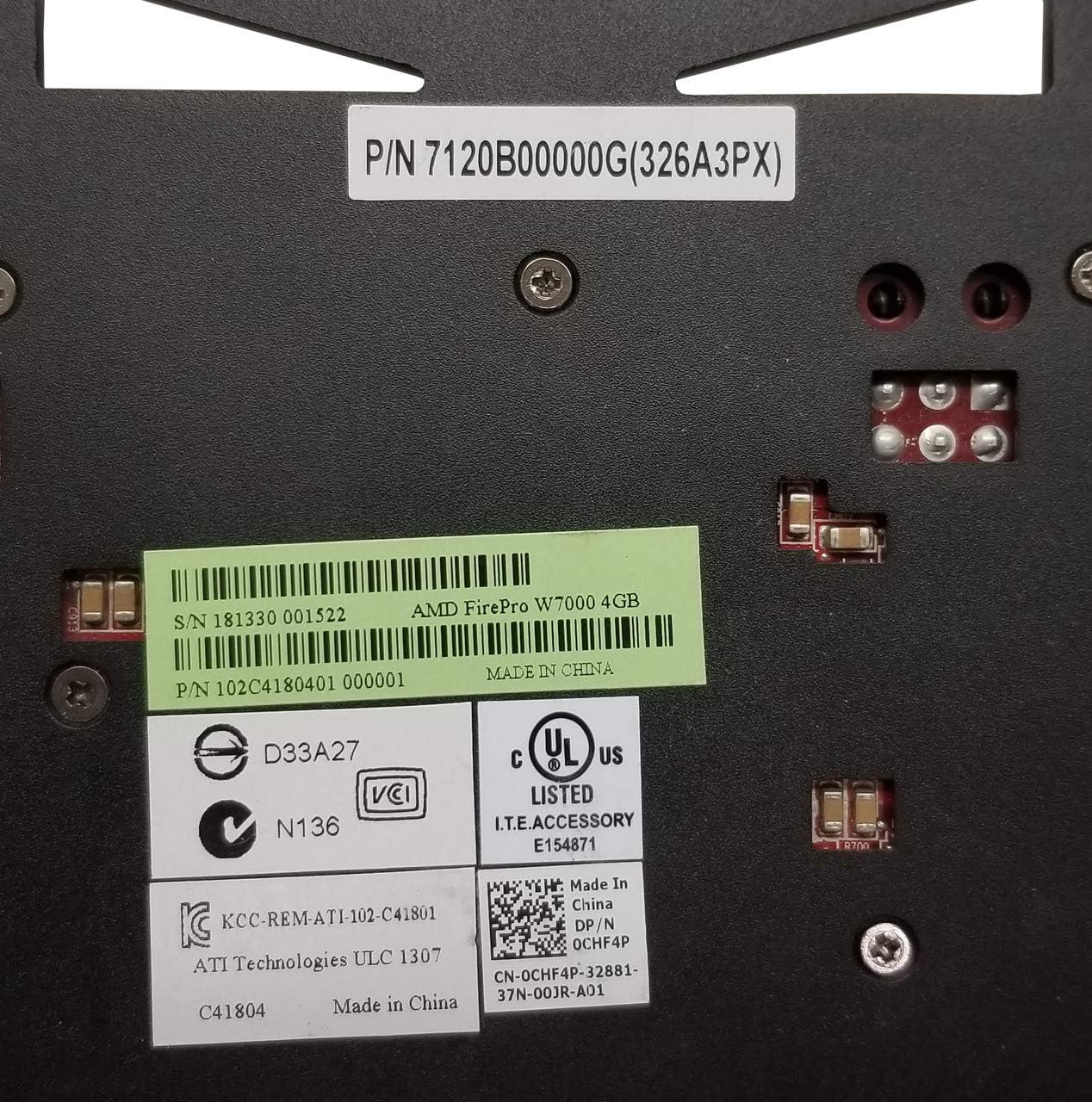
Figure 4: Close-up of the product label on the AMD FirePro W7000, displaying the Serial Number (S/N 181330 001522) and Part Number (P/N 102C4180401 000001). These numbers are crucial for product registration and support inquiries.
ข้อมูลจำเพาะ
| คุณสมบัติ | รายละเอียด |
|---|---|
| ความละเอียดหน้าจอสูงสุด | ขนาด 4096x2160 |
| ความเร็วหน่วยความจำ | 1200 เมกะเฮิรตซ์ |
| โคโปรเซสเซอร์กราฟิก | เอเอ็มดี |
| ยี่ห้อชิปเซ็ต | แสดงลิงค์ |
| คำอธิบายการ์ด | AMD FirePro W7000 |
| ขนาดแรมการ์ดจอ | 4GB |
| ยี่ห้อ | เอเอ็มดี |
| ชุด | FirePro W7000 |
| หมายเลขรุ่นสินค้า | 100-505634 |
| น้ำหนักสินค้า | 1.5 ปอนด์ |
| ขนาดสินค้า (กxยxส) | 9.8 x 2.6 x 6.4 นิ้ว |
| จำนวนโปรเซสเซอร์ | 1 |
| ประเภทหน่วยความจำคอมพิวเตอร์ | ไม่ทราบ |
| ผู้ผลิต | เอเอ็มดี |
| วันที่พร้อมใช้งานครั้งแรก | วันที่ 7 กันยายน 2012 |
| ความเร็วสัญญาณนาฬิกา GPU | 950 เมกะเฮิรตซ์ |
| อินเทอร์เฟซเอาท์พุตวิดีโอ | ดิสเพย์พอร์ต |
การรับประกันและการสนับสนุน
For warranty information, technical support, and the latest drivers, please visit the official AMD support website or contact AMD customer service.
- ผู้ผลิต: เอเอ็มดี
- การสนับสนุนเอเอ็มดี Webเว็บไซต์: www.amd.com/support
- ร้านค้า AMD: AMD Official Store on Amazon
- When contacting support, please have your model number (100-505634), serial number (e.g., 181330001522), and part number (e.g., 102C4180401 000001) ready.


