1. โอเวอร์ทั่วไปview
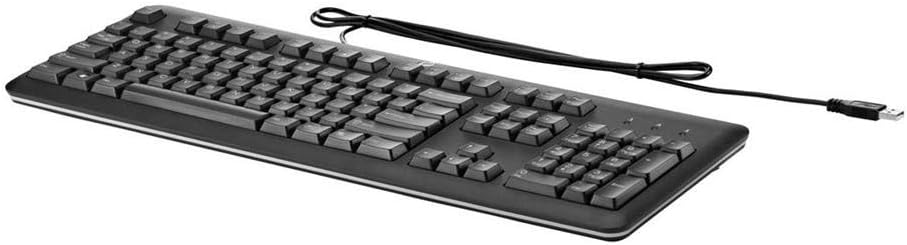
The HP QY776AA#ABA USB Keyboard is a full-size, wired keyboard designed for reliable and comfortable use with various computer systems. It features a U.S. English localization layout, quiet keys, and a durable, spill-resistant design, making it suitable for both home and office environments.
2. คำแนะนำในการตั้งค่า
Setting up your HP QY776AA#ABA USB Keyboard is a straightforward process, thanks to its plug-and-play functionality.
- แกะคีย์บอร์ดออก: นำคีย์บอร์ดออกจากบรรจุภัณฑ์อย่างระมัดระวัง
- ค้นหาพอร์ต USB: Identify an available USB-A port on your computer (desktop, laptop, gaming console, or smart TV).
- เชื่อมต่อสาย USB: Insert the USB-A connector of the keyboard's cable into the available USB port on your device.
- การจดจำระบบ: Your operating system should automatically detect and install the necessary drivers for the keyboard. This may take a few moments.
- เริ่มใช้งาน: Once the system recognizes the keyboard, it is ready for immediate use.
3. การใช้งานคีย์บอร์ด
The HP QY776AA#ABA keyboard offers a standard, comfortable typing experience with several convenient features.
3.1 Key Layout and Functionality
- เค้าโครงขนาดเต็ม: The keyboard features a complete QWERTY layout, including a dedicated numeric keypad on the right side for efficient data entry.
- คีย์ที่เงียบสงบ: The keys are designed for quiet operation, minimizing typing noise in shared environments.
- ปุ่มฟังก์ชั่น (F1-F12): These keys provide standard functionality and often include secondary media control functions (e.g., volume up/down, play/pause) when used in combination with the 'Fn' key.
- ปุ่ม Windows: A dedicated Windows key provides quick access to the Start Menu and other operating system functions.
3.2 ขาตั้งปรับระดับได้
For enhanced ergonomic comfort, the keyboard is equipped with adjustable tilt legs located on the underside. These legs can be extended to raise the back of the keyboard, providing a slight incline that some users prefer for typing. To adjust, simply flip out the legs to your desired position.

4. การบำรุงรักษา
To ensure the longevity and optimal performance of your HP QY776AA#ABA USB Keyboard, follow these simple maintenance guidelines:
- การทำความสะอาด: Regularly wipe the keyboard surface with a soft, slightly damp cloth. Avoid using harsh chemicals or abrasive materials. For cleaning between keys, use compressed air to dislodge dust and debris.
- ความต้านทานการรั่วไหล: The keyboard features a spill-resistant design. In case of accidental spills, immediately disconnect the keyboard from your computer, gently wipe away the liquid, and allow it to air dry completely before reconnecting.
- พื้นที่จัดเก็บ: เมื่อไม่ได้ใช้งานเป็นเวลานาน ควรเก็บแป้นพิมพ์ไว้ในที่สะอาดและแห้ง ห่างจากอุณหภูมิที่สูงหรือต่ำเกินไป
5 การแก้ไขปัญหา
If you encounter issues with your HP QY776AA#ABA USB Keyboard, try the following troubleshooting steps:
- แป้นพิมพ์ไม่ตอบสนอง:
- ตรวจสอบให้แน่ใจว่าเสียบสาย USB เข้ากับพอร์ต USB ที่ใช้งานได้บนคอมพิวเตอร์ของคุณอย่างแน่นหนาแล้ว
- ลองเสียบคีย์บอร์ดเข้ากับพอร์ต USB อื่น
- รีสตาร์ทเครื่องคอมพิวเตอร์ของคุณ
- ปุ่มไม่ทำงาน:
- Check for any physical obstructions or debris under the affected keys.
- Ensure the keyboard is clean (refer to the Maintenance section).
- การแสดงผลอักขระไม่ถูกต้อง:
- Verify that your operating system's keyboard language settings match the U.S. English layout of the keyboard.
If problems persist after attempting these steps, consult the HP support resources mentioned in the Warranty and Support section.
6. ข้อมูลจำเพาะ
| คุณสมบัติ | ข้อมูลจำเพาะ |
|---|---|
| ยี่ห้อ | HP |
| ชื่อรุ่น | QY776AA#ABA |
| เทคโนโลยีการเชื่อมต่อ | ยูเอสบี, ยูเอสบี-เอ |
| คำอธิบายแป้นพิมพ์ | Standard Full-size |
| คุณสมบัติพิเศษ | Spill-resistant, Adjustable Tilt Legs |
| สี | สีดำ |
| ขนาดรายการ (LxWxH) | 18.12 x 6.47 x 0.96 นิ้ว |
| น้ำหนักสินค้า | 2 ปอนด์ |
| แหล่งพลังงาน | ขับเคลื่อนด้วย USB |
| ภาษา | English (U.S. localization) |
| อุปกรณ์ที่รองรับ | เครื่องเล่นเกม, แล็ปท็อป, พีซี, สมาร์ททีวี |
7. การรับประกันและการสนับสนุน
This HP USB Keyboard is covered by HP's limited warranty. For detailed information regarding warranty terms, regulatory notices, and technical support, please refer to the documentation included with your product or visit the official HP website. You can often find specific regulatory information by scanning the QR code provided in the product packaging or by visiting hp.com/go/regulatory.
For customer service and technical assistance, please consult the contact information provided in your product's warranty card or on the HP support webเว็บไซต์.