1. บทนำ
This manual provides essential instructions for the safe and effective use of the Testo 0560 8312 830-T1 IR Thermometer. This device is designed for non-contact measurement of surface temperatures in various industrial and trade applications. It features 12:1 optics and a dual laser for precise targeting, allowing for accurate temperature readings even on smaller objects from a safe distance.
2. ข้อมูลด้านความปลอดภัย
Please read this section carefully before operating the device to ensure safe and proper use.
- Do not point the laser directly into eyes or at other people.
- ห้ามใช้อุปกรณ์ในบรรยากาศที่อาจเกิดการระเบิดได้
- Protect the device from extreme temperatures, impacts, and strong vibrations.
- รักษาอุปกรณ์ให้สะอาดและแห้ง
- Only use the device for its intended purpose as described in this manual.
- การซ่อมแซมควรดำเนินการโดยบุคลากรที่ได้รับอนุญาตเท่านั้น
3. สินค้าหมดview
The Testo 830-T1 IR Thermometer is a handheld device designed for quick and accurate non-contact temperature measurements.
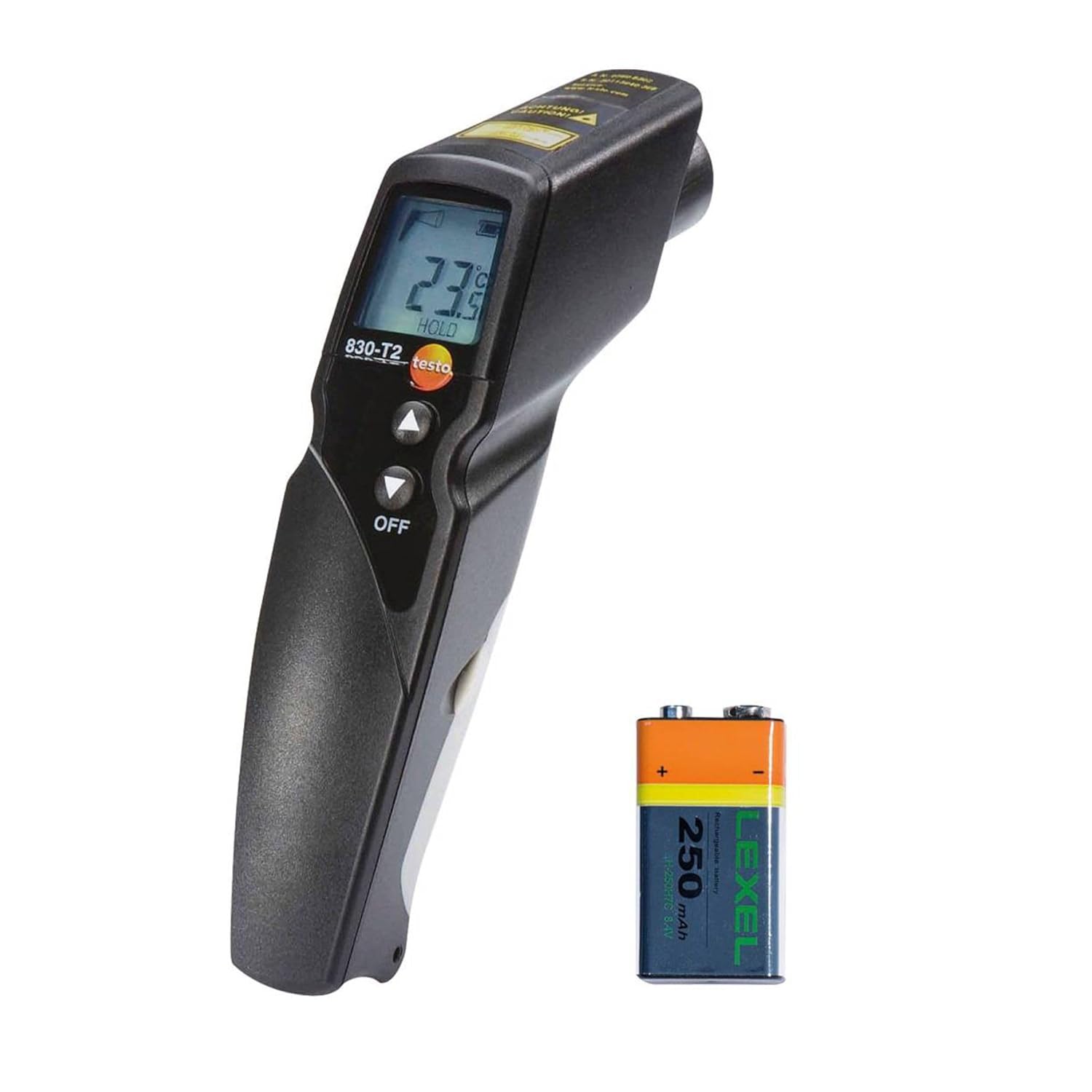
Figure 1: Testo 830-T1 Infrared Thermometer with included battery.
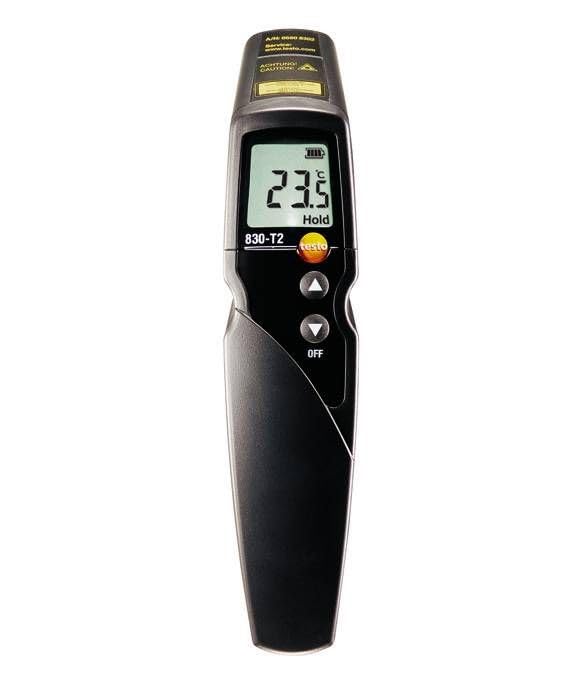
รูปที่ 2 : ด้านหน้า view of the Testo 830-T1, showing the display, measurement trigger, and control buttons.
3.1 ส่วนประกอบ
- เซ็นเซอร์อินฟราเรด: Located at the front of the device, used for non-contact temperature measurement.
- ตัวชี้เลเซอร์คู่: Two laser dots indicate the measurement spot size.
- แสดง: Shows temperature readings, measurement units, battery status, and other indicators.
- ตัวกระตุ้นการวัด: เปิดใช้งานการวัดและเลเซอร์
- ปุ่มควบคุม: For navigating menus, adjusting settings (e.g., emissivity, units), and accessing functions like MIN/MAX.
- ช่องใส่แบตเตอรี่: Located in the handle for battery installation.
4. การตั้งค่า
4.1 การติดตั้งแบตเตอรี่
- ค้นหาฝาครอบช่องใส่แบตเตอรี่บนด้ามจับของเทอร์โมมิเตอร์
- เปิดฝาครอบ
- Insert two AAA batteries, ensuring correct polarity (+/-). The device requires 2 AAA batteries, which are included.
- ปิดฝาช่องใส่แบตเตอรี่ให้แน่น
4.2 Initial Power-On and Unit Selection
Upon first use or after battery replacement, the device will power on. You may need to select your preferred temperature unit (Celsius or Fahrenheit).
- To change units: Typically, this involves pressing and holding a specific button (often the 'Mode' or 'Set' button, or an arrow button) while the device is off, then powering it on, or accessing a menu option. Refer to the on-screen prompts or the official Testo documentation for the exact procedure for your specific device firmware, as methods can vary.
5. คู่มือการใช้งาน
5.1 การวัดผล
- หันเซ็นเซอร์อินฟราเรดไปยังวัตถุเป้าหมาย
- Press and hold the measurement trigger. The dual laser pointers will activate, indicating the measurement spot.
- The temperature reading will appear on the display.
- Release the trigger to hold the last measured value (HOLD function).

Figure 3: The Testo 830-T1 in use, measuring the surface temperature of a radiator.
5.2 Understanding 12:1 Optics and Dual Laser
The 12:1 optics mean that at a distance of 12 inches, the measurement spot diameter is 1 inch. The dual laser pointers converge at the center of this measurement spot, helping you accurately identify the area being measured. This is particularly useful for measuring smaller objects or from a greater distance.
5.3 ฟังก์ชัน MIN/MAX
The device can display the minimum and maximum temperatures recorded during a continuous measurement. This function is useful for monitoring temperature fluctuations over a period.
- To activate MIN/MAX: Press the appropriate button (refer to your device's specific button layout, often an arrow or 'Mode' button) while taking a measurement. The display will cycle through current, minimum, and maximum values.
5.4 การปรับค่าการแผ่รังสี
Emissivity is a measure of an object's ability to emit infrared energy. Different materials have different emissivities. For accurate readings, adjust the emissivity setting on your thermometer to match the material being measured. Common emissivity values:
- 0.95 (default for many devices): Most organic materials, painted surfaces, water, plastic.
- 0.85-0.90: Concrete, brick, rough wood.
- 0.60-0.70: Polished metals (can vary significantly).
Consult an emissivity table for specific materials. Incorrect emissivity settings will lead to inaccurate temperature readings.
6. การบำรุงรักษา
6.1 การทำความสะอาด
To ensure optimal performance and longevity, keep the device clean.
- Wipe the device exterior with a clean, damp ผ้า ห้ามใช้สารทำความสะอาดที่มีฤทธิ์กัดกร่อนหรือตัวทำละลาย
- Carefully clean the infrared lens with a soft, lint-free cloth or a lens cleaning wipe. Avoid scratching the lens.
6.2 การเปลี่ยนแบตเตอรี่
When the battery indicator on the display shows low power, replace the batteries promptly to avoid interruption of operation. Follow the battery installation steps in Section 4.1.
6.3 พื้นที่จัดเก็บ
Store the thermometer in a dry, dust-free environment within the recommended temperature range (refer to specifications). If storing for extended periods, remove the batteries to prevent leakage.
7 การแก้ไขปัญหา
If you encounter issues with your Testo 830-T1, refer to the following common problems and solutions:
- อุปกรณ์ไม่เปิดเครื่อง:
- Check if batteries are correctly inserted with proper polarity.
- เปลี่ยนแบตเตอรี่ใหม่
- การอ่านค่าที่ไม่ถูกต้อง:
- Ensure the infrared lens is clean.
- Verify the emissivity setting matches the target material.
- Ensure the measurement distance is appropriate for the target size (12:1 optics).
- Avoid measuring through glass or highly reflective surfaces.
- ไม่เห็นแสงเลเซอร์:
- ตรวจสอบระดับแบตเตอรี่
- Ensure the measurement trigger is pressed.
If problems persist, contact Testo customer support for assistance.
8. ข้อมูลจำเพาะ
| คุณสมบัติ | รายละเอียด |
|---|---|
| หมายเลขรุ่น | 0560 8312 |
| ยี่ห้อ | เทสโต้ |
| เลนส์ | 12:1 น. |
| เลเซอร์ | Dual Laser Spot Marking |
| คุณสมบัติพิเศษ | การวัดแบบไม่สัมผัส |
| ประเภทจอภาพ | ดิจิตอล |
| แหล่งพลังงาน | แบตเตอรี่ AAA จำนวน 2 ก้อน (รวมอยู่ด้วย) |
| ขนาดสินค้า | 2.95 x 1.5 x 7.48 นิ้ว |
| น้ำหนักสินค้า | 0.04 ออนซ์ |
| วัสดุภายนอก | พลาสติก |
| ส่วนประกอบที่รวมอยู่ | Testo T2 Infrared Thermometer |
| ตรงตามข้อกำหนด | CE, FCC, ISO 9001 |
| เทคโนโลยีการเชื่อมต่อ | USB (Note: Functionality may require specific software/cables, not detailed here) |
9. การรับประกันและการสนับสนุน
For warranty information, technical support, or service inquiries, please contact Testo SE & Co. directly. Details regarding specific warranty periods and terms are typically provided with the product packaging or on the manufacturer's official webเว็บไซต์.
ผู้ผลิต: Testo SE & Co.
โปรดเก็บหลักฐานการซื้อของคุณไว้เพื่อเรียกร้องการรับประกัน


