1. บทนำ
This manual provides detailed instructions for the installation, operation, and maintenance of your White-Rodgers 1F82-0261 Emerson Programmable Heat Pump Thermostat. This device is designed to control your heating and cooling system, offering programmable settings for optimal comfort and energy efficiency.
Key features include a 2-inch backlit display, 5+1+1 day programming, and compatibility with 24-volt or millivolt heat pump systems (2 Heat/1 Cool).
อะไรอยู่ในกล่อง:
- หน่วยเทอร์โมสตัท
- คู่มือการใช้งาน (เอกสารนี้)

รูปที่ 1 : ด้านหน้า view of the White-Rodgers 1F82-0261 Thermostat, showing the display and control buttons.
2. การตั้งค่าและการติดตั้ง
2.1 ข้อควรระวังเพื่อความปลอดภัย
- คำเตือน: ปิดระบบทำความร้อน/ทำความเย็นที่ฟิวส์หลักหรือแผงเบรกเกอร์ก่อนติดตั้งหรือซ่อมบำรุงเทอร์โมสตัท
- อ่านคำแนะนำทั้งหมดอย่างละเอียดก่อนดำเนินการติดตั้ง
- หากคุณไม่แน่ใจเกี่ยวกับขั้นตอนใดๆ ควรให้ช่างผู้ชำนาญการดำเนินการติดตั้ง
2.2 การเดินสายไฟ
The thermostat is designed for 24-volt or millivolt heat pump systems (2 Heat/1 Cool). It can be hardwired or battery-powered. Ensure proper wiring connections to the terminals.
การกำหนดเทอร์มินัล:
- R: 24V AC (Heating/Cooling Power)
- C: Common (24V AC Common)
- G: รีเลย์พัดลม
- Y: Compressor Contactor (Cooling)
- ส 2: ความร้อนเสริม/ฉุกเฉิน
- O / B: วาล์วถอยหลัง (ปั๊มความร้อน)
- L: System Monitor (Optional)
Refer to your heat pump system's manual for specific wiring diagrams. Connect wires securely to the corresponding terminals on the thermostat base.
2.3 การกำหนดค่าเริ่มต้น
After wiring and restoring power, the thermostat will power on. You may need to set the current time and day. Consult the full installation guide for advanced installer settings, such as system type configuration.
3. คู่มือการใช้งาน
3.1 แสดงผลเกินview
The thermostat features a clear 2-inch blue backlit display that shows the current time, temperature, system mode, and fan status. Buttons below the display allow for mode selection and programming.
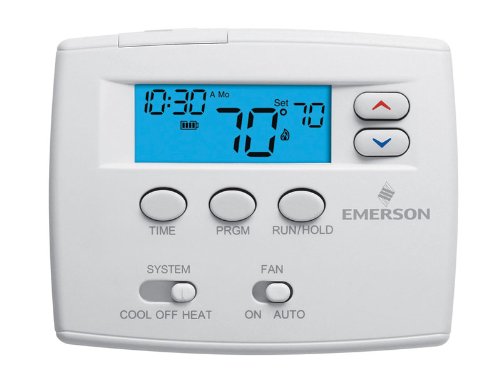
Figure 2: Close-up of the thermostat display and control buttons for operation.
3.2 โหมดระบบ
Use the "SYSTEM" switch located at the bottom left of the thermostat to select the desired operating mode:
- เย็น: เทอร์โมสตัทจะควบคุมระบบทำความเย็นของคุณ
- ปิด: ระบบทำความร้อนและความเย็นถูกปิด
- ความร้อน: เทอร์โมสตัทจะควบคุมระบบทำความร้อนของคุณ
- EMERGENCY (EM HEAT): Activates the auxiliary/emergency heating system, typically used when the heat pump is not functioning or during extreme cold.
- อัตโนมัติ: The thermostat automatically switches between heating and cooling to maintain the set temperature.
3.3 โหมดพัดลม
Use the "FAN" switch located at the bottom right of the thermostat to select the desired fan operation:
- อัตโนมัติ: พัดลมจะทำงานเฉพาะเมื่อระบบทำความร้อนหรือทำความเย็นกำลังทำงานอยู่เท่านั้น
- บน: พัดลมจะทำงานอย่างต่อเนื่องไม่ว่าระบบทำความร้อนหรือทำความเย็นจะทำงานอยู่ก็ตาม
3.4 Programming Schedule (5+1+1 Day)
The thermostat allows for 5+1+1 day programming, meaning you can set one schedule for weekdays, one for Saturday, and one for Sunday. This allows for four time periods per day (Wake, Leave, Return, Sleep).
- กดปุ่ม พีอาร์จีเอ็ม ปุ่มเพื่อเข้าสู่โหมดการเขียนโปรแกรม
- ใช้ เวลา button to advance through the program periods (Wake, Leave, Return, Sleep) and days (Mon-Fri, Sat, Sun).
- ใช้ Up และ ลง arrow buttons to adjust the start time and temperature for each period.
- กด วิ่ง/ยึด to exit programming mode and activate the schedule.
For detailed programming steps, refer to the full instruction guide.
3.5 การปรับอุณหภูมิ
To temporarily adjust the temperature, use the Up และ ลง arrow buttons on the right side of the display. The new temperature will be maintained until the next programmed period begins or until you press วิ่ง/ยึด to cancel the temporary hold.
To permanently hold a temperature, adjust the temperature and then press the วิ่ง/ยึด button until "HOLD" appears on the display. Press วิ่ง/ยึด again to resume the program.
3.6 Energy Management Recovery
This feature allows the thermostat to activate the heating or cooling system prior to a programmed time period to ensure the desired temperature is reached by the start of that period. For example, if you set your "Wake" temperature to 70°F at 6:00 AM, the thermostat might start heating at 5:30 AM to achieve 70°F by 6:00 AM.
4. การบำรุงรักษา
4.1 การเปลี่ยนแบตเตอรี่
If your thermostat is battery-powered, replace the batteries when the low battery indicator appears on the display. Typically, two AA alkaline batteries are required. Open the battery compartment, remove old batteries, insert new ones observing polarity, and close the compartment.
4.2 การทำความสะอาด
ทำความสะอาดภายนอกเทอร์โมสตัทด้วยผ้านุ่มๆamp ผ้า ห้ามใช้น้ำยาทำความสะอาดหรือตัวทำละลายที่มีฤทธิ์กัดกร่อน หลีกเลี่ยงการฉีดน้ำยาลงบนเทอร์โมสตัทโดยตรง
5 การแก้ไขปัญหา
- ไม่มีจอแสดงผล/ไม่มีพลังงาน:
Check if the main power to the HVAC system is on. If battery-powered, replace batteries. Verify wiring connections are secure.
- ระบบไม่ตอบสนอง (ไม่มีการทำความร้อน/ทำความเย็น):
Ensure the system switch is set to HEAT or COOL (not OFF). Check circuit breakers for the HVAC system. Verify correct wiring. Allow a few minutes for the system to respond after changing settings.
- การอ่านอุณหภูมิไม่ถูกต้อง:
Ensure the thermostat is not exposed to direct sunlight, drafts, or heat sources that could affect its sensor. Recalibration may be required (refer to advanced settings in the full manual).
- ปัญหาการเขียนโปรแกรม:
Double-check that the current time and day are set correctly. Ensure you have pressed RUN/HOLD to activate the program after making changes. If a temporary hold is active, cancel it by pressing RUN/HOLD.
6. ข้อมูลจำเพาะ
| หมายเลขรุ่น | 1F82-0261 |
| แสดง | 2-inch Blue Backlit Digital Display |
| ประเภทของระบบ | Heat Pump (2 Heat / 1 Cool) |
| การเขียนโปรแกรม | 5+1+1 Day Programmable (4 periods/day) |
| แหล่งพลังงาน | 24 Volts AC or Millivolt (Hardwired or Battery) |
| ช่วงอุณหภูมิ | 45°F ถึง 90°F (7°C ถึง 32°C) |
| เทอร์มินัล | R, C, G, Y, W2, O/B, L |
| ขนาด | ขนาดโดยประมาณ 2 x 6.5 x 4.5 นิ้ว (สูง x กว้าง x ลึก) |
| ผู้ผลิต | White-Rodgers / Emerson |
7. การรับประกันและการสนับสนุน
For warranty information and technical support, please refer to the documentation provided with your purchase or contact Emerson customer service directly. Keep your proof of purchase for warranty claims.
ผู้ผลิต: White-Rodgers / Emerson


