1. บทนำ
The Cisco Small Business 16-Port Gigabit Switch SG100-16 is an unmanaged network switch designed to provide basic network connectivity and reliability for small business environments. This device offers wire-speed Gigabit Ethernet connectivity, enabling high-performance data transfer for various business applications, including bandwidth-intensive video services. It is designed for ease of use, requiring no software installation or configuration.
คุณสมบัติที่สำคัญ ได้แก่:
- การทำงานแบบปลั๊กแอนด์เพลย์: No configuration required; ports automatically adjust for optimal speed and duplex mode.
- ประสิทธิภาพสูง: Supports Gigabit Ethernet speeds for fast file transfers and smooth application performance.
- การปรับใช้แบบยืดหยุ่น: Available in desktop and rack-mount models with wall-mount options for discreet placement.
- คุณภาพการบริการ (QoS): Supports advanced features to prioritize network traffic.
2. การตั้งค่า
This section outlines the steps for setting up your Cisco SG100-16 Gigabit Switch. The switch is designed for simple, plug-and-play installation.
2.1 เนื้อหาบรรจุภัณฑ์
ตรวจสอบว่าแพ็คเกจของคุณมีรายการต่อไปนี้:
- Cisco SG100-16 Gigabit Switch
- อะแดปเตอร์แปลงไฟ/สายไฟ
- ขายึดสำหรับติดตั้งบนแร็ค (ถ้ามี)
- Rubber feet for desktop placement
- เอกสารประกอบ (คู่มือการเริ่มต้นฉบับย่อ)
2.2 การจัดวางทางกายภาพ
Choose a suitable location for the switch, considering:
- การระบายอากาศ : ตรวจสอบให้แน่ใจว่ามีการระบายอากาศที่เพียงพอรอบๆ อุปกรณ์เพื่อป้องกันความร้อนสูงเกินไป
- แหล่งพลังงาน: Proximity to a reliable power outlet.
- การจัดการสายเคเบิล: Easy access for network cables.
- สิ่งแวดล้อม: Avoid areas with excessive dust, moisture, or extreme temperatures.
The switch can be placed on a desktop, mounted on a wall, or installed in a rack using the provided brackets.

รูปที่ 1 : ด้านหน้า view of the Cisco SG100-16 Gigabit Switch, showing 16 Ethernet ports and status indicators. Rack-mount ears are attached.
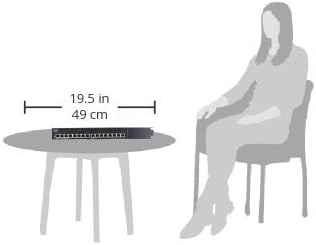
Figure 2: Illustrative diagram demonstrating the compact size of the Cisco SG100-16 switch, measuring approximately 19.5 inches (49 cm) in width, suitable for desktop placement.
2.3 การเชื่อมต่อสวิตช์
- เชื่อมต่อพลังงาน: Plug the power cord into the switch's power input and then into a grounded electrical outlet. The Power LED on the front panel should illuminate.
- เชื่อมต่ออุปกรณ์เครือข่าย: Connect your network devices (computers, printers, servers, routers, etc.) to any of the 16 Ethernet ports on the front panel using standard Ethernet cables. The Link/Act LED for each connected port will light up, indicating an active connection. It will blink to show network activity.
- ตรวจสอบการเชื่อมต่อ: Ensure all connected devices are powered on and their network adapters are enabled. The switch will automatically detect the speed and duplex mode of each connected device.
3. การดำเนินการ
The Cisco SG100-16 is an unmanaged switch, meaning it operates without requiring any user configuration. Once connected, it automatically facilitates network communication between connected devices.
3.1 เปิด/ปิดเครื่อง
To power on the switch, connect it to a power source. There is no dedicated power button. To power off, disconnect the power cord.
3.2 ไฟแสดงสถานะ LED
แผงด้านหน้ามีไฟ LED แสดงสถานะ:
- PWR (กำลังไฟ) LED:
- สีเขียวทึบ: สวิตช์เปิดและทำงานตามปกติ
- ปิด: สวิตช์ปิดอยู่หรือไม่มีกระแสไฟเข้า
- Link/Act (Link/Activity) LEDs (per port):
- สีเขียวทึบ: มีการสร้างการเชื่อมต่อเครือข่ายที่ถูกต้องบนพอร์ตแล้ว
- กะพริบเป็นสีเขียว: ข้อมูลกำลังถูกส่งหรือรับผ่านทางพอร์ต
- ปิด: No device is connected, or the connected device is powered off/has no link.
3.3 คุณภาพการบริการ (QoS)
The SG100-16 switch supports Quality of Service (QoS) to help prioritize network traffic. This feature automatically identifies and prioritizes delay-sensitive traffic, such as voice and video, to ensure smooth performance even during periods of high network utilization. No user configuration is required for this function.
4. การบำรุงรักษา
The Cisco SG100-16 switch is designed for reliable, low-maintenance operation. Regular maintenance is minimal.
- การทำความสะอาด: Periodically clean the exterior of the switch with a soft, dry cloth. Do not use liquid or aerosol cleaners. Ensure ventilation openings are free from dust accumulation.
- อัพเดตเฟิร์มแวร์: As an unmanaged switch, firmware updates are typically not user-installable or required. If a critical update is released by Cisco, consult the official Cisco support webเว็บไซต์สำหรับคำแนะนำ
- สภาพแวดล้อม : Ensure the switch remains within its specified operating temperature and humidity ranges to prolong its lifespan.
5 การแก้ไขปัญหา
This section provides solutions to common issues you might encounter with your SG100-16 switch.
5.1 ไม่มีไฟฟ้า
- อาการ: The PWR LED is off.
- สารละลาย:
- Ensure the power cord is securely connected to the switch and a working electrical outlet.
- ตรวจสอบว่าเต้ารับไฟฟ้าใช้งานได้โดยเสียบอุปกรณ์อื่น
5.2 No Link Light on a Port
- อาการ: The Link/Act LED for a connected device is off.
- สารละลาย:
- Ensure the Ethernet cable is securely plugged into both the switch port and the device.
- ลองใช้สายเคเบิลอีเทอร์เน็ตอื่นเพื่อตัดสายเคเบิลที่ผิดปกติออกไป
- Verify the connected device is powered on and its network adapter is enabled.
- ลองเชื่อมต่ออุปกรณ์เข้ากับพอร์ตอื่นบนสวิตช์
- รีสตาร์ทอุปกรณ์ที่เชื่อมต่อ
5.3 ประสิทธิภาพเครือข่ายช้า
- อาการ: Data transfer speeds are slower than expected.
- สารละลาย:
- ตรวจสอบให้แน่ใจว่าอุปกรณ์และสายเคเบิลที่เชื่อมต่อทั้งหมดรองรับ Gigabit Ethernet (แนะนำให้ใช้สาย Cat5e หรือ Cat6 เพื่อความเร็วระดับ Gigabit)
- Check for excessive network traffic or bandwidth-intensive applications running on connected devices.
- Verify that the Link/Act LEDs are solid green (indicating a Gigabit connection) rather than amber (which might indicate a 10/100 Mbps connection on some switches, though this model uses green for both link speeds).
- Isolate the issue by testing performance with fewer devices connected.
5.4 การเชื่อมต่อที่ไม่ต่อเนื่อง
- อาการ: Network connection drops sporadically.
- สารละลาย:
- ตรวจสอบการเชื่อมต่อสายเคเบิลทั้งหมดว่าหลวมหรือเสียหายหรือไม่
- ควรวางสวิตช์ไว้ในบริเวณที่มีการระบายอากาศดี เพื่อป้องกันความร้อนสูงเกินไป
- Test with different cables and devices to pinpoint the source of the intermittency.
- Consider potential sources of electromagnetic interference (EMI) near the switch or cables.
6. ข้อมูลจำเพาะ
The following table lists the technical specifications for the Cisco SG100-16 Gigabit Switch:
| คุณสมบัติ | รายละเอียด |
|---|---|
| หมายเลขรุ่น | เอสจี100-16-เอ็นเอ |
| จำนวนพอร์ต | 16 กิกะบิตอีเทอร์เน็ต |
| อัตราการถ่ายโอนข้อมูล | 1000 เมกะบิตต่อวินาที (Mbps) |
| ประเภทอินเทอร์เฟซ | อีเธอร์เน็ต |
| ขนาด (กxยxส) | 11" x 6.7" x 1.75" (279.4 x 170 x 44.5 มม.) |
| น้ำหนักสินค้า | 3.15 ปอนด์ (1.43 กก.) |
| เล่มที่tage | 240 Volts (AC input, specific range depends on power adapter) |
| ความเข้ากันได้ของระบบปฏิบัติการ | Linux, Mac OS, Windows (OS independent) |
| สี | สีเงิน/สีดำ |
| ผู้ผลิต | ซิสโก้ |
7. การรับประกันและการสนับสนุน
For detailed warranty information, please refer to the warranty card included with your product or visit the official Cisco website. Cisco provides various support resources for its products.
7.1 การสนับสนุนด้านเทคนิค
If you encounter issues that cannot be resolved using the troubleshooting steps in this manual, please contact Cisco Technical Support. Have your product model number (SG100-16-NA) and serial number ready when contacting support.
You can find support resources, including FAQs, documentation, and contact information, on the official Cisco webเว็บไซต์:
- ฝ่ายสนับสนุนของซิสโก้ Webเว็บไซต์: www.cisco.com/go/support
- Cisco Small Business Community: community.cisco.com
Please note that warranty terms and support availability may vary by region and product. Always refer to the most current information provided by Cisco.


