1. บทนำ
This manual provides instructions for the Busicom BC-423HP-B Manual Operated Cash Drawer. Please read this manual thoroughly before use to ensure proper operation and longevity of the product. This cash drawer is designed for manual operation and does not require electrical connections.

ภาพ: ด้านหน้า view of the Busicom BC-423HP-B Manual Operated Cash Drawer, highlighting its robust construction and 'Made in Japan' quality.
2. ข้อมูลด้านความปลอดภัย
- อย่าพยายามถอดประกอบหรือซ่อมแซมอุปกรณ์ด้วยตนเอง โปรดติดต่อช่างผู้ชำนาญเพื่อขอรับบริการ
- Keep the cash drawer away from excessive moisture, direct sunlight, or extreme temperatures.
- Ensure the unit is placed on a stable, level surface to prevent tipping or accidental movement.
- Avoid placing heavy objects on top of the cash drawer that exceed its specified load capacity.
- Keep fingers and other objects clear of the drawer mechanism when opening or closing to prevent injury.
3. เนื้อหาบรรจุภัณฑ์
ตรวจสอบว่ามีรายการทั้งหมดอยู่ในแพ็คเกจ:
- Main unit (Busicom BC-423HP-B Cash Drawer)
- กุญแจล็อค
4. การตั้งค่า
- การจัดวาง: Select a stable, level surface for the cash drawer. Ensure there is adequate space for the drawer to open fully without obstruction. The external dimensions are approximately 16.65 inches (423 mm) deep, 15.94 inches (405 mm) wide, and 4.45 inches (113 mm) high.
- การใส่คีย์: Insert the provided key into the lock mechanism on the front panel. The key is used to lock the drawer for security.
- ไม่มีการเชื่อมต่อไฟฟ้า: This model is a manual cash drawer and does not require any electrical connections or cables. It operates independently.
- Anti-Tilt/Anti-Forward Features: The drawer is equipped with features to prevent tilting and accidental forward movement. Ensure the unit is placed correctly to utilize these features.

ภาพ: จากบนลงล่าง view of the cash drawer with labeled dimensions (width 405mm, depth 423mm, height 113mm).
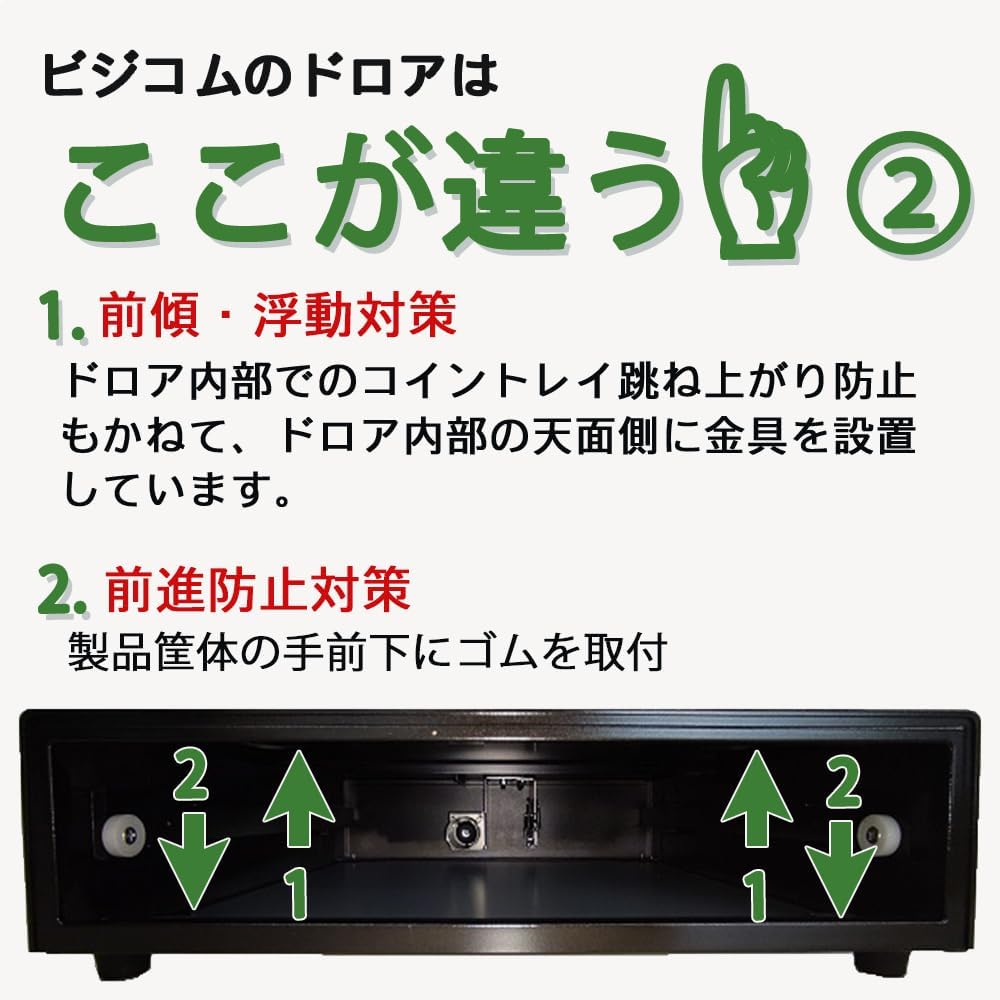
ภาพ: ด้านล่าง view of the cash drawer, illustrating the rubber feet and internal mechanisms designed to prevent tilting and forward movement.
5. คู่มือการใช้งาน
- การเปิดลิ้นชัก: To open the cash drawer, gently push the center of the front panel inward. The drawer will spring open.
- การจัดการสกุลเงิน: The internal tray is designed to hold 4 types of bills and 6 types of coins. Place currency in the designated compartments.
- การปิดลิ้นชัก: To close the drawer, gently push it inward until it latches securely. Ensure no currency or objects obstruct the closing mechanism.
- การล็อคลิ้นชัก: Use the provided key to lock the drawer when not in use or for enhanced security. Turn the key to the locked position and remove it.

Image: A hand demonstrating the manual push-to-open mechanism of the cash drawer.
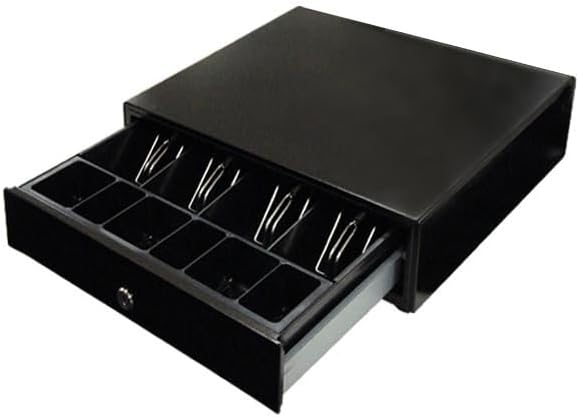
Image: The cash drawer fully open, revealing the internal layout with compartments for bills and coins.
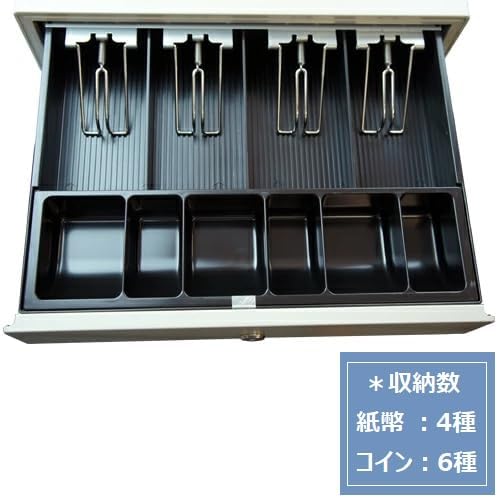
ภาพ: รายละเอียด view of the cash drawer's internal compartments, indicating capacity for 4 types of bills and 6 types of coins.
6. การบำรุงรักษา
- การทำความสะอาด: Wipe the exterior of the cash drawer with a soft, dry cloth. Do not use abrasive cleaners, solvents, or harsh chemicals, as these may damage the finish.
- การทำความสะอาดภายใน: Periodically remove the coin and bill trays to clean any dust, debris, or foreign objects that may accumulate inside the drawer mechanism.
- การตรวจสอบ: Regularly inspect the drawer slides and locking mechanism for any signs of wear or damage.
- การหล่อลื่น: The cash drawer is designed for long-term, maintenance-free operation. No user-serviceable parts require lubrication.
7 การแก้ไขปัญหา
- Drawer not opening smoothly: Check for any obstructions in the drawer's path or within the internal compartments. Ensure the locking mechanism is fully disengaged.
- Drawer not closing securely: Verify that no currency or objects are blocking the drawer slides or the latch mechanism. Ensure the internal coin tray is properly seated.
- Key difficult to turn: Ensure the key is fully inserted into the lock. Do not force the key; check if it is bent or damaged. If the key is damaged, contact support for assistance.
8. ข้อมูลจำเพาะ
| หมายเลขรุ่น | BC-423HP-B |
| หมายเลขชิ้นส่วน | BC-423HP |
| ขนาดภายนอก (กว้าง x ลึก x สูง) | 15.94 x 16.65 x 4.45 นิ้ว (405 x 423 x 113 มม.) |
| น้ำหนักสินค้า | 17.6 ปอนด์ (8 กิโลกรัม) |
| สี | สีดำ |
| วัสดุ | High strength steel body (excluding coin tray) |
| Bill Compartments | 4 แบบ |
| Coin Compartments | 6 แบบ |
| Top Surface Load Capacity | 30 kg (when load is evenly distributed) |
| ความทนทาน | Confirmed for 1 million open/close operations |
| แบตเตอรี่ที่จำเป็น | เลขที่ |
| ระดับความต้านทานต่อน้ำ | ทนน้ำ |

ภาพ: ภายใน view of the cash drawer, emphasizing its all-steel construction (excluding the coin tray) and highlighting its 30kg load capacity and 1 million operation durability.
9. การรับประกันและการสนับสนุน
This Busicom cash drawer comes with a รับประกัน 3 ปี, reflecting its reliable quality and robust construction.
For customer support, warranty claims, or any inquiries regarding your product, please contact Busicom customer service. When contacting support, please provide your order number to facilitate the process.
For more information, please visit the official Busicom webไซต์หรือดูเอกสารการซื้อของคุณ


