1. สินค้าหมดview
The IBM Flex System EN2092 1 Gb Ethernet scalable switch is designed to provide comprehensive Layer 2 and Layer 3 switching and routing capabilities. It integrates seamlessly within an IBM Flex System Enterprise Chassis, offering both 1 Gb and 10 Gb uplink options. This switch is engineered for simplified deployment and growth through its scalable architecture.
คุณสมบัติที่สำคัญ ได้แก่:
- Simplified deployment and growth via a scalable architecture.
- Tight integration and management through the IBM Flex System Manager.
- Streamlined network management using port profileโทโพโลยี viewและการจัดการระบบเสมือนจริง
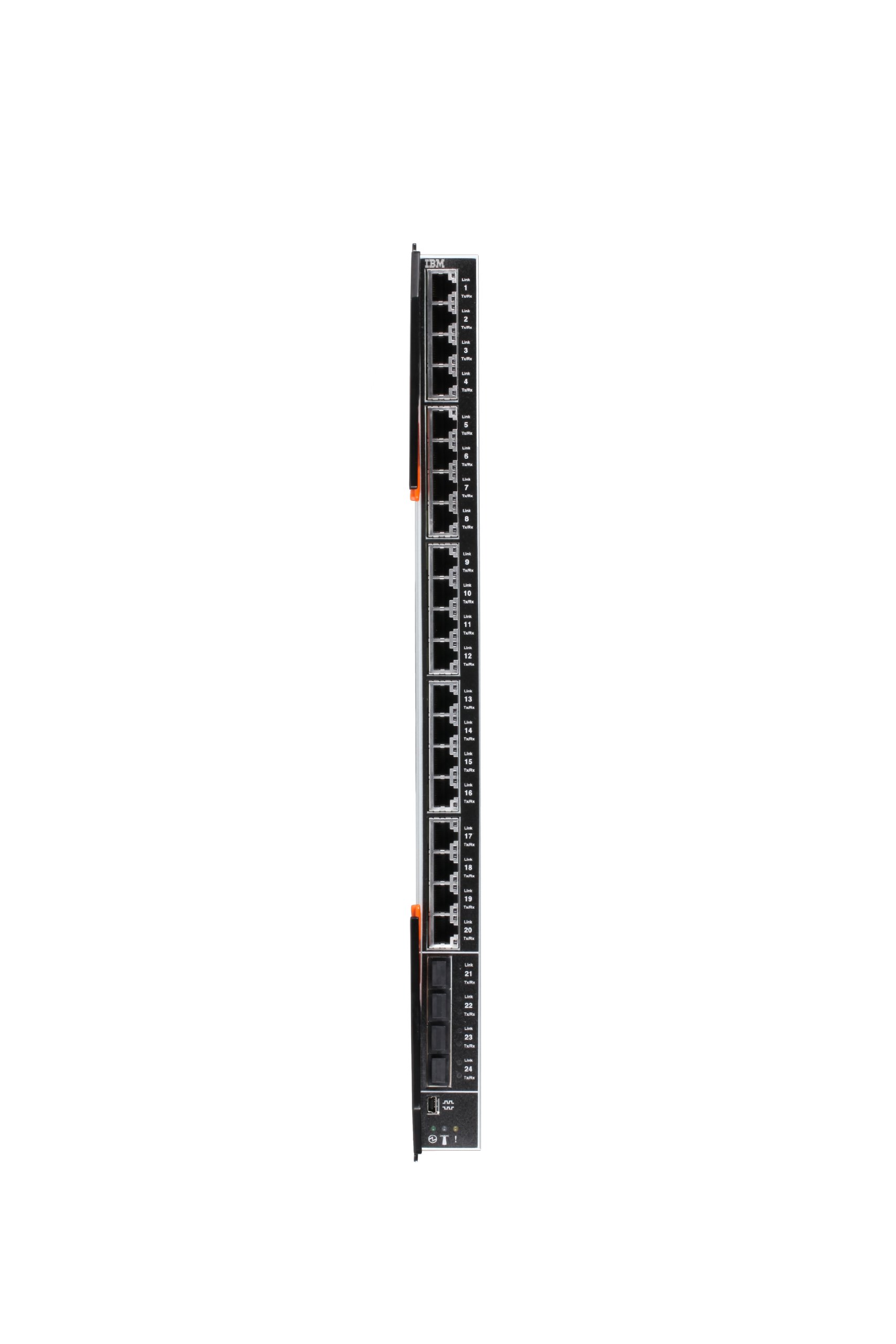
รูปที่ 1: ด้านหน้า view of the IBM Flex System EN2092 1GB Ethernet Scalable Switch. This image displays the compact form factor and port layout of the switch, designed for integration into a Flex System Enterprise Chassis.
2. การตั้งค่าและการติดตั้ง
This section outlines the general steps for installing and initially configuring your IBM Flex System EN2092 switch. For detailed chassis-specific installation, refer to your IBM Flex System Enterprise Chassis documentation.
2.1 การแกะบรรจุภัณฑ์และการตรวจสอบ
- แกะสวิตช์ออกจากบรรจุภัณฑ์อย่างระมัดระวัง
- Inspect the switch for any signs of physical damage. If damage is found, contact your supplier immediately.
- ตรวจสอบว่ามีส่วนประกอบทั้งหมดที่ระบุไว้ในใบแจ้งรายการบรรจุภัณฑ์อยู่
2.2 การติดตั้งแชสซี
- Ensure the IBM Flex System Enterprise Chassis is powered off and disconnected from the power source before installation.
- Locate an available I/O module bay in the chassis.
- Align the switch with the bay and slide it in until it clicks into place. Ensure it is fully seated.
- Secure the switch using any provided retention mechanisms or screws.
2.3 Initial Connectivity
- Connect the necessary network cables (Ethernet, fiber) to the appropriate ports on the switch.
- Connect the chassis to its power source and power it on.
- Observe the indicator LEDs on the switch to confirm proper power-on and link status.
3. คู่มือการใช้งาน
The IBM Flex System EN2092 switch operates as an integral part of the IBM Flex System environment. Management and configuration are primarily performed through the IBM Flex System Manager.
3.1 Accessing the Flex System Manager
- Ensure your management workstation has network connectivity to the IBM Flex System Manager.
- เปิด web browser and navigate to the IP address or hostname of your Flex System Manager.
- เข้าสู่ระบบโดยใช้ข้อมูลประจำตัวผู้ดูแลระบบของคุณ
3.2 การกำหนดค่าสวิตช์
- Within the Flex System Manager interface, locate the installed EN2092 switch.
- Utilize the management tools to configure VLANs, port settings, routing protocols, and other network parameters.
- Implement port profiles and virtualization management features as required for your network architecture.
- Monitor switch status, port activity, and network performance through the manager's dashboard.
For detailed configuration procedures, refer to the IBM Flex System Manager documentation and the specific firmware guide for the EN2092 switch.
4. การบำรุงรักษา
Regular maintenance ensures optimal performance and longevity of your IBM Flex System EN2092 switch.
การอัปเดตเฟิร์มแวร์ 4.1 รายการ
- Periodically check the IBM support website for new firmware releases for the EN2092 switch.
- Follow the instructions provided with the firmware update package carefully. Firmware updates often require a system reboot and can temporarily disrupt network services.
4.2 Physical Inspection and Cleaning
- With the chassis powered off and disconnected, periodically inspect the switch for dust accumulation, especially around ventilation areas.
- Use compressed air to gently clean dust from vents and ports. Do not use liquid cleaners directly on the switch.
- ตรวจสอบให้แน่ใจว่าการเชื่อมต่อสายเคเบิลทั้งหมดมีความปลอดภัยและไม่มีความเสียหาย
4.3 การสำรองข้อมูลการกำหนดค่า
- Regularly back up your switch configuration settings using the IBM Flex System Manager. This is crucial for quick recovery in case of configuration errors or hardware replacement.
5 การแก้ไขปัญหา
This section provides solutions to common issues you might encounter with your EN2092 switch.
5.1 No Power / Status LEDs Off
- Check Chassis Power: Ensure the IBM Flex System Enterprise Chassis is powered on and receiving power.
- ถอดและเสียบสวิตช์ใหม่: Power off the chassis, then carefully remove and re-insert the EN2092 switch into its bay to ensure it is fully seated.
- ตรวจสอบตัวถังรถ: Verify that the chassis itself is functioning correctly.
5.2 ไม่มีลิงก์บนพอร์ต
- ตรวจสอบสายเคเบิล: Ensure the Ethernet or fiber cable is securely connected at both ends and is not damaged. Try a different cable.
- Verify Connected Device: Confirm that the device connected to the switch port is powered on and functioning correctly.
- การกำหนดค่าพอร์ต: Check the port configuration in the IBM Flex System Manager to ensure it is enabled and correctly configured (e.g., speed, duplex, VLAN).
- ลองใช้พอร์ตอื่นดู: Test the connection using a different port on the switch.
5.3 ปัญหาการเชื่อมต่อเครือข่าย
- การกำหนดค่า IP: Verify IP addresses, subnet masks, and gateway settings on connected devices and the switch.
- การกำหนดค่า VLAN: Ensure devices are assigned to the correct VLANs and that VLAN tagging is properly configured.
- Routing Issues: If Layer 3 routing is configured, check routing tables and protocols within the Flex System Manager.
- เฟิร์มแวร์: Ensure the switch is running the latest stable firmware version.
6. ข้อมูลจำเพาะทางเทคนิค
| คุณสมบัติ | รายละเอียด |
|---|---|
| ยี่ห้อ | ไอบีเอ็ม |
| หมายเลขรุ่น | 49Y4294 |
| ขนาดสินค้า (กxยxส) | 10 x 6 x 8 นิ้ว |
| น้ำหนักสินค้า | 8 ปอนด์ |
| โปรโตคอลการเชื่อมต่อ | อีเธอร์เน็ต |
| เล่มที่tage | 240 โวลต์ |
| การให้คะแนนการคุ้มครองระหว่างประเทศ | IP65 |
| วันที่พร้อมใช้งานครั้งแรก | วันที่ 8 สิงหาคม 2012 |
| ยูพีซี | 132017838342, 883436161985 |
7. การรับประกันและการสนับสนุน
IBM products typically come with a standard limited warranty. For specific warranty terms and conditions applicable to your IBM Flex System EN2092 switch, please refer to the warranty documentation included with your purchase or visit the official IBM support webเว็บไซต์.
7.1 การสนับสนุนด้านเทคนิค
For technical assistance, troubleshooting beyond this manual, or to report a product issue, please contact IBM Support. Have your product model number (49Y4294) and serial number ready when contacting support.
- ฝ่ายสนับสนุนของ IBM Webเว็บไซต์: www.ibm.com/support
- ข้อมูลติดต่อ: Refer to the IBM support website for regional contact numbers and online support options.


