1. บทนำ
This manual provides detailed instructions for the installation, operation, and maintenance of the Intermatic ET91215CR 30A 120-277V SPDT 365-Day Astronomic Energy Control. This robust device is designed for heavy-duty industrial and commercial applications, offering precise control over electrical circuits with its astronomic time-keeping capabilities and durable Type 3R steel enclosure.
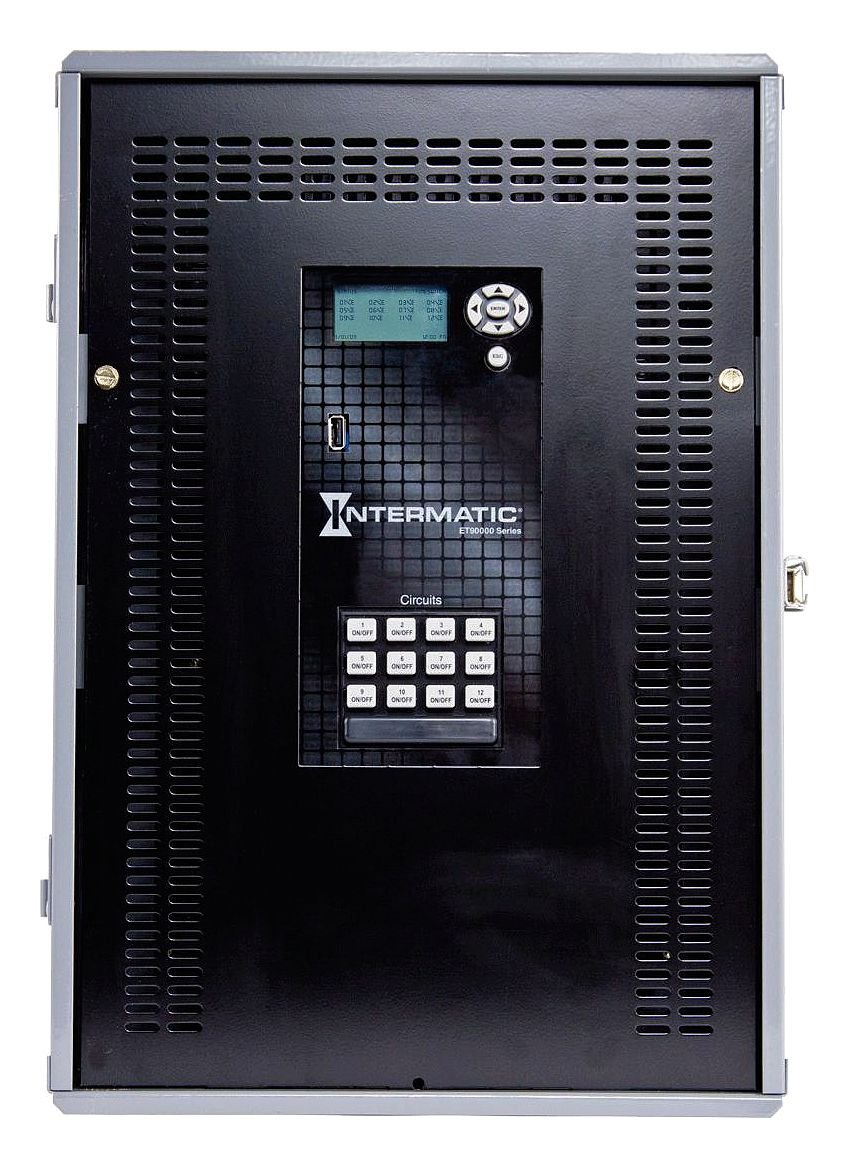
รูปที่ 1: Front panel of the Intermatic ET91215CR Energy Control. The unit features a digital display for programming, navigation buttons, a USB port for data transfer, and twelve individual ON/OFF buttons for circuit control, labeled 1 through 12. The Intermatic logo and 'ET90000 Series' designation are visible below the display.
2. ข้อมูลด้านความปลอดภัย
คำเตือน: Risk of electric shock. Installation and servicing must be performed by qualified personnel only. Disconnect power at the circuit breaker or fuse before installing or servicing. Follow all local and national electrical codes.
- Always ensure the power supply is disconnected before working on the unit.
- Do not operate the unit with damaged wiring or if the enclosure is compromised.
- This device is intended for permanent installation.
- ตรวจสอบให้แน่ใจว่ามีสายดินที่เหมาะสมเพื่อป้องกันอันตรายจากไฟฟ้า
3. การตั้งค่าและการติดตั้ง
3.1 การติดตั้งสิ่งที่แนบมา
The ET91215CR features a Type 3R steel enclosure, suitable for outdoor applications, providing protection against rain, sleet, and external ice formation. Mount the enclosure securely to a flat, vertical surface using appropriate hardware (not included). Ensure adequate clearance for wiring and ventilation.
3.2 คำแนะนำในการเดินสายไฟ
This device is rated for 30A and operates on 120-277V. It features a Single Pole Double Throw (SPDT) switch configuration. All wiring must comply with the National Electrical Code (NEC) and local codes. Refer to the wiring diagram provided inside the enclosure door for specific connections.
- Disconnect all power to the installation site at the main circuit breaker.
- เปิดประตูตู้
- Connect the incoming power supply wires to the designated terminals.
- Connect the load wires for each controlled circuit to the appropriate output terminals.
- ตรวจสอบให้แน่ใจว่าการเชื่อมต่อทั้งหมดแน่นหนาและปลอดภัย
- Close the enclosure door and restore power.
บันทึก: For optimal performance and safety, it is highly recommended that a licensed electrician perform the installation and wiring of this energy control unit.
4. คู่มือการใช้งาน
4.1 การเปิดเครื่องและการแสดงผลครั้งแรก
Upon initial power-up, the digital display will illuminate. The display shows current time, date, and status information. Use the navigation buttons (up, down, left, right, ENTER, ESC) located next to the display to navigate through menus and adjust settings.
4.2 การตั้งเวลาและวันที่
Access the main menu using the navigation buttons. Select the 'Time/Date' option to set the current time, date, and year. Ensure these settings are accurate for the astronomic feature to function correctly.
4.3 Programming Schedules (Astronomic Feature)
The 365-day astronomic feature automatically adjusts ON/OFF times based on sunrise and sunset for your geographical location. This requires setting your precise latitude and longitude. Consult the detailed programming guide within the unit's internal menu or refer to the full product manual for advanced scheduling options.
- Navigate to the 'Astronomic Settings' menu.
- Enter your geographical coordinates (latitude and longitude).
- Define desired offsets from sunrise/sunset if needed.
- Assign astronomic schedules to specific circuits.
4.4 Manual Circuit Control
The unit features twelve individual ON/OFF buttons for direct control of each circuit. Pressing an 'ON/OFF' button will toggle the corresponding circuit's power state. This manual override can be used independently of programmed schedules.
4.5 ฟังก์ชันการทำงานของพอร์ต USB
The integrated USB port allows for easy transfer of programming schedules, event logs, and firmware updates. Refer to the Intermatic software documentation for detailed instructions on using this feature.
5. การบำรุงรักษา
The Intermatic ET91215CR is designed for minimal maintenance. Regular inspection is recommended to ensure optimal performance.
- การทำความสะอาด: ทำความสะอาดภายนอกของกรงเป็นระยะด้วยผ้าเนื้อนุ่มและแห้งamp ผ้า ห้ามใช้สารทำความสะอาดที่มีฤทธิ์กัดกร่อนหรือตัวทำละลาย
- การตรวจสอบ: Annually inspect all wiring connections for tightness and signs of wear or corrosion. Check the enclosure for any damage that might compromise its Type 3R rating.
- อัพเดตเฟิร์มแวร์: Check the Intermatic website periodically for available firmware updates via the USB port to ensure your unit has the latest features and bug fixes.
6 การแก้ไขปัญหา
If you encounter issues with your ET91215CR, refer to the following common troubleshooting steps:
| ปัญหา | สาเหตุที่เป็นไปได้ | สารละลาย |
|---|---|---|
| เครื่องไม่เปิด | ไม่มีไฟเลี้ยง; เบรกเกอร์ตัดวงจร | Check power supply at the source. Reset circuit breaker. Verify wiring connections. |
| Schedules not activating. | Incorrect time/date; schedule not enabled; astronomic settings incorrect. | Verify current time and date. Ensure schedules are programmed and enabled for the correct circuits. Check astronomic coordinates. |
| Circuit not responding to manual ON/OFF. | Wiring issue; internal fault. | Check wiring for the specific circuit. If problem persists, contact technical support. |
| หน้าจอว่างเปล่าหรือไม่สามารถอ่านได้ | Power issue; display fault. | Verify power supply. If power is present and display remains blank, contact technical support. |
If troubleshooting steps do not resolve the issue, contact Intermatic Technical Support for further assistance.
7. ข้อมูลจำเพาะ
| คุณสมบัติ | ข้อมูลจำเพาะ |
|---|---|
| หมายเลขรุ่น | ET91215CR |
| เล่มที่tage | 120-277 โวลต์ |
| Ampกำลังการผลิตไฟฟ้า | 30 Amps |
| ประเภทสวิตซ์ | SPDT (ขั้วเดี่ยวสองขั้ว) |
| ประเภทตู้ปิด | Type 3R Steel Enclosure |
| การเขียนโปรแกรม | 365-Day Astronomic |
| ขนาดสินค้า | 3.6 x 5.7 x 9.6 นิ้ว |
| น้ำหนักสินค้า | 21 ปอนด์ |
| Material (Internal) | อลูมิเนียม, ทองแดง |
| การรับรอง | NOM, UL |
| ส่วนประกอบที่รวมอยู่ | Intermatic ET91215CR Timer, 30A 120-277V SPDT 365-Day Astronomic Energy Control w/Type 3R Steel Enclosure |
8. การรับประกันและการสนับสนุน
8.1 การรับประกันแบบจำกัด
The Intermatic ET91215CR is covered by a limited warranty. For specific terms and conditions, please refer to the warranty documentation included with your product or visit the official Intermatic webเว็บไซต์นี้ การรับประกันนี้โดยทั่วไปครอบคลุมถึงข้อบกพร่องในวัสดุและฝีมือการผลิตภายใต้การใช้งานปกติ
8.2 การสนับสนุนด้านเทคนิค
For technical assistance, product inquiries, or warranty claims, please contact Intermatic Customer Service. Have your product model number (ET91215CR) and purchase date available when contacting support.
Intermatic Contact Information:
Please refer to the official Intermatic webตรวจสอบข้อมูลติดต่อล่าสุดได้จากเว็บไซต์หรือบรรจุภัณฑ์ของผลิตภัณฑ์


