1. บทนำ
This manual provides instructions for the Uniden DECT 6.0 Cordless Phone, model D1364. This phone features DECT 6.0 digital technology for enhanced clarity, security, and range. It includes Caller ID, Call Waiting, a phonebook, and an Eco-Mode for power management.
For optimal performance and to prevent damage, please read these instructions thoroughly before using your new phone.
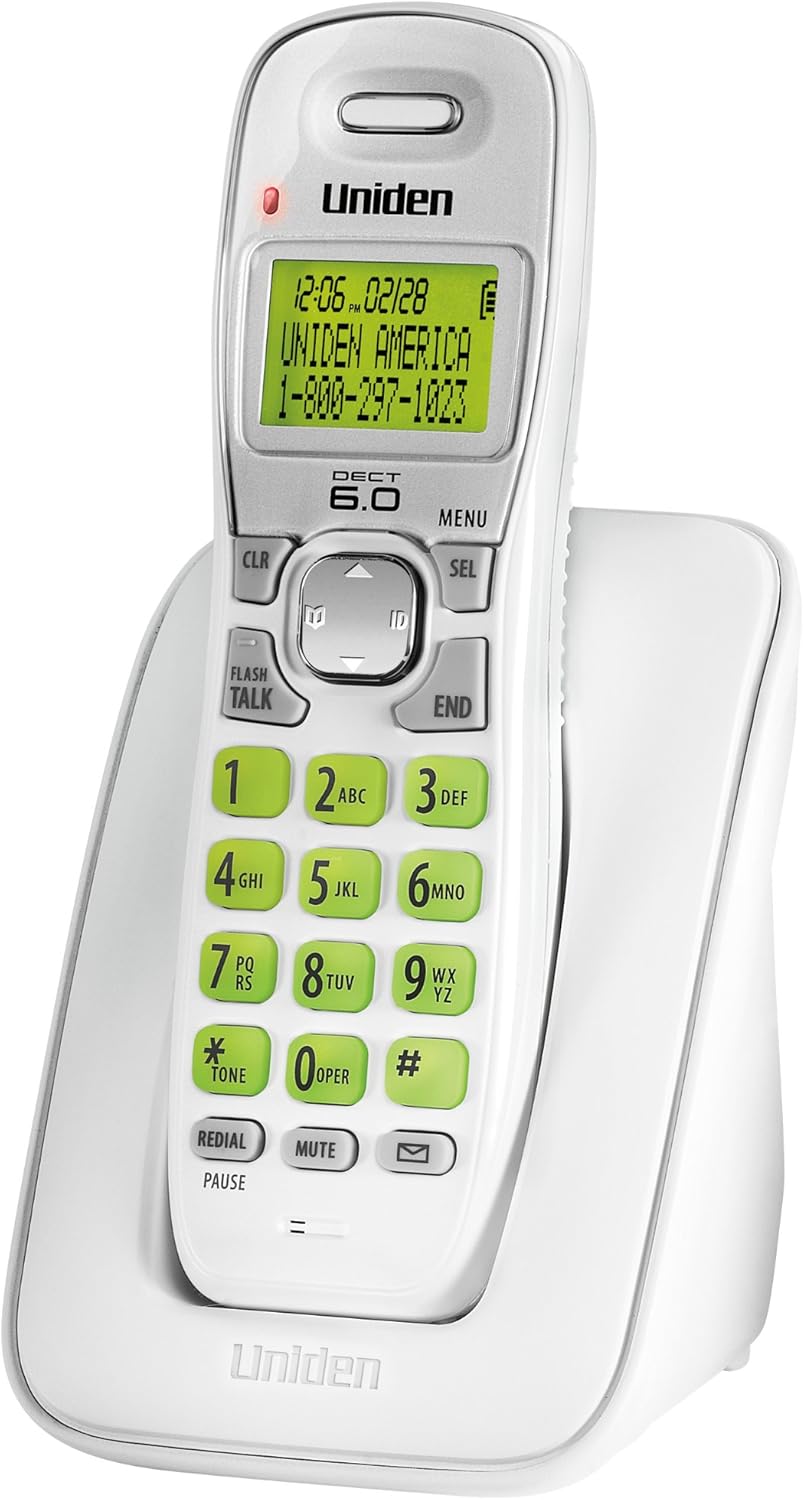
รูปที่ 1: Uniden DECT 6.0 Cordless Phone D1364. This image shows the white cordless handset resting in its charging base. The handset features a green backlit LCD display showing time, date, and a sample caller ID entry. The keypad has large, green-backlit buttons for dialing and function keys like CLR, MENU, SEL, FLASH/TALK, END, REDIAL/PAUSE, MUTE, and a message indicator.
2. เนื้อหาบรรจุภัณฑ์
ตรวจสอบว่าแพ็คเกจของคุณมีรายการต่อไปนี้:
- One (1) Cordless Handset (D1364)
- One (1) Handset Charging Base
- One (1) AC Adapter for the charging base
- สายโทรศัพท์หนึ่ง (1) เส้น
- One (1) Rechargeable Battery Pack (Product Specific, included)
- คู่มือผู้ใช้เล่มนี้
3. การตั้งค่า
3.1 การติดตั้งแบตเตอรี่
- ค้นหาฝาปิดช่องใส่แบตเตอรี่ที่ด้านหลังของโทรศัพท์มือถือ
- เลื่อนฝาครอบลงแล้วยกออก
- ต่อขั้วต่อแบตเตอรี่เข้ากับช่องเสียบภายในช่องใส่แบตเตอรี่ ตรวจสอบให้แน่ใจว่าขั้วถูกต้อง
- วางชุดแบตเตอรี่ลงในช่องใส่แบตเตอรี่
- ปิดฝาช่องใส่แบตเตอรี่ โดยเลื่อนขึ้นจนกระทั่งได้ยินเสียงคลิกเข้าที่
3.2 การเชื่อมต่อหน่วยฐาน
- Plug the small end of the AC adapter into the DC IN jack on the back of the charging base.
- เสียบปลายด้านใหญ่ของอะแดปเตอร์ AC เข้ากับเต้ารับไฟฟ้ามาตรฐาน
- Plug one end of the telephone line cord into the TEL LINE jack on the back of the charging base.
- เสียบปลายอีกด้านหนึ่งของสายโทรศัพท์เข้ากับช่องเสียบโทรศัพท์ที่ผนัง
3.3 การชาร์จแบตเตอรี่เริ่มต้น
Place the handset on the charging base. The handset display will indicate charging. Allow the handset to charge for at least 15-20 ชั่วโมง before initial use to ensure full battery capacity.
3.4 การติดตั้งบนผนัง (ทางเลือก)
The charging base includes a built-in wall mount feature. Consult the diagrams in the full manual for detailed wall mounting instructions, typically involving two screws spaced appropriately on the wall.
4. คู่มือการใช้งาน
4.1 การโทรออกและรับสาย
- ในการโทรออก: กด แฟลช/พูดคุยจากนั้นกดหมายเลข หรืออีกวิธีหนึ่งคือ กดหมายเลขก่อน แล้วค่อยกด แฟลช/พูดคุย.
- วิธีวางสาย: กด จบ or place the handset back on the charging base.
- เพื่อรับสาย: เมื่อโทรศัพท์ดัง ให้กด แฟลช/พูดคุย.
4.2 การปรับระดับเสียง
ระหว่างการโทร ให้ใช้ปุ่ม ปุ่มลูกศรขึ้น/ลง on the navigation pad to adjust the earpiece volume.
4.3 สมุดโทรศัพท์
สมุดโทรศัพท์สามารถบันทึกชื่อและหมายเลขโทรศัพท์ได้สูงสุด 30 หมายเลข
- วิธีการเพิ่มรายการ: กด เมนู, navigate to "Phonebook," select "Add Entry," and follow the on-screen prompts to enter the name and number.
- วิธีโทรออกโดยใช้สมุดโทรศัพท์: กดปุ่ม ปุ่มลูกศรขึ้น/ลง to browse the phonebook, then press แฟลช/พูดคุย to dial the selected entry.
4.4 การระบุหมายเลขผู้โทรและการรอสาย
This phone supports Caller ID and Call Waiting features (subscription required from your telephone service provider).
- The Caller ID list stores up to 30 incoming calls. Press the ID button (down arrow on navigation pad) to review รายการแสดงหมายเลขผู้โทรเข้า
- During a call, if you hear a Call Waiting tone, press แฟลช to switch to the incoming call.
4.5 การโทรซ้ำ
โทรศัพท์จะบันทึกหมายเลขที่โทรออกล่าสุด 5 หมายเลข
- กด โทรซ้ำ/หยุดชั่วคราว ถึง view รายการโทรซ้ำ
- ใช้ ปุ่มลูกศรขึ้น/ลง to select a number, then press แฟลช/พูดคุย การโทรออก
4.6 ฟังก์ชั่นปิดเสียง
ในระหว่างการโทร ให้กด MUTE to temporarily disable your microphone. The other party will not hear you. Press MUTE อีกครั้งเพื่อสนทนาต่อ
4.7 Handset Locator
If you misplace the handset, press the หา button on the base unit. The handset will beep, allowing you to locate it.
4.8 โหมด Eco
The phone features Eco-Mode, which automatically manages power consumption to extend battery life. This mode is active by default and does not require manual activation.
5. การบำรุงรักษา
5.1 การทำความสะอาด
เช็ดโทรศัพท์และฐานด้วยผ้านุ่มๆamp cloth. Do not use cleaning sprays or abrasive cleaners, as they may damage the finish or electrical components.
5.2 การดูแลแบตเตอรี่
- ควรใช้แบตเตอรี่แบบชาร์จไฟได้ตามที่ระบุไว้เสมอ
- If the phone will not be used for an extended period, remove the battery pack to prevent leakage.
- Dispose of old batteries according to local regulations. Do not dispose of them in fire.
5.3 ข้อพิจารณาด้านสิ่งแวดล้อม
Avoid placing the phone in direct sunlight, near heat sources, or in areas with high humidity. Ensure proper ventilation around the base unit.
6 การแก้ไขปัญหา
| ปัญหา | สาเหตุที่เป็นไปได้ | สารละลาย |
|---|---|---|
| ไม่มีเสียงสัญญาณโทรศัพท์ | สายโทรศัพท์ถูกตัดการเชื่อมต่อ | ตรวจสอบให้แน่ใจว่าสายโทรศัพท์เสียบเข้ากับฐานและเต้ารับที่ผนังอย่างแน่นหนาแล้ว |
| โทรศัพท์ไม่ชาร์จ | AC adapter is disconnected or handset is not seated correctly. | Verify the AC adapter is plugged into the base and a working outlet. Re-seat the handset firmly on the charging base. |
| คุณภาพเสียงไม่ดี/สัญญาณรบกวน | Interference from other electronic devices or distance from base. | Move the handset closer to the base. Relocate the base away from other electronic devices (Wi-Fi routers, microwaves). |
| ไม่แสดงหมายเลขผู้โทร | No subscription to Caller ID service. | Contact your telephone service provider to subscribe to Caller ID service. |
| Handset lost connection to base | Handset out of range or power interruption. | Move the handset closer to the base. Check power connections for the base. |
7. ข้อมูลจำเพาะ
| คุณสมบัติ | รายละเอียด |
|---|---|
| แบบอย่าง | D1364 |
| เทคโนโลยี | DECT 6.0 ดิจิทัล |
| สี | สีขาว |
| หน่วยความจำหมายเลขผู้โทร | 30 ชื่อ/หมายเลข |
| ความจุสมุดโทรศัพท์ | 30 ชื่อ/หมายเลข |
| หน่วยความจำการโทรซ้ำ | 5 ตัวเลขสุดท้าย |
| แสดง | Green Backlit LCD |
| แป้นพิมพ์ตัวเลข | แบ็คไลท์สีเขียว |
| ประเภทแบตเตอรี่ | Rechargeable (Product Specific, included) |
| Talk Time (approx.) | นานถึง 7 ชั่วโมง |
| Standby Time (approx.) | นานถึง 6 วัน |
| แหล่งพลังงาน | AC Adapter (Base), Battery Powered (Handset) |
| ขนาด (กว้าง x ยาว x สูง) | 5.12 x 3.62 x 7.68 นิ้ว |
| น้ำหนักสินค้า | 3.76 ปอนด์ |
| ประสิทธิภาพการใช้พลังงาน | Eco-Mode, Energy Star compliant |
8. การรับประกันและการสนับสนุน
For warranty information and technical support, please refer to the warranty card included with your product or visit the official Uniden website. You may also contact Uniden customer service directly.
Uniden America Customer Service: 1-800-297-1023
หมายเหตุ: ข้อมูลจำเพาะและคุณสมบัติของผลิตภัณฑ์อาจมีการเปลี่ยนแปลงโดยไม่ต้องแจ้งให้ทราบล่วงหน้า


