การแนะนำ
This manual provides detailed instructions for the safe and efficient operation of your Utilitech Mechanical Residential Plug-In Timer. Please read this manual thoroughly before use and retain it for future reference.
The Utilitech Mechanical Residential Plug-In Timer is designed to automate the on/off cycles of electrical devices, helping to conserve energy and enhance convenience. It features up to 48 on/off settings per day and includes 4 outlets for connecting multiple devices.
สินค้าเกินview
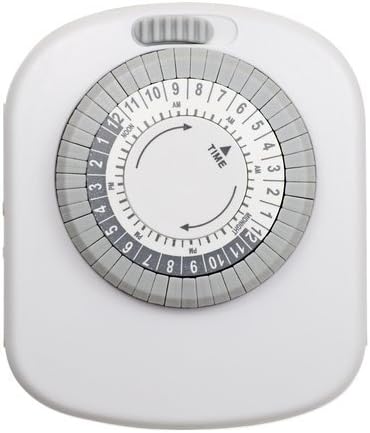
รูปที่ 1 : ด้านหน้า view of the Utilitech Mechanical Residential Plug-In Timer, showing the central dial with time markings and surrounding pins.
The timer features a circular dial with hour markings (AM/PM) and a series of push-down pins around its circumference. These pins control the on/off cycles. A manual override switch is typically located on the top or side of the unit.
คุณสมบัติหลัก:
- Up to 48 on/off settings per 24-hour period.
- Non-removable pins for easy programming.
- Designed for energy saving.
- Equipped with 4 outlets for multiple device connections.
- Simple plug-in installation.
การตั้งค่า
ตั้งค่าเริ่มต้น:
แกะตัวจับเวลา: นำตัวจับเวลาออกจากบรรจุภัณฑ์อย่างระมัดระวัง ตรวจสอบดูว่ามีส่วนใดเสียหายหรือไม่
เสียบปลั๊ก: Plug the timer into a standard 120V AC wall outlet. Ensure the outlet is easily accessible.
Charge Battery (if applicable): Although this model does not require batteries for operation, some timers may have an internal battery for timekeeping during power outages. If so, allow it to charge for at least 30 minutes before programming.
ตั้งเวลาปัจจุบัน: Rotate the entire dial clockwise until the current time aligns with the "TIME" arrow indicator on the timer's face. The dial is marked with AM and PM hours (e.g., 12 PM for Noon, 12 AM for Midnight).
Figure 2: Detail of the timer dial, highlighting the "TIME" arrow and the 24-hour markings for setting the current time.
คำแนะนำการใช้งาน
Programming On/Off Times:
The timer uses push-down pins around the dial to set the on/off intervals. Each pin represents a 30-minute segment.
ระบุพิน: Locate the small, grey pins around the outer edge of the dial. Each pin corresponds to a 30-minute interval.
Set "ON" Times: Push down the pins corresponding to the time periods you want the connected device to be ON. When a pin is pushed down, it activates the power during that 30-minute segment as the dial rotates.
Set "OFF" Times: Leave the pins in the "up" position for the time periods you want the connected device to be ปิด. When a pin is in the up position, it deactivates the power during that 30-minute segment.
รูปที่ 3: รายละเอียด view of the timer's outer ring with individual pins, illustrating how to push them down for "ON" periods.
สวิตช์แทนที่ด้วยตนเอง: The timer typically has a manual override switch (often a slider or button) located on the top or side. This switch allows you to bypass the programmed settings and keep the device either continuously ON or OFF. Ensure this switch is in the "Timer" or "Auto" position for programmed operation.
เชื่อมต่ออุปกรณ์: Plug the device you wish to control into one of the 4 outlets on the timer. Ensure the device's own power switch is set to the "ON" position.
Example Programming:
To turn a lamp on from 6:00 PM to 10:00 PM:
- Locate the 6 PM mark on the dial.
- Push down all pins from 6 PM to 10 PM.
- Ensure all other pins are in the "up" position.
- Set the current time on the dial.
- เสียบปลั๊กลamp into the timer.
การซ่อมบำรุง
The Utilitech Mechanical Residential Plug-In Timer requires minimal maintenance.
การทำความสะอาด: ถอดปลั๊กตัวตั้งเวลาออกจากเต้ารับก่อนทำความสะอาด เช็ดภายนอกด้วยผ้าแห้งนุ่มๆ ห้ามใช้น้ำยาทำความสะอาดหรือวัสดุที่มีฤทธิ์กัดกร่อน
พื้นที่จัดเก็บ: If storing the timer for an extended period, ensure it is clean and dry. Store in a cool, dry place away from direct sunlight and extreme temperatures.
การตรวจสอบ: Periodically inspect the timer and its cord for any signs of damage, such as frayed wires or cracked casing. หากพบความเสียหาย ให้หยุดใช้งานทันทีและเปลี่ยนเครื่องใหม่
การแก้ไขปัญหา
| ปัญหา | สาเหตุที่เป็นไปได้ | สารละลาย |
|---|---|---|
| Device does not turn ON/OFF as programmed. |
|
|
| ปุ่มหมุนตั้งเวลาไม่หมุน |
|
|
| Timer makes a rattling or loud noise. |
|
|
ข้อมูลจำเพาะ
| คุณลักษณะ | รายละเอียด |
|---|---|
| หมายเลขรุ่น | 358707 |
| หมายเลขชิ้นส่วน | TM20DHBL |
| ยี่ห้อ | ยูทิลิเทค |
| พิมพ์ | Mechanical Residential Plug-In Timer |
| จำนวนจุดจำหน่าย | 4 |
| Daily Settings | Up to 48 on/off settings (30-minute intervals) |
| ประเภทการติดตั้ง | ติดตั้งปลั๊กอิน |
| สี | สีขาว |
| น้ำหนักสินค้า | 6.4 ออนซ์ |
| ขนาดแพ็คเกจ | 6.7 x 4.1 x 2.1 นิ้ว |
| แบตเตอรี่ที่จำเป็น | เลขที่ |
| ยูพีซี | 070686507131 |
ข้อมูลด้านความปลอดภัย
โปรดอ่านและปฏิบัติตามคำแนะนำด้านความปลอดภัยทั้งหมดเพื่อป้องกันการบาดเจ็บหรือความเสียหาย
สำหรับใช้ภายในอาคารเท่านั้น: This timer is designed for indoor use in dry locations only. Do not expose to water or moisture.
คะแนนไฟฟ้า: อย่าใช้ไฟฟ้าเกินพิกัดของตัวตั้งเวลา การใช้งานเกินกำลังอาจทำให้เกิดความร้อนสูงเกินไปและไฟไหม้ได้
การต่อลงดิน: Ensure the timer is plugged into a properly grounded outlet if applicable. This model is a 2-prong device.
เด็กและสัตว์เลี้ยง: เก็บให้พ้นจากมือเด็กและสัตว์เลี้ยง
การตัดการเชื่อมต่อ: ควรดึงปลั๊กเครื่องตั้งเวลาออกจากเต้ารับทุกครั้งก่อนทำความสะอาดหรือเมื่อไม่ได้ใช้งานเป็นเวลานาน
ซ่อมแซม: ห้ามเปิดหรือซ่อมตัวตั้งเวลาด้วยตนเอง โปรดส่งซ่อมโดยช่างผู้ชำนาญการเท่านั้น
การรับประกันและการสนับสนุน
For warranty information or technical support, please refer to the product packaging or contact Utilitech customer service. Keep your purchase receipt for warranty claims.
Note: Specific warranty terms and contact information may vary. Please consult the documentation included with your product.


