1. บทนำ
This manual provides essential information for the safe and efficient operation of your Cen-Tech 750W Continuous/1500W Peak Power Inverter. This device converts 12V DC battery power into 115V AC household power, allowing you to operate various electronics and small appliances from your vehicle or other 12V power sources. Please read this manual thoroughly before installation and use, and retain it for future reference.
2. ข้อมูลด้านความปลอดภัยที่สำคัญ
คำเตือน: Failure to follow these instructions may result in electric shock, fire, serious injury, or death. Always exercise extreme caution when working with electrical equipment.
- อันตรายจากไฟฟ้าช็อต: ห้ามเปิดอินเวอร์เตอร์ casing. There are no user-serviceable parts inside. Contact qualified service personnel for repairs.
- อันตรายจากไฟไหม้: Do not operate the inverter near flammable materials, gases, or vapors. Ensure adequate ventilation around the inverter.
- การระบายอากาศที่เหมาะสม: The inverter generates heat during operation. Ensure it is placed in a well-ventilated area, away from direct sunlight or heat sources.
- ขั้วที่ถูกต้อง: Always connect the inverter to a 12V DC battery with the correct polarity (red to positive, black to negative). Incorrect connection can damage the inverter and battery.
- ระบบป้องกันการโอเวอร์โหลด: Do not exceed the inverter's continuous power rating (750W) or peak power rating (1500W). Overloading can cause damage and fire.
- การสัมผัสความชื้น: Do not expose the inverter to rain, moisture, or water. This can cause electric shock or damage.
- เด็กและสัตว์เลี้ยง: เก็บอินเวอร์เตอร์ให้พ้นมือเด็กและสัตว์เลี้ยง
- อุปกรณ์ทางการแพทย์: This inverter is not designed for use with life-support systems or other medical devices.
3. คุณสมบัติของผลิตภัณฑ์
The Cen-Tech 750W Power Inverter is designed for reliable performance and includes the following key features:
- พลังต่อเนื่อง: Provides up to 750 watts of continuous power.
- พลังสูงสุด: Capable of handling up to 1500 watts for starting products with high surge requirements.
- เอาต์พุตคลื่นไซน์ที่ดัดแปลง: Efficiently converts 12V DC to 115V AC with up to 87% efficiency.
- มีหลายสาขา: Features two 115V AC power outlets for connecting various devices.
- พอร์ตชาร์จ USB: Includes a 5V/500mA USB port for charging compatible devices.
- การป้องกันที่ครอบคลุม: Built-in safeguards against low/high voltage, low/high temperatures, low/high currents, short circuits, and overloads.
- การเชื่อมต่อที่ง่ายดาย: Comes with heavy-duty input cables equipped with alligator clips for direct battery connection.
- ตัวบ่งชี้สถานะ: An LED indicator light provides operational status.
4. เนื้อหาบรรจุภัณฑ์
กรุณาตรวจสอบแพ็คเกจสำหรับรายการต่อไปนี้:
- Cen-Tech 750W Continuous/1500W Peak Power Inverter
- Heavy-duty input cables with alligator clips
- คู่มือการใช้งาน (เอกสารนี้)
5. การตั้งค่าและการติดตั้ง
Follow these steps to properly set up your power inverter:
- เลือกตำแหน่ง: Select a dry, well-ventilated area for the inverter. Ensure it is away from direct sunlight, heat sources, and flammable materials. The inverter should be placed on a stable, flat surface.
- เตรียมแบตเตอรี่: Ensure the 12V DC battery is fully charged and in good condition. Turn off any loads connected to the battery.
- Connect Input Cables:
- เชื่อมต่อ สีแดง alligator clip cable to the บวก (+) terminal of the 12V battery.
- เชื่อมต่อ สีดำ alligator clip cable to the เชิงลบ (-) terminal of the 12V battery.
สำคัญ: Ensure connections are secure and correct polarity is observed to prevent damage to the inverter or battery. A loose connection can cause overheating.
- เปิดเครื่อง: Once the battery connections are secure, turn on the inverter using its power switch (if applicable). The LED indicator light should illuminate.
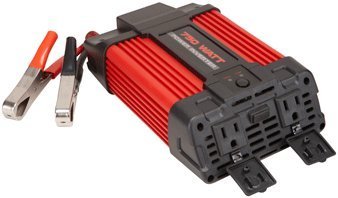
Image 1: Cen-Tech 750W Power Inverter connected to a 12V battery using the provided alligator clips. The image shows the compact design and the input/output ports.
6. คู่มือการใช้งาน
After successful setup, you can begin using your power inverter:
- เปิดใช้งานอินเวอร์เตอร์: Ensure the inverter's power switch is in the "ON" position. The LED indicator should confirm it is powered.
- เชื่อมต่ออุปกรณ์ไฟฟ้ากระแสสลับ: Plug your 115V AC devices into the inverter's AC outlets. Ensure the total wattage of all connected devices does not exceed 750 watts continuously or 1500 watts peak.
- เชื่อมต่ออุปกรณ์ USB: For charging USB-powered devices, plug them into the 5V/500mA USB port.
- ตรวจสอบระดับแบตเตอรี่: Keep an eye on your 12V battery's charge level. Prolonged use can drain the battery. The inverter has low voltage protection and will shut down if the battery voltage ลดลงต่ำเกินไป
- หมดแรง: When finished, first disconnect all AC and USB devices from the inverter. Then, turn off the inverter's power switch. Finally, disconnect the alligator clips from the battery, starting with the black (negative) clip, then the red (positive) clip.
บันทึก: Some sensitive electronic devices may not operate correctly with a modified sine wave inverter. Consult your device's manufacturer for compatibility if issues arise.
7. การบำรุงรักษา
การบำรุงรักษาตามปกติจะช่วยให้อินเวอร์เตอร์ของคุณทำงานได้อย่างเหมาะสมและมีอายุการใช้งานยาวนาน:
- การทำความสะอาด: Keep the inverter clean and free of dust and debris. Use a dry cloth to wipe the exterior. Do not use liquid cleaners.
- การระบายอากาศ : Periodically check that the ventilation openings are not blocked. Clear any obstructions to ensure proper airflow.
- การเชื่อมต่อสายเคเบิล: Regularly inspect the input cables and alligator clips for any signs of wear, damage, or corrosion. Ensure connections remain tight and secure.
- พื้นที่จัดเก็บ: When not in use for extended periods, store the inverter in a cool, dry place, away from direct sunlight and extreme temperatures. Disconnect it completely from the battery.
8 การแก้ไขปัญหา
หากคุณพบปัญหาเกี่ยวกับอินเวอร์เตอร์ โปรดดูปัญหาและวิธีแก้ไขทั่วไปต่อไปนี้:
| ปัญหา | สาเหตุที่เป็นไปได้ | สารละลาย |
|---|---|---|
| ไม่มีไฟออก / อินเวอร์เตอร์ไม่ทำงาน |
|
|
| อินเวอร์เตอร์หยุดทำงานโดยไม่คาดคิด |
|
|
| AC devices not working correctly |
|
|
9. ข้อมูลจำเพาะ
| คุณสมบัติ | รายละเอียด |
|---|---|
| หมายเลขรุ่น | ซีที-750-12 |
| พลังงานต่อเนื่อง | 750 วัตต์ |
| พลังสูงสุด | 1500 วัตต์ |
| อินพุต Voltage | กระแสตรง 12 โวลต์ |
| ปริมาณการส่งออกtage | กระแสสลับ 115 โวลต์ |
| รูปคลื่นเอาท์พุต | คลื่นไซน์ดัดแปลง |
| ประสิทธิภาพ | สูงสุดถึง 87% |
| AC Outlets AC | 2 |
| พอร์ต USB | 5โวลต์/500มิลลิแอมป์ |
| คุณสมบัติการป้องกัน | ปริมาณต่ำ/สูงtage, Low/High Temperature, Low/High Current, Short Circuit, Overload |
| น้ำหนักสินค้า | 2.11 ปอนด์ |
| ขนาด (โดยประมาณ) | ไม่ได้ระบุไว้ในข้อมูลที่ให้ไว้ |
10. การรับประกันและการสนับสนุน
Information regarding product warranty and customer support was not provided in the available product data. For warranty details or technical assistance, please refer to the product packaging or contact the manufacturer directly.


