การแนะนำ
This manual provides essential instructions for the safe and effective use of your Fujifilm FinePix HS25EXR digital camera. The HS25EXR is designed for photographers seeking versatility and optical quality, featuring a 16MP EXR CMOS sensor, a 3-inch tilting LCD, a 30x optical zoom lens, and Full HD movie recording capabilities. Please read this manual thoroughly before using your camera and keep it for future reference.

รูปที่ 1 : ด้านหน้า view of the Fujifilm FinePix HS25EXR camera with the lens retracted.
การตั้งค่า
1. การติดตั้งแบตเตอรี่
The Fujifilm FinePix HS25EXR operates on four AA batteries. For optimal performance, use high-quality alkaline or rechargeable Ni-MH batteries.
- เปิดฝาช่องใส่แบตเตอรี่ที่อยู่บริเวณด้านล่างของกล้อง
- Insert four AA batteries according to the polarity indicators (+/-) inside the compartment.
- ปิดฝาช่องใส่แบตเตอรี่ให้แน่น
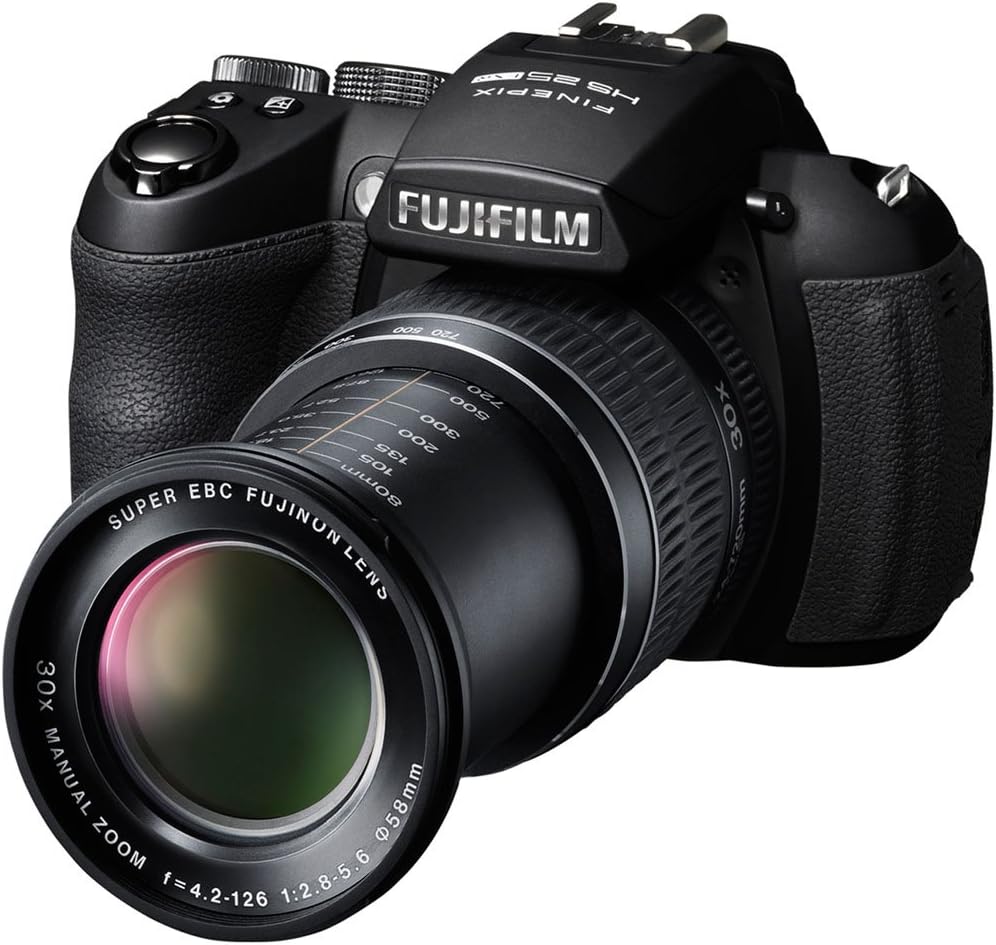
Figure 2: The camera with its 30x optical zoom lens extended, ready for use.
2. การใส่การ์ดหน่วยความจำ
The camera uses SD, SDHC, or SDXC memory cards (sold separately) to store photos and videos.
- Locate the memory card slot, typically next to the battery compartment or on the side of the camera.
- Insert the memory card with the label facing the correct direction, pushing it gently until it clicks into place.
- ในการถอด ให้ดันการ์ดเข้าไปอีกครั้งจนกระทั่งการ์ดดีดออกมาเล็กน้อย จากนั้นดึงการ์ดออก
3. การเปิดเครื่องครั้งแรกและการตั้งค่าวันที่/เวลา
หลังจากใส่แบตเตอรี่และเมมโมรี่การ์ดแล้ว:
- กดปุ่ม เปิด/ปิด ปุ่มเพื่อเปิดกล้อง
- The first time you power on, you may be prompted to set the date and time. Follow the on-screen instructions using the directional pad and เมนู/ตกลง ปุ่ม.
การใช้งานกล้อง
1. โหมดถ่ายภาพพื้นฐาน
Rotate the mode dial (located on the top of the camera) to select your desired shooting mode:
- AUTO (SR AUTO): The camera automatically detects the scene and optimizes settings.
- P (Program AE): Camera sets aperture and shutter speed, but you can adjust other settings.
- A (Aperture-Priority AE): You set the aperture, camera sets shutter speed.
- S (Shutter-Priority AE): You set the shutter speed, camera sets aperture.
- M (แมนนวล): You control both aperture and shutter speed.
- EXR: Utilizes the EXR CMOS sensor for enhanced image quality in various conditions (e.g., high resolution, wide dynamic range, high sensitivity/low noise).
- SP (Scene Position): Choose from various scene modes like Portrait, Landscape, Sport, Night, Beach, etc.
- ภาพยนตร์: For recording videos.

รูปที่ 3: ด้านบน view of the camera, highlighting the mode dial and manual zoom lens.
2. Focusing and Zooming
- ซูม: The HS25EXR features a 30x manual optical zoom lens. Rotate the zoom ring on the lens to adjust the focal length.
- ออโต้โฟกัส (ออโตโฟกัส): Half-press the shutter button to activate autofocus. The camera will focus on the subject in the selected AF area.
- โฟกัสแบบแมนนวล (MF): In manual focus mode, rotate the focus ring on the lens to adjust focus. Use the focus assist features on the LCD or EVF for precision.
3. Using the LCD Monitor and Electronic Viewไฟน์เดอร์ (EVF)
The camera is equipped with a 3-inch tilting LCD monitor and an electronic viewตัวค้นหา
- Tilting LCD: The LCD can be tilted for comfortable shooting from various angles, including low-angle and high-angle shots.
- EVF/LCD Button: กดปุ่ม EVF/LCD button to switch between the electronic viewช่องมองภาพและจอ LCD

รูปที่ 4: ด้านหลัง view of the camera, showing the LCD monitor and control buttons.

Figure 5: The camera with its tilting LCD screen extended for flexible viewมุมการเอียง
4. Recording Full HD Movies
การบันทึกวิดีโอ:
- Rotate the mode dial to the ภาพยนตร์ ตำแหน่ง.
- Press the movie record button (usually a red dot icon) to start and stop recording.
- The camera supports 1080p Full HD video recording.
การซ่อมบำรุง
1. การทำความสะอาดกล้อง
- ตัวกล้อง: Use a soft, dry cloth to wipe the camera body. For stubborn dirt, lightly dampชุบผ้าด้วยน้ำหรือน้ำยาทำความสะอาดอ่อนๆ
- เลนส์: Use a lens brush or blower to remove dust. For smudges, use a lens cleaning cloth and lens cleaning fluid. Avoid touching the lens surface with your fingers.
- จอแอลซีดี: Gently wipe with a soft, dry cloth. Do not apply pressure.
2. การดูแลแบตเตอรี่
- ถอดแบตเตอรี่ออกเมื่อไม่ได้ใช้งานกล้องเป็นเวลานาน
- เก็บแบตเตอรี่ไว้ในที่แห้งและเย็น
- If using rechargeable batteries, follow the manufacturer's charging instructions.
3. การจัดเก็บ
Store the camera in a dry, well-ventilated area, away from direct sunlight, high temperatures, and humidity. Use a camera bag to protect it from dust and physical damage.
การแก้ไขปัญหา
| ปัญหา | สาเหตุที่เป็นไปได้ / วิธีแก้ไข |
|---|---|
| กล้องไม่สามารถเปิดได้ |
|
| ภาพเบลอหรือไม่ชัด |
|
| Images are grainy or noisy. |
|
| ข้อผิดพลาดการ์ดหน่วยความจำ |
|
| แฟลชไม่ทำงาน |
|
For further assistance, please refer to the official Fujifilm support resources.
ข้อมูลจำเพาะ
| คุณสมบัติ | รายละเอียด |
|---|---|
| ชื่อรุ่น | HS25EXR |
| ความละเอียดของเซนเซอร์ภาพ | 16 MP |
| เทคโนโลยีโฟโต้เซนเซอร์ | CMOS (EXR CMOS) |
| ซูมออปติคอล | 30 เท่า |
| ความยาวโฟกัสต่ำสุด | 24 มิลลิเมตร (เทียบเท่า) |
| ความยาวโฟกัสสูงสุด | 720 มิลลิเมตร (เทียบเท่า) |
| รูรับแสงสูงสุด | เอฟ/2.8 |
| ระบบป้องกันภาพสั่นไหว | เซ็นเซอร์กะ |
| ขนาดหน้าจอ | 3 นิ้ว |
| ประเภทการติดตั้งจอแสดงผล | Tilting LCD |
| Viewตัวค้นหา | อิเล็กทรอนิกส์ |
| ความละเอียดวิดีโอ | 1920 x 1080 (30 เฟรมต่อวินาที), 1280 x 720 (60 เฟรมต่อวินาที) |
| รองรับ File รูปแบบ | เจเพ็ก, ดิบ |
| แหล่งพลังงาน | แบตเตอรี่ AA 4 ก้อน |
| เทคโนโลยีการเชื่อมต่อ | HDMI, ยูเอสบี |
| ประเภทการ์ดหน่วยความจำ | เอสดี, เอสดีเอชซี, เอสดีเอ็กซ์ซี |
| น้ำหนักสินค้า | 2.55 ปอนด์ (ประมาณ 1.16 กก.) |
ข้อมูลการรับประกัน
ผลิตภัณฑ์นี้มาพร้อมกับ การรับประกันชิ้นส่วนและค่าแรง 1 ปี (จำกัด) from the manufacturer, Fujifilm. Please retain your proof of purchase for warranty claims. The warranty covers defects in materials and workmanship under normal use. It does not cover damage caused by misuse, accidents, unauthorized repairs, or normal wear and tear.
For detailed terms and conditions, please refer to the warranty card included with your product or visit the official Fujifilm support webเว็บไซต์.
การสนับสนุนและการติดต่อ
For technical support, service, or additional information regarding your Fujifilm FinePix HS25EXR camera, please visit the official Fujifilm webเว็บไซต์:
You may also find FAQs and driver downloads on their support pages.


