1. บทนำ
This manual provides essential information for the proper use and care of your Leica V-LUX 3 digital camera. The Leica V-LUX 3 is designed for versatile photography, featuring a 24x super-telephoto zoom lens and a 12.1-megapixel CMOS image sensor. It is capable of capturing high-quality still images and recording full-HD video.
Please read this manual thoroughly before operating the camera to ensure optimal performance and longevity of the device.
2. สินค้าหมดview
2.1 คุณสมบัติหลัก
- 12.1-megapixel CMOS image sensor for high-quality imaging.
- 24x optical super-telephoto zoom lens (25-600mm equivalent) for extensive focal length range.
- Full-HD video recording capability (1920 x 1080 at 60 fps).
- Optical Image Stabilization to reduce blur.
- 3-inch articulating LCD display and electronic viewตัวค้นหา
- Fast continuous shooting up to 12 frames per second.
2.2 อะไรอยู่ในกล่อง
The Leica V-LUX 3 package typically includes:
- Leica V-LUX 3 Camera Body
- Lithium-Ion Rechargeable Battery (BP-DC 9)
- เครื่องชาร์จแบตเตอรี่
- สายสะพายไหล่
- สาย USB
- ฝาปิดเลนส์
- คู่มือการใช้งาน (เอกสารนี้)
3. การตั้งค่า
3.1 การชาร์จแบตเตอรี่
- Insert the battery into the provided charger.
- เสียบที่ชาร์จเข้ากับเต้ารับไฟฟ้า ไฟแสดงสถานะการชาร์จจะสว่างขึ้น
- Once charging is complete, the indicator light will change or turn off. Disconnect the charger and remove the battery.
Note: Fully charge the battery before first use for optimal performance.
3.2 การใส่แบตเตอรี่และการ์ดหน่วยความจำ
โปรดตรวจสอบให้แน่ใจว่ากล้องปิดอยู่ก่อนใส่หรือถอดแบตเตอรี่หรือการ์ดหน่วยความจำ
- เปิดฝาช่องใส่แบตเตอรี่/การ์ดที่อยู่ด้านล่างของกล้อง
- Insert the charged battery with the contacts facing the correct direction, as indicated inside the compartment. Push until it clicks into place.
- Insert an SD/SDHC/SDXC memory card into the card slot with the label facing the correct direction. Push until it clicks.
- ปิดฝาปิดช่องใส่ให้แน่น

รูปที่ 1 : ด้านหน้า view of the Leica V-LUX 3 camera. This image displays the lens, built-in flash, and the Leica branding on the camera body.
3.3 การเปิดเครื่องครั้งแรกและการตั้งค่าพื้นฐาน
- เลื่อนสวิตช์เปิด/ปิดไปที่ตำแหน่ง 'เปิด'
- The camera's LCD screen will power on.
- Follow the on-screen prompts to set the date, time, and language. Use the directional buttons and 'MENU/SET' button to navigate and confirm selections.
4. การใช้งานกล้อง
4.1 การถ่ายภาพขั้นพื้นฐาน
- เปิดกล้อง
- Rotate the mode dial (located on the top of the camera) to select your desired shooting mode (e.g., Program AE, Aperture Priority, Shutter Priority, Manual, Scene Modes).
- Frame your shot using the LCD monitor or the electronic viewตัวค้นหา
- กดปุ่มชัตเตอร์ลงครึ่งหนึ่งเพื่อเปิดใช้งานระบบโฟกัสอัตโนมัติและการวัดแสง
- กดปุ่มชัตเตอร์จนสุดเพื่อถ่ายภาพ
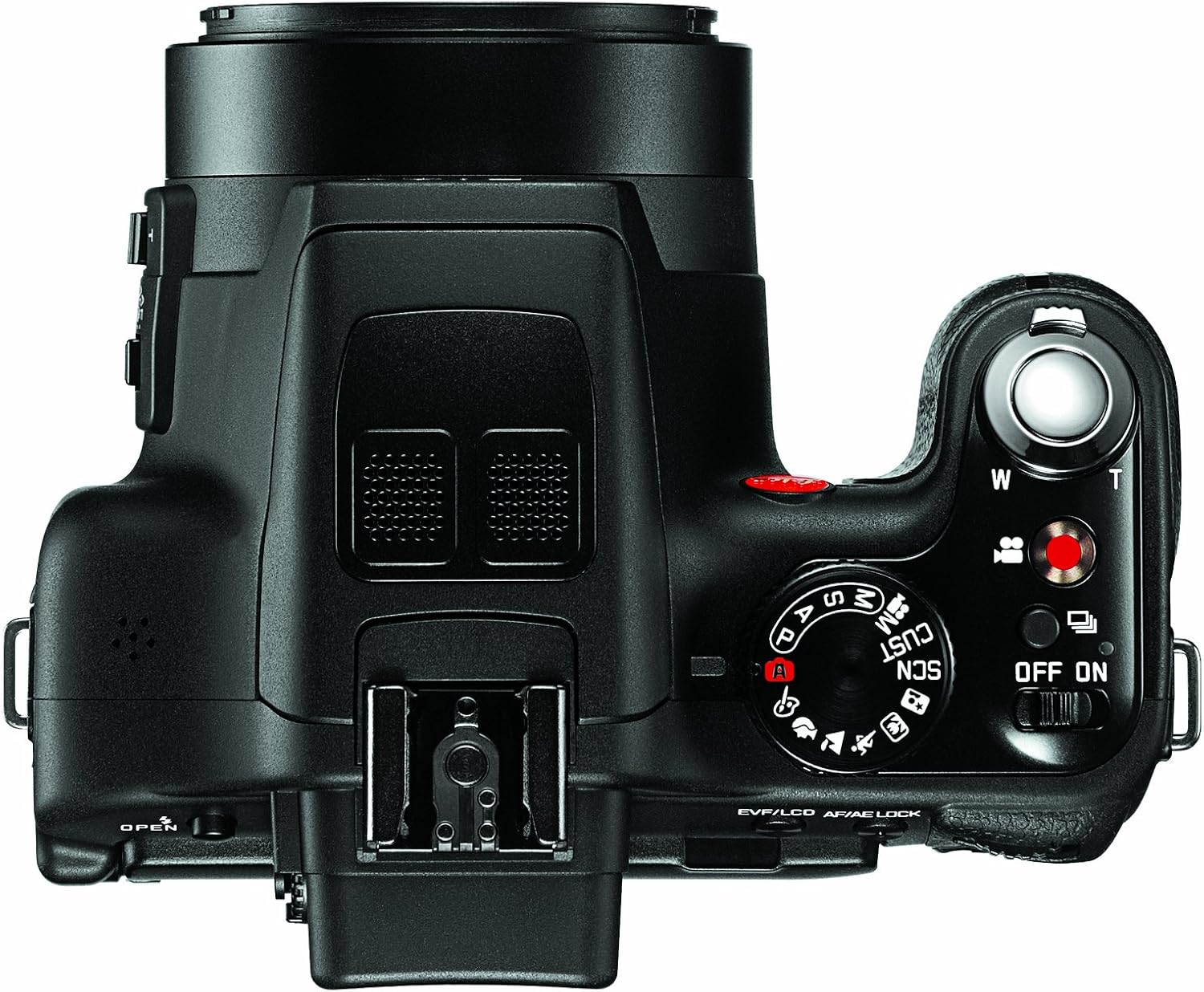
รูปที่ 2: ด้านบน view of the Leica V-LUX 3 camera. This image highlights the mode dial, shutter button, and zoom lever.
4.2 การใช้งานการซูม
The camera features a 24x optical zoom lens. Use the zoom lever, typically located around the shutter button, to adjust the focal length.
- Push the zoom lever towards 'W' (Wide) to zoom out.
- Push the zoom lever towards 'T' (Telephoto) to zoom in.

รูปที่ 3: ด้านข้าง view of the Leica V-LUX 3 camera. This image shows the side controls, including the zoom rocker and focus mode switch.
4.3 การบันทึกวิดีโอ
การบันทึกวิดีโอ:
- Press the dedicated video recording button (often marked with a red dot) to start recording.
- กดปุ่มอีกครั้งเพื่อหยุดการบันทึก
- The camera records in AVCHD and MPEG-4 formats, with resolutions up to 1920 x 1080 at 60 frames per second.
4.4 การใช้งานแฟลช
The Leica V-LUX 3 has a built-in flash. To use the flash:
- Locate the flash pop-up button or lever, typically near the flash unit.
- Press the button to raise the flash.
- In certain shooting modes (e.g., Auto), the flash may pop up automatically in low-light conditions.
- Access flash modes (Auto, Red-eye Reduction, Forced Flash, Slow Sync, Flash Off) through the camera's menu system.

รูปที่ 4 : ด้านหน้า view of the Leica V-LUX 3 camera with the built-in flash in the deployed (popped-up) position.
4.5 การโฟกัส
The camera offers both autofocus and manual focus options.
- ระบบโฟกัสอัตโนมัติ (AF): The default setting. Press the shutter button halfway to allow the camera to automatically focus on your subject. The V-LUX 3 uses contrast detection AF with 23 autofocus points.
- โฟกัสแบบแมนนวล (MF): Switch to MF mode using the dedicated switch on the lens barrel or through the menu. Rotate the focus ring on the lens to adjust focus manually.
5. การบำรุงรักษา
5.1 การทำความสะอาดกล้อง
- เลนส์: ใช้ผ้าเนื้อนุ่มที่ไม่เป็นขุยหรือแปรงทำความสะอาดเลนส์ค่อยๆ เช็ดฝุ่นออก สำหรับคราบสกปรก ให้ใช้น้ำยาทำความสะอาดเลนส์โดยเฉพาะชุบผ้าก่อนเช็ด ไม่ควรเช็ดลงบนเลนส์โดยตรง
- ตัวกล้อง: เช็ดด้วยผ้าแห้งนุ่มๆ สำหรับคราบฝังแน่น ให้เช็ดด้วยน้ำสะอาดเล็กน้อยampชุบผ้าให้เปียกน้ำ หลีกเลี่ยงการใช้น้ำยาทำความสะอาดที่มีฤทธิ์กัดกร่อน
- หน้าจอ LCD: ใช้ผ้าแห้งนุ่มๆ เช็ด หลีกเลี่ยงการกดแรงเกินไป
5.2 การดูแลแบตเตอรี่
- เก็บแบตเตอรี่ไว้ในที่เย็นและแห้งเมื่อไม่ได้ใช้งาน
- หลีกเลี่ยงการปล่อยแบตเตอรี่จนหมดบ่อยครั้ง
- อย่าให้แบตเตอรี่สัมผัสกับอุณหภูมิที่สูงหรือต่ำเกินไป
5.3 พื้นที่จัดเก็บ
เมื่อเก็บกล้องไว้เป็นเวลานาน ควรถอดแบตเตอรี่และการ์ดหน่วยความจำออก เก็บกล้องไว้ในที่แห้ง ปราศจากฝุ่น ควรใส่ไว้ในกระเป๋าหรือเคสกล้องเพื่อป้องกันแรงกระแทกและความชื้น
6 การแก้ไขปัญหา
| ปัญหา | สาเหตุที่เป็นไปได้ / วิธีแก้ไข |
|---|---|
| กล้องไม่สามารถเปิดได้ |
|
| ภาพมีความเบลอ |
|
| แฟลชไม่ทำงาน |
|
| ข้อผิดพลาดการ์ดหน่วยความจำ |
|
7. ข้อมูลจำเพาะ
| คุณสมบัติ | รายละเอียด |
|---|---|
| ชื่อรุ่น | VLUX 3 |
| ความละเอียดของเซนเซอร์ภาพ | 12.1 MP |
| เทคโนโลยีโฟโต้เซนเซอร์ | ซีมอส |
| ซูมออปติคอล | 24 เท่า |
| ประเภทเลนส์ | Telephoto, Zoom (25-600mm equivalent) |
| รูรับแสงสูงสุด | เอฟ2.8 |
| ระบบป้องกันภาพสั่นไหว | ออฟติคอล |
| ความละเอียดวิดีโอ | 1920 x 1080 (60, 30 fps), 1280 x 720 (60, 30 fps), 640 x 480 (30 fps) |
| รองรับ File รูปแบบ | AVCHD, MPEG-4, Motion JPEG (Video); JPEG (Still) |
| ขนาดหน้าจอ | 3 นิ้ว |
| ประเภทจอภาพ | Articulating LCD |
| Viewตัวค้นหา | อิเล็กทรอนิกส์ |
| ประเภทหน่วยความจำแฟลช | เอสดี/เอสดีเอชซี/เอสดีเอ็กซ์ซี |
| เทคโนโลยีการเชื่อมต่อ | HDMI, ยูเอสบี |
| ประเภทแบตเตอรี่ | Lithium-Ion BP-DC 9 rechargeable battery |
| น้ำหนักสินค้า | 1.19 ปอนด์ |
| สี | สีดำ |
8. ข้อมูลการรับประกันและการสนับสนุน
8.1 การรับประกัน
This product is covered by a 90-day parts and labor warranty from the date of purchase. This warranty covers manufacturing defects and malfunctions under normal use. It does not cover damage caused by misuse, accidents, unauthorized repairs, or normal wear and tear.
โปรดเก็บหลักฐานการซื้อของคุณไว้เพื่อเรียกร้องการรับประกัน
8.2 การสนับสนุนลูกค้า
For technical assistance, troubleshooting beyond this manual, or warranty service, please contact Leica customer support. Refer to the official Leica webเว็บไซต์หรือเอกสารการซื้อของคุณเพื่อดูข้อมูลการติดต่อปัจจุบัน


