1. บทนำ
This manual provides detailed instructions for the XP Deus LCD Remote Control Display. This device serves as the primary interface for controlling the XP Deus metal detector, featuring a back-lit display and an integrated audio speaker. It is designed as a direct replacement or standard component for the XP Deus system, ensuring full compatibility and seamless integration.
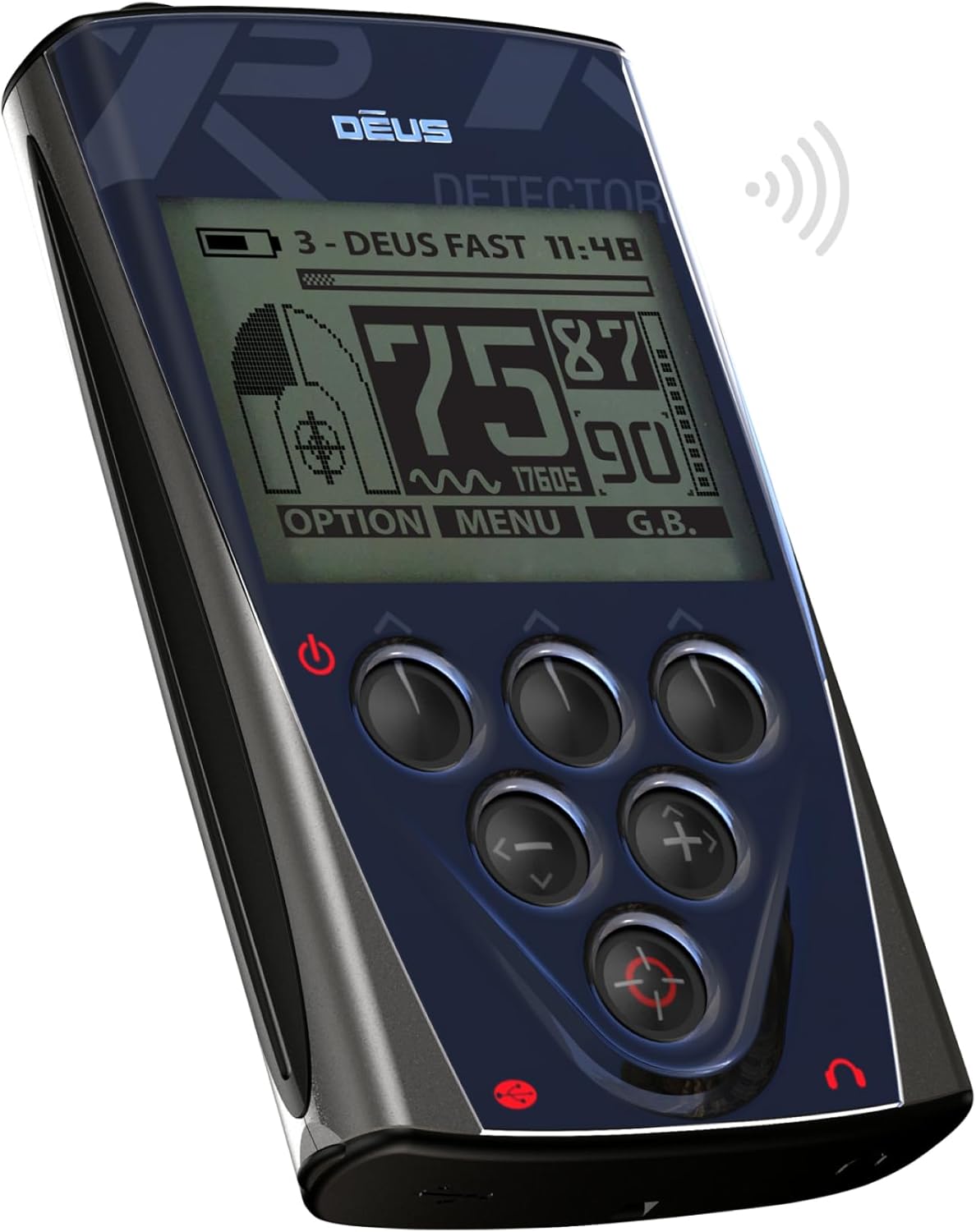
รูปที่ 1: มุม view of the XP Deus LCD Remote Control Display. This image shows the device from an angle, highlighting its ergonomic design, the main display screen, and the arrangement of its control buttons.
2. สินค้าหมดview
The XP Deus LCD Remote Control Display is a sophisticated control unit for the XP Deus metal detector. It features a clear, back-lit LCD screen for displaying detection information, settings, and menus. An integrated audio speaker provides audible alerts and tones, enhancing the user's detection experience. The unit is equipped with various control buttons for navigation and selection, allowing for precise adjustment of detector parameters.

รูปที่ 2: ด้านหน้า view of the XP Deus LCD Remote Control Display. This image provides a direct view of the device's front panel, clearly showing the LCD screen, the power button, and the array of control buttons for menu navigation and setting adjustments.
คุณสมบัติหลัก:
- Back-lit LCD display for clear visibility in various lighting conditions.
- Integrated audio speaker for immediate target response.
- การออกแบบตามหลักสรีรศาสตร์เพื่อการจัดการที่สะดวกสบาย
- Intuitive button control for easy navigation and setting adjustments.
- Powered by an included Lithium Polymer battery.
3. การตั้งค่า
3.1. การชาร์จครั้งแรก
The remote control display comes with a pre-installed Lithium Polymer battery. Before first use, it is recommended to fully charge the device. Connect the provided charging cable to the charging port on the remote control and to a suitable USB power source. The display will indicate charging status.
3.2. Attaching to the Metal Detector (Optional)
The remote control can be used handheld or attached to the shaft of your XP Deus metal detector using the appropriate mounting bracket (sold separately or included with the detector kit). Ensure the remote control is securely fastened to prevent accidental drops during use.

รูปที่ 3: XP Deus LCD Remote Control Display mounted on a metal detector shaft. This image illustrates how the remote control integrates with the full metal detector assembly, showing its position on the shaft for convenient access during operation.
3.3. Pairing with the XP Deus Coil
For the remote control to function, it must be paired wirelessly with the XP Deus search coil. Refer to your main XP Deus metal detector manual for specific instructions on the pairing process. Generally, this involves powering on both devices and initiating a pairing sequence through the remote control's menu.
4. คู่มือการใช้งาน
4.1. เปิด/ปิดเครื่อง
- To power on: Press and hold the power button (usually located at the bottom left of the control panel) until the display illuminates.
- วิธีปิดเครื่อง: กดปุ่มเปิด/ปิดค้างไว้จนกว่าอุปกรณ์จะปิดลง
4.2. การนำทางเมนู
The remote control features a series of buttons for menu navigation:
- ปุ่มลูกศร: Use the up, down, left, and right arrow buttons to navigate through menu options and adjust settings.
- ปุ่มเมนู: Typically used to access the main menu or confirm selections.
- ปุ่มตัวเลือก: May provide quick access to frequently used settings or contextual options.
Detailed information on specific menu functions and settings (e.g., discrimination, sensitivity, ground balance, frequency) can be found in the comprehensive XP Deus metal detector user manual.
4.3. ลำโพงเสียง
The integrated speaker provides audible feedback for detected targets. Volume can typically be adjusted through the remote control's menu settings. For private listening or in noisy environments, headphones can be connected to the appropriate port (if available) or used wirelessly with compatible XP Deus headphones.
5. การบำรุงรักษา
5.1. การทำความสะอาด
Wipe the remote control display and casing กับ d อ่อนamp ผ้า หลีกเลี่ยงการใช้น้ำยาทำความสะอาดที่มีฤทธิ์กัดกร่อน ตัวทำละลาย หรือสารเคมีรุนแรง เพราะอาจทำให้หน้าจอหรือผ้าเสียหายได้asing. Ensure the charging port and any other openings are free from dirt and debris.
5.2. การจัดเก็บ
When not in use, store the remote control in a dry, cool place, away from direct sunlight and extreme temperatures. If storing for an extended period, ensure the battery is partially charged (around 50%) to prolong its lifespan. Avoid storing in environments with high humidity.
5.3. การดูแลแบตเตอรี่
The Lithium Polymer battery is designed for long life. To maximize battery health, avoid fully discharging the battery frequently. Recharge the device as needed. If the battery performance significantly degrades over time, contact XP METAL DETECTORS support for service options.
6 การแก้ไขปัญหา
6.1. จอภาพไม่เปิด
- ตรวจสอบให้แน่ใจว่าแบตเตอรี่ชาร์จเต็มแล้ว เสียบอุปกรณ์เข้ากับที่ชาร์จและรอสักครู่ก่อนที่จะลองเปิดเครื่องอีกครั้ง
- Check the power button for any obstruction or damage.
6.2. No Audio from Speaker
- Verify that the volume setting in the menu is not set to zero or muted.
- Ensure no headphones are plugged in, which might disable the internal speaker.
- Check for any physical obstruction in the speaker grille.
6.3. Remote Control Not Connecting to Coil
- Ensure both the remote control and the search coil are powered on.
- Repeat the pairing procedure as outlined in the main XP Deus metal detector manual.
- Check for any strong electromagnetic interference in the immediate vicinity.
6.4. Erratic Behavior
- Try restarting the remote control.
- Ensure the firmware is up to date. Refer to the XP METAL DETECTORS webเว็บไซต์สำหรับคำแนะนำการอัพเดตเฟิร์มแวร์
7. ข้อมูลจำเพาะ
| คุณสมบัติ | รายละเอียด |
|---|---|
| แบบอย่าง | XP Deus LCD Remote Control Display |
| ยี่ห้อ | เครื่องตรวจจับโลหะ XP |
| น้ำหนักสินค้า | 6.1 ออนซ์ |
| แบตเตอรี่ | แบตเตอรี่ลิเธียมโพลิเมอร์ 1 ก้อน (รวมอยู่ด้วย) |
| เทคโนโลยีการเชื่อมต่อ | Infrared (for internal communication, wireless for coil) |
| ประเภทตัวควบคุม | ปุ่มควบคุม |
| คุณสมบัติพิเศษ | Ergonomic, Back-lit Display, Integrated Speaker |
| ASIN | B0069VDPOC |
8. การรับประกันและการสนับสนุน
For warranty information, technical support, or service inquiries, please refer to the official XP METAL DETECTORS webหรือติดต่อฝ่ายบริการลูกค้าโดยตรง โปรดเก็บหลักฐานการซื้อไว้เพื่อใช้ในการเคลมประกัน
You can visit the official XP METAL DETECTORS store for more information: XP METAL DETECTORS Store


