1. บทนำ
The Antec Eleven Hundred is a Super Mid Tower computer case designed to accommodate high-performance PC builds. It supports a wide range of components, including XL-ATX motherboards and multiple graphics card configurations. The case features an advanced cooling system with pre-installed fans and multiple additional fan mounts, along with efficient cable management solutions to ensure a clean and optimized internal layout.
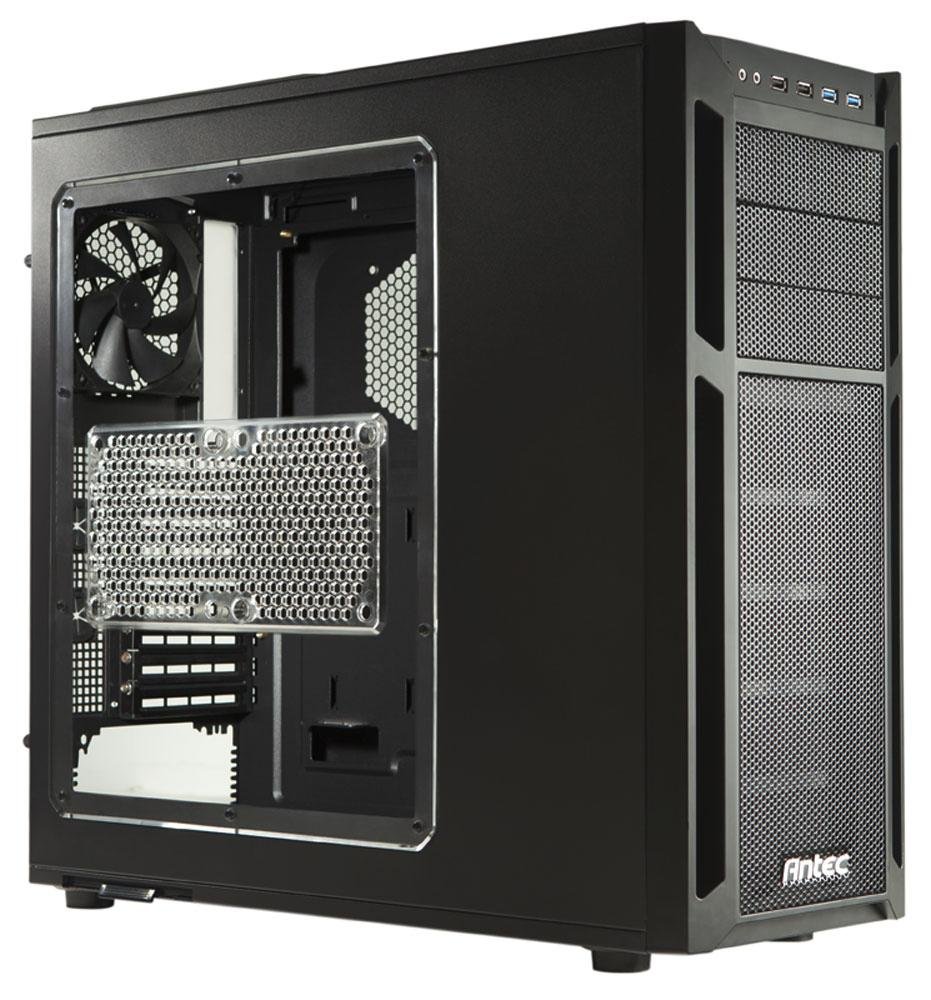
2. การตั้งค่าและการติดตั้งส่วนประกอบ
This section provides instructions for installing various components into your Antec Eleven Hundred case.
2.1 การติดตั้งเมนบอร์ด
The Eleven Hundred case supports XL-ATX motherboards (up to 10.3 x 13.6 inches).
- Prepare the motherboard tray by installing the necessary standoffs for your motherboard form factor.
- วางเมนบอร์ดของคุณลงบนสแตนด์ออฟอย่างระมัดระวัง โดยจัดรูสกรูให้ตรงกัน
- ยึดเมนบอร์ดด้วยสกรู
2.2 การติดตั้งการ์ดจอ (GPU)
The case features nine expansion slots and can accommodate graphics cards up to 13 inches (330 mm) in length, supporting multi-GPU configurations (e.g., three-way NVIDIA SLI or four-way AMD CrossFireX™).
- ถอดฝาครอบช่องขยายที่จำเป็นออกจากด้านหลังของเคส
- Insert the graphics card into the appropriate PCIe slot on your motherboard.
- Secure the graphics card with the provided thumb screws.
2.3 การติดตั้งไดรฟ์
The Eleven Hundred offers eleven drive bays: three 5.25-inch bays and six 3.5-inch tool-less bays. Additionally, there are two 2.5-inch drive mounts.
- ไดรฟ์ขนาด 5.25 นิ้ว: Utilize the tool-less mechanisms for easy installation of optical drives or other 5.25-inch devices.
- ไดรฟ์ขนาด 3.5 นิ้ว: The six 3.5-inch bays feature tool-less trays. Slide your hard drive into a tray and then slide the tray into the bay until it clicks into place.
- ไดรฟ์ขนาด 2.5 นิ้ว (SSD): Dedicated mounts are available for 2.5-inch solid-state drives. Secure these drives with screws.
2.4 Cooling System and Fan Installation
The case includes a 200 mm blue LED top exhaust fan and a 120 mm rear exhaust fan. It also provides mounts for up to seven additional fans for enhanced cooling.
- Additional Fan Mounts: Strategic positions are available for optional fans, including an intake fan mount behind the motherboard tray for CPU cooling.
- Fan Power Hub: A convenient fan power hub allows connection of up to four 3-pin fans to a single Molex connector, simplifying cable management.
- Liquid Cooling Compatibility: The Eleven Hundred is compatible with Antec KÜHLER H2O liquid CPU coolers.
2.5 การจัดการสายเคเบิล
Effective cable management is crucial for airflow and aesthetics. The case provides 36 mm of space behind the motherboard tray and features grommet-lined cable routing holes.
- Route power supply cables and data cables through the grommeted holes to the rear of the motherboard tray.
- การใช้ประโยชน์จาก ample space behind the tray to organize and secure cables using cable ties.
- Connect front panel I/O cables (USB 3.0, USB 2.0, HD Audio) to the corresponding headers on your motherboard. The two front USB 3.0 ports connect via internal motherboard connectors.
3. การดำเนินการ
Once all components are installed and connected, close the side panels. Power on your system. The pre-installed fans will begin operating to provide cooling.
3.1 I/O ที่แผงด้านหน้า
แผงด้านหน้าช่วยให้เข้าถึงส่วนต่างๆ ได้อย่างสะดวก:
- พอร์ต USB 2 จำนวน 3.0 พอร์ต
- พอร์ต USB 2 จำนวน 2.0 พอร์ต
- HD Audio jacks (headphone and microphone)
- ปุ่มเปิดปิด
- ปุ่มรีเซ็ต
4. การบำรุงรักษา
Regular maintenance helps ensure optimal airflow and component longevity.
4.1 การทำความสะอาดตัวกรองอากาศ
The Eleven Hundred case is equipped with removable and washable air filters to prevent dust buildup.
- PSU Air Intake Filter: Located at the bottom of the case, beneath the power supply.
- Front Air Intake Filter: Located behind the quick-release front bezel.
การทำความสะอาด:
- ค่อยๆ ถอดแผ่นกรองออก
- Wash them with water and mild soap, or use a vacuum cleaner to remove dust.
- ตรวจสอบให้แน่ใจว่าตัวกรองแห้งสนิทก่อนติดตั้งกลับเข้าไปใหม่
4.2 การทำความสะอาดทั่วไป
Use a soft, dry cloth to wipe down the exterior of the case. For internal cleaning, use compressed air to remove dust from fans and components. Ensure the system is powered off and unplugged before performing any internal cleaning.
5 การแก้ไขปัญหา
หัวข้อนี้จะกล่าวถึงปัญหาทั่วไปที่คุณอาจพบเจอ
5.1 เสียงพัดลมดังเกินไป
If you experience unusual or excessive noise from the fans, particularly the top 200mm fan:
- ตรวจสอบสิ่งกีดขวาง: Ensure no cables or debris are interfering with the fan blades.
- การติดตั้งพัดลม: Verify that all fans are securely mounted and screws are tightened.
- การเชื่อมต่อไฟฟ้า: The included fans connect via Molex. If connected to a motherboard fan header, ensure fan speed settings in the BIOS/UEFI or operating system are appropriate.
- การสึกหรอของส่วนประกอบ: Over time, fan bearings can wear out, leading to increased noise. Consider replacing the fan if it remains noisy after checking the above.
5.2 การระบายอากาศไม่ดีหรือความร้อนสูงเกินไป
If components are running hotter than expected:
- ทำความสะอาดตัวกรอง: Ensure all air intake filters are clean and free of dust.
- การจัดการสายเคเบิล: Verify that internal cables are neatly routed and not obstructing airflow.
- การกำหนดค่าพัดลม: Ensure fans are oriented correctly for optimal airflow (intake at front/bottom, exhaust at rear/top). Consider adding optional fans to improve cooling.
- ที่นั่งส่วนประกอบ: Check that CPU coolers and GPU heatsinks are properly seated and making good contact.
6. ข้อมูลจำเพาะ
| ยี่ห้อ | แอนเทค |
| แบบอย่าง | Eleven Hundred |
| ประเภทเคส | Super Mid Tower |
| สี | สีดำ |
| วัสดุ | เหล็กอัลลอยด์ |
| ความเข้ากันได้ของเมนบอร์ด | XL-ATX, ATX, Micro-ATX, Mini-ITX |
| ช่องเสียบขยาย | 9 |
| ช่องไดรฟ์ | 3 x 5.25" (external), 6 x 3.5" (internal, tool-less), 2 x 2.5" (internal) |
| พอร์ต I / O ด้านหน้า | 2 x USB 3.0, 2 x USB 2.0, HD Audio In/Out |
| พัดลมรวม | 1 x 200mm Top Exhaust (Blue LED), 1 x 120mm Rear Exhaust |
| Optional Fan Mounts | Up to 7 additional fans |
| ความยาวสูงสุดของ GPU | 13 นิ้ว (330 มม.) |
| พื้นที่การจัดการสายเคเบิล | 36 mm behind motherboard tray |
| ขนาด (สูง x กว้าง x ลึก) | 20.7 x 9.3 x 21.5 นิ้ว (52.6 x 23.6 x 54.6 ซม.) |
| น้ำหนัก | 20 ปอนด์ (9 กก.) |
| ยูพีซี | 761345159500 |
| ASIN | B005X3E4YC |
7. การรับประกันและการสนับสนุน
7.1 การรับประกันของผู้ผลิต
The Antec Eleven Hundred computer case is backed by a manufacturer's รับประกันจำกัด 3 ปี, covering both parts and labor. Please retain your proof of purchase for warranty claims.
7.2 การสนับสนุนลูกค้า
For technical assistance, warranty inquiries, or to report any issues, please contact Antec customer support. Refer to the official Antec webไซต์สำหรับข้อมูลติดต่อและทรัพยากรสนับสนุนล่าสุด


