1. ข้อมูลด้านความปลอดภัยที่สำคัญ
Please read this entire manual before assembling or operating your ZIPRO One S exercise bike. Retain this manual for future reference. Failure to follow these instructions can result in injury or damage to the product.
- Consult your physician before starting any exercise program, especially if you have pre-existing health conditions.
- อุปกรณ์นี้รองรับน้ำหนักผู้ใช้สูงสุด 110 กิโลกรัม (242 ปอนด์)
- Ensure all bolts, nuts, and connections are securely tightened before each use.
- Place the exercise bike on a flat, stable surface. Use a protective mat if necessary.
- เก็บเด็กและสัตว์เลี้ยงให้ห่างจากอุปกรณ์ระหว่างการใช้งาน
- ควรสวมใส่ชุดออกกำลังกายและรองเท้าที่เหมาะสม หลีกเลี่ยงเสื้อผ้าหลวมๆ ที่อาจไปเกี่ยวติดกับชิ้นส่วนที่เคลื่อนไหวได้
- หยุดออกกำลังกายทันทีหากคุณรู้สึกจะเป็นลม เวียนศีรษะ หรือมีความเจ็บปวด
- ผลิตภัณฑ์นี้ได้รับการออกแบบสำหรับใช้ภายในอาคารเท่านั้น
2. สินค้าหมดview
The ZIPRO One S is a compact exercise bike designed for home cardio training. It features 8 levels of magnetic resistance, an LCD display for tracking workout metrics, and an adjustable saddle for user comfort.

ภาพที่ 2.1: ด้านหน้า view of the ZIPRO One S Exercise Bike.

Image 2.2: The ZIPRO One S Exercise Bike highlighting its compact dimensions (897mm length, 435mm width, 1100mm height) and key features such as modern design, silent operation, practical adjustment, and compact size.
3. คำแนะนำในการประกอบ
Assembly typically takes 30-40 minutes. All necessary tools are included. Follow these steps carefully.
- แกะส่วนประกอบ: Carefully remove all parts from the packaging and lay them out. Check against the parts list (refer to included diagram in the box) to ensure all components are present.
- ติดตั้งตัวกันโคลง: ยึดเหล็กกันโคลงด้านหน้าและด้านหลังเข้ากับโครงหลักโดยใช้สลักเกลียวและแหวนรองที่ให้มา ตรวจสอบให้แน่ใจว่ายึดแน่นเพื่อความมั่นคง
- ติดตั้งคันเหยียบ: Identify the left (L) and right (R) pedals. Thread the left pedal counter-clockwise and the right pedal clockwise into their respective crank arms. Tighten securely with a wrench. Ensure the pedal straps are correctly oriented.

ภาพที่ 3.1: ภาพระยะใกล้ view of the pedal with an adjustable strap, ensuring proper foot positioning during exercise.
- ประกอบหลักอานและเบาะ: Insert the seat post into the main frame. Adjust the height to your preference and secure it with the adjustment knob. Attach the saddle to the seat post.

ภาพที่ 3.2: รายละเอียด view of the saddle and its adjustment mechanism, allowing users to customize seat height for optimal comfort.
- Install Handlebars and Console: Attach the handlebar post to the main frame. Connect any necessary sensor cables from the main frame to the console. Mount the console onto the handlebar post and secure it. Insert 2 AAA batteries (included) into the console.
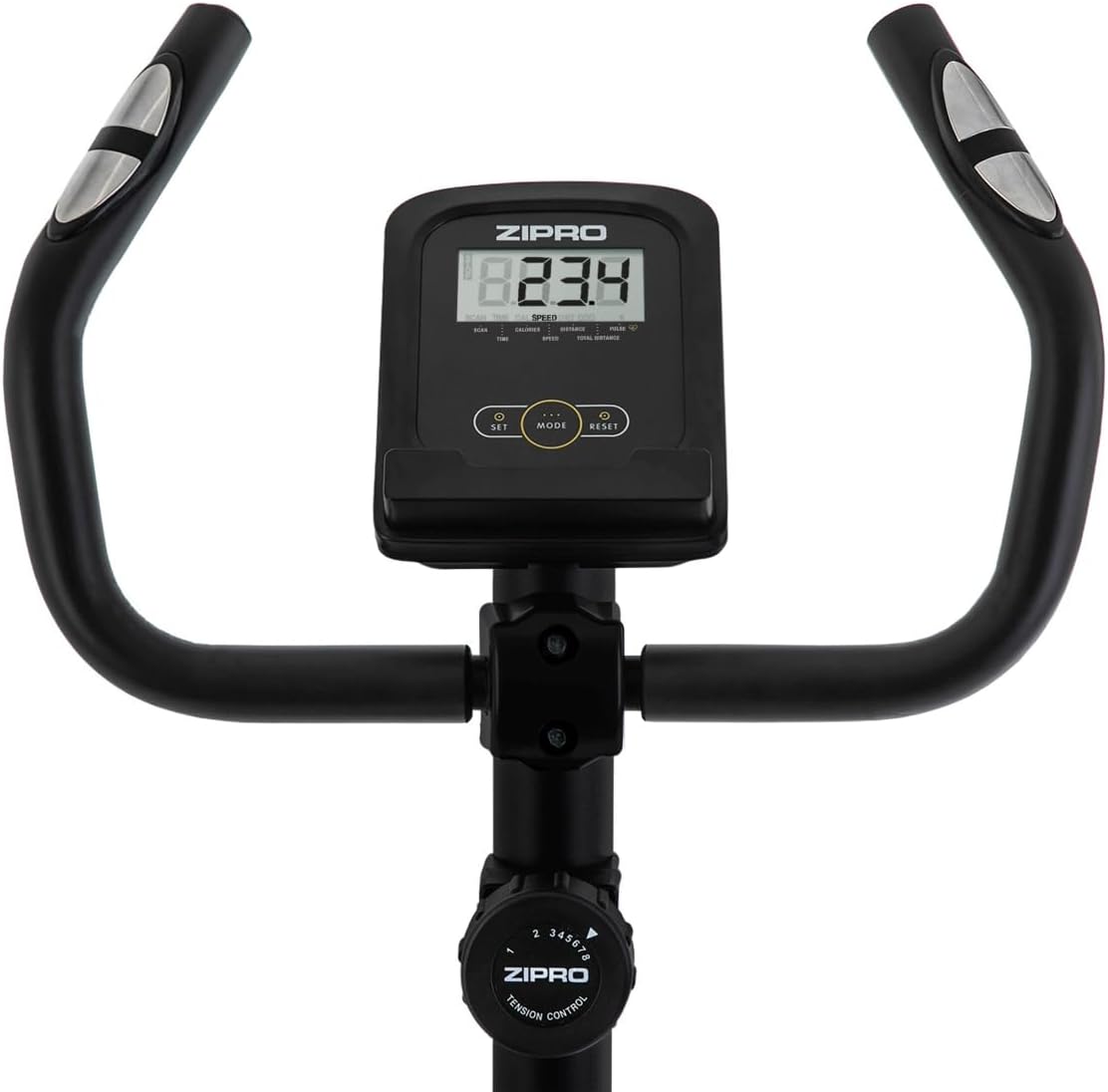
ภาพที่ 3.3: View of the handlebars, integrated LCD display, and the manual resistance control knob, showing the primary user interface.
- การตรวจสอบขั้นสุดท้าย: Before first use, double-check all connections and ensure the bike is stable.
4. คู่มือการใช้งาน
4.1 การปรับแต่งจักรยาน
- ความสูงของอาน: Loosen the adjustment knob on the seat post, raise or lower the saddle to a comfortable height (recommended: 65-80 cm from the ground, 55-75 cm from pedals), and re-tighten the knob. Your leg should have a slight bend at the knee when the pedal is at its lowest point.
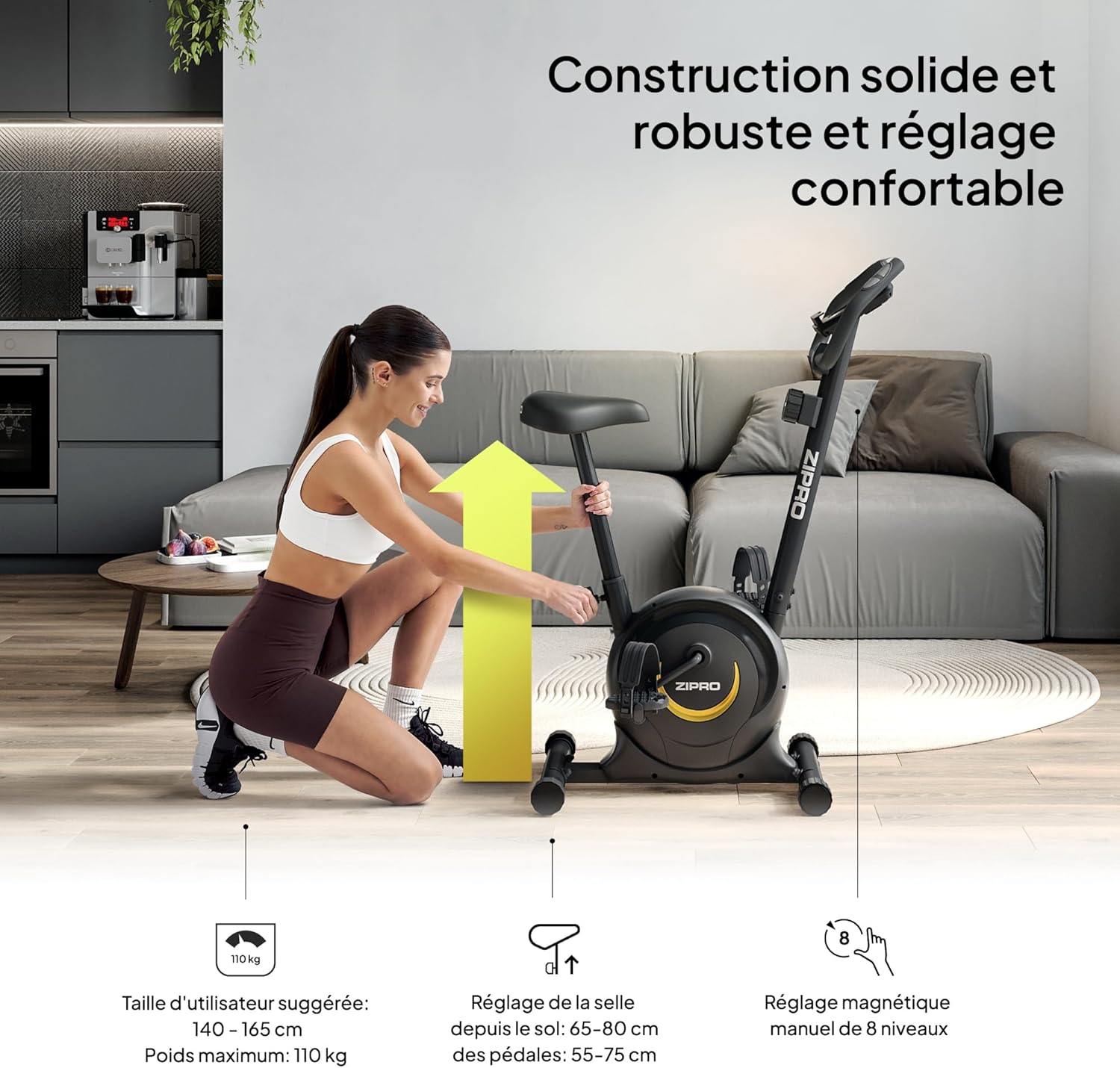
Image 4.1: A user demonstrating the saddle height adjustment, which is crucial for ergonomic and effective training. The image also indicates suggested user height (140-165 cm) and maximum weight (110 kg).
4.2 Using the Console
The LCD console tracks your workout data. It is powered by 2 AAA batteries.

ภาพที่ 4.2: รายละเอียด view of the LCD display, showing various metrics, and the integrated pulse sensors on the handlebars for heart rate monitoring.
- ฟังก์ชั่นการแสดงผล: The console displays Time, Distance, Calories, and Pulse. It also features a SCAN function that cycles through these parameters automatically.
- การวัดชีพจร: จับเซ็นเซอร์วัดชีพจรที่แฮนด์จักรยานเพื่อวัดอัตราการเต้นของหัวใจ
- ที่วางสมาร์ทโฟน: Use the integrated holder to place your smartphone or tablet for entertainment or tracking during your workout.

Image 4.3: A smartphone securely placed in the integrated holder on the handlebars, allowing for easy access to media or fitness apps during a workout.
4.3 การปรับแนวต้าน
The ZIPRO One S offers 8 levels of magnetic resistance.
- ปุ่มปรับความต้านทาน: Turn the resistance knob located below the console clockwise to increase resistance (harder pedaling) and counter-clockwise to decrease resistance (easier pedaling).
- Choose a resistance level that challenges you without causing excessive strain.

Image 4.4: This image illustrates the manual resistance adjustment knob, pedal straps, and saddle height adjustment, highlighting the bike's customizable features.
5. การบำรุงรักษา
การบำรุงรักษาอย่างสม่ำเสมอจะช่วยให้จักรยานออกกำลังกายของคุณใช้งานได้ยาวนานและปลอดภัย
- การทำความสะอาด: เช็ดจักรยานด้วยโฆษณาamp หลังการใช้ทุกครั้งเพื่อขจัดเหงื่อและฝุ่น หลีกเลี่ยงน้ำยาทำความสะอาดหรือตัวทำละลายที่มีฤทธิ์กัดกร่อน
- การตรวจสอบ: ตรวจสอบสลักเกลียว น็อต และชิ้นส่วนเคลื่อนไหวทั้งหมดเป็นระยะๆ เพื่อความแน่นหนาและการสึกหรอ ขันสกรูยึดที่หลวมให้แน่น
- การหล่อลื่น: The magnetic resistance system is generally maintenance-free. Do not attempt to lubricate internal components unless specifically instructed by customer support.
- พื้นที่จัดเก็บ: When not in use, store the bike in a dry, cool place away from direct sunlight and moisture. The integrated transport wheels allow for easy relocation.

Image 5.1: A user easily moving the ZIPRO One S exercise bike, demonstrating its portability thanks to integrated transport wheels.
6 การแก้ไขปัญหา
If you encounter any issues, refer to the following common troubleshooting steps:
- หน้าจอคอนโซลไม่แสดงผล: Check if the 2 AAA batteries are correctly installed and not depleted. Replace if necessary.
- Inaccurate Pulse Reading: Ensure your hands are firmly gripping both pulse sensors. Dry hands or excessive movement can affect accuracy.
- เสียงที่ผิดปกติ: Check all visible bolts and nuts for tightness. Ensure no parts are rubbing against each other. If the noise persists, discontinue use and contact customer support.
- ความต้านทานไม่เปลี่ยนแปลง: Verify that the resistance knob is turning freely and engaging with the internal mechanism. If it feels stuck or unresponsive, contact customer support.
7. ข้อมูลจำเพาะ
Detailed technical specifications for the ZIPRO One S Exercise Bike.
| คุณสมบัติ | ข้อมูลจำเพาะ |
|---|---|
| ชื่อรุ่น | หนึ่งเอส |
| หมายเลขรุ่น | 5941659 |
| ยี่ห้อ | ซิปโปร |
| กลไกต้านทาน Resistance | แม่เหล็ก |
| ระดับความต้านทาน | 8 (Manual Adjustment) |
| ประเภทจอภาพ | จอแอลซีดี |
| แสดงเมตริก | Time, Distance, Calories, Pulse, Scan |
| แหล่งจ่ายไฟ (คอนโซล) | 2 x AAA แบตเตอรี่ (รวม) |
| น้ำหนักผู้ใช้สูงสุด | 110 กก. (242 ปอนด์) |
| ความสูงที่แนะนำสำหรับผู้ใช้ | 140 - 165 ซม. |
| Saddle Height Adjustment (from ground) | 65 - 80 ซม. |
| Saddle Height Adjustment (from pedals) | 55 - 75 ซม. |
| ขนาดสินค้า (กว้าง x ยาว x สูง) | 89.7 x 43.5 x 110 ซม. |
| น้ำหนักผลิตภัณฑ์ | 15.5 กก. |
| วัสดุหลัก | เหล็กกล้าคาร์บอน |
| คุณสมบัติพิเศษ | Compact design, Adjustable saddle, Smartphone holder, Transport wheels |
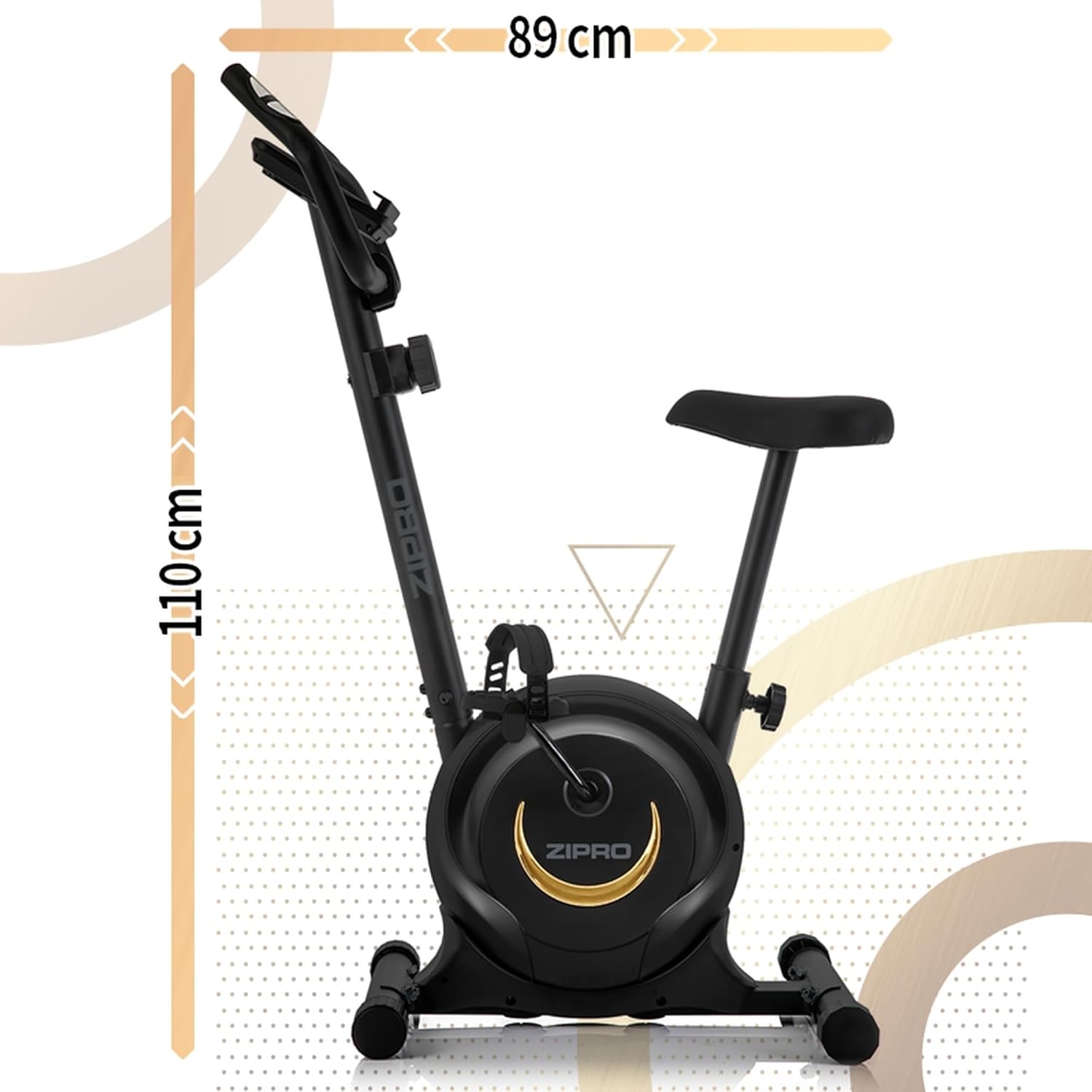
ภาพที่ 7.1: ด้านข้าง view of the ZIPRO One S Exercise Bike, illustrating its overall dimensions of approximately 110 cm in height and 89 cm in length.
8. การรับประกันและการสนับสนุน
For warranty information, product support, or to order replacement parts, please contact ZIPRO customer service. Refer to your purchase documentation for specific warranty terms and contact details.
- Keep your proof of purchase (receipt or order confirmation) for warranty claims.
- Do not attempt to repair the product yourself if it is under warranty, as this may void the warranty.


