1. สินค้าหมดview
The Mitel MiVoice 5304 IP Phone is a compact and cost-effective entry-level display phone designed for various environments such as hotel rooms, university dorms, classrooms, and retail spaces. It provides essential communication features and integrates seamlessly with Mitel IP-based communication platforms.
This phone supports both MiNet and SIP protocols, offering flexibility in deployment. It features a backlit display, two lines with LED indication, and programmable keys for enhanced functionality.
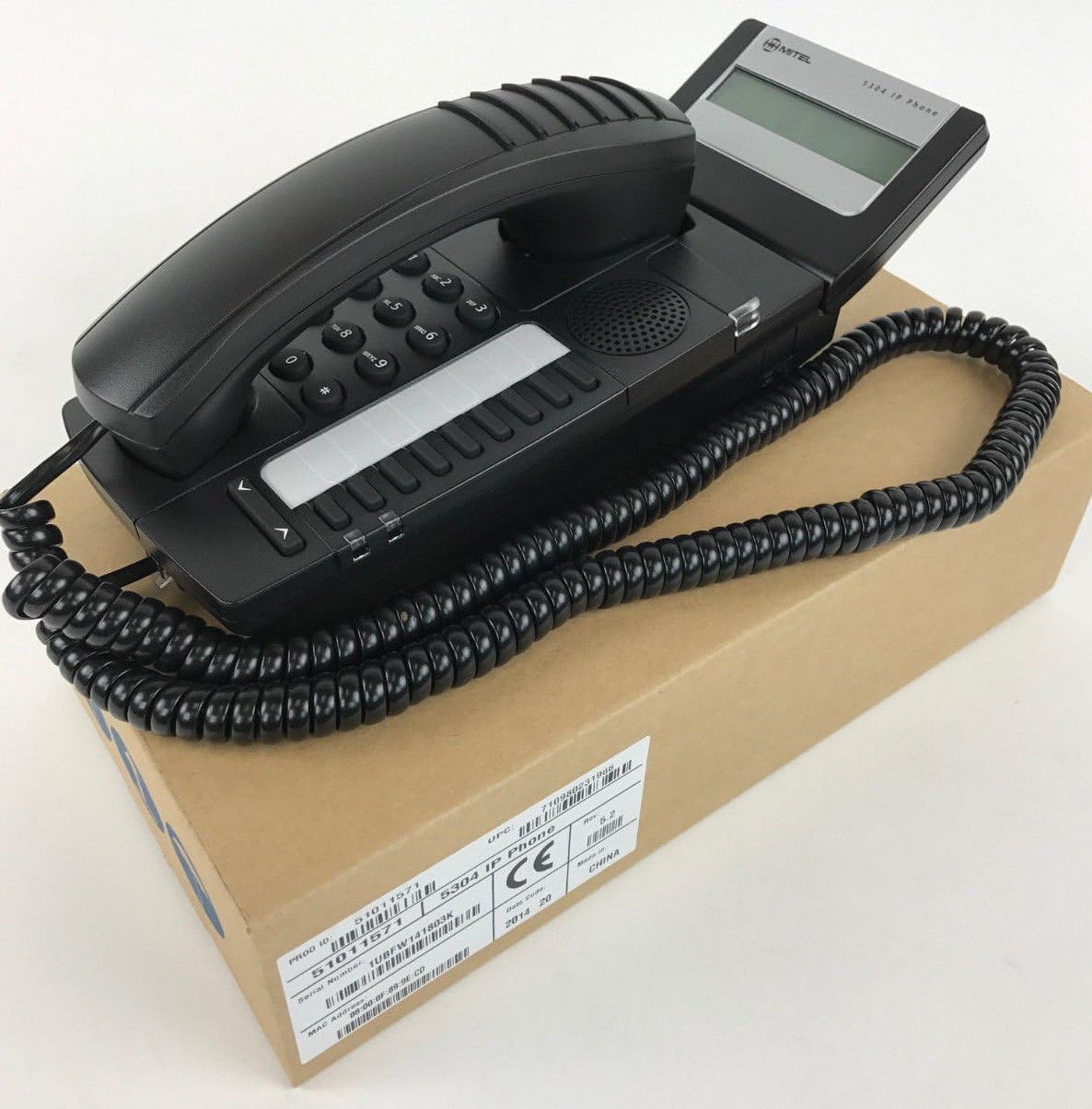
Figure 1: Mitel MiVoice 5304 IP Phone. This image shows the black IP phone with its coiled handset cord, resting on a brown cardboard box. The phone features a numeric keypad, several function buttons, and a small display screen.
2. คุณสมบัติหลัก
- แสดง: Two x 20 character backlit display with auto-dimming.
- เส้น: Two lines with LED indication (one prime line, one programmable key).
- ปุ่มที่ตั้งโปรแกรมได้: Eight programmable keys for speed dials, feature access codes, paging, conferencing, voicemail access, etc.
- เพจจิ้ง: Paging and page receive capability, including direct page and group page support.
- การสนับสนุนสองโหมด: Compatible with both MiNet and SIP protocols.
- ตัวบ่งชี้ทางภาพ: Incoming call visual indication and message waiting indication.
- การควบคุมเสียง: Adjustable volume and ringing controls.
- การติดตั้ง: Wall-mountable (optional accessory may be required).
- กำลังไฟฟ้า: Multiple powering options, including 802.3af compliant Power over Ethernet (PoE).
- การเข้าถึง: ADA-compliant (HAC handset).
- การออกแบบที่กะทัดรัด: Small footprint (approximately 26.5 cm x 10 cm or 10.5 x 4 inches).
- ประหยัดพลังงาน: Designed for power conservation to reduce overall energy consumption.
3. การตั้งค่าและการติดตั้ง
3.1 เนื้อหาบรรจุภัณฑ์
ก่อนที่คุณจะเริ่มต้น โปรดตรวจสอบให้แน่ใจว่ามีส่วนประกอบทั้งหมดครบถ้วน:
- Mitel MiVoice 5304 IP Phone unit
- โทรศัพท์มือถือ
- สายขดหูโทรศัพท์
- สายอีเทอร์เน็ต
- (Optional) Power adapter if PoE is not used
3.2 การเชื่อมต่อโทรศัพท์
- เชื่อมต่อโทรศัพท์มือถือ: เสียบปลายด้านหนึ่งของสายหูฟังแบบขดเข้าในหูฟัง และเสียบปลายอีกด้านหนึ่งเข้าในพอร์ตหูฟังบนฐานโทรศัพท์
- เชื่อมต่อกับเครือข่าย: Connect one end of the Ethernet cable to the LAN port on the back of the phone and the other end to an active network port (e.g., a wall jack or network switch). If using Power over Ethernet (PoE), the phone will power on automatically.
- เชื่อมต่อพลังงาน (หากไม่ได้ใช้ PoE): If your network does not provide PoE, connect an optional Mitel-approved power adapter to the power port on the phone and then to a standard electrical outlet.
- การบูตครั้งแรก: The phone will power on and begin its boot-up sequence. This may take a few moments as it obtains an IP address and registers with your communication system.
3.3 การติดตั้งบนผนัง (ทางเลือก)
The Mitel 5304 IP Phone can be wall-mounted. An optional wall-mount kit (sold separately) may be required. Follow the instructions provided with the wall-mount kit for proper installation.
4. คู่มือการใช้งาน
4.1 การโทรออกและรับสาย
- ในการโทรออก:
- ยกหูโทรศัพท์หรือกด ลำโพง ปุ่ม.
- กดหมายเลขที่ต้องการโดยใช้ปุ่มกด
- กดปุ่ม โทรออก or ส่ง button (if available) or wait for the call to connect automatically.
- เพื่อรับสาย:
- ยกหูโทรศัพท์หรือกดปุ่มสายที่กะพริบ หรือ ลำโพง ปุ่ม.
- วิธีวางสาย:
- เปลี่ยนหูฟังหรือกดปุ่ม วางสาย or ลำโพง ปุ่ม.
4.2 Using Programmable Keys
The Mitel 5304 features eight programmable keys. Their functions are typically configured by your system administrator and can include:
- Speed Dial numbers
- Access to specific features (e.g., Call Forward, Do Not Disturb)
- Paging functions
- Voicemail access
- การประชุมทางไกล
To use a programmable key, simply press the button corresponding to the desired function.
4.3 การปรับระดับเสียง
Use the volume control buttons (usually located below the keypad or on the side of the phone) to adjust the handset, speakerphone, or ringer volume. Press the + button to increase volume and the - ปุ่มเพื่อลดระดับเสียง
4.4 Message Waiting Indication
A flashing LED indicator on the phone signifies that you have new voicemail messages. To retrieve messages, press the dedicated ข้อความ button (if configured) or dial your voicemail access code.
5. การบำรุงรักษาและการดูแล
- การทำความสะอาด: ใช้แปรงนุ่มๆ ปัดเบาๆamp cloth to clean the phone's surface. Do not use abrasive cleaners, solvents, or strong chemicals, as these can damage the finish.
- ฝุ่น: Regularly dust the phone, especially around the keypad and display, to prevent accumulation that could affect performance.
- สิ่งแวดล้อม: Keep the phone away from excessive heat, direct sunlight, and moisture. Ensure proper ventilation if placed in an enclosed space.
- สาย: ตรวจสอบให้แน่ใจว่าสายเคเบิลทั้งหมดเชื่อมต่ออย่างแน่นหนาและไม่ถูกหนีบหรือเสียหาย
6 การแก้ไขปัญหา
| ปัญหา | สาเหตุที่เป็นไปได้ | สารละลาย |
|---|---|---|
| โทรศัพท์ไม่สามารถเปิดเครื่องได้ | No power from Ethernet (PoE) or power adapter not connected/faulty. |
|
| ไม่มีสัญญาณโทรศัพท์หรือไม่สามารถโทรออกได้ | Network connectivity issue, phone not registered, or system configuration problem. |
|
| หน้าจอว่างเปล่าหรือไม่สามารถอ่านได้ | Power issue or display fault. |
|
| ไม่ได้ยินเสียงผู้โทร หรือผู้โทรไม่ได้ยินเสียงฉัน | Volume settings, handset/speaker issue, or network audio problem. |
|
7. ข้อมูลจำเพาะ
| คุณลักษณะ | รายละเอียด |
|---|---|
| หมายเลขรุ่น | 51011571 |
| ขนาดสินค้า (กว้าง x ยาว x สูง) | 10 x 10 x 6 นิ้ว (25.4 x 25.4 x 15.24 ซม.) |
| น้ำหนักสินค้า | 1.9 ปอนด์ (0.86 กก.) |
| สี | สีดำ |
| ประเภทโทรศัพท์ | โทรศัพท์ IP แบบมีสาย |
| แหล่งพลังงาน | Corded Electric (PoE 802.3af compliant or optional power adapter) |
| ประเภทผู้โทรออก | ปุ่มกดเดียว |
| แสดง | Two x 20 character backlit display |
| สายสนับสนุน | 2 Lines with LED indication |
| โปรโตคอลที่สนับสนุน | MiNet, SIP |
| อุปกรณ์ที่รองรับ | VoIP services, IP-based communication systems, Mitel 3300, Mitel SX-200 IP Communications Platforms |
| ความสามารถในการประชุมทางโทรศัพท์ | 2 ทาง |
8. การรับประกันและการสนับสนุน
For information regarding product warranty, please refer to the warranty card included with your purchase or visit the official Mitel website. For technical support, service, or further inquiries, please contact your Mitel authorized dealer or system administrator.
You can also find additional resources and contact information on the official Mitel webเว็บไซต์: www.mitel.com


