1. บทนำ
This manual provides essential information for the safe and efficient operation of your Datalogic PowerScan M8300-AR910RB Handheld Laser Bar Code Reader. Please read this manual thoroughly before using the device to ensure proper setup, operation, and maintenance. Keep this manual for future reference.
2. ข้อมูลด้านความปลอดภัย
ปฏิบัติตามข้อควรระวังด้านความปลอดภัยต่อไปนี้เสมอเพื่อป้องกันการบาดเจ็บหรือความเสียหายต่ออุปกรณ์:
- ความปลอดภัยของเลเซอร์: This device emits a laser beam. Do not stare directly into the laser beam or point it at others. Avoid direct eye exposure.
- ความปลอดภัยของแบตเตอรี่: Use only Datalogic-approved batteries and charging accessories. Do not expose batteries to extreme temperatures, puncture, or disassemble them. Dispose of batteries according to local regulations.
- สภาพแวดล้อม : Do not operate the device in explosive atmospheres or near flammable materials. Keep the device dry and away from extreme temperatures.
- การซ่อมบำรุง: Refer all servicing to qualified service personnel. Do not attempt to open or modify the device.
3. เนื้อหาบรรจุภัณฑ์
ตรวจสอบว่ามีรายการทั้งหมดอยู่ในแพ็คเกจ:
- Datalogic PowerScan M8300-AR910RB Handheld Laser Bar Code Reader
- แบตเตอรี่แบบถอดได้
- Charging/Communication Cradle (may be sold separately depending on configuration)
- USB or Serial Cable (for cradle connection, may be sold separately)
- Power Supply (for cradle, may be sold separately)
- คู่มือเริ่มต้นอย่างรวดเร็ว
4. สินค้าหมดview
The Datalogic PowerScan M8300 is a robust, cordless handheld laser bar code reader designed for industrial applications. It features a durable casing and a 910MHz radio for reliable wireless communication.
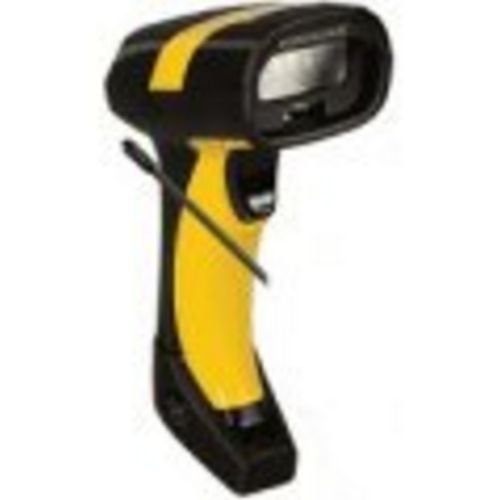
ภาพที่ 1: Datalogic PowerScan M8300 Handheld Laser Bar Code Reader. This image displays the front view of the scanner, highlighting its ergonomic design, scan window, and trigger button.
ส่วนประกอบหลัก:
- หน้าต่างสแกน: Located at the front, where the laser beam exits to read barcodes.
- สิ่งกระตุ้น: Activates the laser for scanning.
- ไฟแสดงสถานะ: Provide feedback on scan status, battery level, and communication.
- ช่องใส่แบตเตอรี่: Located at the base of the handle, housing the removable battery.
- อินเทอร์เฟซการสื่อสาร: For wireless data transmission via the 910MHz radio.
5. การตั้งค่า
5.1. การติดตั้งแบตเตอรี่
- ตรวจสอบให้แน่ใจว่าสแกนเนอร์ปิดอยู่
- หาฝาปิดช่องใส่แบตเตอรี่ที่อยู่ด้านล่างของด้ามจับ
- เปิดฝาครอบและใส่แบตเตอรี่แบบถอดได้ โดยตรวจสอบให้แน่ใจว่าขั้วถูกต้อง
- ปิดฝาช่องใส่แบตเตอรี่ให้แน่น
5.2. การชาร์จแบตเตอรี่
- Place the scanner into its charging cradle. Ensure the contacts on the scanner align with those on the cradle.
- Connect the power supply to the charging cradle and plug it into an electrical outlet.
- The scanner's indicator light will show charging status (typically amber for charging, green for fully charged).
- ควรชาร์จแบตเตอรี่ให้เต็มก่อนใช้งานครั้งแรก (ประมาณ 4 ชั่วโมง)
5.3 การเชื่อมต่อกับระบบโฮสต์
The PowerScan M8300 uses a 910MHz radio for wireless communication. It typically connects to a host system (e.g., PC, laptop) via a base station or cradle connected by a USB or serial cable.
- Connect the communication cable (USB or serial) from the charging/communication cradle to your host system.
- Connect the power supply to the cradle and plug it in.
- Place the scanner in the cradle. The scanner and cradle will automatically establish a wireless link.
- Install any necessary drivers or software on your host system as prompted or as instructed by Datalogic documentation for your specific cradle model.
6. คู่มือการใช้งาน
6.1. การเปิด/ปิดเครื่อง
- การเปิดเครื่อง: The scanner typically powers on automatically when removed from the cradle or when the trigger is pressed.
- วิธีปิดเครื่อง: The scanner will enter a low-power sleep mode after a period of inactivity. To fully power off, remove the battery.
6.2. การสแกนบาร์โค้ด
- Aim the scan window at the barcode you wish to read.
- กดปุ่มไกปืนค้างไว้ เส้นเลเซอร์จะปรากฏขึ้น
- Position the laser line across the entire barcode.
- Once the barcode is successfully read, the scanner will emit an audible beep and/or an indicator light will illuminate.
- Release the trigger. The scanned data will be transmitted to the connected host system.
6.3. การส่งข้อมูล
The PowerScan M8300 transmits scanned data wirelessly to its paired base station/cradle. Ensure the scanner is within range of its base station for successful data transfer. Out-of-range scanning capabilities may vary by configuration; refer to advanced programming guides for details.
7. การบำรุงรักษา
7.1. การทำความสะอาดอุปกรณ์
- ใช้ผ้านุ่มสะอาดเช็ดampลงด้วยน้ำหรือน้ำยาทำความสะอาดอ่อนๆ
- ห้ามใช้น้ำยาทำความสะอาดที่มีฤทธิ์กัดกร่อน ตัวทำละลาย หรือสารเคมีรุนแรง
- เช็ดทำความสะอาดช่องสแกนและภายนอกเครื่องสแกนอย่างเบามือ
- ตรวจสอบให้แน่ใจว่าไม่มีของเหลวเข้าไปในช่องเปิดของอุปกรณ์
7.2. การดูแลแบตเตอรี่
- ชาร์จแบตเตอรี่อย่างสม่ำเสมอ
- หลีกเลี่ยงการปล่อยแบตเตอรี่จนหมดบ่อยครั้ง
- Store the scanner and spare batteries in a cool, dry place when not in use.
7.3. การจัดเก็บ
When storing the scanner for extended periods, ensure the battery is partially charged (around 50%) and remove it from the device if possible. Store in a temperature-controlled environment.
8 การแก้ไขปัญหา
If you encounter issues with your PowerScan M8300, refer to the following common problems and solutions:
| ปัญหา | สาเหตุที่เป็นไปได้ | สารละลาย |
|---|---|---|
| เครื่องสแกนเนอร์ไม่สามารถเปิดเครื่องได้ | แบตเตอรี่เสียหรือติดตั้งไม่ถูกต้อง | Check battery installation. Charge the battery. Replace battery if necessary. |
| เครื่องสแกนไม่สามารถอ่านบาร์โค้ดได้ | Barcode damaged or poorly printed; scan window dirty; incorrect symbology enabled. | Try scanning a different barcode. Clean the scan window. Refer to the programming guide to enable/disable symbologies. |
| ไม่มีข้อมูลถูกส่งไปยังโฮสต์ | Scanner out of range; base station not connected; communication issue. | Move scanner closer to the base station. Verify base station connection to host. Check base station power. |
| แบตเตอรี่มีอายุการใช้งานสั้น | Battery nearing end of life; frequent use; improper charging. | Replace battery. Ensure full charges. Reduce backlight/power settings if configurable. |
If the problem persists, contact Datalogic technical support.
9. ข้อมูลจำเพาะ
The following specifications apply to the Datalogic PowerScan M8300-AR910RB model:
- หมายเลขรุ่น: PM8300-AR910RB
- ขนาดสินค้า : 2.72 x 4.49 x 8.15 นิ้ว
- น้ำหนักสินค้า: 13.9 ออนซ์
- ผู้ผลิต: ADC ของ Datalogic
- แหล่งพลังงาน: ใช้พลังงานจากแบตเตอรี่
- เทคโนโลยีการเชื่อมต่อ: ไร้สาย (910MHz)
- อุปกรณ์ที่รองรับ: เดสก์ท็อป, โน๊ตบุ๊ก
- ยูพีซี: 053926383351
10. ข้อมูลการรับประกัน
Datalogic products are covered by a limited warranty against defects in materials and workmanship. The specific terms and duration of the warranty may vary by region and product. Please refer to the warranty card included with your product or visit the official Datalogic webเว็บไซต์สำหรับข้อมูลการรับประกันและขั้นตอนการลงทะเบียนโดยละเอียด
11. การสนับสนุน
For technical assistance, product inquiries, or to report issues, please contact Datalogic customer support:
- Webเว็บไซต์: Visit the official Datalogic webเว็บไซต์นี้เป็นแหล่งรวบรวมข้อมูลสนับสนุน คำถามที่พบบ่อย และไฟล์ดาวน์โหลดไดรเวอร์
- ติดต่อ: Refer to the 'Contact Us' section on the Datalogic webเว็บไซต์นี้รวบรวมหมายเลขโทรศัพท์และที่อยู่อีเมลที่เฉพาะเจาะจงสำหรับภูมิภาคของคุณ
When contacting support, please have your product model number (PM8300-AR910RB) and serial number ready.


