1. บทนำ
The VOLTCRAFT BS-1000T is a high-quality endoscope base unit designed for detailed visual inspection in various applications. It operates with a rechargeable battery and features a mini USB interface, a large 8.89 cm (3.5 inch) 320 x 240 pixel screen, an SD card slot, and a TV output. This base unit is compatible with various endoscope cameras, allowing for flexible use.
คุณสมบัติที่สำคัญ ได้แก่:
- 8.89 cm (3.5 inch) LCD screen
- ฟังก์ชั่นซูมดิจิตอล
- TV output for external display
- Video and photo recording capabilities
- Continuous brightness adjustment for the camera light
- Integrated LiPo battery for up to 4 hours of operation
- SD card support for media storage
- Tripod mounting thread for stable positioning
The VOLTCRAFT BS-1000T endoscope base unit, an SD card, and various accessories neatly organized within a black, hard-shell protective carrying case.
2. คำแนะนำด้านความปลอดภัย
โปรดอ่านและทำความเข้าใจคำแนะนำด้านความปลอดภัยทั้งหมดก่อนใช้งานอุปกรณ์ การไม่ปฏิบัติตามคำแนะนำเหล่านี้อาจส่งผลให้เกิดไฟฟ้าช็อต ไฟไหม้ หรือการบาดเจ็บร้ายแรงได้
- เก็บอุปกรณ์ให้ห่างจากน้ำและความชื้น
- ห้ามเปิดหรือดัดแปลงอุปกรณ์ด้วยตนเอง โปรดส่งต่ออุปกรณ์ดังกล่าวให้ช่างผู้ชำนาญการเป็นผู้ดำเนินการซ่อมแซม
- Use only the specified power adapter for charging the integrated LiPo battery.
- หลีกเลี่ยงการให้อุปกรณ์สัมผัสกับอุณหภูมิที่ร้อนจัดหรือโดนแสงแดดโดยตรง
- Ensure the endoscope camera probe is clean and undamaged before insertion into any area.
- Do not use the device in environments with explosive gases or vapors.
- เก็บให้พ้นจากมือเด็ก
3. ส่วนประกอบผลิตภัณฑ์
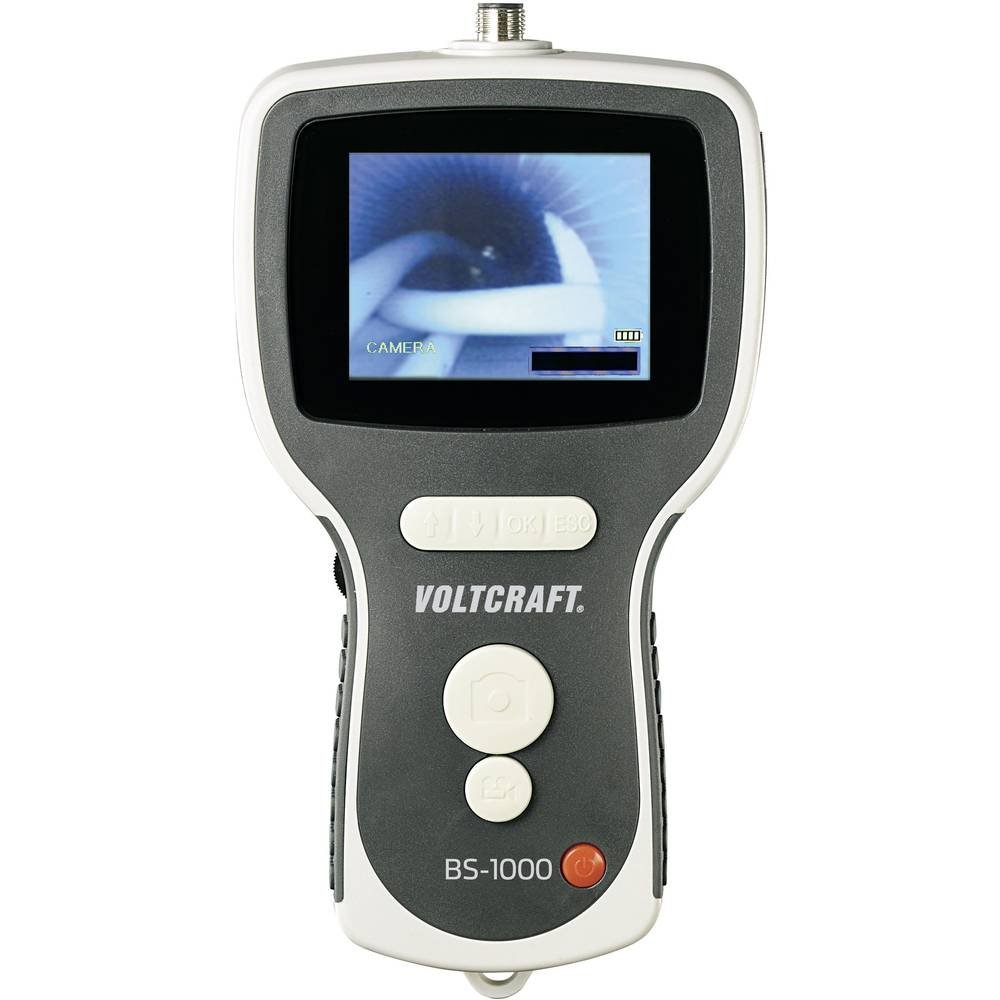
The BS-1000T endoscope base unit consists of the main display unit, control buttons, and connection ports. It is designed to be used with a compatible endoscope camera probe (sold separately or included in specific kits).
คุณสมบัติหน่วยหลัก:
- หน้าจอ LCD ขนาด 3.5 นิ้ว: Displays live video feed and recorded media.
- ปุ่มควบคุม: For power, menu navigation, zoom, brightness, and recording functions.
- พอร์ต USB ขนาดเล็ก: สำหรับชาร์จแบตเตอรี่และถ่ายโอนข้อมูลไปยังคอมพิวเตอร์
- ช่องเสียบการ์ด SD: For storing videos and images.
- สัญญาณ AV: สำหรับเชื่อมต่อกับจอแสดงผลภายนอก (เช่น ทีวี)
- ขั้วต่อกล้อง: For attaching the flexible endoscope camera probe.
- ด้ายขาตั้งกล้อง: Located at the bottom for mounting on a tripod.

The VOLTCRAFT BS-1000T endoscope base unit held in hand, with a flexible camera probe extending from its top. The unit's screen shows a live feed from the camera.
4. การตั้งค่า
4.1. การชาร์จแบตเตอรี่
- Connect the provided USB cable to the mini USB port on the BS-1000T unit.
- ต่อปลายอีกด้านของสาย USB เข้ากับอะแดปเตอร์แปลงไฟ USB ที่เหมาะสม (ไม่ได้รวมอยู่ในชุด) หรือพอร์ต USB ของคอมพิวเตอร์
- The charging indicator will illuminate. A full charge provides up to 4 hours of operation.
4.2. การใส่การ์ด SD
- Locate the SD card slot on the side of the BS-1000T unit.
- Insert a compatible SD card (up to 32GB, Class 10 recommended) into the slot with the metal contacts facing down until it clicks into place.
- To remove, gently push the SD card until it springs out.
4.3. Connecting the Endoscope Camera
- Ensure the BS-1000T unit is powered off.
- Align the connector of the endoscope camera probe with the camera connector port on the top of the BS-1000T unit.
- Gently push and twist the connector to secure the camera probe. Do not force the connection.
5. การดำเนินการ
5.1. การเปิด/ปิดเครื่อง
- ในการเปิดเครื่อง ให้กดปุ่มเปิด/ปิดค้างไว้จนกว่าหน้าจอจะสว่างขึ้น
- หากต้องการปิดเครื่อง ให้กดปุ่มเปิด/ปิดค้างไว้จนกว่าหน้าจอจะดับลง
5.2. การบันทึกวิดีโอ
- With the unit powered on and camera connected, press the Video Record button to start recording. A recording indicator will appear on the screen.
- Press the Video Record button again to stop recording. The video file will be saved to the inserted SD card.
5.3. การจับภาพ
- ระหว่างถ่ายทอดสด view or video playback, press the Photo Capture button to take a still image.
- รูปภาพ file will be saved to the inserted SD card.
5.4. ฟังก์ชั่นซูม
- Press the Zoom button to digitally magnify the image on the screen.
- Repeated presses will cycle through different zoom levels.
5.5. การปรับความสว่าง
- Use the Brightness control buttons to adjust the intensity of the camera's LED lights.
- This allows for optimal illumination in various inspection environments.
5.6. Image Mirroring
- The device supports mirroring the displayed image. This feature is useful when using mirror attachments on the camera probe to correct the visual orientation.
- Refer to the on-screen menu for mirroring options.
5.7. TV Output
- Connect an AV cable (not included) from the AV output port on the BS-1000T unit to the AV input of a television or external monitor.
- The live feed or recorded media will be displayed on the external screen.

A close-up shot of the VOLTCRAFT BS-1000T endoscope's color LCD screen, showing a detailed image captured by the connected camera.

A person is shown holding the VOLTCRAFT BS-1000T endoscope base unit, with its flexible camera probe inserted into a sink drain for inspection. The unit's screen displays the live view from inside the drain.
6. การบำรุงรักษา
6.1. การทำความสะอาด
- เช็ดตัวเครื่องหลักด้วยผ้าแห้งเนื้อนุ่ม ห้ามใช้สารทำความสะอาดที่มีฤทธิ์กัดกร่อนหรือตัวทำละลาย
- For the camera probe, gently clean the lens with a lens cleaning cloth. If necessary, use a slightly damp และให้แน่ใจว่าแห้งสนิทก่อนจัดเก็บ
6.2. การจัดเก็บ
- Store the BS-1000T unit and its accessories in a cool, dry place, away from direct sunlight and extreme temperatures.
- หากเก็บรักษาเป็นเวลานาน ควรตรวจสอบให้แน่ใจว่าแบตเตอรี่มีประจุอยู่บ้าง (ประมาณ 50%) เพื่อยืดอายุการใช้งาน
7 การแก้ไขปัญหา
If you encounter issues with your VOLTCRAFT BS-1000T, please refer to the following common problems and solutions:
| ปัญหา | สาเหตุที่เป็นไปได้ | สารละลาย |
|---|---|---|
| อุปกรณ์ไม่เปิดเครื่อง | แบตเตอรี่หมด | ชาร์จอุปกรณ์โดยใช้สาย USB |
| ไม่มีภาพปรากฏบนหน้าจอ | Camera probe not connected properly or faulty. | Ensure the camera probe is securely connected. Test with another compatible probe if available. |
| Cannot record video or capture images. | SD card is full, not inserted, or faulty. | ตรวจสอบว่าเสียบการ์ด SD ถูกต้องหรือไม่ ลบข้อมูลเก่าออก fileหรือเปลี่ยนการ์ด SD ใหม่ ตรวจสอบให้แน่ใจว่าการ์ดไม่ได้ถูกป้องกันการเขียน |
| ภาพไม่ชัดหรือไม่คมชัด | Camera lens is dirty or focus is incorrect. | Clean the camera lens. Adjust the focus type (manual focus for this model). |
| No output on external TV. | AV cable not connected correctly or TV input not selected. | Verify AV cable connection. Select the correct AV input source on your television. |
8. ข้อมูลจำเพาะทางเทคนิค
| คุณสมบัติ | ข้อมูลจำเพาะ |
|---|---|
| ยี่ห้อ | VOLTCRAFT |
| แบบอย่าง | บีเอส-1000ที |
| สี | สีดำ |
| ขนาดหน้าจอ | 8.89 ซม. (3.5 นิ้ว) |
| ความละเอียดวิดีโอ | 320 x 240 พิกเซล |
| เทคโนโลยีการเชื่อมต่อ | ยูเอสบี |
| รูปแบบที่รองรับ | Video, Image |
| อุปกรณ์ที่รองรับ | Endoscope cameras |
| ขนาดสินค้า (กว้าง x ยาว x สูง) | 42 x 34 x 12 ซม. |
| น้ำหนักสินค้า | 450 กรัม |
| ประเภทการซูม | ดิจิตอล |
| ประเภทโฟกัส | คู่มือ |
| ความละเอียดของภาพนิ่งที่มีประสิทธิภาพ | 320 พิกเซล |
9. การรับประกันและการสนับสนุน
VOLTCRAFT products are designed for reliability and performance. For information regarding spare parts availability, please note that spare parts are guaranteed for 1 year from the date of purchase within the EU.
For further assistance, technical support, or warranty claims, please contact your retailer or visit the official VOLTCRAFT webเว็บไซต์สำหรับข้อมูลการติดต่อ


