1. บทนำ
Thank you for choosing the Philips AJB3552/12 DAB+ FM Clock Radio. This manual provides essential information for setting up, operating, and maintaining your device. Please read it carefully to ensure optimal performance and safe use of your clock radio.
Key features of your Philips AJB3552/12 include:
- DAB+ (Digital Audio Broadcasting) for clear, noise-free radio reception.
- FM tuner for traditional radio stations.
- Dynamic Bass Boost for enhanced low-frequency sound.
- Integrated alarm with multiple wake-up options.
- Light sensor for automatic display brightness adjustment.
- Backlit LCD display for easy readability.
2. ข้อมูลด้านความปลอดภัย
โปรดปฏิบัติตามข้อควรระวังด้านความปลอดภัยต่อไปนี้เพื่อป้องกันไฟฟ้าช็อต ไฟไหม้ หรือความเสียหายต่ออุปกรณ์:
- อย่าให้อุปกรณ์โดนฝนหรือความชื้น
- อย่าวางวัตถุที่บรรจุของเหลว เช่น แจกัน ไว้บนอุปกรณ์
- ตรวจสอบให้แน่ใจว่ามีการระบายอากาศที่เพียงพอ อย่าปิดกั้นช่องระบายอากาศ
- ปกป้องสายไฟจากการถูกเหยียบหรือถูกหนีบ
- ใช้เฉพาะอุปกรณ์เสริม/สิ่งที่แนบตามที่ผู้ผลิตกำหนดเท่านั้น
- ถอดปลั๊กอุปกรณ์ในระหว่างที่มีพายุฝนฟ้าคะนองหรือเมื่อไม่ได้ใช้งานเป็นเวลานาน
- ส่งต่อการบริการทั้งหมดไปยังบุคลากรบริการที่มีคุณสมบัติเหมาะสม
3. เนื้อหาบรรจุภัณฑ์
ตรวจสอบว่าแพ็คเกจของคุณมีรายการต่อไปนี้:
- Philips AJB3552/12 Clock Radio
- คู่มือการใช้งาน (เอกสารนี้)
- คู่มือเริ่มต้นอย่างรวดเร็ว
- หน่วยจ่ายไฟ
- ใบรับประกันสินค้า
4. สินค้าหมดview
Familiarize yourself with the components of your Philips AJB3552/12 Clock Radio.
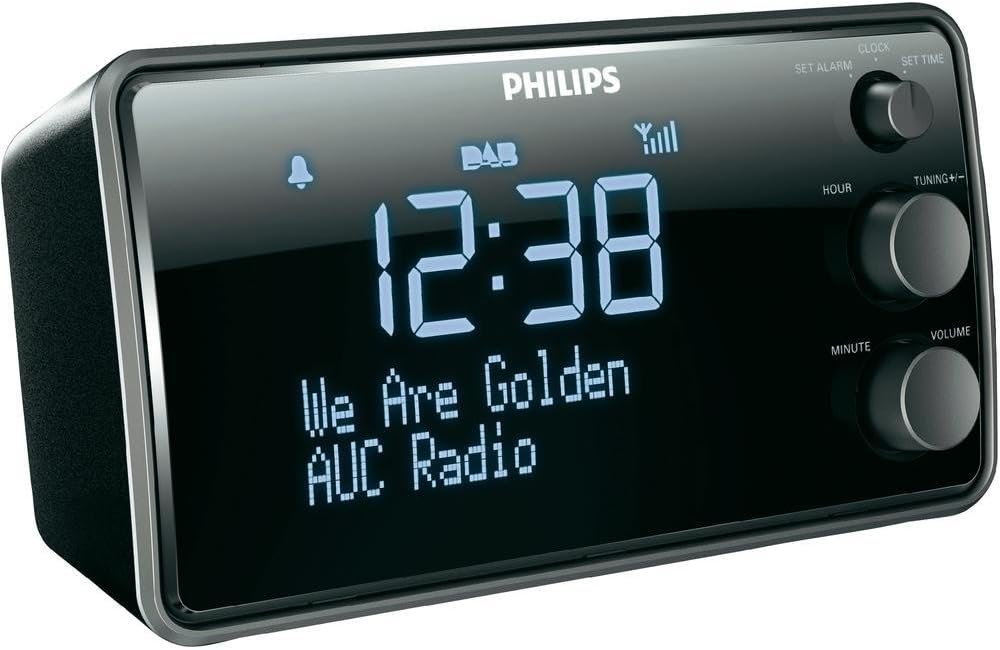
ภาพที่ 1: ด้านหน้า view of the Philips AJB3552/12 Clock Radio, showing the digital display, Philips logo, and control knobs for setting time, tuning, and volume.
แผงด้านหน้า
- แสดง: Shows time, radio station information, and alarm status.
- SET ALARM knob: ใช้เพื่อตั้งเวลาปลุก
- SET TIME knob: ใช้เพื่อตั้งเวลาปัจจุบัน
- HOUR button: ปรับเวลา
- MINUTE button: ปรับนาที
- TUNING +/- knob: For tuning radio frequencies or navigating menus.
- ปุ่มปรับระดับเสียง: ปรับระดับเอาต์พุตเสียง
แผงด้านหลัง
- กำลังไฟเข้า: เชื่อมต่อกับอะแดปเตอร์ไฟฟ้าที่ให้มา
- เสาอากาศ FM/DAB: สำหรับการรับสัญญาณวิทยุ
5. การตั้งค่า
5.1 การต่อสายไฟ
- Uncoil the FM/DAB antenna fully for optimal reception.
- Connect the power adapter to the DC IN socket on the rear of the clock radio.
- เสียบอะแดปเตอร์ไฟฟ้าเข้ากับเต้ารับไฟฟ้าที่ผนัง
5.2 Initial Power On and Time Synchronization
Upon first connection, the clock radio will automatically attempt to synchronize the time via DAB+ signal. This process may take a few minutes.

ภาพที่ 2: The Philips AJB3552/12 Clock Radio positioned on a wooden bedside table next to a bed, illustrating a typical usage scenario.
5.3 Manual Time Setting (if automatic synchronization fails)
- กดปุ่มค้างไว้ ตั้งเวลา knob until the hour digits flash.
- หมุน ชั่วโมง กดปุ่มเพื่อปรับเวลา ชั่วโมง เพื่อยืนยัน.
- หมุน นาที กดปุ่มเพื่อปรับนาที นาที เพื่อยืนยัน.
- ตอนนี้ตั้งเวลาแล้ว
6. คู่มือการใช้งาน
6.1 เปิด/ปิดเครื่อง
- To turn on the clock radio, press the พลัง button (usually integrated with the VOLUME knob).
- To turn off the clock radio, press the พลัง button again. The display will show the current time.
6.2 การใช้งานวิทยุ
วิทยุ 6.2.1 DAB+
- กดปุ่ม โหมด button (if available, or cycle through modes using the power button) to select DAB+ mode.
- The radio will automatically scan for available DAB+ stations. This may take a few moments.
- Once scanning is complete, rotate the การปรับแต่ง +/- ปุ่มหมุนสำหรับเลือกดูสถานีต่างๆ ที่มีอยู่
- กดปุ่ม การปรับแต่ง +/- ปุ่มหมุนเพื่อเลือกสถานีวิทยุ
- To store a preset, press and hold a preset number button (if available) until the display confirms.
6.2.2 วิทยุ FM
- กดปุ่ม โหมด ปุ่มเพื่อเลือกโหมด FM
- หมุน การปรับแต่ง +/- ปุ่มหมุนสำหรับปรับความถี่ด้วยตนเอง
- หากต้องการสแกนหาสถานีที่ว่างถัดไปโดยอัตโนมัติ ให้กดปุ่มค้างไว้ การปรับแต่ง +/- ลูกบิด
- To store a preset, press and hold a preset number button (if available) until the display confirms.
6.2.3 การเพิ่มเสียงเบสแบบไดนามิก
The Dynamic Bass Boost feature enhances low-frequency sounds for a richer audio experience. To activate or deactivate, press the DBB button (if available, or check menu options).
6.3 การตั้งค่าสัญญาณเตือน
The Philips AJB3552/12 allows you to set an alarm to wake up to your preferred radio station or a buzzer.
- กดปุ่มค้างไว้ ตั้งนาฬิกาปลุก knob until the alarm time digits flash.
- หมุน ชั่วโมง button to set the alarm hour. Press ชั่วโมง เพื่อยืนยัน.
- หมุน นาที button to set the alarm minute. Press นาที เพื่อยืนยัน.
- Select the alarm source: Rotate the การปรับแต่ง +/- knob to choose between วิทยุ or บัซเซอร์. Press the knob to confirm.
- Select the alarm frequency: Rotate the การปรับแต่ง +/- knob to choose between รายวัน, วันธรรมดา (Mon-Fri), or สุดสัปดาห์ (Sat-Sun). Press the knob to confirm.
- หากต้องการเปิด/ปิดสัญญาณเตือน ให้กดปุ่ม เปิด / ปิดนาฬิกาปลุก button (often located on top or integrated with the SET ALARM knob). An alarm icon will appear on the display when active.
6.3.1 ฟังก์ชั่นเลื่อนซ้ำ
เมื่อเสียงปลุกดัง ให้กด เลื่อน button (usually a large button on top) to temporarily silence the alarm. The alarm will sound again after a few minutes (default snooze time is typically 9 minutes).
6.3.2 ตัวตั้งเวลาปิดเครื่อง
ตัวตั้งเวลาปิดเครื่องช่วยให้คุณหลับไปพร้อมกับวิทยุ ซึ่งจะปิดเครื่องโดยอัตโนมัติหลังจากเวลาที่กำหนดไว้ กดปุ่ม นอน button repeatedly to cycle through available sleep times (e.g., 120, 90, 60, 30, 15 minutes, or OFF).
6.4 การตั้งค่าการแสดงผล
The clock radio features a light sensor that automatically adjusts the display brightness based on ambient light conditions. If manual adjustment is desired, consult the full user manual for specific steps, as this may vary.
7. การบำรุงรักษา
7.1 การทำความสะอาด
To clean the unit, use a soft, dry cloth. Do not use abrasive cleaners, alcohol, or benzene, as these can damage the surface. Ensure the device is unplugged before cleaning.
7.2 ข้อมูลแบตเตอรี่
The device requires 1 Lithium-ion battery for backup purposes (e.g., to retain time settings during a power outage). This battery is typically pre-installed and not user-replaceable. If the time is consistently lost after power interruptions, professional servicing may be required.
8 การแก้ไขปัญหา
If you encounter issues with your clock radio, refer to the following common problems and solutions:
| ปัญหา | สาเหตุที่เป็นไปได้ | สารละลาย |
|---|---|---|
| ไม่มีไฟฟ้า | สายไฟไม่ได้เชื่อมต่ออย่างถูกต้อง | ตรวจสอบให้แน่ใจว่าสายไฟเสียบเข้ากับตัวเครื่องและเต้ารับที่ผนังอย่างแน่นหนา |
| การรับสัญญาณวิทยุไม่ดี (DAB+/FM) | Antenna not fully extended or positioned incorrectly. Interference from other electronic devices. | Fully extend and adjust the antenna. Move the unit away from other electronic devices. Try repositioning the unit. |
| นาฬิกาปลุกไม่ส่งเสียง | Alarm not activated. Alarm volume too low. | Ensure the alarm is set and activated (alarm icon visible). Increase the alarm volume. |
| หน้าจอแสดงผลสว่าง/มืดเกินไป | Automatic light sensor adjustment. | The light sensor adjusts brightness automatically. If manual override is desired, refer to the full user manual. |
9. ข้อมูลจำเพาะ
Detailed technical specifications for the Philips AJB3552/12 Clock Radio:

ภาพที่ 3: จากบนลงล่าง view of the Philips AJB3552/12 Clock Radio, indicating its dimensions: 9.2 cm depth and 6.3 cm height.
| คุณสมบัติ | ข้อมูลจำเพาะ |
|---|---|
| ยี่ห้อ | ฟิลิปส์ |
| หมายเลขรุ่น | AJB3552/12 |
| ผู้ผลิต | ทีพี วิชั่น |
| ขนาดสินค้า | 17.2 x 6.3 x 9.2 ซม. (กว้าง x สูง x ลึก) |
| น้ำหนัก | 658 กรัม |
| สี | สีดำ |
| ประเภทจอภาพ | ดิจิตอล |
| คุณสมบัติพิเศษ | Integrated clock, Built-in speakers, Volume control, DAB+, Dynamic Bass Boost, Light sensor |
| แหล่งพลังงาน | Battery (backup) / AC Power |
| ประเภทห้อง | ห้องนอน |
| ฟอร์มแฟกเตอร์ | ปริซึมสี่เหลี่ยม |
| สภาพแวดล้อมการใช้งาน | ในร่ม |
| แบตเตอรี่ที่จำเป็น | 1 Lithium ion battery (for backup) |
10. การรับประกันและการสนับสนุน
For warranty information and customer support, please refer to the warranty certificate included in your package or visit the official Philips support webไซต์นี้ โปรดเก็บหลักฐานการซื้อไว้เพื่อใช้ยืนยันการรับประกัน


