1. บทนำ
This manual provides detailed instructions for the safe and efficient operation of your Caliber PMT302 FM Transmitter and MP3/WMA Player. The PMT302 allows you to play MP3 or WMA music files from a USB flash drive or SD card and broadcast them to your car's FM stereo. It also features an AUX input for connecting external audio devices.
2. ข้อมูลด้านความปลอดภัย
คำแนะนำด้านความปลอดภัยที่สำคัญ:
- หลีกเลี่ยงการใช้อุปกรณ์ใกล้กับอุปกรณ์ไร้สายอื่น ๆ เพื่อป้องกันการรบกวน
- Keep the device and any associated batteries away from extreme temperatures and high humidity.
- Always eject memory cards safely before removing them from the device to prevent data loss.
- Dispose of batteries and electronic waste according to local regulations.
- อย่าพยายามถอดประกอบหรือดัดแปลงอุปกรณ์ แนะนำให้ส่งช่างผู้ชำนาญเข้ารับบริการทั้งหมด
3. สินค้าหมดview
The Caliber PMT302 is a versatile FM transmitter designed for in-car audio playback. It features a compact design and an intuitive interface.

Figure 1: Caliber PMT302 FM Transmitter with accessories. This image displays the main transmitter unit, the remote control, a 3.5mm AUX cable, and a spare fuse.
3.1 คุณสมบัติของหน่วยหลัก
- จอแสดงผล LCD ดิจิตอล: Shows frequency, track information, and volume.
- พอร์ต USB: For connecting USB flash drives (up to 32 GB).
- ช่องเสียบการ์ด SD: For inserting SD cards (up to 32 GB).
- อินพุต AUX 3.5 มม.: For connecting external audio devices like smartphones or MP3 players.
- ปุ่มควบคุม: For frequency adjustment, track navigation, volume control, and playback modes.
- แหล่งพลังงาน: Plugs into a 12V car cigarette lighter socket.
3.2 การควบคุมระยะไกล
The included remote control provides convenient access to various functions of the PMT302 from a distance.
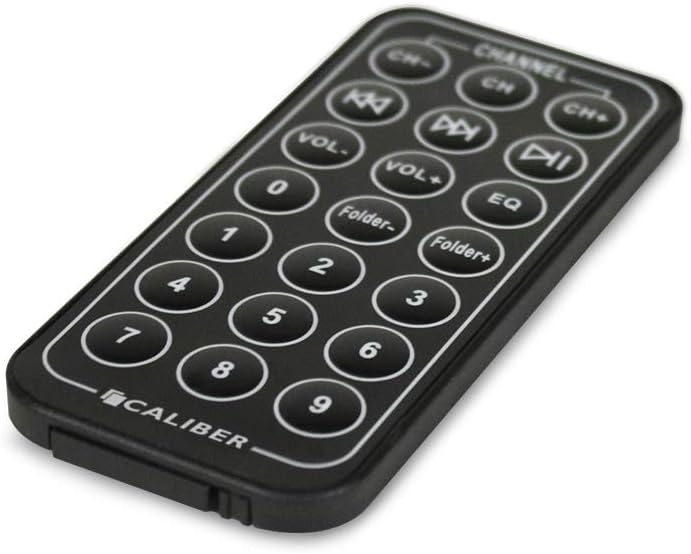
Figure 2: Remote control for the Caliber PMT302. This image shows the layout of buttons on the remote, including channel selection, volume, track navigation, folder navigation, and EQ settings.
- CH-/CH+: ปรับความถี่วิทยุ FM
- ฉบับ-/ฉบับ+: ปรับระดับเสียง.
- เพลงก่อนหน้า/ถัดไป: Navigate through music files.
- เล่น/หยุดชั่วคราว: ควบคุมการเล่นเพลง
- โฟลเดอร์-/โฟลเดอร์+: Navigate through folders on USB/SD card.
- EQ: เลือกค่าที่ตั้งไว้ของอีควอไลเซอร์
- ปุ่มกดตัวเลข: การเลือกแทร็กโดยตรง
4. การตั้งค่า
- เสียบเข้ากับเต้ารับไฟในรถยนต์: Plug the PMT302 into your vehicle's 12V cigarette lighter socket. The device will power on automatically.
- Prepare Music Files:
- For USB: Load MP3 or WMA files onto a USB flash drive (up to 32 GB).
- For SD Card: Load MP3 or WMA files onto an SD card (up to 32 GB).
- ใส่อุปกรณ์จัดเก็บข้อมูล: Insert the prepared USB flash drive into the USB port or the SD card into the SD card slot on the PMT302. The device will automatically detect and begin playing music.
- Connect External Audio (Optional): If using an external device (e.g., smartphone), connect it to the PMT302's 3.5mm AUX input using the provided AUX cable.
5. คู่มือการใช้งาน
5.1 Setting the FM Frequency
- Turn on your car's FM radio.
- Tune your car radio to an unused FM frequency (one with static or no broadcast).
- On the PMT302, use the "CH-" or "CH+" buttons (on the device or remote) to match the FM frequency displayed on the PMT302's LCD screen to the frequency set on your car radio.
- Adjust the frequency until the music from the PMT302 is clearly heard through your car speakers.
Note: The PMT302 supports 206 FM channels from 87.5 MHz to 108 MHz. For best audio quality, select a frequency that is clear of strong radio stations.
5.2 Playing Music from USB/SD Card
- Once a USB drive or SD card is inserted, the device will automatically start playing MP3/WMA files.
- Use the Previous/Next Track buttons to skip between songs.
- ใช้ปุ่มเล่น/หยุดชั่วคราวเพื่อควบคุมการเล่น
- Adjust volume using the VOL-/VOL+ buttons on the device or remote.
- The device has a memory feature that saves the last played frequency, song, and volume settings.
5.3 Loop Playback Modes
The PMT302 offers four loop playback modes:
- สุ่ม: เล่นเพลงตามลำดับแบบสุ่ม
- ทำซ้ำโฟลเดอร์: Repeats all songs within the current folder.
- ทำซ้ำทั้งหมด: Repeats all songs on the storage device.
- ทำซ้ำหนึ่ง: เล่นเพลงปัจจุบันซ้ำ
Refer to the device's on-screen menu or remote control for selecting these modes.
5.4 การใช้งานช่องต่อ AUX
To play music from an external device:
- Connect your external audio device (e.g., smartphone, MP3 player) to the PMT302's 3.5mm AUX input using the provided cable.
- Ensure the external device is playing audio.
- The PMT302 will automatically switch to AUX input mode or may require manual selection via a mode button (if available).
- Adjust the volume on both the PMT302 and your external device for optimal sound.
6. การบำรุงรักษา
- การทำความสะอาด: ใช้ผ้านุ่มและแห้งเช็ดทำความสะอาดอุปกรณ์ ห้ามใช้น้ำยาทำความสะอาดหรือสเปรย์
- พื้นที่จัดเก็บ: เมื่อไม่ใช้งาน ให้เก็บอุปกรณ์ไว้ในที่แห้งและเย็น ห่างจากแสงแดดโดยตรงและอุณหภูมิที่สูงหรือต่ำเกินไป
- การเปลี่ยนฟิวส์: If the device stops working, check the fuse located in the tip of the car charger plug. Replace it with a fuse of the same type and rating (a spare fuse is often included).
- Memory Card/USB Care: Handle SD cards and USB drives carefully. Avoid bending or exposing them to moisture.
7 การแก้ไขปัญหา
| ปัญหา | สาเหตุที่เป็นไปได้ | สารละลาย |
|---|---|---|
| ไม่มีไฟเข้าอุปกรณ์ | Car power outlet is not working, or fuse is blown. | Check if the car power outlet is active. Replace the fuse in the PMT302's plug if necessary. |
| คุณภาพเสียงไม่ดี/มีเสียงรบกวน | FM frequency interference, low volume, or weak signal. | Tune to a different, clear FM frequency on both the PMT302 and your car radio. Increase volume on both devices. Ensure no other strong radio signals are on the chosen frequency. |
| Music not playing from USB/SD card. | ไม่ถูกต้อง file รูปแบบเสียหาย files, or card/drive not inserted correctly. | ทำให้มั่นใจ files are MP3 or WMA format. Reinsert the USB drive/SD card. Try a different USB drive/SD card. |
| รีโมทคอนโทรลไม่ทำงาน | Battery depleted or line of sight blocked. | Replace the remote control battery. Ensure there is a clear path between the remote and the PMT302. |
| LCD display is dim or not working correctly. | อุปกรณ์ทำงานผิดปกติ | This may indicate a hardware issue. If within warranty, contact customer support. |
8. ข้อมูลจำเพาะ
- แบบอย่าง: พีเอ็มที302
- รูปแบบเสียงที่รองรับ: MP3, WMA
- ช่วงความถี่ FM: 87.5 - 108 MHz (206 channels)
- การสนับสนุนพื้นที่เก็บข้อมูล: USB Flash Drive (up to 32 GB), SD Card (up to 32 GB)
- การเชื่อมต่อ: Auxiliary (3.5mm), USB 1.1
- แสดง: จอแอลซีดี
- แหล่งพลังงาน: 12V DC Car Cigarette Lighter
- น้ำหนักสินค้า: 78 กรัม
- วิธีการควบคุม: Touch (on device), Remote Control
- สี: สีดำ
9. การรับประกันและการสนับสนุน
This Caliber PMT302 FM Transmitter comes with a 15-day exchange warranty นับจากวันที่ซื้อ โปรดเก็บหลักฐานการซื้อไว้เพื่อใช้ในการเคลมประกัน
For technical support or warranty inquiries, please contact your retailer or the manufacturer, Sondpex Corporation of America.


