1. บทนำ
The Behringer FEEDBACK DESTROYER FBQ1000 is a high-performance 2-channel feedback destroyer and parametric equalizer designed for professional audio applications. This device automatically detects and suppresses acoustic feedback, ensuring clear and stable sound reinforcement.
คุณสมบัติที่สำคัญ ได้แก่:
- Ultra-fast response for immediate feedback suppression.
- Integrated parametric EQ functionality.
- Automatic mode that continuously monitors the audio mix and sets filters.
- Ultra-Narrow FBQ filters for effective feedback suppression while maintaining high sonic quality.
2. สินค้าหมดview
Familiarize yourself with the front and rear panels of the FBQ1000.

รูปที่ 1: แผงด้านหน้า view of the Behringer FBQ1000, showing controls and display.
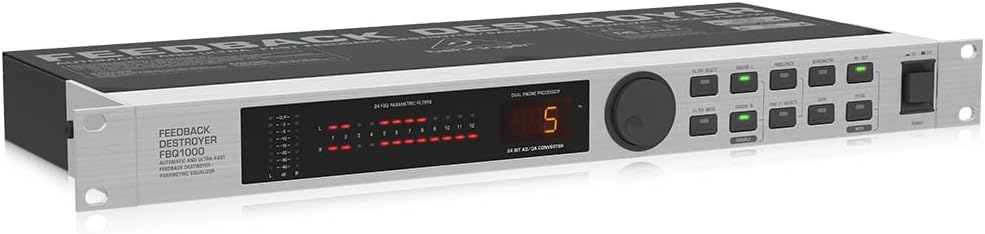
รูปที่ 2: มุม view of the Behringer FBQ1000, illustrating its rack-mountable design.
3. การตั้งค่าและการเชื่อมต่อ
Proper setup is crucial for optimal performance of your FBQ1000. Ensure all connections are secure before powering on the device.
- การเชื่อมต่อไฟฟ้า: Connect the supplied power cable to the FBQ1000 and then to a suitable AC power outlet.
- อินพุตเสียง: Connect the audio source (e.g., mixer output, microphone preamplifier) to the FBQ1000's input connectors using balanced XLR or 1/4" TRS cables. The FBQ1000 features two independent channels.
- เอาต์พุตเสียง: Connect the FBQ1000's output connectors to your amplifier, powered speakers, or subsequent audio processing equipment using balanced XLR or 1/4" TRS cables.
- การจัดวาง: Install the FBQ1000 in a standard 19-inch equipment rack or place it on a stable surface, ensuring adequate ventilation.
- เปิดเครื่องครั้งแรก: After all connections are made, power on your audio system components in the correct sequence (source first, then FBQ1000, then amplifiers/speakers).
4. คู่มือการใช้งาน
The FBQ1000 offers both automatic and manual modes for feedback suppression and parametric equalization.
4.1 Automatic Feedback Suppression
In automatic mode, the FBQ1000 continuously monitors the audio signal and identifies feedback frequencies. It then applies ultra-narrow notch filters to eliminate the feedback without significantly affecting the overall sound quality.
- Engaging Auto Mode: Refer to the device's front panel controls for selecting the automatic operating mode. This typically involves pressing a dedicated 'Auto' button or selecting a preset that utilizes automatic detection.
- Filter Deployment: The unit will automatically detect and apply up to 24 FBQ filters across its two channels. Indicators on the front panel will show which filters are active.
- การตรวจสอบอย่างต่อเนื่อง: The FBQ1000 adapts to changing acoustic environments, ensuring ongoing feedback protection.
4.2 Parametric Equalization
Beyond feedback suppression, the FBQ1000 can function as a parametric equalizer, allowing precise control over frequency, bandwidth, and gain for sound shaping.
- ควบคุมด้วยมือ: Use the front panel controls (e.g., 'Frequency', 'Bandwidth', 'Gain' knobs/buttons) to manually adjust EQ parameters for specific frequencies.
- การเลือกตัวกรอง: Select the desired filter number to adjust its parameters.
- การตั้งค่าการบันทึก: Custom EQ settings can often be stored as user presets for recall. Consult the full user manual for detailed instructions on saving and recalling presets.
5. การบำรุงรักษา
To ensure the longevity and reliable operation of your Behringer FBQ1000, follow these maintenance guidelines:
- การทำความสะอาด: Regularly wipe the exterior of the unit with a soft, dry cloth. Avoid using abrasive cleaners or solvents.
- การระบายอากาศ : ตรวจสอบให้แน่ใจว่าช่องระบายอากาศสะอาดและไม่มีสิ่งกีดขวาง เพื่อป้องกันความร้อนสูงเกินไป
- พื้นที่จัดเก็บ: เมื่อไม่ได้ใช้งานเป็นเวลานาน ควรเก็บเครื่องไว้ในที่แห้งและเย็น หลีกเลี่ยงแสงแดดโดยตรงและอุณหภูมิที่สูงหรือต่ำเกินไป
- การตรวจสอบสายเคเบิล: Periodically check all audio and power cables for signs of wear or damage. Replace any faulty cables immediately.
6 การแก้ไขปัญหา
If you encounter issues with your FBQ1000, refer to the following common troubleshooting steps:
- ไม่มีไฟฟ้า:
- ตรวจสอบว่าสายไฟเชื่อมต่อกับตัวเครื่องและเต้ารับไฟฟ้าอย่างแน่นหนาแล้วหรือไม่
- ตรวจสอบว่าเต้ารับไฟฟ้าสามารถใช้งานได้
- Ensure the power switch on the FBQ1000 is in the 'ON' position.
- ไม่มีเอาต์พุตเสียง:
- Confirm that the audio input cables are correctly connected and the source is active.
- Check the audio output cables connecting the FBQ1000 to your ampเครื่องขยายเสียง/ลำโพง
- Ensure the FBQ1000 is not in bypass mode (if applicable) and that its output level is appropriately set.
- Verify that all connected devices (mixer, amplifier) are powered on and functioning correctly.
- Feedback Still Occurs:
- Ensure the FBQ1000 is in an active feedback suppression mode (e.g., Auto mode).
- Check the input gain levels to ensure they are not excessively high, which can overwhelm the unit.
- Verify that the unit's filters are being deployed and indicated on the display.
- Consider the acoustic environment; extreme conditions may require additional measures.
- Unwanted Sound Alteration:
- If using manual parametric EQ, review your settings for frequency, bandwidth, and gain.
- In automatic mode, ensure the unit is not over-filtering. Some modes allow for adjustment of filter aggressiveness.
For more detailed troubleshooting, please refer to the comprehensive user manual available for download from the Behringer webเว็บไซต์.
7. ข้อมูลจำเพาะ
| คุณสมบัติ | รายละเอียด |
|---|---|
| ชื่อรุ่น | FBQ1000 |
| คุณสมบัติพิเศษ | Automatic Feedback Detection and Suppression |
| เทคโนโลยีการเชื่อมต่อ | เสริม, XLR |
| โหมดเอาต์พุตเสียง | Feedback Suppression and Parametric EQ |
| ขนาดสินค้า | ลึก 7.68 นิ้ว x กว้าง 19.02 นิ้ว x สูง 1.73 นิ้ว |
| น้ำหนักสินค้า | 4.19 ปอนด์ |
| สี | สีดำ |
| แหล่งพลังงาน | สายไฟ |
| วิธีการควบคุม | Touch (referring to buttons/interface) |
| การใช้งานเฉพาะของผลิตภัณฑ์ | Live sound performances, public events, professional audio setups |
| ส่วนประกอบที่รวมอยู่ | Automatic Destroyer Parametric (unit itself) |
8. การรับประกันและการสนับสนุน
ผลิตภัณฑ์ของ Behringer ออกแบบมาเพื่อความน่าเชื่อถือและประสิทธิภาพ สำหรับข้อมูลการรับประกันโดยละเอียด โปรดดูบัตรรับประกันที่ให้มาพร้อมกับผลิตภัณฑ์ของคุณ หรือเยี่ยมชมเว็บไซต์ของ Behringer อย่างเป็นทางการ webเว็บไซต์.
อาจมีแผนคุ้มครองเพิ่มเติมให้เลือกซื้อ ซึ่งให้ความคุ้มครองที่มากกว่าการรับประกันมาตรฐานของผู้ผลิต
For technical support, service, or to download the complete user manual (PDF), please visit the Behringer support section on their official website. The full user manual provides in-depth information on advanced features, MIDI implementation, and detailed troubleshooting.
คุณสามารถค้นหาคู่มือผู้ใช้ฉบับทางการได้ที่นี่ ที่นี่.


