1. บทนำ
The Grandstream GXP2100 is an enterprise-grade IP phone designed for business communication. It features support for four lines, a backlit graphical LCD, and various programmable keys to enhance user experience. This manual provides detailed instructions for the installation, configuration, and operation of your GXP2100 IP phone.
2. เนื้อหาบรรจุภัณฑ์
Upon unpacking your Grandstream GXP2100, verify that all items are present and in good condition. The standard package typically includes:
- Grandstream GXP2100 IP Phone Unit
- โทรศัพท์มือถือพร้อมสายขด
- ขาตั้งโทรศัพท์
- สายอีเทอร์เน็ต
- อะแดปเตอร์แปลงไฟ
- Quick Installation Guide (this manual provides more detail)
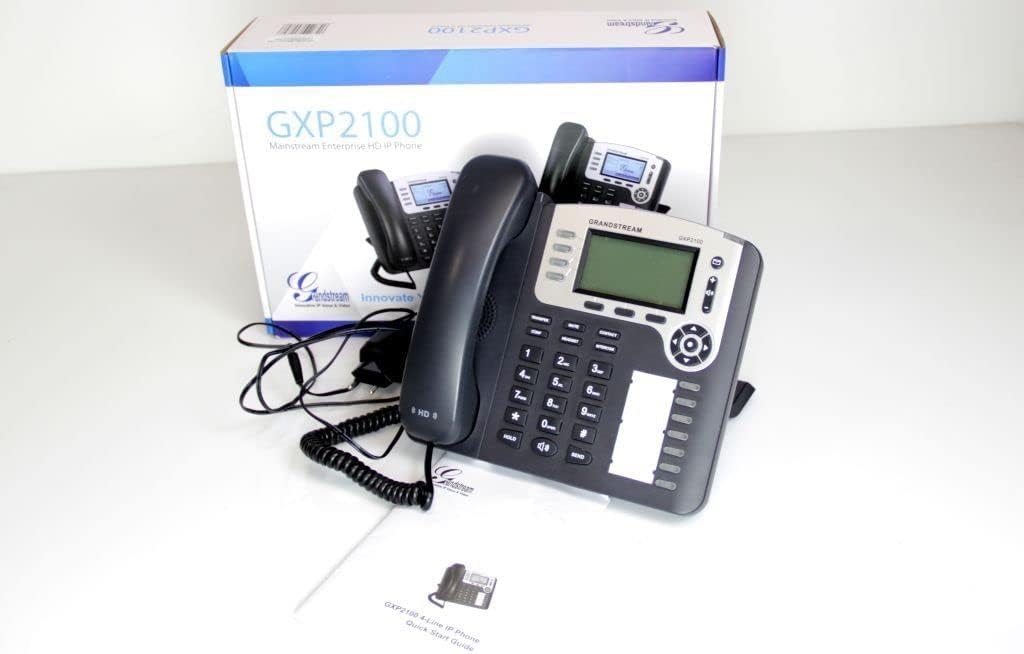
Image 2.1: Grandstream GXP2100 IP Phone unit, handset, coiled cord, power adapter, Ethernet cable, and quick start guide, displayed with its retail packaging.
3. คุณสมบัติของผลิตภัณฑ์
The GXP2100 IP phone offers a range of features designed for efficient business communication:
- คีย์บรรทัด: 4 dual-color line keys supporting up to 4 SIP accounts.
- ซอฟท์คีย์: 3 XML programmable context-sensitive soft keys for dynamic functions.
- BLF Extension Keys: 7 dual-color BLF (Busy Lamp Field) extension keys, supporting up to 11 call appearances.
- การประชุมทางโทรศัพท์: Up to 5-way conference capability.
- คุณภาพเสียง: HD wideband audio and a superb full-duplex hands-free speakerphone with advanced acoustic echo cancellation.
- การเชื่อมต่อเครือข่าย: Dual network ports with integrated Power over Ethernet (PoE).
- สมุดโทรศัพท์: Automated phone book synchronization with directory servers using XML.
- การใช้งาน: Integrated real-time web applications (e.g., weather, stock, currency, RSS news).
- ความปลอดภัย: Advanced security protection for privacy.
- การปรับใช้: Supports automated provisioning for easy deployment.

ภาพที่ 3.1: ด้านหน้า view of the Grandstream GXP2100 IP Phone, highlighting the display, keypad, and function buttons.
4. การตั้งค่า
4.1 การเชื่อมต่อทางกายภาพ
Follow these steps to connect your GXP2100 IP phone:
- เชื่อมต่อโทรศัพท์มือถือ: Plug the coiled cord into the handset port on the side of the phone and into the handset.
- เชื่อมต่อชุดหูฟัง (ไม่จำเป็น): If using a headset, plug it into the dedicated headset port.
- เชื่อมต่อกับเครือข่าย:
- If using PoE: Connect one end of the Ethernet cable to the LAN port on the phone and the other end to a PoE-enabled switch or hub.
- If not using PoE: Connect one end of the Ethernet cable to the LAN port on the phone and the other end to your network switch/router. Then, connect the power adapter to the phone's power jack and to an electrical outlet.
- เชื่อมต่อกับพีซี (ทางเลือก): If you wish to connect a computer through the phone, connect an Ethernet cable from the PC port on the phone to your computer's Ethernet port.

ภาพที่ 4.1: ด้านข้าง view of the Grandstream GXP2100 IP Phone, showing the various connection ports for handset, headset, LAN, and PC.
4.2 การกำหนดค่าเริ่มต้น
After physical connection, the phone will attempt to obtain an IP address via DHCP. You can access the phone's web configuration interface for detailed setup:
- รับที่อยู่ IP: กดปุ่ม เมนู button on the phone, navigate to สถานะ, แล้ว สถานะเครือข่าย to find the phone's IP address.
- เข้าถึง Web อินเทอร์เฟซ: เปิด web browser on a computer connected to the same network and enter the phone's IP address in the address bar.
- เข้าสู่ระบบ: Enter the administrator username and password (default values are typically 'admin' for both, refer to your network administrator or Grandstream documentation for specific defaults).
- Configure SIP Accounts: นำทางไปที่ บัญชี section to configure your SIP account details provided by your VoIP service provider. This includes SIP Server, SIP User ID, Authenticate ID, and Password.
- บันทึกและนำไปใช้: After making changes, save and apply the configuration. The phone may reboot.
5. คู่มือการใช้งาน
5.1 ฟังก์ชันการโทรพื้นฐาน
- การโทร:
- ยกหูโทรศัพท์ กด ลำโพง button, or press an available เส้น สำคัญ.
- กดหมายเลขที่ต้องการ
- กดปุ่ม ส่ง กดปุ่มหรือรอสักครู่เพื่อให้ระบบโทรออกอัตโนมัติ
- รับสาย:
- หยิบหูฟังขึ้นมา
- กดไฟกระพริบ เส้น สำคัญ.
- กดปุ่ม ลำโพง ปุ่ม.
- การวางสาย: วางหูโทรศัพท์หรือกด ลำโพง ปุ่มนี้หากใช้โหมดแฮนด์ฟรี
5.2 Advanced Call Functions
- ถือ: ในระหว่างการสนทนา ให้กดปุ่ม ถือ button. The line key will flash. To resume, press the flashing เส้น สำคัญ.
- โอน:
- ในระหว่างการสนทนา ให้กดปุ่ม โอนย้าย soft key. The active call will be put on hold.
- กดหมายเลขที่คุณต้องการโอนสายไป
- กดปุ่ม โอนย้าย soft key again to complete the transfer (blind transfer) or wait for the party to answer and announce the call before pressing โอนย้าย (มีการรับส่งเข้าร่วม)
- การประชุม:
- ในระหว่างการสนทนา ให้กดปุ่ม คอนเฟิม soft key. The active call will be put on hold.
- Dial the number of the next participant and press ส่ง.
- เมื่อฝ่ายที่สองตอบรับ ให้กดปุ่ม คอนเฟิม soft key again to establish the conference call. Repeat for additional participants (up to 5-way).
- ปิดเสียง: กดปุ่ม MUTE ปุ่มนี้ใช้เพื่อปิดเสียงไมโครโฟนระหว่างการโทร กดอีกครั้งเพื่อเปิดเสียง
- สปีกเกอร์โฟน: กดปุ่ม ลำโพง button to toggle speakerphone mode on or off.
- BLF Keys: The BLF (Busy Lamp Field) keys can be programmed to monitor the status of other extensions. A green light indicates idle, red indicates busy, and flashing red indicates ringing. Pressing a BLF key can initiate a call to that extension or pick up a ringing call.
- ซอฟท์คีย์: The three soft keys below the LCD display change their function based on the phone's current state (e.g., during a call, idle, or in a menu). Their current function is displayed on the LCD directly above them.
6. การบำรุงรักษา
- การทำความสะอาด: Use a soft, dry cloth to clean the phone's surface. Avoid abrasive cleaners or solvents.
- อัพเดตเฟิร์มแวร์: Grandstream periodically releases firmware updates to improve performance and add features. Firmware updates are typically performed via the phone's web interface. Consult your network administrator or Grandstream's official support resources for the latest firmware and update procedures. Manual firmware updates often require downloading files from the manufacturer and hosting them on a local web เซิร์ฟเวอร์
- สภาพแวดล้อม : Operate the phone within recommended temperature and humidity ranges to ensure optimal performance and longevity.
7 การแก้ไขปัญหา
This section addresses common issues you might encounter with your GXP2100 IP phone.
| ปัญหา | สาเหตุที่เป็นไปได้ | สารละลาย |
|---|---|---|
| โทรศัพท์ไม่สามารถเปิดเครื่องได้ | No power from adapter or PoE switch. |
|
| ไม่มีเสียงสัญญาณโทรออก / ไม่สามารถโทรออกหรือรับสายได้ | Network connectivity issue, SIP account not registered, incorrect configuration. |
|
| One-way audio (you can hear, but the other party cannot, or vice-versa). | Network firewall/NAT issues, incorrect audio codec settings. |
|
| Phone frequently loses registration. | Unstable network connection, SIP server issues, incorrect registration expiration. |
|
8. ข้อมูลจำเพาะ
Key technical specifications for the Grandstream GXP2100 IP Business Phone:
| คุณลักษณะ | ค่า |
|---|---|
| หมายเลขรุ่น | GXP2100 |
| ยี่ห้อ | แกรนด์สตรีม |
| ขนาดสินค้า (กว้าง x ยาว x สูง) | 8.7 x 8.3 x 3.6 นิ้ว |
| น้ำหนักสินค้า | 2.4 ปอนด์ |
| สี | สีเทา |
| ประเภทโทรศัพท์ | แบบมีสาย |
| แหล่งพลังงาน | ระบบไฟฟ้าแบบมีสาย (รองรับ PoE) |
| ประเภทผู้โทรออก | ปุ่มกดเดียว |
| ประเภทของระบบตอบรับ | ดิจิตอล |
| ความสามารถในการประชุมทางโทรศัพท์ | 5 ทาง |
| การทำงานแบบหลายบรรทัด | Multi-Line Operation (4 lines) |
| ASIN | B004PAS3SM |
| วันที่พร้อมใช้งานครั้งแรก | 9 กุมภาพันธ์ 2011 |
9. การรับประกันและการสนับสนุน
สำหรับข้อมูลการรับประกัน การสนับสนุนทางเทคนิค หรือความช่วยเหลือเพิ่มเติมเกี่ยวกับโทรศัพท์ IP Grandstream GXP2100 โปรดดูที่เว็บไซต์อย่างเป็นทางการของ Grandstream website or contact your product vendor. Keep your purchase receipt and product serial number handy when seeking support.
แกรนด์สตรีมอย่างเป็นทางการ Webเว็บไซต์: www.grandstream.com


