1. บทนำ
ขอบคุณสำหรับการซื้อasing the Edifier M1360 Wired Multimedia Speaker System. This 2.1 speaker system is designed to provide a convenient and high-quality audio solution for various multimedia applications, including computers, laptops, gaming consoles, and MP3 players. Featuring upward-angled satellites and a downward-angled subwoofer, the system delivers clear sound with steady bass output. The wired remote control offers easy volume adjustment and includes a headphone jack for private listening.
2. ข้อมูลด้านความปลอดภัยที่สำคัญ
- Read these instructions thoroughly before operating the product.
- เก็บคู่มือนี้ไว้เพื่อใช้อ้างอิงในอนาคต
- อย่าให้เครื่องโดนฝนหรือความชื้นเพื่อป้องกันไฟไหม้หรือไฟฟ้าช็อต
- อย่าปิดกั้นช่องระบายอากาศใดๆ ติดตั้งตามคำแนะนำของผู้ผลิต
- ห้ามติดตั้งใกล้แหล่งความร้อน เช่น หม้อน้ำ เครื่องทำความร้อน เตา หรืออุปกรณ์อื่น ๆ (รวมถึง ampเครื่องให้ความร้อน) ที่ผลิตความร้อน
- ปกป้องสายไฟไม่ให้ถูกเหยียบหรือถูกหนีบ โดยเฉพาะที่ปลั๊ก เต้ารับไฟฟ้า และจุดที่สายไฟออกจากเครื่อง
- ใช้เฉพาะอุปกรณ์เสริม/สิ่งที่แนบตามที่ผู้ผลิตกำหนดเท่านั้น
- ถอดปลั๊กอุปกรณ์นี้ในระหว่างพายุฝนฟ้าคะนองหรือเมื่อไม่ได้ใช้งานเป็นเวลานาน
- แจ้งบริการทั้งหมดให้ช่างที่ผ่านการรับรองทราบ จำเป็นต้องให้บริการเมื่ออุปกรณ์ได้รับความเสียหายในลักษณะใดก็ตาม เช่น สายไฟหรือปลั๊กชำรุด ของเหลวหกหรือมีวัตถุตกลงไปในอุปกรณ์ อุปกรณ์โดนฝนหรือความชื้น ไม่สามารถทำงานได้ตามปกติ หรือตกหล่น
3. เนื้อหาบรรจุภัณฑ์
โปรดตรวจสอบสิ่งของภายในบรรจุภัณฑ์ของคุณ หากมีสินค้าใดสูญหายหรือเสียหาย โปรดติดต่อผู้ค้าปลีกของคุณ
- 1x Edifier M1360 Subwoofer
- 2x ลำโพงแซทเทิลไลท์
- 1x รีโมทคอนโทรลแบบมีสาย
- 1x 3.5mm Audio Input Cable
- 1x คู่มือผู้ใช้ (เอกสารนี้)
4. สินค้าหมดview
4.1 ส่วนประกอบของระบบ
- ซับวูฟเฟอร์: Houses the main amplifier and bass driver. Connects to the satellite speakers and the audio source.
- ลำโพงดาวเทียม: Two compact speakers for mid-range and high-frequency audio.
- รีโมทคอนโทรลแบบมีสาย: Features a volume dial, power switch, and headphone output.
4.2 การระบุส่วนประกอบ

รูปที่ 1 : ด้านหน้า view of the Edifier M1360 speaker system, showing the central subwoofer, two angled satellite speakers, and the wired remote control unit.
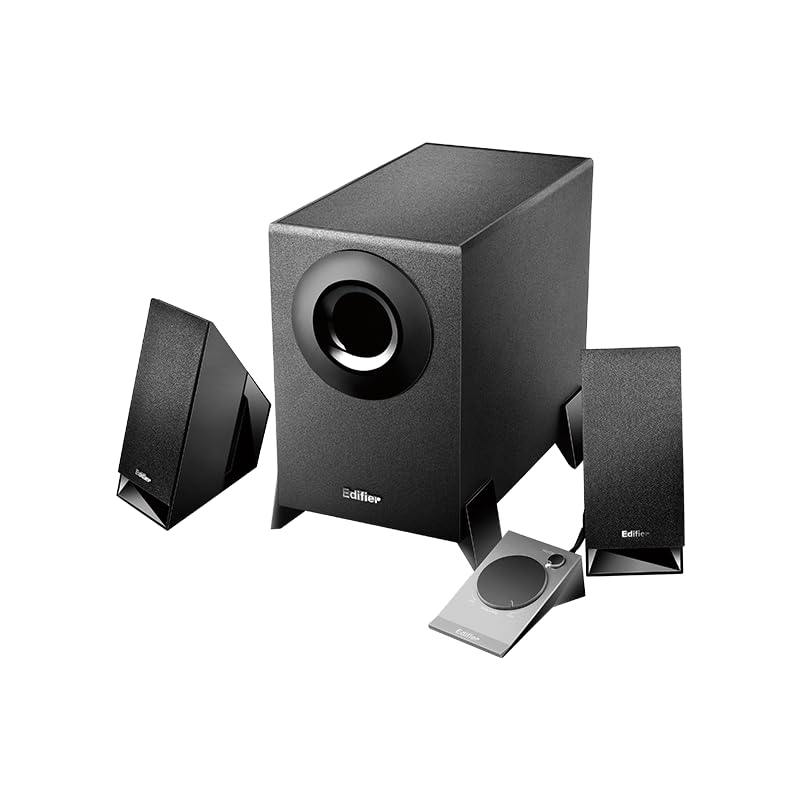
Figure 2: Another perspective of the Edifier M1360 speaker system, highlighting the compact design of the satellite speakers and the wired remote's placement.
5. การตั้งค่า
5.1 การจัดวาง
- Place the subwoofer on the floor or a sturdy surface near your computer or audio source.
- Position the satellite speakers on either side of your monitor or listening area, ensuring they are angled towards you for optimal sound.
- Ensure adequate ventilation around all components.
5.2 การเชื่อมต่อ
- Connect the satellite speakers to the corresponding output jacks on the back of the subwoofer. Ensure the left and right speakers are connected correctly.
- Connect the wired remote control cable to the dedicated port on the subwoofer.
- Connect the 3.5mm audio input cable from the "AUDIO IN" port on the subwoofer to the audio output (headphone jack) of your computer, laptop, MP3 player, or other audio source.
- Plug the power cord of the subwoofer into a standard AC power outlet.
6. คู่มือการใช้งาน
6.1 เปิด/ปิดเครื่อง
- To turn on the speaker system, press the power button located on the wired remote control. The power indicator light will illuminate.
- To turn off the speaker system, press the power button again. The power indicator light will turn off.
6.2 การควบคุมระดับเสียง
- Rotate the large dial on the wired remote control clockwise to increase the volume.
- Rotate the large dial counter-clockwise to decrease the volume.
6.3 เอาต์พุตหูฟัง
- To listen privately, plug your headphones into the 3.5mm headphone jack on the wired remote control.
- When headphones are connected, the speaker output will automatically mute.
- Unplug the headphones to resume audio playback through the speakers.
7. การบำรุงรักษาและการดูแล
- การทำความสะอาด: ใช้ผ้าแห้งเนื้อนุ่มเช็ดทำความสะอาดพื้นผิวของลำโพงและซับวูฟเฟอร์ ห้ามใช้น้ำยาทำความสะอาดหรือสเปรย์กระป๋อง
- การระบายอากาศ : Ensure that the ventilation openings on the subwoofer are not blocked. Proper airflow prevents overheating.
- พื้นที่จัดเก็บ: หากจะเก็บรักษาระบบไว้เป็นเวลานาน ควรตัดการเชื่อมต่อจากแหล่งจ่ายไฟและเก็บไว้ในที่แห้งและเย็น หลีกเลี่ยงแสงแดดโดยตรงและอุณหภูมิที่สูงหรือต่ำเกินไป
- หลีกเลี่ยงความชื้น: Keep the speaker system away from water, humidity, and other liquids.
8 การแก้ไขปัญหา
| ปัญหา | สาเหตุที่เป็นไปได้ | สารละลาย |
|---|---|---|
| ไม่มีเสียง |
|
|
| เสียงเพี้ยน |
|
|
| ลำโพงตัวหนึ่งไม่ทำงาน |
|
|
9. ข้อมูลจำเพาะ
| คุณสมบัติ | รายละเอียด |
|---|---|
| ชื่อรุ่น | M1360 |
| ประเภทลำโพง | มัลติมีเดีย |
| การกำหนดค่าช่องเสียงรอบทิศทาง | 2.1 |
| เทคโนโลยีการเชื่อมต่อ | Wired (3.5mm stereo input) |
| โหมดเอาต์พุตเสียง | สเตอริโอ |
| กำลังขับสูงสุดของลำโพง | 8.5 วัตต์ |
| เส้นผ่านศูนย์กลางซับวูฟเฟอร์ | 5 นิ้ว |
| เส้นผ่านศูนย์กลางทวีตเตอร์ | 1 นิ้ว |
| อัตราส่วนสัญญาณต่อเสียงรบกวน | 85 เดซิเบล |
| การตอบสนองความถี่ | 20 KHz (Note: This is likely the upper limit, not the full range. Common for speakers to list only max freq.) |
| อุปกรณ์ที่รองรับ | Smartphone, Laptop, Desktop, Gaming Console, MP3 Player |
| ขนาดสินค้า | 6.4D x 11.2W x 14H เซนติเมตร |
| น้ำหนักสินค้า | 2.5 กก. (2500 กรัม) |
| แหล่งพลังงาน | AC |
| สี | สีดำ |
| ประเทศต้นกำเนิด | จีน |
10. การรับประกันและการสนับสนุน
For detailed warranty information and customer support, please refer to the warranty card included with your product packaging or visit the official Edifier webเว็บไซต์.
Manufacturer: Edifier
Importer: Nikita Distributors - Green Terrace Building, Lane Number 5, South Koregaon Park, Pune 411001, MH, India


