1. บทนำ
Thank you for choosing the LTC 3-Channel 60W Public Address Amplifier with USB/SD-MP3. This manual provides essential information for the safe and efficient operation of your new amplifier. Please read it thoroughly before use and keep it for future reference. This amplifier is designed for public address applications, offering versatile input options including microphones, auxiliary devices, and integrated USB/SD card playback.
2. คำแนะนำด้านความปลอดภัย
เพื่อให้มั่นใจถึงการทำงานที่ปลอดภัยและป้องกันความเสียหาย โปรดปฏิบัติตามข้อควรระวังด้านความปลอดภัยต่อไปนี้:
- แหล่งพลังงาน: เชื่อมต่อ amplifier only to the specified power sources (12V DC or 220V AC) as indicated on the unit. Ensure the voltage ตรงกับแหล่งจ่ายไฟในพื้นที่ของคุณ
- การระบายอากาศ : อย่าปิดกั้นช่องระบายอากาศใดๆ ตรวจสอบให้แน่ใจว่ามีการไหลเวียนของอากาศรอบเครื่องอย่างเพียงพอเพื่อป้องกันความร้อนสูงเกินไป
- ความชื้น: อย่าเปิดเผย amplifier to rain, moisture, or excessive humidity. Keep it away from liquids.
- การทำความสะอาด: Disconnect the power before cleaning. Use a dry, soft cloth. Do not use liquid cleaners or aerosols.
- การบริการ: อย่าพยายามซ่อมแซมผลิตภัณฑ์นี้ด้วยตนเอง แนะนำให้ช่างผู้ชำนาญการซ่อมบำรุงเป็นผู้รับผิดชอบทั้งหมด การเปิดเครื่องอาจทำให้คุณสัมผัสกับสารอันตรายtagหรืออันตรายอื่น ๆ
- การจัดวาง: วาง amplifier on a stable, flat surface. Avoid placing it near heat sources or in direct sunlight.
- โอเวอร์โหลด: อย่าโอเวอร์โหลด ampเครื่องขยายเสียง ตรวจสอบให้แน่ใจว่าลำโพงที่เชื่อมต่อตรงกับเครื่องขยายเสียง ampค่าความต้านทานและกำลังขับของเครื่องขยายเสียง
3. สินค้าหมดview
The LTC 3-Channel 60W Public Address Amplifier is a versatile audio solution designed for various PA applications. It features multiple input options and an integrated MP3 player for convenience.
3.1 การควบคุมและการเชื่อมต่อที่แผงด้านหน้า
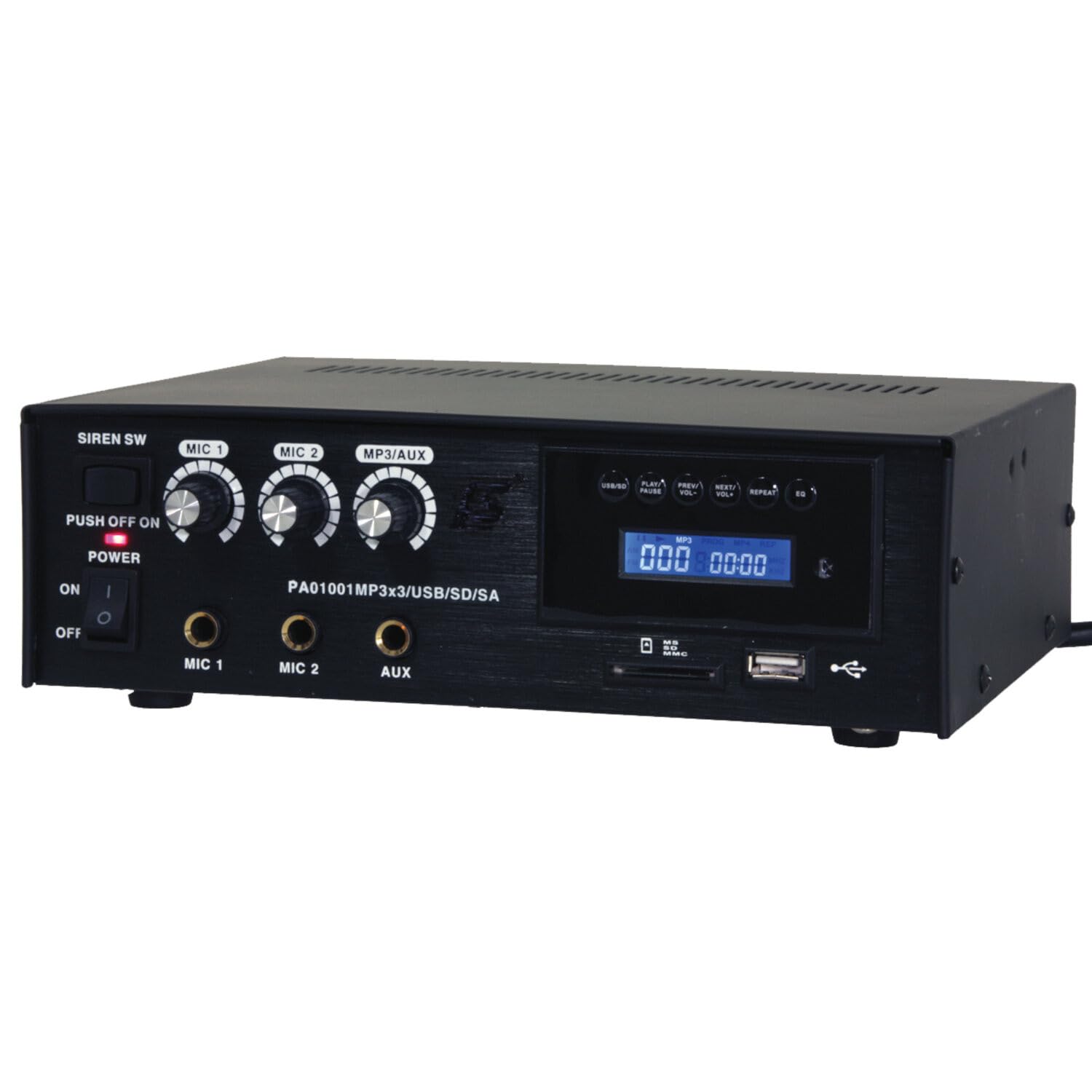
Image: Front panel of the LTC 3-Channel 60W Public Address Amplifier. Visible controls include volume knobs for MIC1, MIC2, and MP3/AUX, a Master volume knob, a Power switch, a Siren switch, and input jacks for MIC1, MIC2, and AUX. The MP3 player section features a display, USB port, and SD card slot.
- SIREN SW: Switch to activate the built-in siren sound.
- PUSH OFF / ON / OF Power Switch: สวิตช์เปิดปิดหลักสำหรับ ampชีวิต.
- MIC 1 Volume: Rotary knob to adjust the volume level for Microphone Input 1.
- MIC 2 Volume: Rotary knob to adjust the volume level for Microphone Input 2.
- MP3/AUX Volume: Rotary knob to adjust the volume level for the MP3 player and Auxiliary input.
- ระดับเสียงหลัก: Rotary knob to control the overall output volume of the ampชีวิต.
- อินพุตไมโครโฟน 1: 6.3mm jack for connecting Microphone 1.
- อินพุตไมโครโฟน 2: 6.3mm jack for connecting Microphone 2.
- อินพุต AUX: 6.3mm jack for connecting external audio sources (e.g., CD player, smartphone).
- USB/SD MP3 Player: Integrated player with USB port and SD card slot for direct playback of audio files. Includes control buttons (Play/Pause, Prev/Vol-, Next/Vol+, Repeat, EQ) and an LCD display.
3.2 คุณสมบัติหลัก
- Mobile or fixed amplifier with 12V battery (car, boat) or 220V mains power supply.
- Integrated MP3 player with USB and SD ports for music playback.
- Includes a siren for powerful sound and an MP3 control screen with a blue LCD display.
4. การตั้งค่า
ทำตามขั้นตอนเหล่านี้เพื่อตั้งค่าของคุณ ampเครื่องฟอก:
4.1 การเชื่อมต่อสายไฟ
- For 220V AC Operation: Connect the supplied power cord to the AC input on the rear panel of the amplifier and then to a standard 220V AC wall outlet.
- สำหรับการใช้งาน 12V DC: Connect a 12V DC power source (e.g., car battery) to the 12V DC input terminals on the rear panel. Ensure correct polarity (+ to + and - to -).
- ให้แน่ใจว่า amplifier's power switch is in the 'OFF' position before connecting to power.
4.2 การเชื่อมต่อลำโพง
- Locate the speaker output terminals on the rear panel of the ampชีวิต.
- Connect your speakers to these terminals, ensuring correct polarity (positive to positive, negative to negative).
- Verify that the total impedance of the connected speakers is compatible with the amplifier's output specifications to prevent damage.
4.3 การเชื่อมต่ออินพุตเสียง
- ไมโครโฟน: Insert your microphones into the MIC 1 and/or MIC 2 input jacks on the front panel.
- อุปกรณ์เสริม: Connect external audio sources (e.g., smartphone, laptop, CD player) to the AUX input jack on the front panel using an appropriate 6.3mm audio cable.
- สื่อ USB/SD: Insert a USB flash drive into the USB port or an SD card into the SD card slot on the front panel for MP3 playback.
5. คู่มือการใช้งาน
เมื่อครั้งหนึ่ง ampเมื่อติดตั้งเครื่องขยายเสียงเสร็จแล้ว โปรดทำตามขั้นตอนต่อไปนี้เพื่อใช้งาน:
5.1 การเปิด/ปิดเครื่อง
- ตรวจสอบให้แน่ใจว่าการเชื่อมต่อทั้งหมดมีความปลอดภัย
- Turn the MASTER volume knob to its minimum position.
- Flip the POWER switch to the 'ON' position. The power indicator light will illuminate.
- To power off, turn the MASTER volume to minimum and then flip the POWER switch to 'OFF'.
5.2 การใช้งานไมโครโฟน
- Connect your microphone(s) to the MIC 1 and/or MIC 2 inputs.
- Slowly increase the MIC 1 and/or MIC 2 volume knob(s) to the desired level.
- Adjust the MASTER volume for overall output.
- Avoid pointing microphones directly at speakers to prevent feedback (howling).
5.3 การใช้งานช่องต่อ AUX
- Connect your external audio device to the AUX input.
- Ensure the volume on your external device is set to a moderate level.
- Slowly increase the MP3/AUX volume knob to the desired level.
- Adjust the MASTER volume for overall output.
5.4 MP3/USB/SD Playback
- Insert a USB flash drive into the USB port or an SD card into the SD card slot. The amplifier will automatically detect the media and begin playback.
- Use the 'PLAY/PAUSE' button to start or pause playback.
- Use the 'PREV/VOL-' button to go to the previous track or press and hold to decrease volume.
- Use the 'NEXT/VOL+' button to go to the next track or press and hold to increase volume.
- Use the 'REPEAT' button to cycle through repeat modes (e.g., repeat one, repeat all).
- Use the 'EQ' button to cycle through equalizer presets.
- Adjust the MP3/AUX volume knob and MASTER volume for desired output.
5.5 Siren Function
- To activate the siren, flip the SIREN SW to the 'ON' position.
- To deactivate, flip the SIREN SW back to the 'OFF' position.
- Use the MASTER volume to control the siren's output level.
6. การบำรุงรักษา
Proper maintenance ensures the longevity of your ampเครื่องฟอก:
- การทำความสะอาด: ควรเช็ดทำความสะอาดตัวเครื่องด้วยผ้าแห้งเนื้อนุ่มเป็นประจำ ห้ามใช้สารทำความสะอาดที่มีฤทธิ์กัดกร่อน แว็กซ์ หรือตัวทำละลาย
- การระบายอากาศ : Ensure that the ventilation grilles are free from dust and debris. Use a soft brush or vacuum cleaner to clear them if necessary.
- พื้นที่จัดเก็บ: หากมีการเก็บข้อมูล ampหากไม่ได้ใช้งานเครื่องขยายเสียงเป็นเวลานาน ควรตัดการเชื่อมต่อจากแหล่งจ่ายไฟและเก็บไว้ในที่แห้งและเย็น หลีกเลี่ยงแสงแดดโดยตรงและอุณหภูมิที่สูงหรือต่ำเกินไป
- การเชื่อมต่อ: Periodically check all cable connections for tightness and signs of wear.
7 การแก้ไขปัญหา
หากคุณพบปัญหาเกี่ยวกับ amplifier, refer to the table below for common problems and solutions:
| ปัญหา | สาเหตุที่เป็นไปได้ | สารละลาย |
|---|---|---|
| ไม่มีไฟฟ้า | Power cable not connected; Power outlet faulty; Power switch off; 12V DC battery depleted or incorrectly connected. | Check power cable connection; Try a different outlet; Ensure power switch is ON; Check 12V DC battery charge and polarity. |
| ไม่มีเสียงออก | Master volume too low; Input volume too low; Speakers not connected or faulty; Incorrect input selected (for MP3/AUX); Mute activated. | Increase Master and input volumes; Check speaker connections and functionality; Ensure correct input source is active; Check if any mute function is engaged. |
| เสียงเพี้ยน | Volume too high (clipping); Speaker impedance mismatch; Faulty cables or connections. | Reduce volume; Verify speaker impedance compatibility; Check and replace faulty cables. |
| MP3/USB/SD not playing | ไม่ถูกต้อง file format; USB drive/SD card faulty or not inserted correctly; MP3/AUX volume too low. | ทำให้มั่นใจ files are MP3 format; Reinsert USB/SD card; Try a different USB/SD card; Increase MP3/AUX volume. |
| Feedback (howling) from microphones | Microphone too close to speakers; Microphone volume too high. | Reposition microphones away from speakers; Reduce microphone volume. |
หากปัญหายังคงมีอยู่หลังจากลองวิธีแก้ไขเหล่านี้แล้ว โปรดติดต่อฝ่ายสนับสนุนลูกค้า
8. ข้อมูลจำเพาะ
Technical specifications for the LTC 3-Channel 60W Public Address Ampเครื่องฟอก:
| คุณสมบัติ | ข้อมูลจำเพาะ |
|---|---|
| หมายเลขรุ่น | LTCAUDIO95-1000 |
| Output Power (12V) | RMS 35W, Max. 45W |
| Output Power (220V) | RMS 45W, Max. 60W |
| จำนวนช่องสัญญาณ | 3 (MIC1, MIC2, AUX/MP3) |
| เล่มที่tage | 220 โวลต์ (กระแสสลับ), 12 โวลต์ (กระแสตรง) |
| ปริมาณอุปทานสูงสุดtage | 240 โวลต์ |
| ปริมาณอุปทานขั้นต่ำtage | 220 โวลต์ (AC) |
| ขนาดสินค้า (กว้าง x ยาว x สูง) | 48 x 9 x 35 ซม. (18.9 x 3.5 x 13.8 นิ้ว) |
| น้ำหนักผลิตภัณฑ์ | 3.26 กิโลกรัม (7.19 ปอนด์) |
| ประเภทการติดตั้ง | ติดตั้งบนโต๊ะ |
| คุณสมบัติแบบบูรณาการ | USB/SD MP3 Player, Siren |
9. การรับประกันและการสนับสนุน
This product is manufactured by Ibiza and sold under the LTC brand. Spare parts availability is indicated for 2 years from the date of purchase. For technical support, troubleshooting assistance beyond what is provided in this manual, or warranty claims, please contact your retailer or the authorized service center. Keep your proof of purchase for warranty validation.


