การแนะนำ
The My Weigh CTS-3000 Digital Counting Scale is a versatile and precise instrument designed for accurate weighing and counting of various items. With a robust 30,000 gram capacity and 0.5 gram resolution, it is suitable for a wide range of applications including kitchen use, business inventory, and educational purposes. This manual provides comprehensive instructions to help you set up, operate, and maintain your scale for optimal performance.
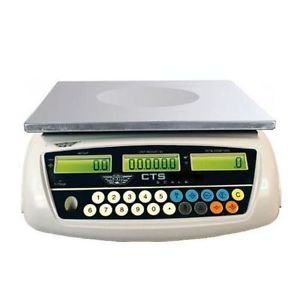
Image: The My Weigh CTS-3000 Digital Counting Scale, featuring a stainless steel platform and a blue backlit LCD display.
การตั้งค่า
- การแกะกล่อง: Carefully remove the scale from its packaging. Ensure all components are present: the scale unit, stainless steel platform, clear protective cover, and AC adapter.
- การจัดวาง: Place the scale on a stable, flat, and level surface. Avoid areas with excessive vibration, drafts, or direct sunlight, as these can affect accuracy. The scale features adjustable feet for leveling.
- การเชื่อมต่อไฟฟ้า:
- ไฟฟ้ากระแสสลับ: Connect the provided AC adapter to the scale's power input port and then plug it into a standard electrical outlet.
- พลังงานแบตเตอรี่: The scale can also operate on 5 AA batteries (not included). Open the battery compartment on the underside of the scale and insert the batteries, ensuring correct polarity. The scale features overcharge and over-discharge protection when using the rechargeable battery pack (if included).
- การติดตั้งแพลตฟอร์ม: Place the stainless steel weighing platform securely onto the scale base.
- ฝาครอบป้องกัน: Position the clear protective cover over the display and control panel to guard against spills and debris.
- เปิดเครื่องครั้งแรก: กดปุ่ม เปิด/ปิด button to power on the scale. The display will show a self-test sequence before settling at 0.00.
คำแนะนำการใช้งาน
1 การชั่งน้ำหนักพื้นฐาน
- เปิดเครื่อง: กดปุ่ม เปิด/ปิด button. Wait for the display to stabilize at 0.00.
- รายการสถานที่: Gently place the item(s) to be weighed onto the center of the stainless steel platform.
- อ่านการวัด: The weight will be displayed on the main LCD screen.
2. Changing Weighing Modes (Units)
The CTS-3000 supports multiple weighing modes: grams (g), ounces (oz), kilograms (kg), and pounds (lb).
- กดโหมด: เมื่อเปิดเครื่องชั่งแล้ว ให้กดปุ่ม โหมด button repeatedly to cycle through the available units.
- เลือกหน่วย: Stop pressing when your desired unit (e.g., "g" for grams, "lb" for pounds) is displayed.
Video: Demonstration of the scale's accurate weighing and unit conversion functions. The video shows how to switch between grams, kilograms, and pounds.
3. ฟังก์ชันภาชนะ
ฟังก์ชัน Tare ช่วยให้คุณหักน้ำหนักของภาชนะออก เพื่อให้ได้น้ำหนักที่วัดได้เฉพาะน้ำหนักของสิ่งของภายในภาชนะเท่านั้น
- วางภาชนะ: วางภาชนะเปล่าบนแท่นชั่งน้ำหนัก จอแสดงผลจะแสดงน้ำหนักของภาชนะ
- Press TARE: กดปุ่ม ทดค่า button. The display will reset to 0.00, effectively subtracting the container's weight.
- เพิ่มรายการ: ใส่สิ่งของที่ต้องการชั่งน้ำหนักลงในภาชนะ หน้าจอจะแสดงเฉพาะน้ำหนักสุทธิของสิ่งของเท่านั้น
4. ฟังก์ชั่นการนับ
The counting function allows you to count a large number of identical items quickly.
- Sampปริมาณ: Place a known number of sample items (e.g., 10, 20, 50, 100) on the platform. The more samples, the more accurate the count.
- อินพุต Sampเลอ: Using the numeric keypad, enter the exact number of samples you placed on the platform.
- กด SAMPLE: กดปุ่ม SAMPLE button. The scale will calculate the average unit weight and display the quantity.
- Add More Items: ถอด samples and add the bulk quantity of items. The scale will automatically count them.
Video: Demonstration of the counting function, showing how to input a sample quantity and then count a larger batch of items.
5. Alarm Function (Weight & Quantity)
The scale features an alarm function that can be set for both weight and quantity thresholds.
- เข้าสู่โหมดเตือนภัย: กดปุ่มค้างไว้ '.' คีย์แล้วกด '5' to enter the alarm mode setting.
- Select Alarm Type: ใช้ M+ key to cycle through alarm modes: "no" (alarm off), "in" (alarm within range), "out" (alarm outside range), "up" (alarm when exceeding set value).
- Set Alarm Value: กดปุ่ม ตั้งปลุก key. Input the desired alarm value using the numeric keypad. For weight, input the value in grams (e.g., 10000 for 1kg on a 0.1g scale). For quantity, input the number of pieces.
- ยืนยัน: กดปุ่ม ทดค่า เพื่อยืนยันการตั้งค่า
Video: Detailed instructions on setting up the weight and quantity alarm functions on the counting scale.
การซ่อมบำรุง
- การทำความสะอาด: Wipe the scale platform and display with a soft, damp cloth. Do not use abrasive cleaners or immerse the scale in water. The removable "gunk shield" protects the display from spills.
- พื้นที่จัดเก็บ: เก็บเครื่องชั่งไว้ในที่สะอาดและแห้ง หลีกเลี่ยงอุณหภูมิและความชื้นที่สูงหรือต่ำเกินไป
- การดูแลแบตเตอรี่ If using battery power, ensure batteries are replaced when low to maintain accuracy. If storing for extended periods, remove batteries to prevent leakage.
การแก้ไขปัญหา
| ปัญหา | สาเหตุที่เป็นไปได้ | สารละลาย |
|---|---|---|
| เครื่องชั่งน้ำหนักไม่เปิด | No power, dead batteries, or faulty adapter. | Check AC adapter connection or replace batteries. |
| การอ่านที่ไม่ถูกต้อง | Unstable surface, drafts, or scale not level. | Place on a stable, level surface. Avoid drafts. Ensure feet are adjusted. |
| หน้าจอแสดงข้อความ "OVERLOAD" | น้ำหนักเกินความจุสูงสุด | ควรเอาส่วนเกินออกทันทีเพื่อป้องกันความเสียหาย |
| Counting function is inaccurate. | ไม่เพียงพอample size or inconsistent unit weight. | ใช้ s ที่ใหญ่กว่าample size (e.g., 50 or 100 pieces) for calibration. Ensure all items are identical. |
ข้อมูลจำเพาะ
- ยี่ห้อ: น้ำหนักของฉัน
- แบบอย่าง: ซีทีเอส-3000
- ความจุ: 30,000 grams (30 kg / 66.078 lb / 1057.24 oz)
- ปณิธาน: 0.5 grams (0.0005 kg / 0.001 lb / 0.02 oz)
- Weighing Modes: Grams (g), Ounces (oz), Kilograms (kg), Pounds (lb), Counting Mode
- แสดง: Three backlit LCD displays (Total Weight, Unit Weight, Number of Pieces)
- เนื้อหาแพลตฟอร์ม: สแตนเลส
- คุณสมบัติ: Tare function, Batching feature, Counting feature, Removable "gunk shield", RS-232 serial port, Liquid level indicator
- พลัง: Rechargeable battery pack and AC adapter included
- ขนาดสินค้า : 14.5 x 7 x 15 นิ้ว
- น้ำหนักสินค้า: 8.9 ปอนด์
การรับประกันและการสนับสนุน
For warranty information and technical support, please refer to the official My Weigh webหรือติดต่อฝ่ายบริการลูกค้า โปรดเก็บใบเสร็จรับเงินไว้เป็นหลักฐานการซื้อสำหรับการเรียกร้องการรับประกันใดๆ
สำหรับข้อมูลเพิ่มเติมและการลงทะเบียนผลิตภัณฑ์ โปรดไปที่: www.myweigh.com


