การแนะนำ
This manual provides comprehensive instructions for the installation, operation, and maintenance of your Kidde AccessPoint 001827 Supra TouchPoint Lock. This lock is designed to replace standard cam locks in various wood storage cabinets or enclosures. Please read this manual thoroughly before installation and use to ensure proper function and longevity of your device.
สินค้าเกินview
คุณสมบัติ
- User changeable combination lock with push button combination, designed to replace a standard cam lock.
- Easily converts keyed cabinets to pushbutton locks; suitable for items with 5/16 inch cams.
- Heavy-duty die-cast construction, ideal for metal cabinets and other enclosures.
- Mounts flush into a door, or on top of a door surface; features a clutch mechanism.
- Includes bracket and stop cams for easy installation, fitting 1.5" Double D openings.
- Equipped with a faceplate for a robust, pronounced appearance.
ส่วนประกอบ
The Kidde AccessPoint 001827 Supra TouchPoint Lock consists of the main lock body, a 10-digit push-button keypad, an 'OPEN' lever, a 'CLEAR' button, and a faceplate. It also includes necessary installation hardware such as brackets and stop cams.
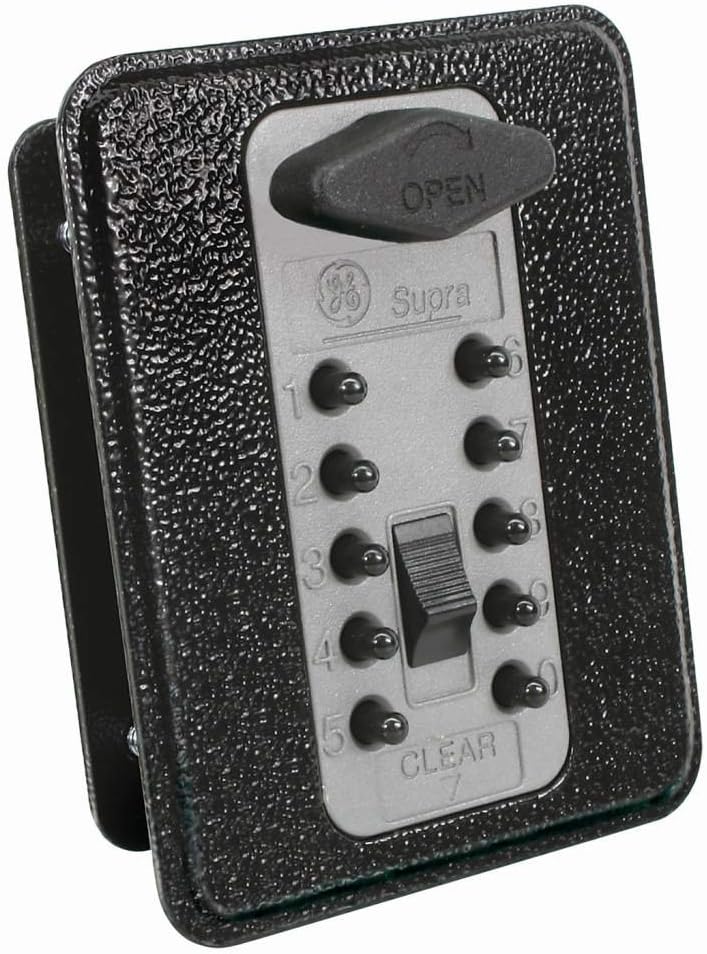
รูปที่ 1: Kidde AccessPoint 001827 Supra TouchPoint Lock. This image displays the lock's front view, featuring a titanium gray faceplate with a black textured body. The keypad has ten numbered buttons (0-9) and a 'CLEAR' button. An 'OPEN' lever is visible at the top, indicating the mechanism to unlock the device. The lock is designed for flush mounting and includes a faceplate.
การติดตั้งและการตั้งค่า
The TouchPoint lock is designed for easy replacement of standard cam locks in wood storage cabinets or enclosures with 5/16 inch square-hole cams. It can be flush-mounted or surface-mounted.
ขั้นตอนการติดตั้ง:
- เตรียมการเปิดงาน: Ensure the cabinet or enclosure has a 5/16 inch square-hole cam opening. If replacing an existing lock, remove the old hardware.
- ตำแหน่งล็อค: Insert the lock body into the prepared opening. The faceplate should sit flush against the surface of the door or cabinet.
- ปลอดภัยด้วยฮาร์ดแวร์: Use the provided bracket and stop cams to secure the lock from the inside of the door. Ensure the lock is firmly in place and does not wobble. The lock fits 1.5" Double D openings.
- การดำเนินการทดสอบ: Before setting a new combination, test the mechanical action of the lock by pressing the 'OPEN' lever. Ensure the cam rotates freely.
Setting/Changing the Combination:
The lock features a user-changeable 10-digit combination. Refer to the specific instructions included in the product packaging for detailed steps on how to set or change your personal combination. This process typically involves a reset mechanism on the back of the lock or a specific sequence of button presses.
คำแนะนำการใช้งาน
การปลดล็อค:
- Enter Combination: Press the buttons corresponding to your set combination in the correct sequence.
- Activate Open Lever: Once the correct combination is entered, push the 'OPEN' lever (visible at the top of the lock) to disengage the locking mechanism.
- Open Door/Drawer: The door or drawer can now be opened.
ล็อค:
- Close Door/Drawer: Ensure the door or drawer is fully closed.
- Scramble Combination: After closing, press the 'CLEAR' button or any random buttons on the keypad to scramble the entered combination. This ensures the lock is secured and the combination is not visible.
สำคัญ: Always scramble the combination after locking to prevent unauthorized access. Remember your combination as there is no master key for this type of lock.
การซ่อมบำรุง
The Kidde AccessPoint 001827 Supra TouchPoint Lock is designed for durability and requires minimal maintenance.
- การทำความสะอาด: เช็ดทำความสะอาดด้านนอกของตัวล็อคด้วยผ้าเนื้อนุ่มและแห้งamp cloth. Avoid using abrasive cleaners, solvents, or harsh chemicals, as these can damage the finish or internal mechanisms.
- การตรวจสอบ: Periodically check the lock for any signs of wear, damage, or loose components. Ensure the 'OPEN' lever and keypad buttons operate smoothly.
- การหล่อลื่น: Do not lubricate the internal mechanism unless specifically instructed by Kidde support. This lock is designed to operate without internal lubrication.
การแก้ไขปัญหา
| ปัญหา | สาเหตุที่เป็นไปได้ | สารละลาย |
|---|---|---|
| Lock does not open after entering combination. | Incorrect combination entered, or combination not fully cleared from previous attempt. | Press the 'CLEAR' button, then re-enter the combination carefully. Ensure all digits are pressed firmly. |
| 'OPEN' lever feels stiff or does not move. | Mechanism obstructed or lock misaligned. | Ensure the door/drawer is not binding against the lock. Check for any foreign objects. Re-check installation alignment if necessary. |
| Combination buttons are sticky or unresponsive. | มีสิ่งสกปรกหรือเศษฝุ่นสะสมอยู่รอบปุ่มต่างๆ | Gently clean around the buttons with a soft, dry brush or cloth. Avoid liquids. |
| Cannot change the combination. | Incorrect procedure followed for combination change. | Refer to the specific combination change instructions provided with your product. Ensure the lock is in the correct state (e.g., unlocked) before attempting to change. |
ข้อมูลจำเพาะ
| ยี่ห้อ | คิดเด |
| ชื่อรุ่น | ทัชพอยต์ |
| หมายเลขชิ้นส่วน | 001827 |
| ประเภทล็อค | กุญแจรหัส |
| วัสดุ | โลหะ |
| สี | สีเทาไททาเนียม |
| สไตล์ | With Faceplate |
| วิธีการควบคุม | สัมผัส (ปุ่มกด) |
| น้ำหนักสินค้า | 1.38 ปอนด์ |
| ขนาดแพ็คเกจ | 6.97 x 3.23 x 2.76 นิ้ว |
| ยูพีซี | 090928018270 |
| ผู้ผลิต | จีอี ซีเคียวริตี้ |
| วันที่พร้อมใช้งานครั้งแรก | 10 พฤศจิกายน 2010 |
การรับประกันและการสนับสนุน
ข้อมูลการรับประกัน:
This Kidde AccessPoint 001827 Supra TouchPoint Lock comes with a รับประกันอะไหล่ 1 ปี from the date of purchase. This warranty covers defects in materials and workmanship under normal use. It does not cover damage resulting from misuse, abuse, unauthorized modification, or improper installation.
การสนับสนุนลูกค้า:
For technical assistance, troubleshooting, or warranty claims, please contact Kidde customer support. You can find contact information on the official Kidde website or through the retailer where you purchased the product. Please have your model number (001827) and proof of purchase ready when contacting support.
เยี่ยมชมเว็บไซต์ทางการของ Kidde webเว็บไซต์สำหรับข้อมูลเพิ่มเติม: www.คิดเด้.com


