การแนะนำ
คู่มือนี้ให้คำแนะนำโดยละเอียดเกี่ยวกับการติดตั้ง การใช้งาน และการบำรุงรักษาเครื่องเล่น DVD Nortek NDVX 2503 อย่างถูกต้อง โปรดอ่านคู่มือนี้อย่างละเอียดก่อนใช้งานอุปกรณ์เพื่อให้มั่นใจถึงประสิทธิภาพและความปลอดภัยสูงสุด เก็บคู่มือนี้ไว้เพื่อใช้อ้างอิงในอนาคต
ข้อมูลด้านความปลอดภัย
- แหล่งพลังงาน: เชื่อมต่อเครื่องเล่นดีวีดีเข้ากับแหล่งจ่ายไฟที่ระบุไว้เท่านั้นtage.
- การระบายอากาศ : ตรวจสอบให้แน่ใจว่ามีการระบายอากาศรอบ ๆ เครื่องอย่างเพียงพอ อย่าปิดกั้นช่องระบายอากาศ
- น้ำและความชื้น: อย่าวางเครื่องไว้ในที่ที่มีฝน ความชื้น หรือของเหลวหยด/กระเด็นใส่
- ความร้อน: เก็บเครื่องให้ห่างจากแหล่งความร้อน เช่น หม้อน้ำ เครื่องทำความร้อน เตา หรืออุปกรณ์อื่นๆ ที่ผลิตความร้อน
- การทำความสะอาด: ถอดปลั๊กเครื่องออกจากเต้ารับที่ผนังก่อนทำความสะอาด ใช้ผ้าแห้งเช็ดทำความสะอาด
- การบริการ: อย่าพยายามให้บริการผลิตภัณฑ์นี้ด้วยตนเอง ส่งต่อการบริการทั้งหมดไปยังช่างบริการที่ผ่านการรับรอง
เนื้อหาแพ็คเกจ
ตรวจสอบว่ารายการทั้งหมดที่ระบุไว้ด้านล่างนี้รวมอยู่ในแพ็คเกจของคุณ:
- เครื่องเล่น DVD Nortek NDVX 2503
- รีโมทคอนโทรล (พร้อมแบตเตอรี่)
- สาย AV (ชนิด RCA)
- คู่มือการใช้งาน (เอกสารนี้)
- สายไฟ
สินค้าเกินview
ทำความคุ้นเคยกับส่วนประกอบและปุ่มควบคุมของเครื่องเล่นดีวีดีของคุณ
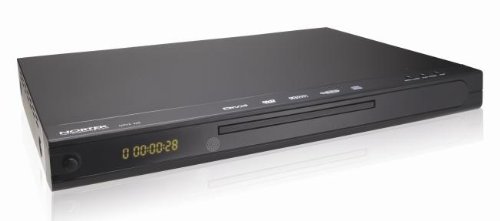
รูปที่ 1: ด้านหน้า view ภาพนี้แสดงให้เห็นเครื่องเล่น DVD Nortek NDVX 2503 ที่มีดีไซน์สีดำเงาasing, ถาดใส่แผ่นดิสก์ตรงกลาง, จอแสดงผลดิจิทัลทางด้านซ้าย และปุ่มควบคุมทางด้านขวาของแผงด้านหน้า
แผงควบคุมด้านหน้า:
- ปุ่มเปิด/ปิด: เปิดหรือปิดเครื่อง
- ถาดใส่แผ่นดิสก์: ใส่แผ่น DVD หรือ CD ของคุณลงในช่องนี้
- แสดง: แสดงเวลาเล่น หมายเลขแทร็ก และสถานะอื่นๆ
- ปุ่มเปิด/ปิด: เปิดและปิดถาดใส่ดิสก์
- ปุ่มเล่น/หยุดชั่วคราว: เริ่มหรือหยุดการเล่นแผ่นดิสก์ชั่วคราว
- ปุ่มหยุด: หยุดการเล่นแผ่น
- ปุ่มข้าม (ไปข้างหน้า/ถอยหลัง): ข้ามไปยังแทร็ก/บทถัดไปหรือก่อนหน้า
การเชื่อมต่อแผงด้านหลัง:
(หมายเหตุ: การเชื่อมต่อเฉพาะอาจแตกต่างกันไป การเชื่อมต่อทั่วไปได้แก่:)
- เอาต์พุตเสียง/วิดีโอ (RCA): ช่องเสียบสีแดง สีขาว (เสียง) และสีเหลือง (วิดีโอ) สำหรับเชื่อมต่อกับทีวีหรือ ampชีวิต.
- เอาต์พุตเสียงดิจิทัลแบบโคแอกเซียล/ออปติคอล: สำหรับเชื่อมต่อกับเครื่องรับสัญญาณโฮมเธียเตอร์สำหรับระบบเสียงดิจิทัล
- กำลังไฟเข้า: เชื่อมต่อสายไฟ
การตั้งค่า
1. การเชื่อมต่อกับโทรทัศน์:
- โปรดตรวจสอบให้แน่ใจว่าทั้งเครื่องเล่นดีวีดีและโทรทัศน์ของคุณปิดอยู่และถอดปลั๊กออกแล้ว
- เชื่อมต่อสายวิดีโอ RCA สีเหลืองจากช่อง "Video Out" บนเครื่องเล่นดีวีดีไปยังช่อง "Video In" บนโทรทัศน์ของคุณ
- เชื่อมต่อสายสัญญาณเสียง RCA สีแดงและสีขาวจากช่อง "Audio Out" (สีแดงสำหรับด้านขวา สีขาวสำหรับด้านซ้าย) บนเครื่องเล่นดีวีดี เข้ากับช่อง "Audio In" ที่ตรงกันบนโทรทัศน์หรือเครื่องรับสัญญาณเสียงของคุณ
- หากใช้ระบบเสียงดิจิทัล ให้เชื่อมต่อสายโคแอกเซียลหรือสายออปติคอลจากช่องสัญญาณเสียงดิจิทัลเอาต์พุตของเครื่องเล่น DVD ไปยังช่องสัญญาณเสียงดิจิทัลอินพุตของเครื่องรับสัญญาณ
2. การเชื่อมต่อไฟฟ้า:
- เสียบสายไฟเข้ากับช่องเสียบไฟด้านหลังเครื่องเล่นดีวีดี
- เสียบปลายสายไฟอีกด้านเข้ากับเต้ารับที่ผนัง
3. การเปิดเครื่องครั้งแรก:
- เปิดโทรทัศน์และเลือกแหล่งสัญญาณเข้าที่ถูกต้อง (เช่น AV1, Video 1) ซึ่งตรงกับช่องที่คุณเชื่อมต่อเครื่องเล่นดีวีดี
- กดปุ่มเปิด/ปิดบนเครื่องเล่นดีวีดีหรือรีโมทคอนโทรลเพื่อเปิดเครื่อง
- โลโก้ Nortek หรือเมนูการตั้งค่าควรปรากฏบนหน้าจอทีวีของคุณ
คำแนะนำการใช้งาน
1. การเล่นแผ่น:
- กดปุ่ม เปิด/ปิด กดปุ่มบนแผงด้านหน้าหรือรีโมทคอนโทรลเพื่อเปิดถาดใส่แผ่นดิสก์
- วางแผ่น DVD, DVD+R หรือ Video CD ลงในถาดอย่างเบามือ โดยให้ด้านที่มีฉลากหงายขึ้น
- กดปุ่ม เปิด/ปิด ปุ่มอีกครั้งเพื่อปิดถาด
- เครื่องเล่นจะเริ่มอ่านแผ่นโดยอัตโนมัติ การเล่นจะเริ่มในไม่ช้า หากเมนูแสดงขึ้น ให้ใช้ปุ่มลูกศรบนรีโมทเพื่อเลื่อนดูและเลือกเมนู เข้า ปุ่มเพื่อเลือก
- ใช้ เล่น/หยุดชั่วคราว, หยุด, และ ข้าม ปุ่มบนรีโมทหรือแผงด้านหน้าสำหรับควบคุมการเล่น
2. การนำทางเมนู:
- ใช้ ลูกศร กดปุ่มบนรีโมทคอนโทรลเพื่อเลื่อนดูตัวเลือกในเมนู
- กดปุ่ม เข้า or OK ปุ่มเพื่อยืนยันการเลือก
- การ เมนู ปุ่มนี้โดยทั่วไปจะนำคุณกลับไปยังเมนูหลักของแผ่นดิสก์
การซ่อมบำรุง
การทำความสะอาดหน่วย:
- ถอดปลั๊กเครื่องเล่นดีวีดีออกจากเต้ารับไฟฟ้าก่อนทำความสะอาด
- ใช้ผ้าแห้งนุ่มเช็ดทำความสะอาดภายนอกตัวเครื่อง ห้ามใช้น้ำยาทำความสะอาดหรือสเปรย์กระป๋อง
- ระวังอย่าให้มีฝุ่นหรือเศษสิ่งสกปรกเข้าไปในกลไกถาดใส่แผ่นดิสก์
การดูแลรักษาแผ่นดิสก์:
- จับแผ่นดิสก์โดยจับที่ขอบเพื่อหลีกเลี่ยงรอยนิ้วมือบนพื้นผิวการเล่น
- ควรเก็บแผ่นดิสก์ไว้ในกล่องเมื่อไม่ได้ใช้งานเพื่อป้องกันรอยขีดข่วน
- ทำความสะอาดแผ่นดิสก์ที่สกปรกด้วยผ้านุ่มที่ไม่เป็นขุย เช็ดจากตรงกลางออกด้านนอก
การแก้ไขปัญหา
| ปัญหา | สาเหตุที่เป็นไปได้ | สารละลาย |
|---|---|---|
| ไม่มีไฟฟ้า | ไม่ได้เสียบสายไฟ; ปลั๊กไฟไม่ทำงาน | ตรวจสอบให้แน่ใจว่าเสียบสายไฟแน่นดีแล้ว ทดสอบเต้ารับกับอุปกรณ์อื่น |
| ไม่มีภาพหรือเสียง | สาย AV เชื่อมต่อไม่ถูกต้อง; เลือกช่องสัญญาณเข้าทีวีไม่ถูกต้อง | ตรวจสอบการเชื่อมต่อสาย AV ทั้งหมด เลือกแหล่งสัญญาณเข้าที่ถูกต้องบนทีวีของคุณ (เช่น AV1, Video 1) |
| แผ่นไม่เล่น | แผ่นดิสก์สกปรกหรือมีรอยขีดข่วน; ใส่แผ่นดิสก์ไม่ถูกต้อง; รูปแบบแผ่นดิสก์ไม่เข้ากัน | ทำความสะอาดแผ่นดิสก์ ตรวจสอบให้แน่ใจว่าใส่แผ่นดิสก์โดยหันด้านที่มีฉลากขึ้นด้านบน ตรวจสอบว่าแผ่นดิสก์เป็นรูปแบบที่รองรับ (DVD, DVD+R, Video CD) |
| รีโมตคอนโทรลไม่ทำงาน | แบตเตอรี่หมดหรือใส่ไม่ถูกต้อง มีสิ่งกีดขวางระหว่างรีโมทและเครื่องเล่น | เปลี่ยนแบตเตอรี่ ตรวจสอบให้แน่ใจว่าใส่แบตเตอรี่ถูกขั้ว นำสิ่งกีดขวางออกให้หมด เล็งรีโมทไปที่เซ็นเซอร์ของเครื่องเล่นโดยตรง |
ข้อมูลจำเพาะ
- ยี่ห้อ: นอร์เท
- ชื่อรุ่น : เอ็นดีวีเอ็กซ์ 2503
- ประเภทสื่อที่รองรับ: ดีวีดี, ดีวีดี+อาร์, วิดีโอซีดี
- ASIN: B0044AL0TM
- ผู้ผลิต: นอร์เท
- หมายเหตุ: ข้อมูลจำเพาะอื่นๆ เช่น ขนาด น้ำหนัก และการใช้พลังงาน ไม่มีอยู่ในข้อมูลที่ให้มา
การรับประกันและการสนับสนุน
สำหรับข้อมูลการรับประกันหรือการสนับสนุนทางเทคนิค โปรดดูบัตรรับประกันที่แนบมากับผลิตภัณฑ์ของคุณ หรือเยี่ยมชมเว็บไซต์อย่างเป็นทางการของ Nortek webไซต์ เก็บหลักฐานการซื้อของคุณไว้เพื่อใช้ในกรณีเรียกร้องการรับประกัน
หากต้องการความช่วยเหลือเพิ่มเติม คุณสามารถติดต่อฝ่ายบริการลูกค้าของ Nortek ผ่านช่องทางอย่างเป็นทางการของบริษัทได้


