การแนะนำ
This manual provides essential information for the safe and effective use of your Lexmark E360, E460, E462 Series High Yield Return Program Toner Cartridge (Part Number E360H11A). This genuine Lexmark product is designed to deliver consistent, high-quality monochrome laser prints with an estimated yield of 9,000 pages. Please read this manual thoroughly before installation and use.
ข้อมูลด้านความปลอดภัย
- เก็บตลับหมึกให้พ้นมือเด็ก
- Do not incinerate toner cartridges. Residual toner dust can ignite.
- Avoid inhaling toner dust. If toner gets on your skin or clothing, wash it off immediately with soap and cold water.
- Do not attempt to disassemble the toner cartridge.
- Store cartridges in their original packaging in a cool, dry place away from direct sunlight.
มีอะไรอยู่ในกล่อง
แพ็คเกจของคุณควรมีรายการต่อไปนี้:
- One (1) Lexmark E360, E460, E462 Series High Yield Return Program Toner Cartridge (Part Number E360H11A)
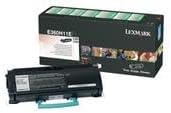
This image displays the Lexmark E360H11A High Yield Return Program Toner Cartridge alongside its retail packaging. The cartridge is black with a light blue handle, and the box features Lexmark branding and product details.
การติดตั้งและการตั้งค่า
Follow these steps to properly install the toner cartridge in your Lexmark E360, E460, or E462 series printer:
- ปิดเครื่องพิมพ์: โปรดตรวจสอบให้แน่ใจว่าเครื่องพิมพ์ปิดอยู่และถอดปลั๊กออกจากเต้าเสียบไฟก่อนเริ่มกระบวนการติดตั้ง
- เปิดหน้าปก: Open the front cover of your Lexmark printer to access the toner cartridge compartment.
- ถอดตลับหมึกเก่าออก (ถ้ามี): If replacing an old cartridge, carefully pull it straight out of the printer. Place it in a protective bag for recycling.
- แกะกล่องตลับหมึกใหม่: Remove the new Lexmark E360H11A toner cartridge from its packaging. Avoid touching the green drum surface.
- เขย่าตลับ: Gently shake the new cartridge horizontally 5-6 times to distribute the toner evenly.
- แกะซีลป้องกันออก: Carefully remove any protective tapes or seals from the cartridge as indicated in your printer's specific manual.
- ใส่ตลับหมึกใหม่: จัดวางตลับหมึกใหม่ให้ตรงกับร่องภายในเครื่องพิมพ์ แล้วดันเข้าไปให้แน่นจนกระทั่งมีเสียงคลิกเข้าที่
- ปิดหน้าปก: ปิดฝาด้านหน้าของเครื่องพิมพ์
- เปิดเครื่องพิมพ์: Plug in and turn on your printer. The printer will typically perform a self-test and recognize the new cartridge.
Refer to your specific Lexmark printer's user manual for detailed instructions and illustrations.
คำแนะนำการใช้งาน
Once the Lexmark E360H11A toner cartridge is installed, your printer is ready for operation. The cartridge functions automatically as part of the printing process.
- การพิมพ์: Initiate print jobs from your computer or device as you normally would. The printer will draw toner from the cartridge to create monochrome prints.
- การตรวจสอบระดับผงหมึก: Most Lexmark printers provide a way to monitor toner levels through the printer's control panel or software utility. Monitor these levels to know when a replacement cartridge will be needed.
- คุณภาพการพิมพ์: If print quality degrades (e.g., faded prints, streaks), it may indicate a low toner level or an issue with the cartridge. Refer to the Troubleshooting section.
การซ่อมบำรุง
การดูแลรักษาและการจัดเก็บอย่างถูกวิธีสามารถยืดอายุการใช้งานและประสิทธิภาพของตลับหมึกพิมพ์ได้:
- พื้นที่จัดเก็บ: เก็บตลับหมึกที่ยังไม่ได้ใช้งานไว้ในบรรจุภัณฑ์เดิมที่ปิดสนิท ในที่แห้งและเย็น หลีกเลี่ยงแสงแดดโดยตรงและอุณหภูมิที่สูงหรือต่ำเกินไป
- การจัดการ: Always handle the cartridge by its designated handles or edges. Avoid touching the imaging drum.
- การกำจัด/รีไซเคิล: This is a Lexmark Return Program Toner Cartridge. Please return the empty cartridge to Lexmark for proper recycling. Instructions for return are typically included with the new cartridge or can be found on the official Lexmark website. Do not dispose of cartridges in regular waste.
การแก้ไขปัญหา
หากคุณพบปัญหาเกี่ยวกับตลับหมึก โปรดพิจารณาวิธีแก้ไขปัญหาทั่วไปต่อไปนี้:
| ปัญหา | สาเหตุที่เป็นไปได้ | สารละลาย |
|---|---|---|
| ภาพพิมพ์ที่ซีดจางหรือจาง | ระดับผงหมึกต่ำ การกระจายผงหมึกไม่สม่ำเสมอ | Gently shake the cartridge horizontally. If problem persists, replace the cartridge. |
| Streaks or Lines on Prints | Dirty imaging drum; damaged cartridge. | Do not touch the drum. If the cartridge is new, ensure all seals are removed. If problem persists, replace the cartridge. |
| "Toner Low" or "Replace Cartridge" Message | Toner is genuinely low; cartridge not seated correctly. | Reseat the cartridge firmly. If message persists, replace with a new cartridge. |
| Cartridge Not Recognized | Improper installation; faulty cartridge. | Remove and reinsert the cartridge, ensuring it clicks into place. Restart the printer. If issue continues, contact Lexmark support. |
For more complex issues, consult your printer's specific user manual or the Lexmark support webเว็บไซต์.
ข้อมูลจำเพาะ
| คุณสมบัติ | รายละเอียด |
|---|---|
| ประเภทสินค้า | ตลับหมึกโทนเนอร์ |
| ยี่ห้อ | เล็กซ์มาร์ก |
| หมายเลขชิ้นส่วน | E360H11A |
| ความเข้ากันได้ | Lexmark E360, E460, E462 Series Monochrome Laser Printers |
| พิมพ์เทคโนโลยี | เลเซอร์ขาวดำ |
| ผลผลิตหน้า | สูงสุด 9,000 หน้า (มาตรฐาน ISO/IEC 19752) |
| คุณสมบัติพิเศษ | High Yield, Return Program Cartridge |
| ส่วนประกอบที่รวมอยู่ | ตลับหมึกโทนเนอร์ |
| ASIN | B00434R3GI |
| วันที่พร้อมใช้งานครั้งแรก | วันที่ 15 กันยายน 2010 |
ข้อมูลการรับประกัน
Lexmark toner cartridges are manufactured to high quality standards. For specific warranty terms and conditions applicable to your Lexmark E360H11A toner cartridge, please refer to the documentation included with your printer or visit the official Lexmark webโดยทั่วไป การรับประกันจะครอบคลุมถึงข้อบกพร่องในวัสดุและฝีมือการผลิตภายใต้การใช้งานปกติ
สนับสนุน
If you require further assistance or have questions regarding your Lexmark E360, E460, E462 Series High Yield Return Program Toner Cartridge, please contact Lexmark Customer Support:
- Lexmark Official Webเว็บไซต์: www.lexmark.com/support
- แหล่งข้อมูลออนไลน์: Access FAQs, drivers, and troubleshooting guides.
- ข้อมูลติดต่อ: Find phone numbers or chat options for direct support on the Lexmark support webเว็บไซต์.
When contacting support, please have your printer model and toner cartridge part number (E360H11A) ready.


