1. บทนำ
The M-AUDIO Avid KeyStudio is a 49-key, velocity-sensitive, synth-action USB MIDI keyboard controller designed for music creation and performance. It provides essential controls for interacting with digital audio workstations (DAWs) and virtual instruments.
คุณสมบัติที่สำคัญ ได้แก่:
- คีย์ 49 คีย์ที่ไวต่อแรงกด เพื่อการเล่นที่แสดงอารมณ์ได้อย่างเต็มที่
- Assignable modulation wheel for vibrato and filter effects.
- Pitch bend wheel for expressive performances.
- Volume slider for output level control.
- Octave and transpose buttons to adjust the keyboard's range.

รูปที่ 1: มุม view of the M-AUDIO Avid KeyStudio 49-Key USB MIDI Keyboard Controller.
2. ข้อมูลด้านความปลอดภัย
Please read and understand the following safety precautions before operating the Avid KeyStudio:
- แหล่งพลังงาน: Connect the device only to a USB port that meets the specified power requirements.
- ความชื้น: อย่าวางเครื่องไว้ในที่ที่มีฝน ความชื้น หรือความชื้นสูงเกินไป
- ความร้อน: ควรวางเครื่องให้ห่างจากแหล่งความร้อน เช่น เครื่องทำความร้อน ช่องระบายความร้อน เตา หรือเครื่องใช้ไฟฟ้าอื่นๆ ที่ให้ความร้อน
- การทำความสะอาด: ทำความสะอาดด้วยผ้าแห้งเท่านั้น ห้ามใช้น้ำยาทำความสะอาดหรือสเปรย์
- การบริการ: อย่าพยายามให้บริการผลิตภัณฑ์นี้ด้วยตนเอง ส่งต่อการบริการทั้งหมดไปยังช่างบริการที่ผ่านการรับรอง
- การจัดวาง: วางอุปกรณ์บนพื้นผิวที่มั่นคงและเรียบ เพื่อป้องกันการตกหล่นโดยไม่ตั้งใจ
3. เนื้อหาบรรจุภัณฑ์
ตรวจสอบว่ามีรายการทั้งหมดอยู่ในแพ็คเกจ:
- Avid KeyStudio 49-Key USB MIDI Keyboard Controller
- สาย USB
- M-Audio Micro USB Audio Interface (may be included with some bundles)
- Software Installation Disc (e.g., Pro Tools SE)
- คู่มือการใช้งาน (เอกสารนี้)

Figure 2: Avid KeyStudio product packaging, indicating included components.

Figure 3: The M-Audio Micro USB Audio Interface, often bundled with the KeyStudio.
4. การตั้งค่า
4.1 การเชื่อมต่อฮาร์ดแวร์
- Connect one end of the supplied USB cable to the USB port on the back of the Avid KeyStudio.
- Connect the other end of the USB cable to an available USB port on your computer. The KeyStudio is USB bus-powered and does not require an external power adapter.
- If using the M-Audio Micro USB Audio Interface, connect it to another available USB port on your computer.

Figure 4: Rear panel of the Avid KeyStudio with the USB port for computer connection.
4.2 การติดตั้งซอฟต์แวร์
The Avid KeyStudio typically includes a software bundle, such as Pro Tools SE, and requires drivers for full functionality. Follow these steps:
- Insert the software installation disc into your computer's optical drive. If no disc is provided or your computer lacks an optical drive, download the latest drivers and software from the official M-Audio webเว็บไซต์.
- Follow the on-screen instructions to install the necessary drivers for the Avid KeyStudio. It is recommended to install drivers before connecting the keyboard for the first time.
- Install the bundled software (e.g., Pro Tools SE) as per its specific instructions.
- หลังจากติดตั้งเสร็จแล้ว ให้รีสตาร์ทคอมพิวเตอร์หากมีข้อความแจ้งเตือน
- Once your computer has restarted, connect the Avid KeyStudio via USB. The operating system should recognize the device.

Figure 5: The Avid KeyStudio connected to a computer, ready for use with music production software.
5. คู่มือการใช้งาน
5.1 การควบคุมมากกว่าview
The Avid KeyStudio features a straightforward layout for intuitive control:

รูปที่ 6: ด้านบน view of the Avid KeyStudio, highlighting its main controls.
- คีย์ไวต่อแรงกด 49 คีย์: These keys respond to how hard you press them, allowing for dynamic musical expression.
- ล้อโค้งสนาม: Located on the left, this wheel allows you to momentarily raise or lower the pitch of notes for expressive effects.
- ล้อปรับ: Also on the left, this wheel is typically assigned to control vibrato, filter cutoff, or other continuous parameters within your software.
- ตัวเลื่อนระดับเสียง: Adjusts the MIDI output volume. This controls the volume within your software, not the physical output of the keyboard itself.
- ปุ่มคู่: Use these buttons to shift the entire keyboard's range up or down in octaves. This allows access to a wider range of notes than the 49 physical keys provide.
- Transpose Buttons: These buttons allow you to shift the pitch of the keyboard up or down in semitone increments.
- Edit Mode Button: This button is used to access advanced configuration options. Refer to the software documentation for specific functions.
5.2 การใช้งานร่วมกับซอฟต์แวร์
The Avid KeyStudio functions as a MIDI controller, sending MIDI data to your computer. It is compatible with most Digital Audio Workstations (DAWs) and music software, including the bundled Pro Tools SE, GarageBand, FL Studio, and REAPER.
- Launch your DAW: Open your preferred music software (e.g., Pro Tools SE).
- Select MIDI Input: In your DAW's preferences or settings, ensure that the Avid KeyStudio is selected as a MIDI input device.
- Load an Instrument: Create a new track and load a virtual instrument (e.g., piano, synth, drums).
- Play and Record: You can now play the virtual instrument using the KeyStudio's keys and controls. Use the DAW's recording functions to capture your performance.
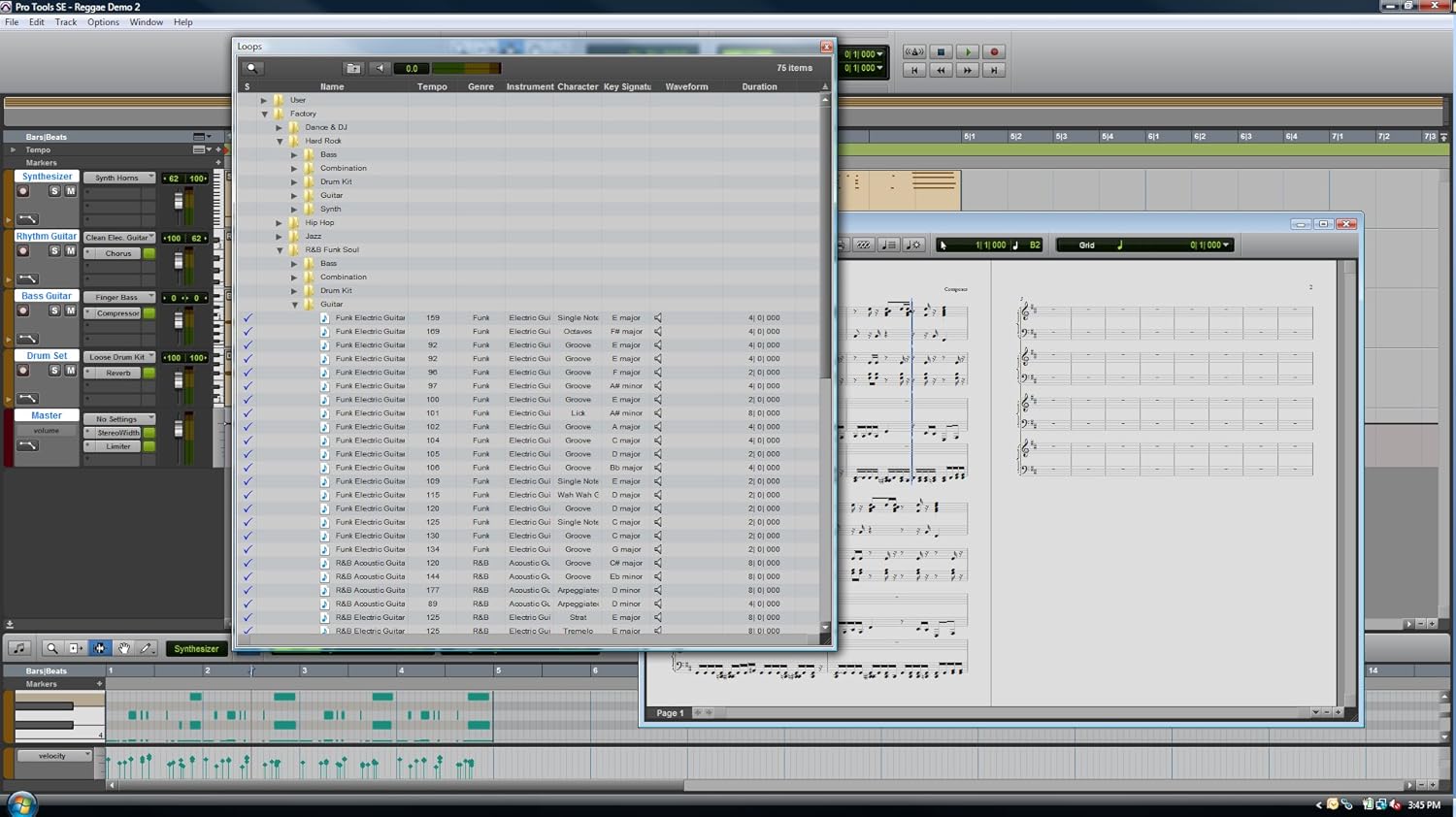
รูปที่ 7: อดีตample of the Pro Tools SE software interface, where the KeyStudio can control virtual instruments.

Figure 8: Pro Tools SE 'New Session' screen, allowing selection of various project templates.

Figure 9: Selecting a virtual instrument (Guitars) within Pro Tools SE.
6. การบำรุงรักษา
Proper maintenance ensures the longevity and optimal performance of your Avid KeyStudio.
- การทำความสะอาด: Use a soft, dry, lint-free cloth to wipe the surface of the keyboard. Avoid abrasive cleaners, solvents, or waxes.
- พื้นที่จัดเก็บ: When not in use, store the keyboard in a clean, dry environment, away from direct sunlight and extreme temperatures. Consider using a dust cover.
- การจัดการ: ควรหลีกเลี่ยงการทำแป้นพิมพ์ตกหรือการกระแทกอย่างแรง และอย่าวางสิ่งของหนักทับแป้นพิมพ์
7 การแก้ไขปัญหา
If you encounter issues with your Avid KeyStudio, refer to the following common problems and solutions:
| ปัญหา | สาเหตุที่เป็นไปได้ / วิธีแก้ไข |
|---|---|
| Keyboard not recognized by computer/software. |
|
| No sound when playing keys. |
|
| Keys feel unresponsive or inconsistent velocity. |
|
| Software crashes during installation or use. |
|
8. ข้อมูลจำเพาะ
| คุณสมบัติ | รายละเอียด |
|---|---|
| กุญแจ | 49, velocity-sensitive, synth-action |
| การเชื่อมต่อ | ยูเอสบี |
| การควบคุม | Pitch Bend Wheel, Modulation Wheel, Volume Slider, Octave Up/Down Buttons, Transpose Buttons, Edit Mode Button |
| พลัง | USB บัสขับเคลื่อน |
| น้ำหนักสินค้า | 6.5 ปอนด์ (2.95 กก.) |
| ขนาดสินค้า | 34 x 4 x 9.5 นิ้ว (86.36 x 10.16 x 24.13 ซม.) |
| หมายเลขรุ่น | Avid KeyStudio |
| ยูพีซี | 763615778978, 777785735495, 613570227335 |
| มีจำหน่ายครั้งแรก | วันที่ 16 กันยายน 2010 |
9. การรับประกันและการสนับสนุน
M-AUDIO products are covered by a limited warranty. For specific warranty terms and conditions, please refer to the warranty card included with your product or visit the official M-AUDIO webเว็บไซต์.
For technical support, driver downloads, and additional resources, please visit the M-AUDIO support page:
https://www.m-audio.com/support
When contacting support, please have your product model (Avid KeyStudio) and serial number ready.