1. บทนำ
This manual provides comprehensive instructions for the setup, operation, and maintenance of your Jensen JCR-175 AM/FM Alarm Clock Radio. Please read this manual thoroughly before using the device to ensure proper function and to maximize your user experience. Keep this manual for future reference.
2. ข้อมูลด้านความปลอดภัย
ปฏิบัติตามข้อควรระวังด้านความปลอดภัยต่อไปนี้เพื่อป้องกันไฟฟ้าช็อต ไฟไหม้ หรือความเสียหายต่อเครื่อง
- อย่าให้เครื่องนี้โดนฝนหรือความชื้น
- อย่าปิดกั้นช่องระบายอากาศใดๆ ติดตั้งตามคำแนะนำของผู้ผลิต
- ห้ามติดตั้งใกล้แหล่งความร้อน เช่น หม้อน้ำ เครื่องทำความร้อน เตา หรืออุปกรณ์อื่น ๆ (รวมถึง ampเครื่องให้ความร้อน) ที่ผลิตความร้อน
- ป้องกันสายไฟเดินหรือถูกบีบโดยเฉพาะที่ปลั๊กเต้ารับอำนวยความสะดวกและจุดที่ออกจากเครื่อง
- ใช้เฉพาะอุปกรณ์เสริม/สิ่งที่แนบตามที่ผู้ผลิตกำหนดเท่านั้น
- ถอดปลั๊กเครื่องใช้ไฟฟ้านี้ในระหว่างพายุฝนฟ้าคะนองหรือเมื่อไม่ได้ใช้งานเป็นเวลานาน
- ควรส่งเครื่องใช้ไฟฟ้าเข้ารับบริการจากช่างผู้ชำนาญการเท่านั้น การเข้ารับบริการเป็นสิ่งจำเป็นเมื่อเครื่องใช้ไฟฟ้าได้รับความเสียหายในลักษณะใดๆ เช่น สายไฟหรือปลั๊กชำรุด มีของเหลวหกใส่ หรือมีสิ่งของตกลงไปในเครื่อง เครื่องใช้ไฟฟ้าโดนฝนหรือความชื้น ไม่ทำงานตามปกติ หรือตกหล่น
- ความปลอดภัยของแบตเตอรี่: Do not mix old and new batteries. Do not mix alkaline, standard (carbon-zinc), or rechargeable (nickel-cadmium) batteries. Ensure batteries are inserted with correct polarity. Remove batteries if the unit is not used for an extended period.
3. เนื้อหาบรรจุภัณฑ์
ตรวจสอบให้แน่ใจว่ามีสินค้าครบถ้วนก่อนเปิดบรรจุภัณฑ์:
- Jensen JCR-175 AM/FM Alarm Clock Radio
- คู่มือเจ้าของ (เอกสารนี้)
4. สินค้าหมดview
The Jensen JCR-175 is an AM/FM alarm clock radio featuring a 0.9-inch green LED display. It allows you to wake to either the radio or a traditional alarm tone and includes snooze functionality.

ภาพที่ 4.1: ด้านหน้า view of the Jensen JCR-175 with key features and controls labeled, including the 0.9-inch green LED display, AM/FM digital tuner, AUX-IN jack, and buttons for HR, MIN, Tuning+, Preset, Snooze, Volume+, Mode, and Radio/Power.
4.1 Controls and Display Elements
- 0.9-inch Green LED Display: แสดงเวลาปัจจุบัน สถานะการปลุก และความถี่วิทยุ
- ปุ่มทรัพยากรบุคคล: Adjusts the hour for clock and alarm settings.
- ปุ่ม MIN: Adjusts the minute for clock and alarm settings.
- -TUNING+ / PRESET Buttons: Used to tune radio frequencies or navigate through preset stations.
- ปุ่มเลื่อน: Temporarily silences the alarm for a short period.
- -VOLUME+ Buttons: ปรับระดับเอาต์พุตเสียง
- ปุ่มโหมด: Cycles through different operating modes (e.g., time display, alarm setting).
- RADIO / POWER Button: Turns the radio on/off and switches between AM/FM bands.
- AUX-IN Jack (on back): เชื่อมต่ออุปกรณ์เสียงภายนอก

Image 4.2: A clear front-angle view of the Jensen JCR-175 AM/FM Alarm Clock Radio, showcasing its compact design and green LED display.
5. การตั้งค่า
5.1 การเชื่อมต่อสายไฟ
Connect the AC power cord to a standard AC 120V/60Hz wall outlet. The unit is now powered and the display will illuminate.
5.2 การติดตั้งระบบสำรองไฟด้วยแบตเตอรี่
The JCR-175 features a battery backup system to maintain time and alarm settings during a power outage. This requires one 9V battery (not included).
- หาฝาปิดช่องใส่แบตเตอรี่ที่ด้านล่างของตัวเครื่อง
- เปิดฝาครอบ
- ใส่แบตเตอรี่ 9V หนึ่งก้อน โดยสังเกตขั้วให้ถูกต้อง (+ และ -)
- ปิดฝาช่องใส่แบตเตอรี่ให้แน่น
Note: The battery backup only preserves settings; it does not power the display or alarm functions during a power outage.
6. คู่มือการใช้งาน
6.1 การตั้งนาฬิกา
- Ensure the unit is in time display mode (not radio or alarm setting mode).
- กดปุ่มค้างไว้ ตั้งเวลา button (if available, otherwise use a combination like MODE + HR/MIN, or refer to specific model instructions if TIME SET is not present). If no dedicated TIME SET, typically pressing and holding the HR or MIN button will initiate time setting.
- ขณะที่ถือ ตั้งเวลา กดปุ่ม HR button repeatedly to set the hour. Observe the PM indicator for afternoon hours.
- ขณะที่ถือ ตั้งเวลา กดปุ่ม นาที button repeatedly to set the minutes.
- ปล่อยตัว ตั้งเวลา ปุ่มเพื่อยืนยันเวลา
6.2 การใช้งานวิทยุ
- กดปุ่ม RADIO / POWER ปุ่มเพื่อเปิดวิทยุ
- กดปุ่ม RADIO / POWER กดปุ่มอีกครั้งเพื่อสลับระหว่างแบนด์ AM และ FM
- ใช้ -TUNING+ ปุ่มสำหรับปรับจูนไปยังสถานีที่คุณต้องการด้วยตนเอง
- To Set Presets:
- ปรับไปยังสถานีที่ต้องการ
- กดปุ่มค้างไว้ พรีเซ็ต กดปุ่มค้างไว้จนกว่าตัวเลขที่ตั้งไว้จะกะพริบบนหน้าจอแสดงผล
- ใช้ -TUNING+ กดปุ่มเพื่อเลือกหมายเลขสถานีที่ตั้งไว้ล่วงหน้า (1-10 สำหรับ AM, 1-10 สำหรับ FM)
- กดปุ่ม พรีเซ็ต กดปุ่มอีกครั้งเพื่อบันทึกสถานี
- วิธีเรียกใช้ค่าที่ตั้งไว้ล่วงหน้า: กดปุ่มสั้นๆ พรีเซ็ต ปุ่มสำหรับสลับดูสถานีที่บันทึกไว้
- ปรับระดับเสียงโดยใช้ปุ่ม -ปริมาณ+ ปุ่ม
- กดปุ่ม RADIO / POWER button to turn off the radio.
6.3 การตั้งค่าสัญญาณเตือน
The JCR-175 supports two independent alarms (Alarm 1 and Alarm 2).
- กดปุ่ม โหมด button once for Alarm 1 setting, or twice for Alarm 2 setting. The alarm time will flash.
- กดปุ่ม HR ปุ่มสำหรับตั้งเวลาปลุกที่ต้องการ
- กดปุ่ม นาที ปุ่มเพื่อตั้งนาทีการปลุกที่ต้องการ
- กดปุ่ม โหมด button again to select the wake source: เสียงปลุก (bell icon) or วิทยุ (music note icon).
- กดปุ่ม โหมด button once more to confirm and exit alarm setting mode. The alarm indicator (bell or music note) will appear on the display.
6.4 ฟังก์ชั่นเลื่อนซ้ำ
เมื่อเสียงสัญญาณเตือนดังขึ้น ให้กดปุ่มขนาดใหญ่ เลื่อน กดปุ่มนี้ สัญญาณเตือนจะหยุดชั่วคราวและจะดังอีกครั้งหลังจากประมาณ 9 นาที
6.5 อินพุตเสริม
The JCR-175 features an AUX-IN jack on the back, allowing you to connect external audio devices such as MP3 players or smartphones.
- Connect one end of a 3.5mm audio cable (not included) to the AUX-IN jack on the back of the JCR-175.
- ต่อปลายอีกด้านของสายเคเบิลเข้ากับช่องเสียบหูฟังหรือช่องสัญญาณเสียงออกของอุปกรณ์ภายนอกของคุณ
- กดปุ่ม โหมด button until 'AUX' appears on the display (or the unit automatically switches to AUX mode).
- เริ่มเล่นบนอุปกรณ์ภายนอกของคุณ
- ปรับระดับเสียงโดยใช้ปุ่ม -ปริมาณ+ buttons on the JCR-175 and/or your external device.
7. การบำรุงรักษา
7.1 การทำความสะอาดหน่วย
ในการทำความสะอาดภายนอกตัวเครื่อง ให้ใช้ผ้าเนื้อนุ่ม ชุบน้ำหมาดๆamp cloth. Do not use abrasive cleaners, waxes, or solvents as these can damage the finish. Ensure the unit is unplugged before cleaning.
7.2 การดูแลทั่วไป
- หลีกเลี่ยงการวางเครื่องไว้กลางแสงแดดโดยตรงหรือใกล้แหล่งความร้อน
- เก็บเครื่องให้ห่างจากสนามแม่เหล็กแรงสูง
- Do not drop the unit or subject it to strong impacts.
- If the unit will not be used for an extended period, remove the backup battery.
8 การแก้ไขปัญหา
If you encounter issues with your JCR-175, refer to the following common problems and solutions:
| ปัญหา | สาเหตุที่เป็นไปได้ | สารละลาย |
|---|---|---|
| ไม่มีไฟเลี้ยง / หน้าจอปิด | ไม่ได้เสียบสายไฟ; ปลั๊กไฟไม่ทำงาน | Ensure AC power cord is securely plugged into a working outlet. |
| การรับสัญญาณวิทยุไม่ดี | เสาอากาศไม่ได้ยืดออก/อยู่ในตำแหน่งที่ถูกต้อง; สัญญาณรบกวน | Extend and reposition the FM wire antenna. For AM, rotate the unit for best reception. Move away from other electronic devices. |
| นาฬิกาปลุกไม่ส่งเสียง | Alarm not set or not activated; Volume too low (for radio alarm) | Verify alarm time is set and the alarm indicator is visible on the display. Increase volume if waking to radio. |
| เวลา/การตั้งค่าจะหายไปหลังจากไฟดับtage | Backup battery not installed or depleted | Install a fresh 9V battery in the backup compartment. |
| ไม่มีเสียงจาก AUX-IN | Cable not connected properly; Volume too low; Incorrect mode selected | Ensure audio cable is fully inserted. Increase volume on both the unit and the external device. Confirm AUX mode is selected. |
9. ข้อมูลจำเพาะ
The following are the technical specifications for the Jensen JCR-175 AM/FM Alarm Clock Radio:
- ยี่ห้อ: เจนเซ่น
- แบบอย่าง: เจซีอาร์-175
- สี: สีดำ
- ประเภทจอภาพ: Digital, 0.9-inch Green LED
- แหล่งพลังงาน: ใช้ไฟฟ้าแบบมีสาย (AC 120V/60Hz)
- แบตเตอรี่สำรอง: แบตเตอรี่ 9V จำนวน 1 ก้อน (ไม่รวมอยู่ในชุด)
- ขนาดสินค้า : 6.4"W x 3"H (approximately)
- น้ำหนักสินค้า: 14.4 ออนซ์
- คุณสมบัติพิเศษ: Alarm, Snooze, AM/FM Radio, Auxiliary Input
- วัสดุ: พลาสติก
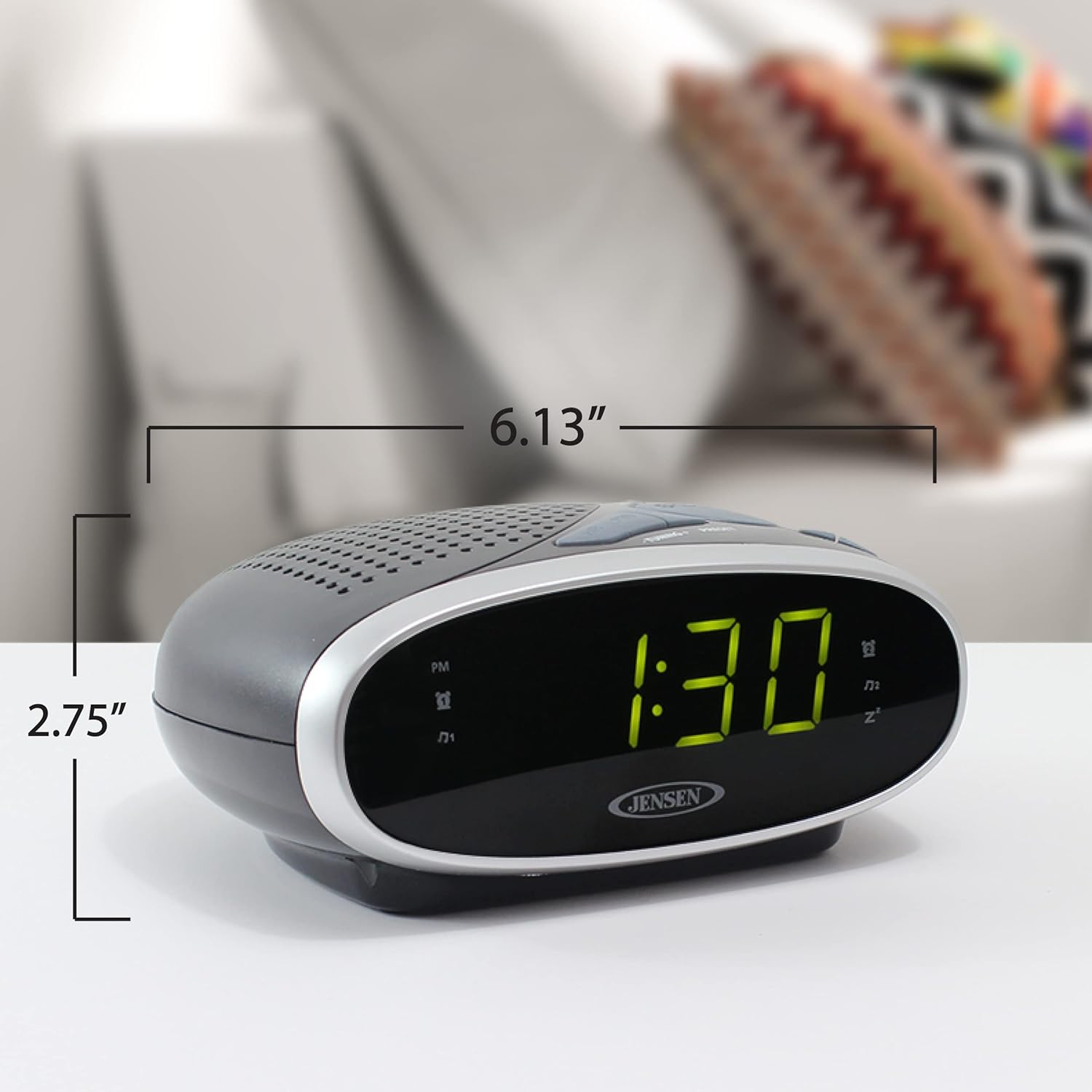
Image 9.1: The Jensen JCR-175 Alarm Clock Radio with its approximate dimensions indicated for reference.
10. การรับประกันและการสนับสนุน
For warranty information and customer support, please refer to the documentation included with your purchase or visit the official Jensen webไซต์ เก็บหลักฐานการซื้อของคุณไว้เพื่อใช้ในกรณีเรียกร้องการรับประกัน


