1. บทนำ
The Zoom R24 is a versatile 24-track portable SD recorder, USB audio interface, pad sampler, and DAW control surface. It features 8 microphone inputs, built-in stereo condenser microphones, integrated effects, and USB connectivity for Mac/PC. This manual provides essential information for setup, operation, and maintenance.
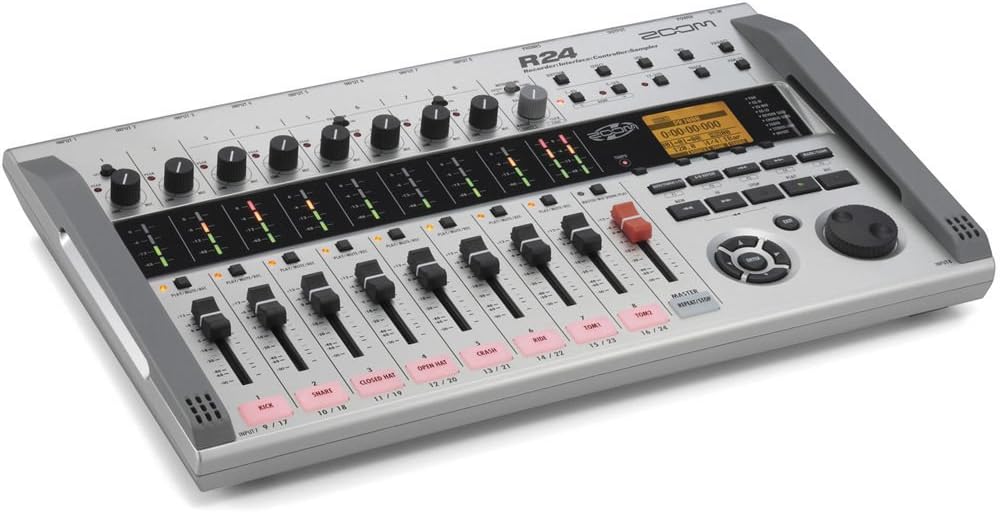
รูปที่ 1: เกินview of the Zoom R24 Digital Multitrack Recorder.
2. การตั้งค่า
2.1 การเปิดเครื่องอุปกรณ์
- The R24 can be powered by 6 AA batteries (included), providing up to 5 hours of operation.
- Alternatively, use an optional AD-17 AC adapter or a USB battery pack for continuous power.
การติดตั้งการ์ด SD 2.2 ตัว
The R24 records to SD and SDHC cards up to 32 GB. Ensure an SD card is properly inserted before recording.
2.3 การเชื่อมต่ออินพุตและเอาต์พุต
The R24 features 8 microphone inputs with combo XLR/TRS jacks. Inputs 1-8 are available. Phantom power is available on inputs 1-6. Input 1 also features a Hi-Z switch for direct guitar/bass connection.

Figure 2: Various connection options and battery compartment of the Zoom R24.
- Connect microphones, keyboards, or mixers to the XLR/TRS inputs.
- Use the Hi-Z switch on Input 1 for direct guitar or bass connection.
- Monitor audio via headphones or connect external monitors to the output jacks.
3. คู่มือการใช้งาน
3.1 การบันทึก
The R24 allows for 8 tracks of simultaneous recording per project. Use the intuitive interface to manage your tracks.

Figure 3: Close-up of the Zoom R24's control panel, showing faders, knobs, and screen interface.
- การกำหนดเส้นทางอินพุต: Select which tracks the inputs will record to via the touchscreen menu.
- Input Dynamics: Apply compression, limiting, or noise gating to each input as needed.
- ไมโครโฟนในตัว: Utilize the high-sensitivity stereo condenser mics for capturing sound effects, speeches, or dialog.
3.2 Editing and Mixing
- Track Editing: Use the touchscreen to drag, drop, loop, and edit audio regions. Options include copy, delete, and split.
- Time Stretching: Adjust the timing of audio clips using the edit function.
- Mixing Tools: Access pan controls and a 3-band EQ for each track in the track settings menu.
- ส่งเอฟเฟกต์: Apply reverb, delay, or chorus effects to tracks.
- Patch Memory: Utilize Zoom's guitar effect collection with 40 preset patches or create custom effect chains of up to three effects.
3.3 Drum Machine and Synthesizer
- Rhythm Loops: The R24 includes 150 drum loops across 30 musical genres, each with five patterns for different song sections (intro, verse, chorus, bridge, outro).
- Synth Tracks: Connect a MIDI keyboard via USB-C or use the touchscreen to add synth parts with 18 available sounds.
3.4 Playback and Mastering
- Bouncing Tracks: Once recorded, edited, and mixed, tracks can be bounced down directly on the R24 to create a final song.
- Sequence Play: Create playlists of your projects for use as backing tracks during live performances or rehearsals.
3.5 USB Audio Interface and DAW Control
- The R24 can function as a 2-in/2-out or 2-in/4-out audio interface for direct recording to a computer (Mac, PC, iOS compatible).
- Utilize the R24's transport controls and faders to control your preferred Digital Audio Workstation (DAW).
วิดีโอ 1: ผลิตภัณฑ์จบview of the Zoom R24, demonstrating key features and functionalities.
4. ข้อมูลจำเพาะ
| คุณสมบัติ | รายละเอียด |
|---|---|
| น้ำหนักสินค้า | 2.87 ปอนด์ |
| ขนาดสินค้า | 14.8 x 9.33 x 2.06 นิ้ว |
| หมายเลขรุ่นสินค้า | R24 |
| แบตเตอรี่ | ต้องใช้แบตเตอรี่ AA 6 ก้อน (รวมอยู่ด้วย) |
| อุปกรณ์ที่รองรับ | Computers, mobile devices, and other audio equipment with USB 2.0 or USB 2.0 Hi-Speed, and devices that support SD and SDHC cards up to 32 GB. |
| ฮาร์ดแวร์อินเตอร์เฟซ | ยูเอสบี |
| ซอฟต์แวร์ที่รองรับ | Any DAW supporting Windows, macOS, and Linux |
| รูปแบบสื่อ | วาฟ |
| ระบบปฏิบัติการ | Linux, Windows, macOS |
| เทคโนโลยีการเชื่อมต่อ | ยูเอสบี |
| จำนวนช่องสัญญาณ | 10 |


