1. บทนำ
The Logitech Z506 Surround Sound Home Theater Speaker System is designed to deliver a powerful and immersive 5.1 surround sound experience for your music, movies, and games. This system provides rich 3D stereo sound, even from 2-channel stereo sources, ensuring a dynamic audio environment. With its ported down-firing subwoofer, it produces deep, clean, and booming bass, complemented by 75 watts (RMS) of balanced, room-filling sound.
This manual provides comprehensive instructions for setting up, operating, maintaining, and troubleshooting your Logitech Z506 speaker system to ensure optimal performance and longevity.
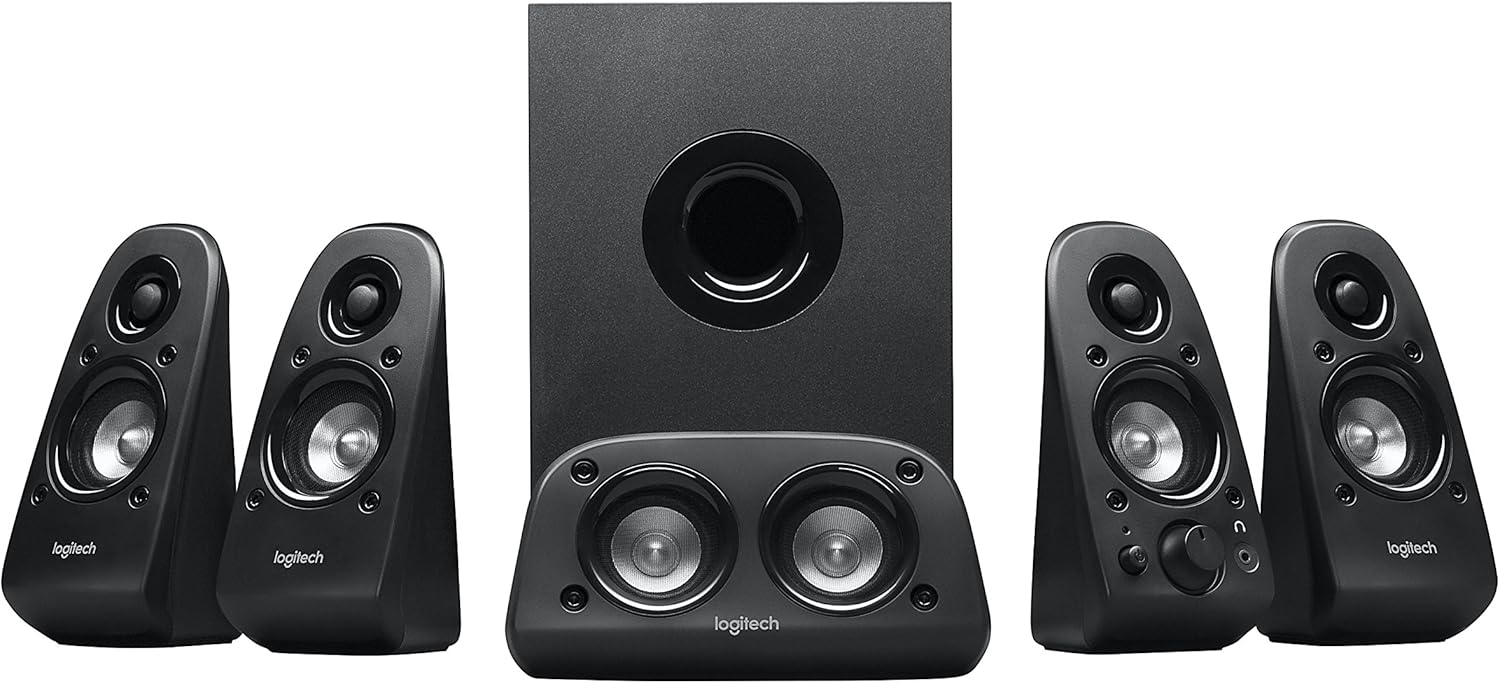
รูปที่ 1: เกินview of the Logitech Z506 Surround Sound Speaker System, showing the subwoofer, center speaker, and four satellite speakers.
2. การตั้งค่า
2.1 การแกะกล่องและการตรวจสอบส่วนประกอบ
Carefully unpack all components from the box. Ensure you have the following items:
- ซับวูฟเฟอร์ (ยูนิตหลัก)
- ลำโพงแซทเทิลไลท์สี่ตัว
- One center channel speaker
- Accessory cables (color-coded speaker cables, audio input cables)
- เอกสารประกอบการใช้งาน (คู่มือนี้)
2.2 การจัดวางลำโพง
Optimal speaker placement is crucial for achieving the best surround sound experience. Position the speakers as follows:
- ลำโพงกลาง: Place directly in front of you, above or below your monitor/TV.
- ลำโพงหน้าซ้ายและขวา: Position on either side of your monitor/TV, equidistant from you.
- ลำโพงหลังซ้ายและขวา: Place behind you, slightly to the sides, to create the surround effect.
- ซับวูฟเฟอร์: Place on the floor, ideally in a corner or near a wall, to enhance bass response.

Figure 2: The Logitech Z506 system, illustrating the subwoofer and satellite speakers from another perspective, useful for identifying components during setup.
2.3 การเชื่อมต่อลำโพง
The Logitech Z506 system offers multiple input options for versatile connectivity. Use the color-coded speaker cables to connect the satellite and center speakers to the corresponding ports on the subwoofer unit.
For audio input, the system supports:
- 3x 0.14" / 3.5 mm Audio In Jacks: For connecting to PCs, smartphones, tablets, and other devices with a 3.5mm audio output.
- 2x Stereo RCA Input Jacks: For connecting to DVD players, game consoles, or other devices with RCA stereo outputs.
- 4x RCA Input Jacks for Speaker System: These are typically for direct 5.1 channel input from a sound card or compatible device.
- 1x DB 9 Pin Connector: For specific legacy connections.
Ensure all connections are secure before powering on the system. Connect the power cable to the subwoofer and then to a wall outlet.
3. การดำเนินการ
3.1 การเปิด/ปิดเครื่องและการควบคุมระดับเสียง
To power on the system, locate the power button, typically on one of the front satellite speakers. The system will indicate it is on, usually with an LED light. Adjust the overall volume using the main volume dial on the front right satellite speaker.
The system also features an on-speaker bass control, allowing you to easily dial the bass level up or down to suit your preference and the audio content.
3.2 Compatibility and Usage
The Logitech Z506 is highly versatile and compatible with a wide range of devices, including:
- โทรทัศน์
- Computers (PC)
- สมาร์ทโฟนและแท็บเล็ต
- Music players
- DVD players and Blu-ray players
- Gaming Consoles (PlayStation, Xbox, Wii)
For optimal 5.1 surround sound, ensure your audio source is configured to output 5.1 channels. If your source is 2-channel stereo, the Z506 will still provide rich 3D stereo sound.

Figure 3: The Logitech Z506 in use, providing immersive audio for gaming, highlighting its integration into a home entertainment setup.
4. การบำรุงรักษา
To ensure the longevity and optimal performance of your Logitech Z506 speaker system, follow these simple maintenance guidelines:
- การทำความสะอาด: Use a soft, dry cloth to wipe down the speakers and subwoofer. Avoid using abrasive cleaners, solvents, or sprays directly on the units.
- การจัดวาง: Keep the speakers away from direct sunlight, heat sources, and excessive moisture. Ensure adequate ventilation around the subwoofer to prevent overheating.
- สาย: Periodically check all cable connections to ensure they are secure and free from damage. Avoid kinking or sharply bending cables.
- พื้นที่จัดเก็บ: หากต้องเก็บรักษาระบบไว้เป็นเวลานาน ควรตัดการเชื่อมต่อจากแหล่งจ่ายไฟและเก็บไว้ในที่แห้งและเย็น โดยควรเก็บไว้ในบรรจุภัณฑ์เดิม
5 การแก้ไขปัญหา
หากคุณพบปัญหาเกี่ยวกับระบบลำโพง Logitech Z506 โปรดดูปัญหาและวิธีแก้ไขทั่วไปต่อไปนี้:
5.1 ไม่มีเสียงหรือเสียงเบา
- Ensure the system is properly plugged into a power outlet and turned on.
- Check all audio cable connections between the speakers, subwoofer, and your audio source. Ensure they are securely plugged into the correct ports.
- Verify that the volume dial on the speaker system is turned up.
- Check the volume settings on your audio source (PC, TV, game console, etc.) and ensure it is not muted or set to a very low level.
- If using a PC, ensure the correct audio output device is selected in your sound settings.
5.2 Static Noise or Hum
A slight static noise or hum, even when no sound is playing, can sometimes occur. Consider the following:
- Ensure the Z506 is plugged directly into a wall outlet, not a power strip or surge protector that might be overloaded.
- The quality of the audio source hardware can influence noise. If connected to an older TV or device, a slight noise might be present. Try connecting to a different audio source to isolate the issue.
- If using with an older TV that doesn't support 5.1 well, try setting the Z506's volume to a lower level and increasing the TV's volume.
- Ensure all cables are properly shielded and not running parallel to power cables, which can introduce interference.
5.3 เสียงผิดเพี้ยน
- Reduce the volume level on both the speaker system and your audio source.
- Adjust the bass control on the speaker system. Excessive bass can lead to distortion, especially at high volumes.
- Check the audio settings on your source device (e.g., equalizer settings on a PC) and reset them to default or adjust them to reduce distortion.
- Ensure the speakers are not placed too close to walls or corners, which can sometimes cause unwanted resonance.
6. ข้อมูลจำเพาะ
| คุณสมบัติ | รายละเอียด |
|---|---|
| ชื่อรุ่น | Z506 |
| ประเภทลำโพง | Surround, Subwoofer |
| การกำหนดค่าช่องเสียงรอบทิศทาง | 5.1 |
| กำลัง RMS ทั้งหมด | 75 วัตต์ (RMS) |
| พลังซับวูฟเฟอร์ | 27 วัตต์ |
| เทคโนโลยีการเชื่อมต่อ | มีสาย |
| Audio Input Jacks | 3x 3.5mm, 2x Stereo RCA, 4x RCA for Speaker System, 1x DB 9 Pin |
| ขนาดสินค้า (ลxกxส) | ลึก 7.13 นิ้ว x กว้าง 15.94 นิ้ว x สูง 11.06 นิ้ว |
| น้ำหนักสินค้า | 11.45 ปอนด์ |
| สี | สีดำ |
7. ข้อมูลการรับประกัน
The Logitech Z506 Surround Sound Home Theater Speaker System comes with a Limited Warranty. For detailed information regarding the terms and conditions of your warranty, including coverage period and claims process, please refer to the official warranty documentation provided with your product or visit the Logitech support webเว็บไซต์.
8. การสนับสนุนและการติดต่อ
For further assistance, technical support, or to access additional resources, please refer to the following:
- คู่มือผู้ใช้แบบออนไลน์: A PDF version of the user guide is available for download ที่นี่.
- ฝ่ายสนับสนุนของ Logitech Webเว็บไซต์: เยี่ยมชมฝ่ายสนับสนุน Logitech อย่างเป็นทางการ webเว็บไซต์นี้รวบรวมคำถามที่พบบ่อย ข้อมูลเกี่ยวกับคนขับ และข้อมูลการติดต่อ
- บริการลูกค้า: If you require direct assistance, please contact Logitech customer service through their official channels.
Always ensure you have your product model number (Z506 or 980-000430) ready when contacting support.


