1. สินค้าหมดview
The Cooler Master HAF X (High Air Flow) is a full tower computer case designed for high-performance systems, offering extensive cooling capabilities and spacious interior for advanced components. This chassis, model RC-942-KKN1, features a rugged black coated interior and a windowed side panel for system visibility.
คุณสมบัติที่สำคัญ ได้แก่:
- Integrated SATA Dock for easy hard drive installation.
- Front I/O panel with USB 3.0 ports.
- Dedicated air duct for cooling graphic cards.
- Support for multiple large fans, including a 230mm red LED front fan and up to three 200mm fans.
- Nine expansion slots to accommodate triple VGA cards.
- Adjustable VGA card holder for heavier graphics processing units.
- Power supply partition for improved cable management.
- Spacious interior compatible with larger component parts and XL-ATX motherboards.
- Advanced cable management system with rubber grommets.

รูปที่ 1.1: มุมด้านหน้า view of the Cooler Master HAF X Full Tower Computer Case, showcasing its robust design and windowed side panel.
2. การตั้งค่าและการติดตั้ง
This section guides you through the installation of various components into your HAF X chassis.
2.1 การติดตั้งเมนบอร์ด
The HAF X supports Micro ATX, ATX, E-ATX, and XL-ATX motherboards. Ensure proper standoffs are installed before mounting your motherboard. The spacious interior allows for easy access during installation.
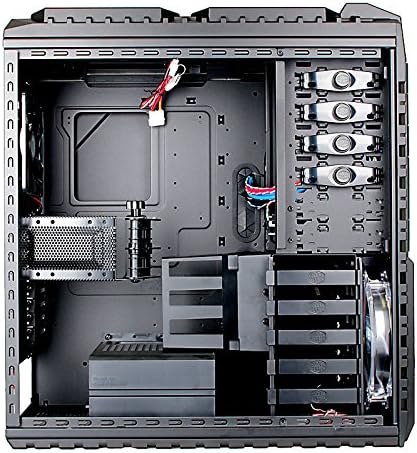
Figure 2.1: Internal layout of the HAF X chassis, showing motherboard tray, drive bays, and cable management cutouts.
2.2 Drive Installation (SATA Dock & Internal Bays)
The case features a convenient SATA Dock for quick installation of 3.5" or 2.5" SATA drives without opening the side panel. For internal drives, utilize the tool-free 3.5" drive bays.
- SATA Dock: Locate the SATA dock on the top front of the case. Simply slide your SATA hard drive into the dock until it clicks into place.
- Internal 3.5" Drives: Open the side panel. For tool-free installation, align the drive with the bay and slide it in until secured by the retention clips.
- ไดรฟ์ขนาด 5.25 นิ้ว: The case has six 5.25" external bays. Remove the front bezel cover, slide the optical drive or other 5.25" device into the bay, and secure it using the tool-free mechanisms.
2.3 Power Supply Installation and Cable Management
The HAF X supports standard ATX PS2 power supplies, mounted at the bottom. A dedicated power supply partition helps conceal cables for a cleaner build and improved airflow.
- Mount your power supply in the designated bottom compartment.
- Route all power cables through the rubber grommets behind the motherboard tray.
- Utilize the power supply cable partition to neatly organize excess cables, enhancing the aesthetic and airflow within the case.
2.4 การติดตั้งการ์ดจอ
The case offers nine expansion slots, supporting configurations up to triple VGA cards. An adjustable VGA card holder is included to provide additional support for heavier graphics cards, preventing sag.
An integrated air duct is positioned to direct airflow directly to the latest graphic cards, optimizing cooling performance.
2.5 Cooling System Setup
The HAF X is designed for superior airflow. It comes with a 230mm red LED front fan and supports additional fans:
- ด้านหน้า: 1x 230 x 30 mm red LED fan (with on/off switch).
- ด้านข้าง: 1x 200 x 30mm fan.
- สูงสุด: Up to 2x 200 x 30mm fans (one optional) or a 360mm radiator for liquid cooling.
- หลัง: 1x 140 x 25mm fan.
- VGA Fan Duct: Optional 1x 120 x 25 mm or 120 x 38 mm fan.
- VGA Holder: Optional 1x 80 x 15 mm fan.
Ensure all fans are properly connected to your motherboard or fan controller for optimal performance.
3. คู่มือการใช้งาน
3.1 แผง I/O ด้านหน้า
The front I/O panel provides convenient access to various ports:
- พอร์ต USB 3.0: Two SuperSpeed USB 3.0 ports for high-speed data transfer.
- พอร์ต USB 2.0: พอร์ต USB 2.0 สองพอร์ต
- พอร์ต eSATA: One eSATA port for external SATA devices.
- แจ็คเสียง: One Mic-in and one Audio-out port.
- IEEE 1394a Port: One FireWire port.

รูปที่ 3.1: ด้านหน้าและด้านหลัง views of the HAF X, highlighting the front I/O panel and rear exhaust fan.
3.2 Power and Reset Buttons
The power and reset buttons are located on the top panel. A safety cover is provided for the power button to prevent accidental shutdowns.
- To power on/off, slide the safety cover open and press the power button.
- To reset the system, press the reset button.
4. การบำรุงรักษา
Regular maintenance ensures optimal performance and longevity of your computer case and components.
4.1 ตัวกรองฝุ่น
The HAF X includes dust filters on the top and side intakes to prevent dust accumulation inside the case. Periodically remove and clean these filters to maintain optimal airflow and cooling efficiency.
- Gently remove the dust filters.
- Clean them using compressed air or by washing with water (ensure they are completely dry before reinstallation).
- Reinstall the filters securely.
4.2 การทำความสะอาดทั่วไป
เช็ดภายนอกเคสด้วยผ้านุ่มๆamp cloth. Avoid using harsh chemicals or abrasive materials that could damage the finish. For internal cleaning, use compressed air to remove dust from fans and components.
5 การแก้ไขปัญหา
หากคุณพบปัญหาในระหว่างหรือหลังการติดตั้ง โปรดลองทำตามขั้นตอนการแก้ไขปัญหาทั่วไปต่อไปนี้:
- ไม่มีไฟฟ้า:
- Ensure the power supply is securely connected to the wall outlet and the case.
- Verify all internal power cables (24-pin ATX, CPU, GPU) are correctly seated.
- Check the power button connection to the motherboard.
- พัดลมไม่หมุน:
- Confirm fan cables are properly connected to the motherboard or fan controller.
- Check fan speed settings in BIOS/UEFI or fan control software.
- พอร์ต USB ไม่ทำงาน:
- Ensure the front panel USB headers are correctly connected to the motherboard.
- Verify motherboard drivers are installed.
- SATA Dock Not Detecting Drive:
- Ensure the drive is fully seated in the dock.
- Check the SATA data and power connections from the dock to the motherboard/power supply.
For further assistance, please refer to the Cooler Master support webเว็บไซต์หรือติดต่อฝ่ายบริการลูกค้า
6. ข้อมูลจำเพาะ
| คุณสมบัติ | ข้อมูลจำเพาะ |
|---|---|
| หมายเลขรุ่น | RC-942-KKN1 |
| ประเภทเคส | ฟูลทาวเวอร์ |
| สี | สีดำ |
| วัสดุ | Steel, Mesh |
| ความเข้ากันได้ของเมนบอร์ด | Micro ATX / ATX / E-ATX / XL-ATX |
| Drive Bays (External) | 6x 5.25" (2 converted SATA HDD drive bay available) |
| Drive Bays (Internal) | 5x 3.5" |
| ช่องเสียบขยาย | 9 |
| พอร์ต I / O ด้านหน้า | 2x USB 3.0, 2x USB 2.0, 1x eSATA, 1x IEEE 1394a, 1x Mic-in, 1x Audio |
| Cooling System (Front) | 1x 230 x 30 mm red LED fan (on/off) |
| Cooling System (Side) | 1x 200 x 30mm fan |
| Cooling System (Top) | 2x 200 x 30mm fans (one optional) or 360mm radiator |
| Cooling System (Rear) | 1x 140 x 25mm fan |
| การรองรับแหล่งจ่ายไฟ | Bottom / Standard ATX PS2 (optional) |
| ขนาด (กxลxส) | 9.1 x 23.2 x 21.7 นิ้ว (230 x 590 x 550 มม.) |
| น้ำหนักสินค้า | 31.5 ปอนด์ (14.35 กก.) |

Figure 6.1: Dimensional drawing of the Cooler Master HAF X case.
7. Product Feature Video Guide
Watch this official video from Cooler Master for a visual demonstration of the HAF X case features and capabilities.
Video 7.1: Official Cooler Master HAF X product feature overview. This video demonstrates key aspects such as the SATA dock, front USB 3.0 ports, power button safety cover, top fan/radiator support, tool-free drive installation, power supply cable management, expansion slots, water cooling outlets, dust filters, air duct for GPUs, adjustable VGA card holder, and XL-ATX motherboard compatibility.
8. การรับประกันและการสนับสนุน
For warranty information, technical support, or any product-related inquiries, please visit the official Cooler Master webเว็บไซต์หรือติดต่อฝ่ายบริการลูกค้าของพวกเขา
คูลเลอร์ มาสเตอร์ อย่างเป็นทางการ Webเว็บไซต์: www.coolermaster.com
Please have your product model number (RC-942-KKN1) and purchase details ready when contacting support.


