การแนะนำ
This manual provides comprehensive instructions for the setup, operation, maintenance, and troubleshooting of your Logitech M510 Wireless Mouse. Designed for comfort and efficiency, the M510 offers precise control and convenient features for your computing needs.
The Logitech M510 is a comfortable wireless computer mouse featuring a USB Unifying Receiver, back/forward buttons, and side-to-side scrolling. It operates on 2 AA batteries and is compatible with Personal Computers and Macbooks running operating systems like Windows 10.
เนื้อหาแพ็คเกจ
- เมาส์ไร้สาย Logitech M510
- เครื่องรับสัญญาณ Logitech Unifying
- แบตเตอรี่ AA 2 ก้อน (ติดตั้งไว้แล้วหรือรวมอยู่ด้วย)
การตั้งค่า
1. การติดตั้งแบตเตอรี่
The Logitech M510 mouse requires two AA batteries for operation. These are typically included with your purchase. If not already installed, follow these steps:
- ค้นหาฝาปิดช่องใส่แบตเตอรี่ที่ด้านล่างของเมาส์
- เลื่อนหรือยกฝาขึ้นเพื่อเปิดช่อง
- Insert two AA batteries, ensuring the positive (+) and negative (-) terminals align correctly with the indicators inside the compartment.
- ปิดฝาช่องใส่แบตเตอรี่ให้แน่น
2. การเชื่อมต่อเครื่องรับสัญญาณรวม
The Logitech M510 uses a Logitech Unifying Receiver for wireless connectivity. This small USB receiver allows you to connect multiple compatible Logitech devices to your computer using a single USB port.
- Locate the Logitech Unifying Receiver. It is often stored inside the battery compartment of the mouse for safekeeping during transport.
- Plug the Unifying Receiver into an available USB port on your computer (desktop, laptop, or Macbook).
- Your computer should automatically detect the receiver and install the necessary drivers. This may take a few moments.
- Once the drivers are installed, the mouse should be ready for use. If not, ensure the mouse's power switch (if present) is in the 'ON' position.

ภาพ: จากบนลงล่าง view of the Logitech M510 Wireless Mouse alongside its compact USB Unifying Receiver.
การใช้งานเมาส์
The Logitech M510 Wireless Mouse is designed for intuitive use with several programmable buttons and comfortable ergonomics.
ฟังก์ชั่นพื้นฐาน
- ปุ่มคลิกซ้าย: ปุ่มหลักสำหรับเลือกรายการ เปิด files, and interacting with software.
- ปุ่มคลิกขวา: ปุ่มรองสำหรับเข้าถึงเมนูบริบทและตัวเลือกเพิ่มเติม
- ล้อเลื่อน: เลื่อนขึ้นหรือลงผ่านเอกสารและ web หน้า ปุ่มเลื่อนยังทำหน้าที่เป็นปุ่มคลิกกลางอีกด้วย
- Side-to-Side Scrolling: Tilt the scroll wheel left or right to scroll horizontally in applications that support this feature.
Advanced Features (Programmable Buttons)
The M510 features two thumb buttons (back/forward) on the left side, which can be customized using Logitech Options software (available for download from the Logitech website). By default, these buttons perform browser navigation functions.
- ปุ่มย้อนกลับ: นำทางกลับเข้าไป web เบราว์เซอร์หรือ file นักสำรวจ
- ปุ่มไปข้างหน้า: นำทางไปข้างหน้าใน web เบราว์เซอร์หรือ file นักสำรวจ
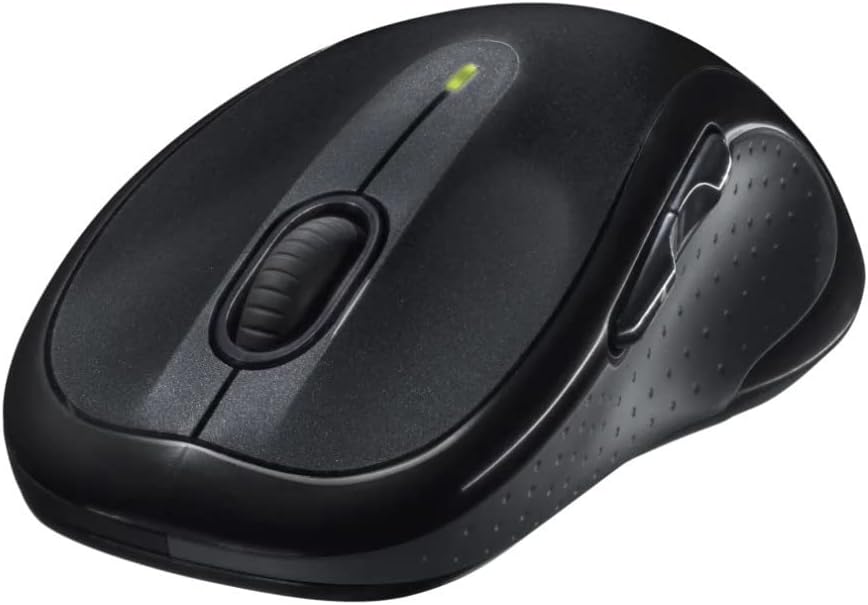
ภาพ: มุมเอียง view of the Logitech M510 Wireless Mouse, highlighting its ergonomic shape and side buttons.
การซ่อมบำรุง
ทำความสะอาดเมาส์ของคุณ
To ensure optimal performance and hygiene, regularly clean your Logitech M510 mouse:
- Disconnect the mouse from your computer by removing the Unifying Receiver.
- ใช้ผ้านุ่มไม่เป็นขุยค่อยๆ งampened with water or a mild cleaning solution (e.g., isopropyl alcohol) to wipe down the surface of the mouse.
- สำหรับซอกมุมและรอบๆ กระดุม ให้ใช้สำลีพันก้านหรือแปรงขนนุ่ม
- Avoid getting liquid into the internal components or the optical sensor.
- Allow the mouse to dry completely before re-connecting.
การเปลี่ยนแบตเตอรี่
The Logitech M510 has an average battery life of 18 months. When the battery indicator light (if present) flashes or mouse performance degrades, it's time to replace the batteries.
- ปิดเมาส์โดยใช้สวิตช์เปิดปิดที่ด้านล่าง
- เปิดฝาช่องใส่แบตเตอรี่
- ถอดแบตเตอรี่ AA เก่าออก
- Insert two new AA batteries, observing the correct polarity (+/-).
- ปิดฝาช่องใส่แบตเตอรี่
- เปิดใช้งานเมาส์อีกครั้ง
การแก้ไขปัญหา
| ปัญหา | สาเหตุที่เป็นไปได้ | สารละลาย |
|---|---|---|
| เมาส์ไม่ตอบสนอง | Low or dead batteries; Unifying Receiver not connected; Mouse power off; Driver issue. | Replace batteries; Ensure Unifying Receiver is securely plugged into a USB port; Turn mouse power switch to 'ON'; Reinstall Logitech Options software or check device manager for driver issues. |
| การเคลื่อนที่ของเคอร์เซอร์ช้าหรือผิดปกติ | Interference; Dirty optical sensor; Mouse used on unsuitable surface; Low battery. | Move mouse closer to receiver; Clear obstructions; Clean optical sensor; Use a mouse pad or suitable surface; Replace batteries. |
| ปุ่มด้านข้างไม่ทำงาน | Software not installed or configured; Application does not support custom buttons. | Download and install Logitech Options software from the official Logitech website to customize button functions. Ensure the application you are using supports these functions. |
| Unifying Receiver not recognized | Faulty USB port; Driver issue. | Try a different USB port; Restart your computer; Download and install the Logitech Unifying Software to re-pair the mouse with the receiver. |
ข้อมูลจำเพาะ
| คุณสมบัติ | รายละเอียด |
|---|---|
| ยี่ห้อ | โลจิเทค |
| หมายเลขรุ่น | 910-001822 |
| ชุด | M510 |
| เทคโนโลยีการเชื่อมต่อ | Radio Frequency, USB (via Unifying Receiver) |
| เทคโนโลยีตรวจจับการเคลื่อนไหว | เลเซอร์ |
| สี | สีเทาเข้ม |
| น้ำหนักสินค้า | 4.6 ออนซ์ (ประมาณ 130 กรัม) |
| ขนาดสินค้า (กxยxส) | 4.38 x 2.5 x 1.75 นิ้ว (ประมาณ 11.13 x 6.35 x 4.45 ซม.) |
| แหล่งพลังงาน | ใช้พลังงานจากแบตเตอรี่ |
| แบตเตอรี่ที่จำเป็น | แบตเตอรี่ AA 2 ก้อน (รวมอยู่ด้วย) |
| อายุการใช้งานแบตเตอรี่โดยเฉลี่ย | 18 เดือน |
| แพลตฟอร์มฮาร์ดแวร์ | Personal Computer, Macbook |
| ความเข้ากันได้ของระบบปฏิบัติการ | Windows 10 (and likely earlier versions, macOS) |
| คุณสมบัติพิเศษ | Battery Life Indicator, Power Saving Mode, Programmable Buttons, Wireless |
| วันที่พร้อมใช้งานครั้งแรก | วันที่ 7 มิถุนายน 2010 |

ภาพ: จากบนลงล่าง view of the Logitech M510 Wireless Mouse showing its approximate dimensions (4.4" length, 2.5" width).
การรับประกันและการสนับสนุน
ข้อมูลการรับประกัน
Logitech products typically come with a limited hardware warranty. For specific warranty terms and conditions applicable to your Logitech M510 Wireless Mouse, please refer to the warranty card included with your product or visit the official Logitech webเว็บไซต์.
การสนับสนุนลูกค้า
For further assistance, technical support, or to download the latest software (such as Logitech Options or Unifying Software), please visit the official Logitech support webเว็บไซต์:
ฝ่ายสนับสนุนของ Logitech Webเว็บไซต์
คุณอาจพบแหล่งข้อมูลที่เป็นประโยชน์ คำถามที่พบบ่อย และฟอรัมชุมชนได้ในเว็บไซต์ของพวกเขาด้วย webเว็บไซต์.


