1. บทนำ
This instruction manual provides essential information for the proper and safe operation of your JVC AP-V14U AC Power Adapter. Please read this manual thoroughly before using the product and retain it for future reference. This adapter is designed to supply power to compatible JVC camcorders and charge their batteries.
2. ข้อควรระวังเพื่อความปลอดภัย
- Do not expose the adapter to rain or moisture.
- Do not disassemble the adapter. Refer servicing to qualified personnel.
- ตรวจสอบให้แน่ใจว่าเต้ารับไฟฟ้ามีระดับเสียงtage matches the adapter's input specifications (110V-240V AC).
- หลีกเลี่ยงการวางของหนักบนสายไฟ
- ควรถอดอะแดปเตอร์ออกจากเต้ารับไฟฟ้าเมื่อไม่ได้ใช้งานเป็นเวลานาน
- Use only with specified JVC camcorder models.
3. สินค้าหมดview
The JVC AP-V14U is a compact AC power adapter designed for portability and efficient power delivery to your JVC camcorder. It features a standard US-style plug and a barrel connector for device compatibility.

รูปที่ 1: สูงสุด view of the JVC AP-V14U AC Power Adapter, showing the main unit with attached power cord and connector.
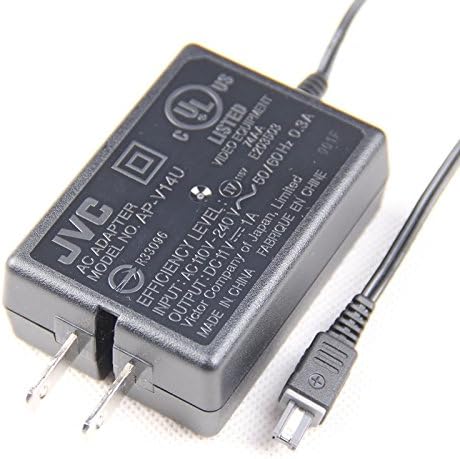
รูปที่ 2: ภาพระยะใกล้ view of the adapter's label, displaying the model number (AP-V14U), input voltage (AC 110V-240V), and output specifications (DC 11V, 1A).

รูปที่ 3: รายละเอียด view of the barrel connector, which plugs into the compatible JVC camcorder.
4. การตั้งค่าและการเชื่อมต่อ
- ตรวจสอบความเข้ากันได้: Before connecting, ensure your JVC camcorder model is listed as compatible with the AP-V14U adapter. Refer to Section 7 for a list of compatible models.
- Connect to Camcorder: Insert the barrel connector end of the adapter cable firmly into the DC input jack on your JVC camcorder. The DC input jack is typically located on the side or rear of the camcorder.
- เชื่อมต่อกับเต้ารับไฟฟ้า: Plug the AC power adapter into a standard electrical wall outlet (110V-240V AC).
- เปิดเครื่อง: Once connected, your camcorder should receive power, and if applicable, its battery will begin charging.
5. คู่มือการใช้งาน
The JVC AP-V14U AC Power Adapter serves two primary functions:
- Direct Power Supply: When connected, the adapter provides continuous power to your camcorder, allowing for extended recording or playback without relying on battery power.
- การชาร์จแบตเตอรี่: If a rechargeable battery is inserted into the camcorder, the adapter will automatically charge the battery while simultaneously powering the device. The charging indicator on your camcorder will typically illuminate during this process. Refer to your camcorder's manual for specific charging indicators and times.
6. การบำรุงรักษาและการดูแล
- การทำความสะอาด: Use a soft, dry cloth to clean the adapter. Do not use liquid cleaners or solvents.
- พื้นที่จัดเก็บ: เก็บอะแดปเตอร์ไว้ในที่แห้งและเย็น หลีกเลี่ยงแสงแดดโดยตรงและอุณหภูมิที่สูงหรือต่ำเกินไป หลีกเลี่ยงการพันสายแน่นเกินไปเพื่อป้องกันความเสียหาย
- การตรวจสอบ: ตรวจสอบอะแดปเตอร์และสายเคเบิลเป็นระยะๆ เพื่อดูว่ามีร่องรอยความเสียหายหรือไม่ เช่น สายไฟชำรุดหรือแตกหักasing. หยุดใช้หากพบความเสียหาย
7 การแก้ไขปัญหา
| ปัญหา | สาเหตุที่เป็นไปได้ | สารละลาย |
|---|---|---|
| Camcorder does not power on or charge. | Adapter not properly connected. | Ensure both ends of the adapter are securely plugged in. |
| ปลั๊กไฟไม่ได้เปิดใช้งานอยู่ | ทดสอบเต้ารับด้วยอุปกรณ์อื่น | |
| Camcorder model is incompatible. | Verify your camcorder model against the compatibility list in Section 8. | |
| อะแดปเตอร์หรือสายเคเบิลชำรุด | Inspect for visible damage. Discontinue use if damaged. | |
| อะแดปเตอร์จะรู้สึกอุ่นระหว่างการใช้งาน | การดำเนินงานปกติ. | A slight warmth is normal. If it becomes excessively hot or emits smoke/odor, disconnect immediately. |
8. ข้อมูลจำเพาะ
- แบบอย่าง: JVC AP-V14U
- ป้อนข้อมูล: ไฟฟ้ากระแสสลับ 110V-240V, 50/60Hz, 0.3A
- เอาท์พุต: DC 11V, 1A
- วัดtage: 5 วัตต์
- ประเภทตัวเชื่อมต่อ: ขั้วต่อบาร์เรล
- วัสดุ: พลาสติก
- ขนาด : ขนาดโดยประมาณ 4.1 x 2.5 x 1.1 นิ้ว (ตัวเครื่องหลัก)
- น้ำหนัก: ประมาณ 3.2 ออนซ์
9. Compatible JVC Camcorder Models
The JVC AP-V14U AC Power Adapter is compatible with a wide range of JVC camcorder models, including but not limited to:
- JVC GR-AXM17U
- JVC GR-AXM18U
- JVC GR-D230U
- JVC GR-D244
- JVC GR-D244U
- JVC GR-D250
- JVC GR-D250U
- JVC GR-D270
- JVC GR-D270U
- JVC GR-D271
- JVC GR-D271U
- JVC GR-D275
- JVC GR-D275U
- JVC GR-D290
- JVC GR-D290U
- JVC GR-D295
- JVC GR-D32U
- JVC GR-D33
- JVC GR-D33U
- JVC GR-D347U
- JVC GR-D350
- JVC GR-D350U
- JVC GR-D370U
- JVC GR-D371U
- JVC GR-D375U
- JVC GR-D395
- JVC GR-D395U
- JVC GR-D396U
- JVC GR-D53
- JVC GR-D650
- JVC GR-D71U
- JVC GR-D72
- JVC GR-D72U
- JVC GR-D72US
- JVC GR-D73
- JVC GR-D73U
- JVC GR-D750
- JVC GR-D770
- JVC GR-D775
- JVC GR-D796
- JVC GR-D850
- JVC GR-D93
- JVC GR-D93U
- JVC GR-D94U
- JVC GR-DA30U
- JVC GR-DA30US
- JVC GR-DF450
- JVC GR-DF450U
- JVC GR-DF550
- JVC GR-DF550U
- JVC GR-Dx77
- JVC GR-DX77U
- JVC GR-Dx97
- JVC GR-DX97U
- JVC GR-SXM260
- JVC GR-SXM260U
- JVC GR-SXM37
- JVC GR-SXM37U
- JVC GR-SXM38U
- JVC GR-X5
- JVC GR-X5U
- JVC GZ-HD
- JVC GZ-HD10
- JVC GZ-HD3
- JVC GZ-HD30
- JVC GZ-HD300
- JVC GZ-HD40
- JVC GZ-HD5
- JVC GZ-HD6
- JVC GZ-HM1
- JVC GZ-HM200
- JVC GZ-HM400
- JVC GZ-MC500
- JVC GZ-MC500U
- JVC GZ-MG155
- JVC GZ-MG20
- JVC GZ-MG20U
- JVC GZ-MG21
- JVC GZ-MG21U
- JVC GZ-MG230
- JVC GZ-MG255
- JVC GZ-MG27
- JVC GZ-MG27U
- JVC GZ-MG30
- JVC GZ-MG30U
- JVC GZ-MG35U
- JVC GZ-MG37
- JVC GZ-MG37U
- JVC GZ-MG50
- JVC GZ-MG50U
- JVC GZ-MG70U
- JVC GZ-MG77
- JVC GZ-MG77U
- JVC GZ-MS120
- JVC GZ-MS130
- JVC GZ-X900
- JVC AP-V13KR
- JVC AP-V14
- JVC AP-V18
- JVC AP-V18U
- JVC AP-V14A
- JVC AP-V14E
- JVC AP-V15E
- JVC AP-V15U
- JVC AP-16U
- JVC AP-V14KR
- JVC AP-V20U
- JVC AP-V20
- JVC AP-V21U
- JVC AP-V21
- JVC AP-V21M
Always refer to your camcorder's specific manual to confirm power adapter compatibility.


