1. บทนำ
The Polk Audio SWA500 Power Amplifier is engineered to provide dedicated power for Polk Audio CSW Series built-in subwoofers. This Class D digital amplifier delivers 500 watts into 4 ohms, ensuring robust and distortion-free bass performance. Its design prioritizes long-term reliability and efficient operation. This manual provides essential information for the safe and effective installation, operation, and maintenance of your SWA500 ampชีวิต.
2. คำแนะนำด้านความปลอดภัยที่สำคัญ
- Read these instructions thoroughly before operating the ampชีวิต.
- เก็บคำแนะนำเหล่านี้ไว้เพื่อใช้อ้างอิงในอนาคต
- โปรดปฏิบัติตามคำเตือนทั้งหมดบนผลิตภัณฑ์และในคู่มือนี้
- Follow all instructions for safe use and installation.
- ห้ามใช้อุปกรณ์นี้ใกล้น้ำหรือความชื้น
- ทำความสะอาดด้วยผ้าแห้งเท่านั้น
- อย่าปิดกั้นช่องระบายอากาศใดๆ ติดตั้งตามคำแนะนำของผู้ผลิต
- ห้ามติดตั้งใกล้แหล่งความร้อน เช่น หม้อน้ำ เครื่องทำความร้อน เตา หรืออุปกรณ์อื่น ๆ (รวมถึง ampเครื่องให้ความร้อน) ที่ผลิตความร้อน
- อย่าละเลยจุดประสงค์ด้านความปลอดภัยของปลั๊กแบบมีขั้วหรือแบบมีสายดิน ปลั๊กแบบมีขั้วจะมีใบมีด 2 ใบ โดยใบหนึ่งจะกว้างกว่าอีกใบ ปลั๊กแบบมีสายดินจะมีใบมีด 2 ใบและขาต่อสายดินที่สาม ขาที่กว้างหรือขาต่อสายดินที่สามนั้นมีไว้เพื่อความปลอดภัยของคุณ หากปลั๊กที่ให้มาไม่พอดีกับเต้ารับของคุณ ให้ปรึกษาช่างไฟฟ้าเพื่อขอเปลี่ยนเต้ารับที่ล้าสมัย
- ปกป้องสายไฟไม่ให้ถูกเหยียบหรือถูกหนีบ โดยเฉพาะที่ปลั๊ก เต้ารับไฟฟ้า และจุดที่สายไฟออกจากเครื่อง
- ใช้เฉพาะอุปกรณ์เสริม/สิ่งที่แนบตามที่ผู้ผลิตกำหนดเท่านั้น
- ถอดปลั๊กอุปกรณ์นี้ในระหว่างพายุฝนฟ้าคะนองหรือเมื่อไม่ได้ใช้งานเป็นเวลานาน
- แจ้งบริการทั้งหมดให้ช่างที่ผ่านการรับรองทราบ จำเป็นต้องให้บริการเมื่ออุปกรณ์ได้รับความเสียหายในลักษณะใดก็ตาม เช่น สายไฟหรือปลั๊กชำรุด ของเหลวหกหรือมีวัตถุตกลงไปในอุปกรณ์ อุปกรณ์โดนฝนหรือความชื้น ไม่สามารถทำงานได้ตามปกติ หรือตกหล่น
คำเตือน: เพื่อลดความเสี่ยงต่อการเกิดไฟไหม้หรือไฟฟ้าช็อต อย่าให้อุปกรณ์นี้โดนฝนหรือความชื้น
3. การตั้งค่าและการเชื่อมต่อ
ก่อนทำการเชื่อมต่อใดๆ โปรดตรวจสอบให้แน่ใจว่า... amplifier is powered off and unplugged from the AC outlet. The SWA500 is designed to power up to two Polk Audio CSW Series subwoofers of the same model.
3.1. SPEX Circuit Card Installation
The SWA500 amplifier utilizes SPEX circuit cards to optimize its performance for specific CSW subwoofer models. Ensure the correct SPEX card for your subwoofer model is inserted into the designated slot on the rear panel of the amplifier. These cards provide custom frequency shaping for optimal bass response.
3.2. การเชื่อมต่อแผงด้านหลัง
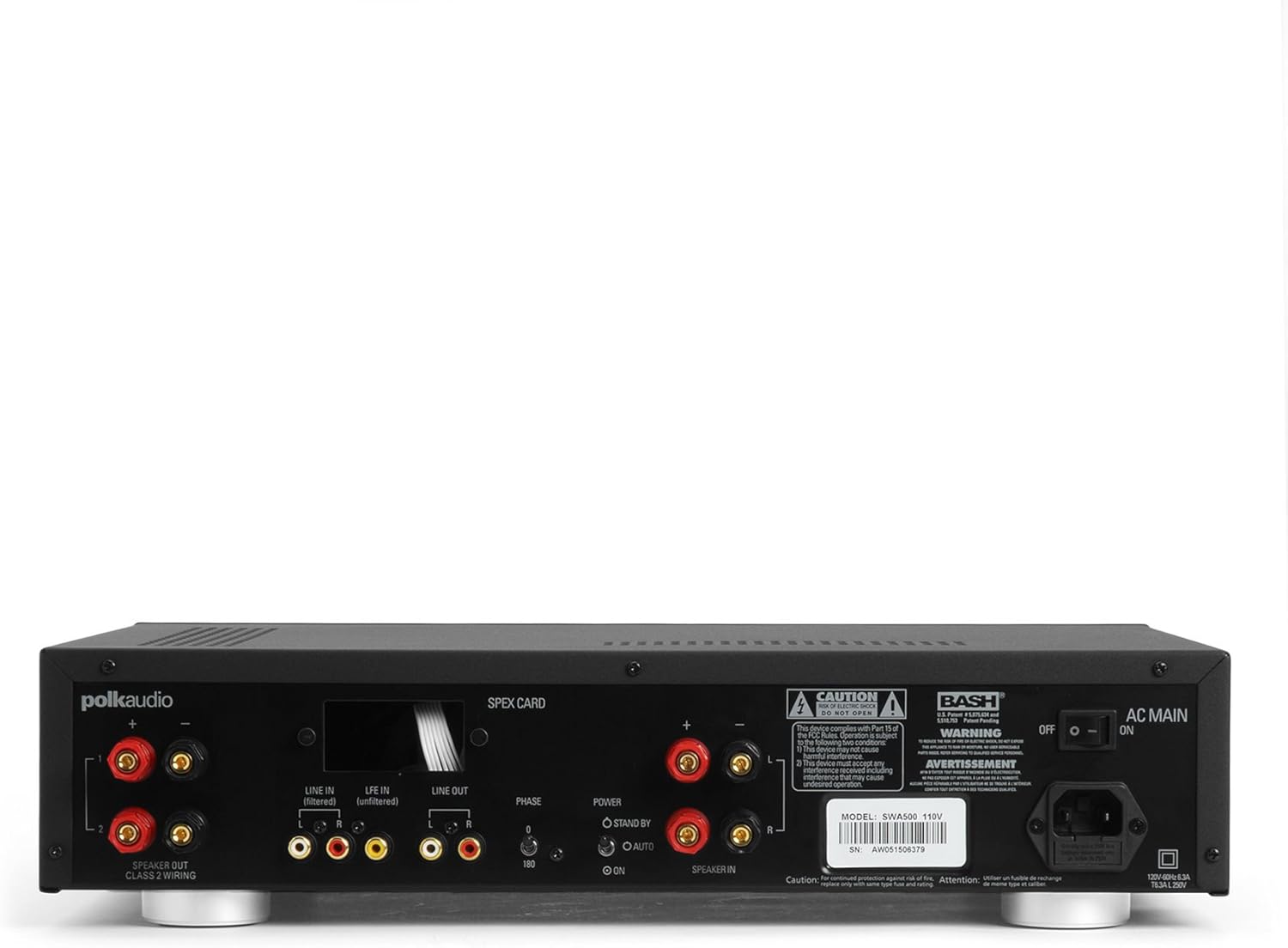
Figure 1: Rear panel of the SWA500 amplifier, illustrating various connection points including Line In, Line Out, Speaker Out, SPEX Card slot, Phase switch, Power mode switch, and AC Main input.
- Line In (Filtered/Unfiltered): Connect your audio source (e.g., AV receiver's subwoofer output) to the appropriate Line In jacks using RCA cables. The "Filtered" input applies a low-pass filter, while "Unfiltered" bypasses it, useful if your source provides its own filtered signal.
- บรรทัดออก: These RCA outputs can be used to pass the audio signal to another ampเครื่องขยายเสียงหรืออุปกรณ์
- ลำโพงออก: Connect your Polk Audio CSW subwoofer(s) to these terminals using appropriate speaker wire. Ensure correct polarity (+ to + and - to -). The SWA500 supports Class 2 wiring.
- สวิตซ์เฟส: Adjust this switch (0° or 180°) to optimize the subwoofer's phase with your main speakers for seamless sound integration.
- สวิตช์โหมดพลังงาน: Select between "ON" (always on), "AUTO" (turns on when an audio signal is detected), or "STANDBY" (low power mode, awaiting signal).
- AC หลัก: Connect the supplied power cord to this input and then to a suitable AC power outlet.
4. การดำเนินการ
Once all connections are made and the amplifier is plugged in, you can begin operating your SWA500.
4.1. การควบคุมที่แผงด้านหน้า

Figure 2: Front panel of the SWA500 amplifier, featuring the Power button, Protection indicator, Low Pass Filter control, and Volume control.
- ปุ่มเปิด/ปิด: กดเพื่อหมุน ampเปิดหรือปิดเครื่องขยายเสียง ไฟแสดงสถานะจะสว่างขึ้นเมื่อเครื่องเปิดอยู่
- ตัวบ่งชี้การป้องกัน: This light illuminates if the amplifier enters protection mode due to overheating or an electrical fault. If this occurs, turn off the amplifier, check connections, and allow it to cool before restarting.
- Low Pass Filter (80Hz - 120Hz): This knob adjusts the upper frequency limit of the subwoofer's output. Adjust this to blend the subwoofer's sound seamlessly with your main speakers. Start with a setting around 80Hz and adjust by ear.
- Volume (Min - Max): This knob controls the overall output level of the subwoofer. Adjust to achieve the desired bass intensity relative to your main speakers.
4.2. Initial Sound Adjustment
Begin with the Low Pass Filter set to a mid-point (e.g., 100Hz) and the Volume knob at a low setting. Play a familiar piece of music or movie scene. Gradually increase the Volume until the bass is noticeable but not overpowering. Then, fine-tune the Low Pass Filter and Phase switch to achieve the most natural and integrated sound with your main speakers. The goal is for the subwoofer to enhance the low frequencies without drawing attention to its location.
5. การบำรุงรักษา
- การทำความสะอาด: Disconnect the power cord before cleaning. Use a soft, dry cloth to wipe the exterior surfaces of the ampห้ามใช้น้ำยาทำความสะอาดชนิดเหลวหรือสเปรย์กระป๋อง
- การระบายอากาศ : ตรวจสอบให้แน่ใจว่าช่องระบายอากาศบน amplifier are not blocked. Proper airflow is crucial for preventing overheating and maintaining long-term reliability.
- พื้นที่จัดเก็บ: หากมีการเก็บข้อมูล amplifier for an extended period, unplug it from the power outlet and store it in a cool, dry place, away from direct sunlight and extreme temperatures.
6 การแก้ไขปัญหา
If you experience issues with your SWA500 ampหากคุณต้องการเครื่องขยายเสียง โปรดดูคู่มือการแก้ไขปัญหาต่อไปนี้:
| ปัญหา | สาเหตุที่เป็นไปได้ | สารละลาย |
|---|---|---|
| ไม่มีไฟแสดงสถานะเพาเวอร์ | Power cord not connected; AC outlet not active; Power switch off. | Ensure power cord is securely connected. Check AC outlet with another device. Press the front panel power button. |
| ไม่มีเสียงจากซับวูฟเฟอร์ | Incorrect input connection; Speaker wires loose or incorrect polarity; Volume too low; SPEX card missing or incorrect; Amplifier in standby/auto mode without signal. | Verify RCA input connections. Check speaker wire connections and polarity. Increase volume. Ensure correct SPEX card is installed. Set Power Mode switch to "ON" for testing. |
| Distorted or poor quality sound | Volume too high; Incorrect Low Pass Filter setting; Phase mismatch; Damaged speaker wire or subwoofer. | Reduce volume. Adjust Low Pass Filter. Toggle Phase switch (0°/180°). Inspect speaker wires and subwoofer for damage. |
| Protection indicator illuminated | Overheating; Short circuit in speaker wiring; Ampข้อบกพร่องของตัวยก | ปิดเครื่อง amplifier and allow to cool. Check speaker wiring for shorts. If problem persists, contact customer support. |
7. ข้อมูลจำเพาะ
- แบบอย่าง: SWA500
- กำลังขับ: 500 วัตต์ เป็น 4 โอห์ม
- Amplifier ประเภท: คลาส ดี ดิจิตอล
- ความเข้ากันได้: Designed for Polk Audio CSW Series built-in subwoofers (requires specific SPEX circuit card)
- กรองผ่านต่ำ: Adjustable (Front Panel)
- การควบคุมระดับเสียง: Adjustable (Front Panel)
- การควบคุมเฟส: 0°/180° (Rear Panel)
- โหมดพลังงาน: ON, AUTO, STANDBY (Rear Panel)
- ขนาดสินค้า : 1 x 1 x 1 นิ้ว (โดยประมาณ ตามข้อมูลที่ให้มา)
- น้ำหนักสินค้า: 12.25 ปอนด์
- ผู้ผลิต: Polk-Audio
- วันที่เข้าใช้งานครั้งแรก: 18 เมษายน 2005
8. การรับประกันและการสนับสนุน
For specific warranty information, please refer to the warranty card included with your product or visit the official Polk Audio webไซต์ โปรดเก็บใบเสร็จรับเงินไว้เป็นหลักฐานการซื้อสำหรับการเรียกร้องการรับประกัน
If you require technical assistance or have questions not covered in this manual, please contact Polk Audio customer support. Contact information can typically be found on the official Polk Audio webไซต์หรือบนบรรจุภัณฑ์ผลิตภัณฑ์ของคุณ
Polk Audio อย่างเป็นทางการ Webเว็บไซต์: www.polkaudio.com


