การแนะนำ
The Leviton 49222-HAO QuickPort Modular Furniture Bracket is designed to facilitate the installation of surface-mount outlets or flush-mount devices, along with a backbox, into various types of modular office furniture. This bracket features a rear cable entry hole, which simplifies the wiring process and allows for a neat and organized cable management solution. It is specifically engineered for compatibility with systems like Herman Miller.
ข้อมูลด้านความปลอดภัย
- ควรตัดกระแสไฟก่อนทำการติดตั้งหรือซ่อมบำรุงทุกครั้ง
- Ensure all connections comply with local electrical codes.
- This product is intended for installation by qualified personnel.
- ห้ามดัดแปลงผลิตภัณฑ์ ใช้ตามวัตถุประสงค์ที่กำหนดไว้เท่านั้น
เนื้อหาแพ็คเกจ
ตรวจสอบว่าส่วนประกอบทั้งหมดมีอยู่ก่อนเริ่มการติดตั้ง
- 1 x Leviton 49222-HAO QuickPort Modular Furniture Bracket
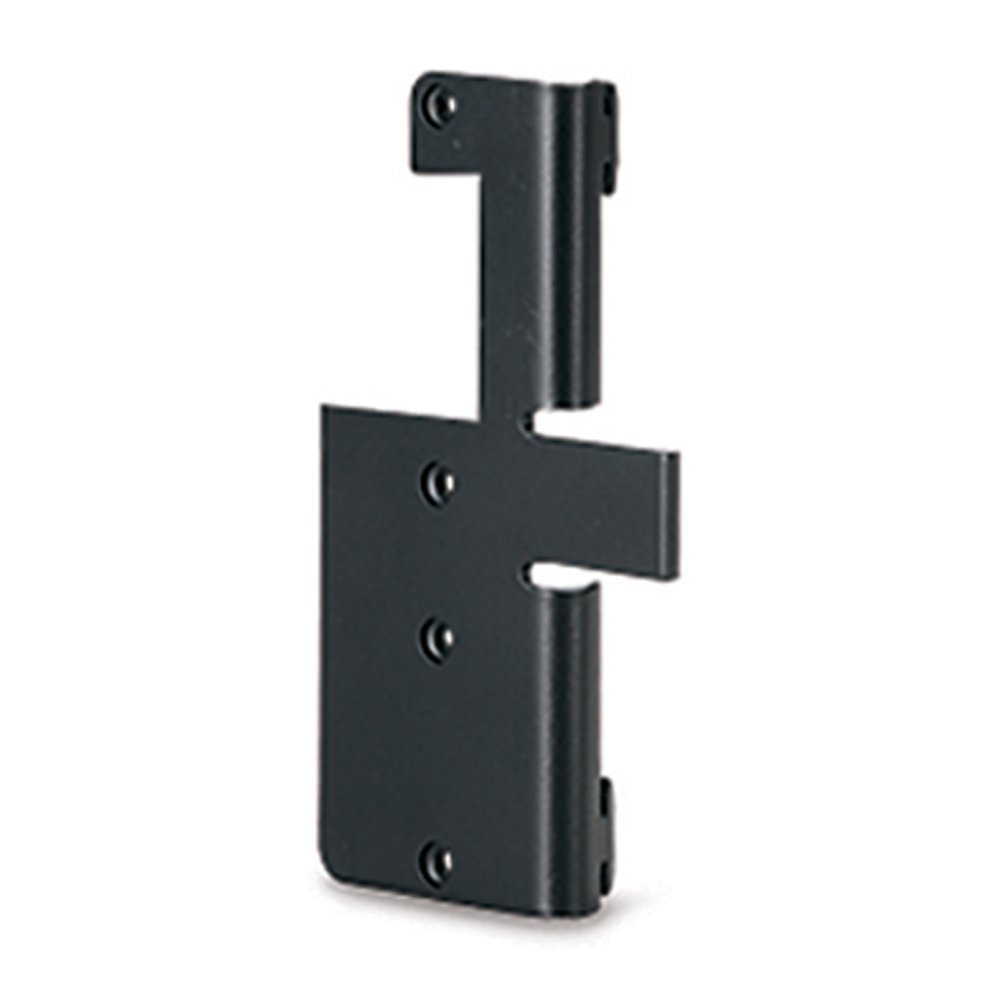
Image: The Leviton 49222-HAO QuickPort Modular Furniture Bracket, shown from a front-side angle, highlighting its compact design and mounting points.
การติดตั้งและการตั้งค่า
The Leviton 49222-HAO bracket is designed for straightforward integration into modular office furniture systems, particularly those from Herman Miller.
ขั้นตอนการติดตั้ง:
- เตรียมเฟอร์นิเจอร์ให้พร้อม: Identify the desired location on the modular office furniture for the outlet or device installation. Ensure there is adequate space and access for wiring.
- ติดวงเล็บ: Position the Leviton 49222-HAO bracket against the furniture surface. Secure it using appropriate fasteners (not included) that are compatible with your furniture material. The bracket is designed to accommodate surface-mount outlets or flush-mount devices with a backbox.
- การเดินสายเคเบิล: Utilize the rear cable entry hole on the bracket to route necessary cables (e.g., data, power) from behind the furniture to the front. This feature helps maintain a clean and organized appearance.
- ติดตั้งอุปกรณ์: Once the bracket is securely mounted and cables are routed, install your QuickPort outlets or other compatible devices into the bracket. Ensure all connections are firm and secure.
- การตรวจสอบขั้นสุดท้าย: Verify that the bracket and installed devices are stable and that all wiring is correctly connected and safely managed.
บันทึก: This bracket is specifically designed for use with Herman Miller modular office systems, ensuring optimal fit and integration.
คำแนะนำการใช้งาน
The Leviton 49222-HAO QuickPort Modular Furniture Bracket functions as a stable mounting platform for various QuickPort compatible devices. Once installed, the operation of the bracket itself is passive, providing structural support and cable management. The functionality will depend on the specific QuickPort outlets or devices installed within it (e.g., data jacks, power outlets).
Ensure that any devices installed into the bracket are used according to their individual operating instructions.
การซ่อมบำรุง
The Leviton 49222-HAO QuickPort Modular Furniture Bracket requires minimal maintenance.
- การทำความสะอาด: Periodically wipe the surface of the bracket with a soft, dry cloth to remove dust. For stubborn marks, a slightly damp สามารถใช้ผ้าชุบสบู่เหลวเช็ดทำความสะอาด แล้วเช็ดให้แห้ง หลีกเลี่ยงน้ำยาทำความสะอาดที่มีฤทธิ์กัดกร่อนหรือตัวทำละลาย
- การตรวจสอบ: Occasionally check the mounting screws or fasteners to ensure they remain tight and secure. Verify that cables are not pinched or damaged.
- สภาพแวดล้อม : Ensure the bracket is not exposed to extreme temperatures or excessive moisture, which could affect its material integrity or the performance of installed devices.
การแก้ไขปัญหา
As a passive mounting bracket, direct troubleshooting for the 49222-HAO is limited. Most issues will relate to the installation process or the devices mounted within it.
ปัญหาทั่วไปและวิธีแก้ไข:
- Bracket is loose: Ensure all mounting fasteners are securely tightened. If the furniture material is damaged, consider relocating the bracket or reinforcing the mounting area.
- Cables are not routing smoothly: Check for obstructions in the cable entry hole or ensure cables are not kinked. Reroute if necessary.
- Installed device is not functioning: This is likely an issue with the device itself or its connection. Refer to the instruction manual for the specific QuickPort device installed. Verify all wiring connections are correct and secure.
ข้อมูลจำเพาะ
| คุณสมบัติ | รายละเอียด |
|---|---|
| หมายเลขรุ่น | 49222-HAO |
| ยี่ห้อ | เลวีตัน |
| ขนาดสินค้า (กxยxส) | 5.41 x 1.45 x 9.07 ซม. (2.13 x 0.57 x 3.57 นิ้ว) |
| น้ำหนักสินค้า | 54.4 กรัม (1.92 ออนซ์) |
| สี | สีดำ |
| ส่วนประกอบที่รวมอยู่ | วงเล็บ |
| ยูพีซี | 078477805466 |
| GTIN | 00078477805466 |
การรับประกันและการสนับสนุน
For warranty information and technical support regarding the Leviton 49222-HAO QuickPort Modular Furniture Bracket, please refer to the official Leviton website or contact Leviton customer service directly. Specific warranty terms may vary by region and purchase date.
แหล่งข้อมูลออนไลน์: เยี่ยมชมเว็บไซต์อย่างเป็นทางการของ Leviton webเว็บไซต์นี้รวบรวมเอกสารผลิตภัณฑ์ คำถามที่พบบ่อย และข้อมูลติดต่อฝ่ายสนับสนุน
บริการลูกค้า: Contact Leviton customer support for assistance with installation, troubleshooting, or product inquiries.


