1. สูงกว่าview
The Intel Pentium Dual-Core Mobile T4300 is a high-performance mobile processor designed for laptops and other portable computing devices. This CPU features a dual-core architecture, providing efficient multitasking capabilities and improved performance for everyday computing tasks. It operates at a frequency of 2.1 GHz with an 800 MHz Front Side Bus (FSB) and is designed for Socket P motherboards.
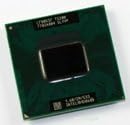
Image 1.1: The Intel Pentium Dual-Core Mobile T4300 processor. This image shows the top view of the CPU, highlighting its compact form factor and the integrated heat spreader.
คุณสมบัติหลัก:
- สถาปัตยกรรมแบบดูอัลคอร์: ช่วยให้สามารถจัดการแอปพลิเคชันหลายตัวพร้อมกันได้อย่างมีประสิทธิภาพ
- ความเร็วสัญญาณนาฬิกา 2.1 GHz: Provides robust performance for general computing.
- 800 MHz Front Side Bus (FSB): Facilitates fast data transfer between the CPU and other components.
- Socket P Compatibility: Designed for specific mobile motherboard platforms.
- EM64T Technology: รองรับสภาพแวดล้อมการประมวลผลแบบ 64 บิต
- เทคโนโลยี SpeedStep ที่ได้รับการปรับปรุง: Optimizes power consumption and heat generation.
- ดำเนินการปิดใช้งานบิต: Enhances system security against certain types of malicious software.
- Refurbished Condition: This CPU is a refurbished working unit.
2. การตั้งค่าและการติดตั้ง
Installing a mobile processor requires careful handling and adherence to specific procedures. It is recommended that installation be performed by a qualified technician. Incorrect installation can damage the CPU, motherboard, or other components.
ขั้นตอนการติดตั้ง:
- เตรียมพื้นที่ทำงาน: Ensure a clean, static-free environment. Use an anti-static wrist strap to prevent electrostatic discharge (ESD) damage.
- Access the CPU Socket: Power off and unplug the laptop. Remove the necessary panels to access the motherboard and the CPU socket. Consult your laptop's service manual for specific instructions.
- Remove Old CPU (if applicable): If replacing an existing CPU, carefully unlock the socket lever and gently lift the old processor straight up.
- ทำความสะอาดซ็อกเก็ต: Ensure the CPU socket is free of dust or debris. Do not touch the pins inside the socket.
- ใช้วางความร้อน: Apply a small, pea-sized amount of high-quality thermal paste to the center of the new CPU's integrated heat spreader (IHS). This ensures efficient heat transfer to the cooler.
- Seat the New CPU: Align the triangular marker on the CPU with the corresponding marker on the socket. Gently lower the CPU straight into the socket. Do not force it. If it does not seat easily, re-check alignment.
- รักษาความปลอดภัยของ CPU: Once the CPU is properly seated, push down the socket lever to lock the processor in place.
- ติดตั้งตัวระบายความร้อน CPU: Reinstall the CPU cooler (heatsink and fan assembly) according to your laptop's specifications. Ensure proper contact and secure all mounting screws.
- ประกอบแล็ปท็อปใหม่: Reconnect any disconnected cables and reattach the panels.
- เปิดเครื่องและทดสอบ: Connect the power adapter and power on the laptop. Verify that the system boots correctly and recognizes the new CPU in the BIOS/UEFI settings.
3. หลักการทำงาน
The Intel Pentium Dual-Core Mobile T4300 functions as the central processing unit (CPU) of your mobile computer. It executes instructions, performs calculations, and manages the flow of information within the system. Its dual-core design allows it to process two instruction streams simultaneously, significantly improving performance in multi-threaded applications and when running multiple programs concurrently.
Key operating characteristics include its clock speed (2.1 GHz), which dictates how many cycles per second the processor can perform, and its Front Side Bus (FSB) speed (800 MHz), which determines the speed of communication with the system memory and chipset. The integrated L2 cache (1 MB) provides fast access to frequently used data, reducing latency and improving overall responsiveness.
Enhanced SpeedStep Technology dynamically adjusts the processor's voltage and frequency based on workload, optimizing power consumption and reducing heat generation, which is crucial for mobile devices to extend battery life and maintain stable operation.
4. การบำรุงรักษา
While the CPU itself requires no direct user maintenance, its optimal performance and longevity depend on maintaining proper thermal conditions within your laptop. Overheating can lead to system instability, reduced performance, and permanent damage to components.
แนวทางปฏิบัติการบำรุงรักษาที่แนะนำ:
- รักษาช่องระบายอากาศให้โล่ง: Ensure that the laptop's air intake and exhaust vents are not obstructed. Avoid using the laptop on soft surfaces like beds or couches that can block airflow.
- Regular Dust Cleaning: Periodically clean the laptop's cooling system (fans and heatsinks) using compressed air. This helps remove accumulated dust that can impede airflow and heat dissipation. This may require opening the laptop.
- Thermal Paste Renewal: Over time, thermal paste can dry out and become less effective. If you notice persistent overheating issues, consider having a qualified technician reapply fresh thermal paste to the CPU. This is typically recommended every few years or if the CPU cooler is removed.
- ตรวจสอบอุณหภูมิ: Use software utilities to monitor CPU temperatures, especially during demanding tasks. If temperatures consistently exceed safe operating limits (e.g., above 90°C under load), investigate the cause.
5 การแก้ไขปัญหา
If you encounter issues after installing or while using your Intel Pentium Dual-Core Mobile T4300 processor, consider the following troubleshooting steps:
ปัญหาทั่วไปและวิธีแก้ไข:
- ระบบไม่บูต / ไม่มีภาพแสดงผล:
- ที่นั่ง CPU: Ensure the CPU is correctly seated in its socket and the locking lever is fully engaged.
- Thermal Paste/Cooler: Verify that the CPU cooler is properly installed and making good contact with the CPU. Insufficient thermal paste or poor cooler contact can cause immediate shutdown or prevent boot.
- ความเข้ากันได้: Confirm that your motherboard's chipset and BIOS version support the T4300 processor. Check the laptop manufacturer's website for CPU compatibility lists.
- RAM/Other Components: Ensure RAM modules are properly seated. Try booting with one RAM stick if multiple are installed.
- เครื่องร้อนเกินไป / ระบบปิดตัวเอง:
- น้ำยาระบายความร้อน: Re-check thermal paste application. Ensure it's evenly spread and sufficient.
- การติดตั้งคูลเลอร์: Verify the CPU cooler is securely mounted and its fan is spinning.
- การสะสมของฝุ่น: Clean dust from the heatsink fins and fan blades.
- การระบายอากาศ : Ensure laptop vents are unobstructed.
- Poor Performance / Sluggishness:
- ไดรเวอร์: ตรวจสอบให้แน่ใจว่าไดรเวอร์ระบบทั้งหมด โดยเฉพาะไดรเวอร์ชิปเซ็ต ได้รับการอัปเดตแล้ว
- การตั้งค่าพลังงาน: Check operating system power management settings to ensure the CPU is not being throttled.
- กระบวนการเบื้องหลัง: Close unnecessary background applications that consume CPU resources.
- การสแกนหาไวรัส: Run a comprehensive malware scan.
If issues persist after attempting these steps, it is advisable to consult a professional computer technician or refer to your laptop's specific service manual.
6. ข้อมูลจำเพาะทางเทคนิค
| ข้อมูลจำเพาะ | ค่า |
|---|---|
| ประเภทโปรเซสเซอร์ | Intel Pentium Dual-Core Mobile |
| หมายเลขรุ่น | T4300 (AW80577GG0451MA) |
| ความถี่ | 2.1 กิกะเฮิรตซ์ |
| ความเร็วบัส | 800 MHz FSB |
| ประเภทซ็อกเก็ต | Socket P (478-pin Micro-FCPGA) |
| จำนวนแกน | 2 |
| L2 Cache Size | 1MB |
| เทคโนโลยีการผลิต | 45 nm (0.045 micron) |
| Core Stepping | R0 |
| พลังการออกแบบเชิงความร้อน (TDP) | 35 วัตต์ |
| Case Temperature (Tกรณี) | 105 องศาเซลเซียส |
| คุณสมบัติ | EM64T, Enhanced SpeedStep, Execute Disable Bit |
| ขนาดแพ็คเกจ | ขนาดบรรจุภัณฑ์สำหรับการจัดส่ง 8 x 5 x 2 นิ้ว |
7. การรับประกันและการสนับสนุน
This Intel Pentium Dual-Core Mobile T4300 processor is sold as a refurbished working CPU. Please note the following important information regarding its condition and support:
การปฏิเสธความรับผิดทางกฎหมาย:
All products are sold in absolute good faith and condition exactly as described. By purchasing, the consumer, client, purchaser, including all associates in "natural and artificial persons/corporations/LLCs/trust companies", etc., and beneficiary hereinafter declares and undersigns that all merchandise purchased are acquired solely for beneficial and nondestructive purposes and uses or intentions. The beneficiary equally undersigns and waives all claims relating to health, to risks of handling, secondary and tertiary consequences from the handling of the item. The buyer waives any rights to lawsuits and claims of any order resulting from the use, handling, and third-party OEM disclosures and nondisclosures. Limitations of our lawsuits for deliberate item destruction all fall under One Million ($1,000,000) United States Dollars per product and not less than USD $300,000 per case/litigation. The buyer waives/disclaims/dis-owns any rights to non-information.
การสนับสนุนด้านเทคนิค:
For further technical assistance or inquiries regarding Intel products, please refer to the official Intel support website or contact their customer service. As this is a refurbished component, direct manufacturer warranty support may vary. Please consult the seller for specific return or exchange policies.
You can visit the official Intel Store for general product information: Intel Official Store on Amazon


