1. บทนำ
Welcome to the user manual for your new NEC NP43 Portable Projector. This manual provides essential information for the safe and efficient operation, setup, maintenance, and troubleshooting of your projector. Please read this manual thoroughly before using the product and keep it for future reference.
2. ข้อมูลด้านความปลอดภัย
To ensure safe operation and prevent damage to the projector, please observe the following precautions:
- อย่าปิดกั้นช่องระบายอากาศ ตรวจสอบให้แน่ใจว่ามีอากาศถ่ายเทเพียงพอรอบๆ โปรเจ็กเตอร์
- อย่ามองตรงเข้าไปในเลนส์โปรเจ็กเตอร์เมื่อลamp เปิดอยู่เนื่องจากแสงที่สว่างเกินไปอาจทำให้ดวงตาเสียหายได้
- Avoid placing the projector in direct sunlight, near heat sources, or in areas with high humidity or excessive dust.
- ใช้เฉพาะสายไฟที่มาพร้อมกับโปรเจคเตอร์เท่านั้น และเสียบเข้ากับเต้ารับที่มีระบบสายดินที่ถูกต้อง
- อย่าพยายามซ่อมแซมโปรเจคเตอร์ด้วยตนเอง โปรดส่งต่อให้ช่างผู้ชำนาญการเป็นผู้ดำเนินการซ่อมแซม
- ถอดปลั๊กโปรเจคเตอร์ออกจากเต้าเสียบไฟก่อนทำความสะอาดหรือเมื่อไม่ได้ใช้งานเป็นเวลานาน
3. เนื้อหาบรรจุภัณฑ์
ตรวจสอบว่ามีรายการทั้งหมดอยู่ในแพ็คเกจ:
- NEC NP43 โปรเจคเตอร์แบบพกพา
- สายไฟ
- สายเคเบิล VGA
- รีโมทคอนโทรลพร้อมแบตเตอรี่
- คู่มือการใช้งาน (เอกสารนี้)
- กระเป๋าสำหรับพกพา (อาจแตกต่างกันไปตามภูมิภาค)
4. สินค้าหมดview
Familiarize yourself with the various parts and connections of your NEC NP43 projector.

รูปที่ 4.1: ด้านข้าง view of the NEC NP43 projector, showing the lamp cover release and ventilation grilles. The "OPEN" arrow indicates the direction to slide the cover.
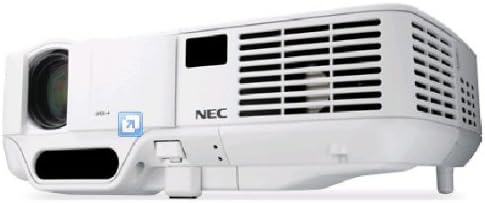
Figure 4.2: Front-side perspective view of the NEC NP43 projector, highlighting the lens, focus ring, zoom ring, and control panel area with indicator lights.
4.1 แผงด้านหน้า
- เลนส์ฉายภาพ: ปล่อยภาพออกมา
- วงแหวนโฟกัส: ปรับความคมชัดของภาพ
- วงแหวนซูม: ปรับขนาดรูปภาพ
- ตัวรับสัญญาณ IR: รับสัญญาณจากรีโมทคอนโทรล
4.2 Rear Panel (Input/Output Ports)
- อินพุต VGA: Connects to computers or other VGA-compatible devices.
- RCA Video Input: Connects to composite video sources.
- อินพุตเสียง: เชื่อมต่อกับแหล่งกำเนิดเสียง
- ช่องจ่ายไฟ: เชื่อมต่อสายไฟ
5. การตั้งค่า
5.1 การจัดวางโปรเจ็กเตอร์
Place the projector on a stable, flat surface or mount it securely. Ensure the projector is positioned at an appropriate distance from the screen to achieve the desired image size. Maintain adequate ventilation space around the unit.
5.2 การเชื่อมต่อสายไฟ
- ต่อสายไฟที่ให้มาเข้ากับช่องเสียบไฟของโปรเจ็กเตอร์
- เสียบปลายอีกด้านของสายไฟเข้ากับเต้ารับไฟฟ้าที่มีสายดิน
5.3 Connecting Source Devices
The NEC NP43 supports VGA and RCA connectivity.
- การเชื่อมต่อวีจีเอ: Connect a VGA cable from your computer's VGA output port to the projector's VGA input port.
- การเชื่อมต่ออาร์ซีเอ: Connect an RCA composite video cable from your video source (e.g., DVD player) to the projector's RCA video input. Ensure to also connect audio cables if your source provides separate audio output.
6. คู่มือการใช้งาน
6.1 การเปิด/ปิดเครื่อง
- การเปิดเครื่อง: Press the Power button on the projector's control panel or the remote control. The power indicator light will turn green.
- วิธีปิดเครื่อง: Press the Power button again. A confirmation message may appear. Press the Power button a second time to confirm shutdown. Allow the projector to cool down before unplugging.
6.2 การเลือกแหล่งที่มาของอินพุต
Press the "Input" or "Source" button on the projector or remote control to cycle through available input sources (VGA, Video).
6.3 การปรับภาพ
- จุดสนใจ: หมุนวงแหวนปรับโฟกัสบนเลนส์จนกว่าภาพจะคมชัด
- ซูม: หมุนวงแหวนซูมบนเลนส์เพื่อปรับขนาดภาพ
- การแก้ไขคีย์สโตน: หากโปรเจคเตอร์ไม่ได้ตั้งฉากกับหน้าจออย่างสมบูรณ์ ให้ใช้ปุ่มแก้ไขภาพบิดเบี้ยว (keystone correction) บนแผงควบคุมหรือรีโมทเพื่อแก้ไขภาพบิดเบี้ยวแบบสี่เหลี่ยมคางหมู
7. การบำรุงรักษา
7.1 ลิตรamp การทดแทน
ลamp has a life expectancy of up to 2500 hours in normal mode and 3500 hours in eco mode. When the lamp หากไฟแสดงสถานะสว่างขึ้นหรือภาพมืดลง แสดงว่าถึงเวลาต้องเปลี่ยนหลอดไฟแล้วamp. Refer to the lamp replacement section in the full service manual for detailed instructions. Always use genuine NEC replacement lamps.
7.2 การทำความสะอาดตัวกรองอากาศ
Regularly clean the air filter to maintain optimal performance and prevent overheating. The filter is typically located on the side or bottom of the projector. Use a soft brush or vacuum cleaner to remove dust. Replace the filter if it is heavily soiled or damaged.
7.3 การทำความสะอาดทั่วไป
Wipe the projector's exterior with a soft, dry cloth. For stubborn marks, dampen the cloth slightly with water. Do not use abrasive cleaners or solvents. Clean the lens gently with a lens cleaning cloth designed for optical surfaces.
8 การแก้ไขปัญหา
| ปัญหา | สาเหตุที่เป็นไปได้ | สารละลาย |
|---|---|---|
| ไม่มีภาพบนหน้าจอ | เลือกแหล่งสัญญาณเข้าไม่ถูกต้อง; สายเคเบิลหลวม; โปรเจคเตอร์อยู่ในโหมดสแตนด์บาย | Select the correct input source. Check all cable connections. Press the Power button to wake the projector. |
| ภาพเบลอ | Focus not adjusted; Lens is dirty. | Adjust the focus ring on the lens. Clean the projector lens. |
| โปรเจ็กเตอร์ร้อนเกินไปและปิดเครื่อง | ช่องระบายอากาศอุดตัน; แผ่นกรองอากาศสกปรก; อุณหภูมิแวดล้อมสูง | Ensure clear ventilation paths. Clean or replace the air filter. Operate in a cooler environment. |
| ไม่มีเสียง | ไม่ได้เชื่อมต่อสายสัญญาณเสียง; ระดับเสียงเบาเกินไป; ปิดเสียง | Connect audio cable. Increase volume. Unmute the projector or source device. |
9. ข้อมูลจำเพาะ
| คุณสมบัติ | รายละเอียด |
|---|---|
| หมายเลขรุ่น | NP43 |
| เทคโนโลยีการแสดงผล | ดีแอลพี (DMD ขนาด 0.55 นิ้ว) |
| ความละเอียดดั้งเดิม | 1024 x 768 (XGA) |
| ความละเอียดการแสดงผลสูงสุด | 1024 x 768 |
| ความสว่าง | 2300 ลูเมน |
| อัตราส่วนคอนทราสต์ | 1600:1 น. |
| Lamp พิมพ์ | 200W AC/170 eco |
| Lamp ชีวิต | 2500 hours (Normal) / 3500 hours (Eco) |
| มาตรฐานวิดีโอที่รองรับ | NTSC 4.43, PAL, PAL-60, PAL-M, PAL-N, SECAM |
| เทคโนโลยีการเชื่อมต่อ | VGA, RCA |
| ขนาดสินค้า (กว้าง x ยาว x สูง) | 7.17 x 9.69 x 2.83 นิ้ว |
| น้ำหนักสินค้า | 3.75 ปอนด์ |
| คุณสมบัติพิเศษ | Pico, Speakers |
10. การรับประกันและการสนับสนุน
For warranty information and technical support, please refer to the warranty card included with your product or visit the official NEC Display Solutions webไซต์นี้ โปรดเก็บหลักฐานการซื้อไว้เพื่อใช้ยืนยันการรับประกัน
ข้อมูลติดต่อ: Please refer to the contact details provided on the NEC website or in your product's packaging for customer service and technical assistance.


