1. บทนำ
The Antec TruePower TPQ-1200 is a high-performance 1200-watt power supply designed for demanding computer systems. It features an 80 PLUS Silver certification, indicating high energy efficiency, and provides stable power delivery through its six +12V rails. This manual provides essential information for the safe installation, operation, and maintenance of your TPQ-1200 power supply.
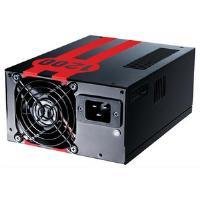
Image 1.1: The Antec TruePower TPQ-1200 Power Supply unit, showcasing its design and modular connectors.
2. ข้อมูลด้านความปลอดภัย
Please read and understand all safety instructions before installing or operating the power supply. Failure to do so may result in personal injury or damage to your equipment.
- ควรตัดสายไฟออกจากเต้ารับที่ผนังทุกครั้งก่อนทำการติดตั้ง ถอด หรือทำความสะอาดอุปกรณ์จ่ายไฟ
- แหล่งจ่ายไฟนี้ออกแบบมาเพื่อใช้กับคอมพิวเตอร์ส่วนบุคคลเท่านั้น ห้ามใช้เพื่อวัตถุประสงค์อื่น
- ห้ามเปิดแหล่งจ่ายไฟ casinก. ปริมาตรสูงtagภายในมีชิ้นส่วนอยู่ และไม่มีชิ้นส่วนใดที่ผู้ใช้สามารถซ่อมแซมได้ การเปิดเคสasinจีจะทำให้การรับประกันเป็นโมฆะ
- ตรวจสอบให้แน่ใจว่าระบบคอมพิวเตอร์ของคุณต่อสายดินอย่างถูกต้อง
- Avoid operating the power supply in high humidity or extreme temperature environments.
- Keep the power supply away from liquids and sources of heat.
3. เนื้อหาบรรจุภัณฑ์
ตรวจสอบว่าแพ็คเกจของคุณมีรายการต่อไปนี้:
- Antec TruePower TPQ-1200 Power Supply Unit
- Modular Cable Set (PCIe, SATA, Molex, Floppy)
- สายไฟ AC
- สกรูยึด
- คู่มือการใช้งาน (เอกสารนี้)
If any items are missing or damaged, please contact your retailer or Antec customer support.
4. คุณสมบัติ
The Antec TruePower TPQ-1200 power supply offers advanced features for reliable and efficient performance:
- 1200 Watts Continuous Power: จัดเตรียมให้ ample power for high-end gaming and workstation systems.
- 80 PLUS Silver Certified: Achieves up to 88% efficiency, reducing heat generation and operating costs.
- Six +12V Rails: Delivers stable and clean power to critical components.
- ระบบจัดการสายเคเบิลขั้นสูง: Semi-modular design allows for cleaner builds and improved airflow.
- PowerCache High Performance Capacitors: Enhances stability and transient response.
- Ultra-Quiet Pulse Width Modulation (PWM) Fan: Provides efficient cooling with minimal noise.
- Industrial Grade Protection Circuitry: รวมถึงระบบป้องกันกระแสเกิน (OCP) และแรงดันไฟเกินtage Protection (OVP) ภายใต้ฉบับที่tage Protection (UVP), Short Circuit Protection (SCP), Over Power Protection (OPP), and Over Temperature Protection (OTP).
5. การตั้งค่าและการติดตั้ง
Follow these steps carefully to install your Antec TruePower TPQ-1200 power supply.
5.1 รายการตรวจสอบก่อนการติดตั้ง
- Ensure your computer case supports an ATX power supply.
- รวบรวมเครื่องมือที่จำเป็น: ไขควงปากแฉก
- Unplug your computer from the wall outlet and discharge any residual power by pressing the power button.
5.2 การติดตั้งพาวเวอร์ซัพพลาย
- Carefully place the power supply into the designated PSU bay in your computer case. Ensure the fan is oriented correctly (typically facing down for bottom-mounted PSUs, or according to case design for top-mounted).
- จัดตำแหน่งรูสกรูบนแหล่งจ่ายไฟให้ตรงกับรูสกรูบนตัวเคส
- Secure the power supply using the provided mounting screws. Do not overtighten.
5.3 การต่อสายไฟ
Connect the necessary cables to your motherboard and components. The TPQ-1200 features both fixed and modular cables.
- 24-Pin ATX Motherboard Power: Connect the main 24-pin connector to the corresponding port on your motherboard. Ensure it clicks into place.
- 8-Pin EPS12V (CPU) Power: Connect the 8-pin (or 4+4 pin) EPS12V connector to the CPU power port on your motherboard.
- PCIe (Graphics Card) Power: For graphics cards requiring additional power, connect the appropriate 6-pin or 6+2 pin PCIe modular cables from the power supply to your graphics card(s).
- กำลังไฟ SATA: Connect SATA modular cables to your SATA hard drives, SSDs, and optical drives.
- Molex (Peripheral) Power: Use Molex modular cables for older peripherals or case fans that require this connector type.
- การจัดการสายเคเบิล: Route cables neatly behind the motherboard tray or in other designated areas of your case to improve airflow and aesthetics.
5.4 การเปิดเครื่องครั้งแรก
- ตรวจสอบให้แน่ใจว่าการเชื่อมต่อทั้งหมดมีความปลอดภัย
- เชื่อมต่อสายไฟ AC เข้ากับแหล่งจ่ายไฟ แล้วจึงเสียบเข้ากับเต้ารับติดผนังที่มีสายดิน
- พลิกสวิตช์เปิด/ปิดที่ด้านหลังของแหล่งจ่ายไฟไปที่ตำแหน่ง 'เปิด' (I)
- เปิดเครื่องคอมพิวเตอร์ของคุณ
6. คู่มือการใช้งาน
The Antec TruePower TPQ-1200 is designed for continuous operation within its specified limits. Ensure adequate ventilation around your computer case to prevent overheating. The intelligent PWM fan will adjust its speed based on the power supply's temperature to maintain optimal cooling and noise levels.
Always shut down your computer properly through the operating system before turning off the power supply switch or unplugging the AC cord.
7. การบำรุงรักษา
การบำรุงรักษาอย่างสม่ำเสมอจะช่วยให้แหล่งจ่ายไฟของคุณมีอายุการใช้งานยาวนานและทำงานได้อย่างมีประสิทธิภาพสูงสุด
- การทำความสะอาดฝุ่น: Periodically (e.g., every 6-12 months), disconnect the power supply from the wall outlet and use compressed air to gently clean dust from the fan grille and ventilation openings. Do not open the power supply casing.
- การตรวจสอบสายเคเบิล: ควรตรวจสอบการเชื่อมต่อสายไฟทั้งหมดเป็นระยะ เพื่อให้แน่ใจว่าแน่นหนาและไม่มีความเสียหาย
8 การแก้ไขปัญหา
If you encounter issues with your power supply, refer to the following troubleshooting guide:
| ปัญหา | สาเหตุที่เป็นไปได้ | สารละลาย |
|---|---|---|
| คอมพิวเตอร์ไม่สามารถเปิดเครื่องได้ | AC power cord not connected or loose. Power supply switch is OFF. Faulty power supply. | Ensure AC cord is firmly connected. Flip PSU switch to 'ON' (I). Test with another power supply if possible. |
| ระบบเปิดอยู่แต่ปิดลงทันที | Overload, short circuit, or overheating. | Check for short circuits (e.g., loose screws). Ensure adequate ventilation. Disconnect non-essential components to check for overload. |
| ระบบไม่เสถียรหรือรีบูตแบบสุ่ม | Insufficient power, faulty component, or power supply issue. | Verify all power connectors are secure. Ensure total system wattage does not exceed PSU capacity. Test components individually if possible. |
| เสียงพัดลมดังมากจากพาวเวอร์ซัพพลาย | Dust accumulation, fan malfunction, or high load. | Clean dust from the fan grille. If noise persists and is excessive, contact support. |
If troubleshooting steps do not resolve the issue, contact Antec customer support for further assistance.
9. ข้อมูลจำเพาะ
Detailed technical specifications for the Antec TruePower TPQ-1200 power supply:
- ชื่อรุ่น : TruePower TPQ-1200
- เอาท์พุต วัดtage: 1200 วัตต์
- ฟอร์มแฟกเตอร์: เอทีเอ็กซ์12วี
- ประเภทตัวเชื่อมต่อ: เอทีเอ็กซ์
- ประสิทธิภาพ: 80 PLUS Silver Certified
- วิธีการทำความเย็น: Air (PWM Fan)
- จำนวนแฟนๆ: 1
- อุปกรณ์ที่รองรับ: เครื่องคอมพิวเตอร์ส่วนบุคคล
- น้ำหนักสินค้า: 4.96 ปอนด์ (2.25 กก.)
- ขนาดแพ็คเกจ: 12.91 x 9.84 x 5.59 นิ้ว (32.8 x 25 x 14.2 ซม.)
- วันที่เข้าใช้งานครั้งแรก: 17 เมษายน 2012
10. การรับประกันและการสนับสนุน
สำหรับข้อมูลการรับประกันและการสนับสนุนทางเทคนิค โปรดดูที่เว็บไซต์อย่างเป็นทางการของ Antec webเยี่ยมชมเว็บไซต์หรือติดต่อฝ่ายบริการลูกค้าโดยตรง เงื่อนไขการรับประกันอาจแตกต่างกันไปตามภูมิภาคและวันที่ซื้อ
Antec Official Webเว็บไซต์: www.antec.com


