การแนะนำ
ขอบคุณสำหรับการซื้อasing the Muse M-10 CR Clock Radio. This manual provides important information regarding the setup, operation, and maintenance of your new device. Please read it thoroughly before use and retain it for future reference.
ข้อมูลด้านความปลอดภัยที่สำคัญ
- อย่าให้เครื่องนี้โดนน้ำหยดหรือกระเซ็น
- ห้ามวางวัตถุที่บรรจุของเหลว เช่น แจกัน บนเครื่องใช้ไฟฟ้า
- ตรวจสอบให้แน่ใจว่ามีการระบายอากาศที่เหมาะสมรอบ ๆ เครื่อง อย่าปิดกั้นช่องระบายอากาศ
- ใช้เฉพาะอะแดปเตอร์ไฟฟ้าที่มาพร้อมกับเครื่องเท่านั้น
- อย่าพยายามถอดประกอบหรือดัดแปลงตัวเครื่อง แนะนำให้ช่างผู้ชำนาญเข้ารับบริการทั้งหมด
- ควรวางอุปกรณ์ให้ห่างจากแสงแดดโดยตรง แหล่งความร้อน และสนามแม่เหล็กแรงสูง
- ทำความสะอาดตัวเครื่องด้วยผ้าแห้งเนื้อนุ่มเท่านั้น
เนื้อหาแพ็คเกจ
โปรดตรวจสอบว่ามีสิ่งของครบถ้วนหรือไม่:
- Muse M-10 CR Clock Radio
- อะแดปเตอร์แปลงไฟ
- คู่มือการใช้งาน
สินค้าเกินview
Familiarize yourself with the controls and display of your Muse M-10 CR.

ภาพ: ด้านหน้า view of the Muse M-10 CR Clock Radio, showing the large white LED display and control buttons on top.

ภาพ: สูงสุด view of the Muse M-10 CR Clock Radio, highlighting the control buttons for power, alarm settings, hour/minute adjustment, radio tuning, and the large snooze button.
การควบคุมและตัวบ่งชี้:
- ปุ่มเปิด/ปิด: เปิด/ปิดเครื่อง
- Alarm 1 / Alarm 2 Buttons: Set and activate individual alarms.
- ปุ่ม HR (ชั่วโมง): ปรับเวลา
- ปุ่ม MIN (นาที): ปรับนาที
- Tuning Buttons (<< / >>): ปรับความถี่วิทยุ
- ปุ่มเลื่อนปลุก: Temporarily silences the alarm and dims the display.
- จอแสดงผล LED: Shows time, alarm status, and radio frequency.
การตั้งค่า
1. การเชื่อมต่อพลังงาน
- Insert the DC plug of the power adapter into the DC IN jack on the back of the unit.
- Plug the power adapter into a standard wall outlet (AC 220V, 50Hz).
- The LED display will light up, indicating the unit is powered.
2. การตั้งเวลา
- ในการตั้งเวลา ให้กด . ค้างไว้ HR ปุ่มเพื่อปรับชั่วโมง
- กดปุ่ม นาที ปุ่มเพื่อปรับนาที
- Release the buttons to confirm the time. The time will be set in 24-hour format.
คำแนะนำการใช้งาน
การใช้งานวิทยุ (FM)
- กดปุ่ม พลัง ปุ่มเพื่อเปิดวิทยุ
- กดปุ่ม Tuning (<< / >>) buttons briefly to manually tune to your desired FM frequency.
- To auto-scan and store presets: Press and hold the Tuning (<< / >>) button for a few seconds. The radio will scan for available stations and store them automatically. The unit supports 20 preset FM stations.
- To recall a preset station: After auto-scanning, use the Tuning (<< / >>) buttons to cycle through the stored preset stations.
บันทึก: For optimal reception, ensure the FM wire antenna (located at the back of the unit) is fully extended.
Setting Alarms (Dual Alarm)
The Muse M-10 CR features a dual alarm system, allowing you to set two separate alarm times.
- กดปุ่ม ปลุก 1 or ปลุก 2 button once. The alarm time will flash on the display.
- While the alarm time is flashing, press the HR ปุ่มสำหรับตั้งเวลาปลุก
- กดปุ่ม นาที ปุ่มสำหรับตั้งเวลาปลุก (นาที)
- กดปุ่ม ปลุก 1 or ปลุก 2 button again to confirm the alarm time.
- To select the alarm source (Buzzer or Radio), press the respective ปลุก 1 or ปลุก 2 button repeatedly until the desired icon (buzzer or radio wave) appears next to the alarm indicator on the display.
- หากต้องการปิดใช้งานสัญญาณเตือน ให้กดปุ่มที่เกี่ยวข้อง ปลุก 1 or ปลุก 2 กดปุ่มค้างไว้จนกว่าไฟแสดงสถานะการเตือนจะหายไปจากหน้าจอ
ฟังก์ชั่นการพักชั่วคราว
เมื่อเสียงสัญญาณเตือนดังขึ้น ให้กดปุ่มขนาดใหญ่ เลื่อน button on top of the unit. The alarm will be temporarily silenced for approximately 9 minutes and will sound again after this period. The snooze function can be used multiple times.
จอแสดงผลหรี่
The 0.6-inch white LED display has adjustable intensity. Press the เลื่อน button while the unit is in standby mode to cycle through different brightness levels (High, Low, Off). This allows you to adjust the display brightness to your preference, especially for nighttime use.
การซ่อมบำรุง
การทำความสะอาด
- ถอดปลั๊กเครื่องออกจากเต้ารับก่อนทำความสะอาดทุกครั้ง
- Use a soft, dry cloth to wipe the exterior surfaces of the clock radio.
- ห้ามใช้สารทำความสะอาดที่มีฤทธิ์กัดกร่อน ขี้ผึ้ง หรือตัวทำละลาย เพราะอาจทำให้พื้นผิวเสียหายได้
พื้นที่จัดเก็บ
หากคุณวางแผนที่จะเก็บรักษาเครื่องไว้เป็นเวลานาน โปรดถอดปลั๊กออกจากแหล่งจ่ายไฟและเก็บไว้ในที่แห้งและเย็น หลีกเลี่ยงแสงแดดโดยตรงและอุณหภูมิที่สูงหรือต่ำเกินไป
การแก้ไขปัญหา
| ปัญหา | สาเหตุที่เป็นไปได้ | สารละลาย |
|---|---|---|
| เครื่องไม่เปิด | อะแดปเตอร์ไฟไม่ได้เชื่อมต่อหรือมีข้อบกพร่อง | ตรวจสอบให้แน่ใจว่าได้เสียบอะแดปเตอร์แปลงไฟเข้ากับตัวเครื่องและเต้ารับที่ใช้งานได้สนิทแล้ว ลองเสียบกับเต้ารับอื่นดู |
| การรับสัญญาณวิทยุไม่ดี | สัญญาณอ่อน; เสาอากาศไม่ได้ยืดออกอย่างถูกต้อง | ยืดเสาอากาศวิทยุ FM ให้สุด ปรับตำแหน่งเครื่องเพื่อให้รับสัญญาณได้ดีขึ้น |
| สัญญาณเตือนภัยไม่ดัง | Alarm not set or deactivated; volume too low (for radio alarm). | Verify that the alarm is set and activated (alarm icon visible). Ensure radio alarm volume is audible. |
| หน้าจอแสดงผลสว่าง/มืดเกินไป | Display dimmer setting needs adjustment. | Press the SNOOZE button in standby mode to cycle through display brightness levels. |
ข้อมูลจำเพาะ
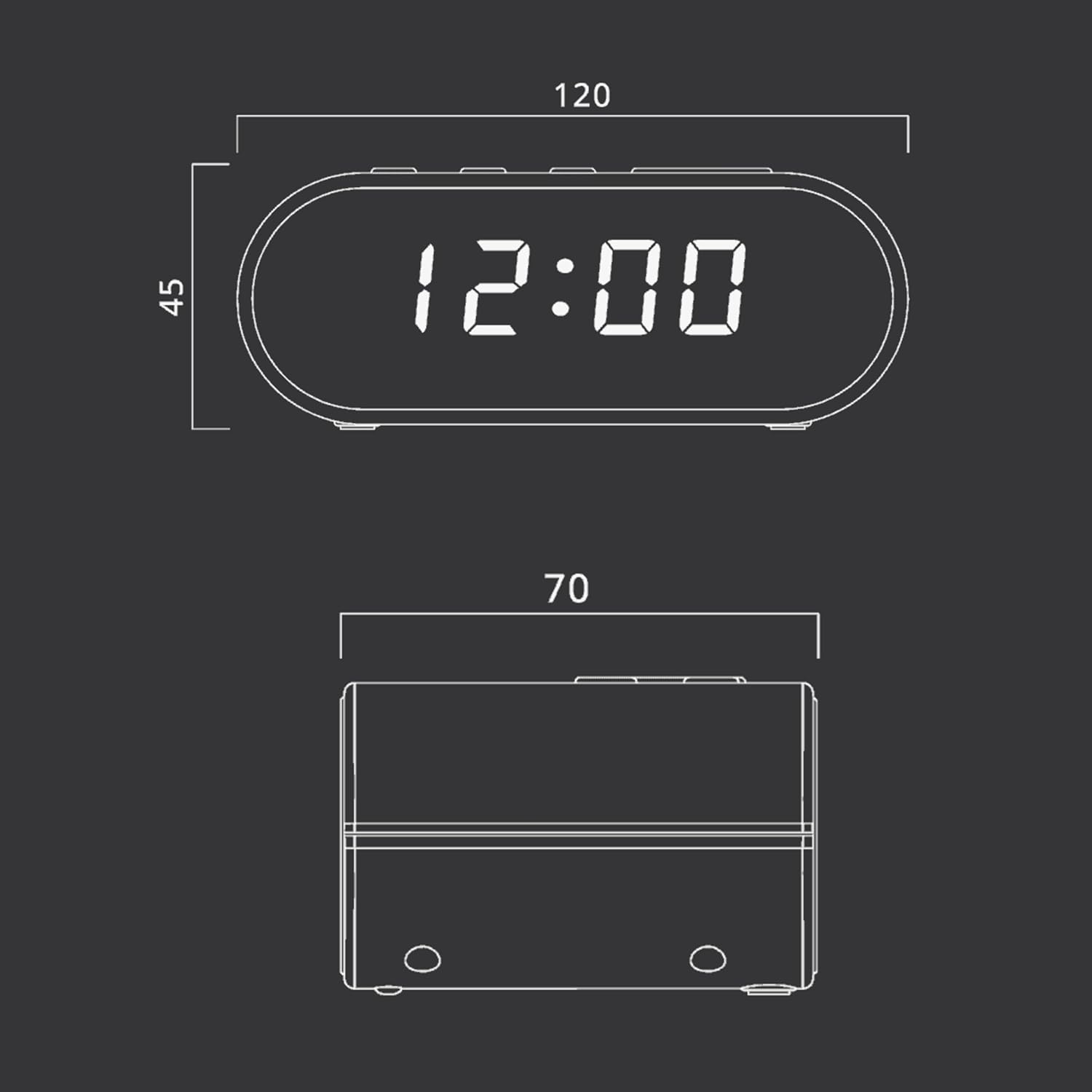
ภาพ: Technical drawing illustrating the dimensions of the Muse M-10 CR Clock Radio, with measurements in millimeters.
- ยี่ห้อ: มิวส์
- หมายเลขรุ่น: 3700460200701
- สี: ชวาร์ส (ดำ)
- ขนาดสินค้า : 12 x 7 x 10.9 ซม. (กว้าง x ยาว x สูง)
- น้ำหนักสินค้า: 200 กรัม
- เล่มที่tage: 220 โวลต์
- วัสดุ: Kunststoff (พลาสติก)
- ประเภทจอภาพ: LED (0.6-inch white)
- วิทยุ: FM PLL Radio with 20 preset stations
- คุณสมบัติพิเศษ: Adjustable Brightness, Large Display, Radio, Snooze Function, Dual Alarm
การรับประกันและการสนับสนุน
For warranty information or technical support, please refer to the warranty card included with your purchase or contact your local Muse distributor or retailer. Keep your proof of purchase for any warranty claims.
You can also visit the official Muse webเว็บไซต์นี้เหมาะสำหรับขอความช่วยเหลือเพิ่มเติมและดูข้อมูลผลิตภัณฑ์


