1. บทนำ
This instruction manual provides essential information for the safe and efficient use of your THOMSON CE-26 Cassette/SD/USB Audio System. Please read this manual thoroughly before operating the device and retain it for future reference. The CE-26 allows you to play audio from cassettes, USB drives, and SD/MMC cards, as well as record audio directly from cassettes or external sources to MP3 format on USB or SD/MMC media.
2. สินค้าหมดview
Familiarize yourself with the components and controls of your CE-26 audio system.

รูปที่ 2.1: แผงด้านหน้า View. This image displays the front of the THOMSON CE-26 unit, showing the cassette deck, control buttons, display screen, USB port, SD/MMC card slot, and volume knob.
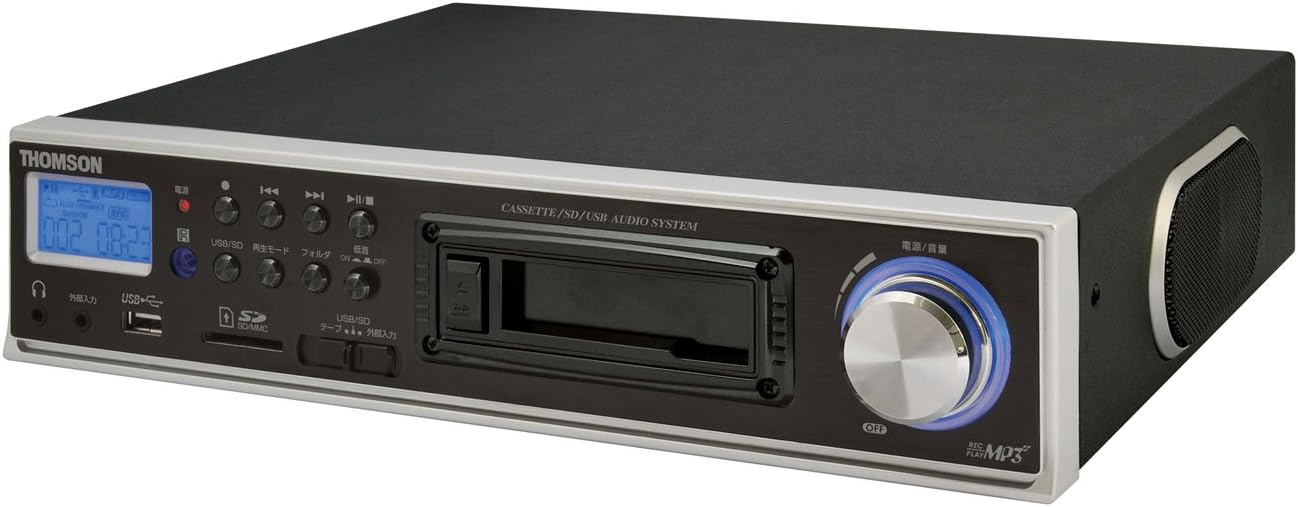
รูปที่ 2.2: มุม View. This image shows the THOMSON CE-26 from an angled perspective, highlighting the integrated side speaker and the overall compact design.

รูปที่ 2.3: รีโมทคอนโทรล This image displays the included remote control for the THOMSON CE-26, featuring buttons for search, display, record, playback mode, program, folder navigation, and USB/SD selection.

รูปที่ 2.4: คุณสมบัติโดยรวมview แผนภาพ This diagram illustrates the key functionalities of the THOMSON CE-26, including direct recording from cassette to USB/SD, MP3/WMA playback, USB/SD memory copying, AUX input, built-in speaker, and remote control.
แผงควบคุมด้านหน้า:
- ปุ่มเปิด/ปิด: เปิดหรือปิดเครื่อง
- หน้าจอแสดงผล: Shows track information, mode, and time.
- ช่องใส่เทปคาสเซ็ท: For inserting and playing audio cassettes.
- พอร์ต USB: Connect USB flash drives for playback or recording.
- ช่องเสียบการ์ด SD/MMC: Insert SD or MMC cards for playback or recording.
- การควบคุมการเล่น: เล่น, หยุดชั่วคราว, หยุด, กรอไปข้างหน้า, กรอถอยหลัง, ข้ามแทร็ก
- ปุ่มบันทึก: เริ่มการบันทึก
- ปุ่มโหมด: Switches between Cassette, USB, SD, and AUX input modes.
- ปุ่มปรับระดับเสียง: ปรับระดับเอาต์พุตเสียง
- แจ็คหูฟัง: สำหรับการฟังส่วนตัว
- อินพุต AUX: เชื่อมต่ออุปกรณ์เสียงภายนอก
3. การตั้งค่า
- การเชื่อมต่อไฟฟ้า: เชื่อมต่อสายไฟ AC เข้ากับช่องเสียบไฟของเครื่อง แล้วเสียบเข้ากับเต้ารับไฟฟ้ามาตรฐานที่ผนัง
- เปิดเครื่องครั้งแรก: กดปุ่มเปิด/ปิดเพื่อเปิดเครื่อง หน้าจอจะสว่างขึ้น
- การแทรกสื่อ:
- เทป: Open the cassette door and insert an audio cassette with the open edge facing upwards. Close the door securely.
- ยูเอสบีไดรฟ์: Insert a USB flash drive into the USB port. Ensure it is formatted to FAT32.
- การ์ด SD/MMC: Insert an SD or MMC card into the card slot until it clicks into place. Ensure it is formatted to FAT32.
- External Audio Device (Optional): To use the AUX input, connect an external audio source (e.g., smartphone, CD player) to the AUX IN jack using a 3.5mm audio cable.
4. คู่มือการใช้งาน
4.1. การเล่นเทปคาสเซ็ต
- ใส่เทปคาสเซ็ท
- Press the "Mode" button until "Cassette" mode is selected (or the cassette deck automatically starts playing).
- กดปุ่มเล่น (►) บนตัวเครื่องหรือรีโมท
- ปรับระดับเสียงโดยใช้ปุ่มปรับระดับเสียง
- Use Fast Forward (►►) หรือ ย้อนกลับ (เ) ปุ่มสำหรับนำทางเทป
- Press Stop (■) to end playback.
4.2. การเล่น USB/SD
- Insert a USB drive or SD/MMC card containing MP3 or WMA audio files.
- Press the "Mode" button to select "USB" or "SD" mode. The unit will automatically scan and begin playing the first track.
- ใช้ปุ่มเล่น/หยุดชั่วคราว (►/∥), หยุด (■), Next Track (|), and Previous Track (|) ปุ่มควบคุมการเล่น
- The "Folder" buttons on the remote can be used to navigate between folders on the USB/SD media.
4.3. Recording Audio to MP3 (Cassette to USB/SD)
This feature allows you to convert your cassette tapes into digital MP3 files.
- Insert a blank or desired USB drive/SD card into the respective slot.
- Insert the cassette tape you wish to record.
- Press the "Mode" button to select "Cassette" mode.
- Start playing the cassette tape.
- Press the "Record" button on the unit or remote. The recording indicator will light up, and the unit will begin converting the cassette audio to MP3 format on the selected USB/SD media.
- To stop recording, press the "Stop" button. The recorded MP3 file will be saved on your USB drive or SD card.
- บันทึก: There might be a slight delay between pressing record and the actual start of recording. It is recommended to start recording slightly before the desired audio begins to avoid cutting off the start of a track.
4.4. Recording Audio to MP3 (AUX Input to USB/SD)
บันทึกเสียงจากอุปกรณ์ภายนอกที่เชื่อมต่อผ่านช่องต่อ AUX
- เชื่อมต่ออุปกรณ์เสียงภายนอกของคุณเข้ากับช่อง AUX IN
- Insert a blank or desired USB drive/SD card.
- Press the "Mode" button to select "AUX" mode.
- เริ่มเล่นบนอุปกรณ์เสียงภายนอกของคุณ
- Press the "Record" button on the unit or remote. The recording indicator will light up, and the unit will begin converting the AUX audio to MP3 format on the selected USB/SD media.
- To stop recording, press the "Stop" button.
4.5. การทำสำเนา Files Between USB and SD/MMC
The CE-26 allows direct copying of MP3/WMA files between a USB drive and an SD/MMC card.
- Ensure both a USB drive and an SD/MMC card are inserted into their respective slots.
- Select either "USB" or "SD" mode using the "Mode" button, depending on which source you want to copy จาก.
- นำทางไปที่ file or folder you wish to copy.
- Press and hold the "Copy" button (often labeled "USB/SD Copy" or similar) on the unit or remote. Follow any on-screen prompts to confirm the copy operation.
- The display will indicate when the copying process is complete.
5. การบำรุงรักษา
- การทำความสะอาด: ใช้ผ้านุ่มและแห้งเช็ดทำความสะอาดภายนอกตัวเครื่อง ห้ามใช้น้ำยาทำความสะอาดหรือวัสดุขัดถู
- การดูแลรักษาเทปคาสเซ็ต: Periodically clean the cassette head and pinch rollers with a specialized cassette head cleaner to ensure optimal audio quality and prevent tape damage.
- พื้นที่จัดเก็บ: When not in use for extended periods, disconnect the power cord and store the unit in a cool, dry place away from direct sunlight and extreme temperatures.
6 การแก้ไขปัญหา
| ปัญหา | สาเหตุที่เป็นไปได้ | สารละลาย |
|---|---|---|
| ไม่มีไฟฟ้า | ไม่ได้เสียบสายไฟ; ปลั๊กไฟไม่ทำงาน | ตรวจสอบให้แน่ใจว่าสายไฟเสียบแน่นดีแล้ว และตรวจสอบว่าปลั๊กไฟใช้งานได้หรือไม่ |
| ไม่มีเสียงในระหว่างการเล่น | ระดับเสียงต่ำเกินไป เลือกโหมดไม่ถูกต้อง เชื่อมต่อหูฟังแล้ว | Increase volume. Select the correct input mode (Cassette, USB, SD, AUX). Disconnect headphones if using speakers. |
| Cassette tape not playing or recording correctly | Tape tangled or damaged; Cassette heads dirty; Incorrect tape direction. | Check tape condition. Clean cassette heads and pinch rollers. Ensure tape is inserted correctly. |
| Recording stops prematurely or has gaps | USB drive/SD card full; Media format issue; Intermittent power. | Ensure sufficient storage space. Use FAT32 formatted media. Check power connection stability. |
| Poor audio quality from USB/SD | ทุจริต files; Low bitrate MP3/WMA files. | Try different audio fileส. ให้แน่ใจว่า fileไม่เสียหาย |
| รีโมตคอนโทรลไม่ทำงาน | Batteries depleted; Obstruction between remote and unit; Incorrect angle. | เปลี่ยนแบตเตอรี่รีโมทคอนโทรล ตรวจสอบให้แน่ใจว่ามองเห็นตัวรับสัญญาณอินฟราเรดของตัวเครื่องได้อย่างชัดเจน |
7. ข้อมูลจำเพาะ
| คุณสมบัติ | รายละเอียด |
|---|---|
| ยี่ห้อ | ทอมสัน |
| หมายเลขรุ่น | CE-26 |
| สื่อที่รองรับ | Cassette Tape, USB Memory, SD/MMC Card |
| รูปแบบเสียงที่รองรับ | MP3, WMA (playback); MP3 (recording) |
| ฟังก์ชั่นการบันทึก | Direct digital recording from Cassette to MP3, AUX to MP3 |
| การเชื่อมต่อ | USB Port, SD/MMC Card Slot, AUX Input (3.5mm), Headphone Output (3.5mm) |
| ลำโพงในตัว | ใช่ |
| รีโมทคอนโทรล | รวมอยู่ด้วย |
| ขนาด (โดยประมาณ) | 35.4 x 33.2 x 12 ซม. |
| น้ำหนัก (โดยประมาณ) | 3.02 กก. |
8. การรับประกันและการสนับสนุน
For warranty information and technical support, please refer to the warranty card included with your product or contact THOMSON customer service directly. Keep your purchase receipt as proof of purchase.
For further assistance, please visit the official THOMSON webไซต์หรือติดต่อศูนย์บริการที่ได้รับอนุญาต


