1. บทนำ
The Logitech Wireless Presenter R400 is designed to provide intuitive control over your presentations, allowing you to move freely and engage with your audience. This device combines essential presentation functions, including slide navigation and a red laser pointer, into a compact and ergonomic design. It operates wirelessly, offering a reliable connection for effective communication during your presentations.

Figure 1.1: The Logitech Wireless Presenter R400, a sleek black device with control buttons and a laser pointer.
2. การตั้งค่า
Setting up your Logitech Wireless Presenter R400 is a straightforward process that requires no software installation.
- ใส่แบตเตอรี่: The presenter requires two AAA batteries. Locate the battery compartment on the underside of the device, open it, and insert the batteries according to the polarity indicators.
- ดึงข้อมูลตัวรับสัญญาณ USB: The wireless mini receiver is conveniently stored inside the presenter itself. Gently pull the receiver out from its storage slot.
- เชื่อมต่อเครื่องรับ: Plug the USB receiver into an available USB port on your computer. The system will automatically detect the device.
- เปิดเครื่อง: Slide the ON/OFF switch on the side of the presenter to the "ON" position. The device is now ready for use.
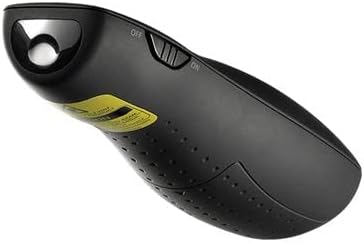
Figure 2.1: The Logitech Wireless Presenter R400 with its USB receiver stored in the base.
No additional drivers or software are required for basic functionality on compatible Windows-based systems.
3. คู่มือการใช้งาน
The R400 presenter features intuitively placed controls for seamless presentation management.

รูปที่ 3.1: ด้านบน view of the Logitech Wireless Presenter R400, highlighting the navigation and laser pointer buttons.
- การนำทางสไลด์:
- กดปุ่ม Forward (>) button to advance to the next slide.
- กดปุ่ม Back (<) button to return to the previous slide.
- ตัวชี้เลเซอร์:
- กดปุ่มค้างไว้ พอยเตอร์เลเซอร์ button (typically a dot icon) to activate the red laser. Release the button to turn off the laser. This feature is useful for highlighting specific points on your presentation screen.
- Black Screen Function:
- กดปุ่ม หน้าจอสีดำ button (often a blank screen icon) to temporarily black out your presentation screen. Press it again to resume the presentation. This allows you to shift audience attention back to yourself.
- Start/Stop Presentation:
- The R400 may include a dedicated button to start or stop your presentation (e.g., a play/pause icon). Consult your software for specific compatibility.
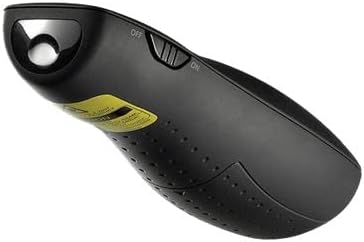
รูปที่ 3.2: ด้านข้าง view of the Logitech Wireless Presenter R400, illustrating the laser output.
The wireless range of the R400 is approximately 50 feet (15 meters), providing ample freedom to move around the room and interact with your audience.
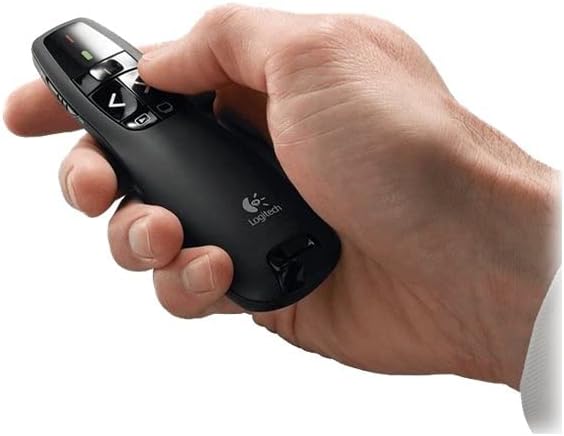
Figure 3.3: A hand comfortably holding the Logitech Wireless Presenter R400, demonstrating its ergonomic design.
4. การบำรุงรักษา
Proper maintenance ensures the longevity and optimal performance of your presenter.
- การเปลี่ยนแบตเตอรี่: When the battery indicator light (if present) signals low power, or if the presenter's responsiveness decreases, replace the two AAA batteries. Always use fresh, high-quality batteries.
- การทำความสะอาด: Use a soft, dry cloth to clean the exterior of the presenter. Avoid using abrasive cleaners or solvents, as these can damage the surface.
- พื้นที่จัดเก็บ: When not in use, turn off the presenter using the ON/OFF switch. Store the USB receiver inside its dedicated slot within the presenter to prevent loss. The included carrying case provides additional protection during transport and storage.
5 การแก้ไขปัญหา
If you encounter issues with your Logitech Wireless Presenter R400, try the following solutions:
| ปัญหา | สาเหตุที่เป็นไปได้ | สารละลาย |
|---|---|---|
| Presenter is unresponsive. | แบตเตอรี่เหลือน้อยหรือหมด Presenter is off. USB receiver is not properly connected. | เปลี่ยนแบตเตอรี่ Slide the ON/OFF switch to "ON". Ensure the USB receiver is fully inserted into a working USB port. Try a different USB port. |
| Laser pointer is dim or not working. | แบตเตอรี่อ่อน Obstruction in front of laser. | เปลี่ยนแบตเตอรี่ Ensure nothing is blocking the laser output. |
| Limited wireless range or intermittent connection. | การรบกวนจากอุปกรณ์ไร้สายอื่น ๆ Distance from receiver is too great. | ขยับเข้าไปใกล้คอมพิวเตอร์มากขึ้น Avoid placing the receiver near other electronic devices that may cause interference. |
| Slide navigation not working in presentation software. | ซอฟต์แวร์ไม่ได้อยู่ในโหมดการนำเสนอ Incompatibility with specific software. | Ensure your presentation software (e.g., PowerPoint, Keynote) is in slideshow or presentation mode. ตรวจสอบกับฝ่ายสนับสนุนของ Logitech website for compatibility information or software updates. |
6. ข้อมูลจำเพาะ
| คุณสมบัติ | รายละเอียด |
|---|---|
| หมายเลขรุ่น | 910-001356 |
| การเชื่อมต่อ | เทคโนโลยีไร้สาย 2.4 GHz |
| ช่วงสาย | สูงถึง 50 ฟุต (15 เมตร) |
| ประเภทเลเซอร์ | ตัวชี้เลเซอร์สีแดง |
| แบตเตอรี่ | แบตเตอรี่ 2 x AAA (มาพร้อมกับเครื่อง) |
| ขนาด (สูง x กว้าง x ลึก) | 1.49 x 4.55 x 1.08 นิ้ว (37.8 x 115.5 x 27.4 มม.) |
| น้ำหนัก | 2.01 ออนซ์ (57 กรัม) |
| ความต้องการของระบบ | Windows-Based Computer: Windows Vista, Windows 7, Windows 8, Windows 10 or later; USB port |
| สี | สีดำ |
| คุณสมบัติพิเศษ | การออกแบบตามหลักสรีรศาสตร์ |
7. การรับประกันและการสนับสนุน
ข้อมูลการรับประกัน: Specific warranty terms and conditions for the Logitech Wireless Presenter R400 may vary by region and retailer. For detailed warranty information, please refer to the warranty card included with your product or visit the official Logitech webเว็บไซต์.
การสนับสนุนลูกค้า: For further assistance, technical support, or to access frequently asked questions, please visit the official Logitech support website. You can typically find support resources, driver downloads (if applicable), and contact information for customer service there.
Official Logitech Webเว็บไซต์: www.logitech.com


