การแนะนำ
ขอบคุณสำหรับการซื้อasing the Muse M-12 CR Radio Alarm Clock. This compact and versatile device combines an FM radio with a dual alarm clock, offering convenience and functionality for your daily routine. Featuring a clear red LED display and intuitive controls, the M-12 CR is designed for ease of use. Please read this manual carefully to ensure proper operation and to fully utilize all features of your new alarm clock.
เนื้อหาแพ็คเกจ
โปรดตรวจสอบว่าสินค้าทั้งหมดมีอยู่และอยู่ในสภาพดี:
- Muse M-12 CR Radio Alarm Clock Unit
- อะแดปเตอร์แปลงไฟ
- คู่มือการใช้งาน (เอกสารนี้)
สินค้าเกินview และการควบคุม
Familiarize yourself with the various parts and controls of your Muse M-12 CR Radio Alarm Clock.

รูปที่ 1: ด้านหน้าและด้านบน view of the Muse M-12 CR Radio Alarm Clock, highlighting the red LED display and the arrangement of control buttons.
Control Buttons (Top Panel):
- ปุ่มเลื่อนปลุก/หรี่ไฟ: Press to temporarily silence the alarm (snooze function). Press and hold to adjust display brightness.
- ปุ่มสัญญาณเตือนภัย 1: Press to activate/deactivate Alarm 1. Press and hold to set Alarm 1 time.
- ปุ่มสัญญาณเตือนภัย 2: Press to activate/deactivate Alarm 2. Press and hold to set Alarm 2 time.
- ปุ่มตั้งเวลา: Press and hold to set the current time.
- ปุ่ม HR (ชั่วโมง): Used to adjust the hour during time or alarm setting.
- ปุ่ม MIN (นาที): Used to adjust the minute during time or alarm setting.
- VOL- / PREV Button: Decreases volume. In radio mode, short press for previous preset station, long press for backward auto-scan.
- VOL+ / NEXT Button: Increases volume. In radio mode, short press for next preset station, long press for forward auto-scan.
- FM / MEM Button: Press to switch to FM radio mode. Press and hold to automatically scan and store FM stations.
- ปุ่มสลีป: เปิดใช้งานฟังก์ชั่นตั้งเวลาปิดเครื่อง
- ปุ่มงีบหลับ: Activates the nap timer function.
การตั้งค่า
1. การเชื่อมต่อไฟฟ้า
- Unpack the Muse M-12 CR unit and the power adapter.
- Insert the DC plug of the power adapter into the DC IN jack located at the back of the unit.
- Plug the power adapter into a standard AC wall outlet (100-240V, 50/60Hz). The display will light up, and the clock will be ready for time setting.
2. ระบบสำรองไฟจากแบตเตอรี่ (เลือกได้)
To maintain time and alarm settings during a power outage, you can install backup batteries (not supplied). The unit typically uses AAA batteries. Refer to the battery compartment on the bottom of the unit for correct battery type and polarity.
คำแนะนำการใช้งาน
การตั้งเวลา
- กดปุ่มค้างไว้ ตั้งเวลา กดปุ่มค้างไว้จนกว่าตัวเลขชั่วโมงจะเริ่มกะพริบ
- กดปุ่ม HR button repeatedly to adjust the hour.
- กดปุ่ม นาที กดปุ่มซ้ำๆ เพื่อปรับนาที
- กดปุ่ม ตั้งเวลา กดปุ่มอีกครั้งเพื่อยืนยันและออกจากโหมดตั้งเวลา
การตั้งค่าสัญญาณเตือน (สัญญาณเตือน 1 และ สัญญาณเตือน 2)
The M-12 CR features two independent alarms.
- กดปุ่มค้างไว้ นาฬิกาปลุก 1 or นาฬิกาปลุก 2 กดปุ่มจนกว่าตัวเลขชั่วโมงปลุกจะกะพริบ
- กดปุ่ม HR ปุ่มสำหรับตั้งเวลาปลุกที่ต้องการ
- กดปุ่ม นาที ปุ่มเพื่อตั้งนาทีการปลุกที่ต้องการ
- กดปุ่ม นาฬิกาปลุก 1 or นาฬิกาปลุก 2 button again to select the alarm source (Radio or Buzzer). The corresponding indicator will light up.
- กดปุ่ม นาฬิกาปลุก 1 or นาฬิกาปลุก 2 button one more time to confirm and activate the alarm. The alarm indicator (1 or 2) will appear on the display.
หากต้องการปิดใช้งานสัญญาณเตือน ให้กดปุ่มที่เกี่ยวข้อง นาฬิกาปลุก 1 or นาฬิกาปลุก 2 button until its indicator disappears from the display.
การใช้งานวิทยุ (FM)
- กดปุ่ม FM / MEM button to switch to FM radio mode. The frequency will be displayed.
- Automatic Scan and Store: กดปุ่มค้างไว้ FM / MEM button to automatically scan for and store available FM stations (up to 20 presets).
- การปรับด้วยตนเอง: ใช้ VOL- / PREV และ VOL+ / NEXT buttons to manually tune to a specific frequency. Long press for auto-scan to the next strong station.
- การเลือกค่าที่ตั้งไว้ล่วงหน้า: กดสั้น ๆ VOL- / PREV or VOL+ / NEXT buttons to cycle through stored preset stations.
- การปรับระดับเสียง: ใช้ VOL- / PREV และ VOL+ / NEXT buttons (when not in tuning mode) to adjust the radio volume.
ฟังก์ชั่นการพักชั่วคราว
เมื่อเสียงปลุกดัง ให้กด เลื่อน/หรี่ไฟ button to temporarily silence the alarm. The alarm will sound again after a few minutes (default snooze time is usually 9 minutes, refer to specific product behavior if different).
นอนฟังก์ชั่นจับเวลา
The sleep timer allows you to fall asleep to the radio, which will automatically turn off after a set period.
- ขณะที่วิทยุกำลังเล่นอยู่ ให้กดปุ่ม นอน button repeatedly to cycle through available sleep timer durations (e.g., 120, 90, 60, 30, 15, 10, 5 minutes, or OFF).
- วิทยุจะปิดเองโดยอัตโนมัติหลังจากเวลาที่กำหนดไว้
ฟังก์ชั่นตั้งเวลางีบหลับ
The nap timer sets an alarm to sound after a short, predefined period.
- กดปุ่ม นอน button repeatedly to select a nap duration (e.g., 120, 90, 60, 30, 15, 10, 5 minutes, or OFF).
- The alarm will sound after the selected nap time has elapsed.
จอแสดงผลหรี่
วิธีปรับความสว่างของจอแสดงผล LED:
- กดปุ่ม เลื่อน/หรี่ไฟ button (when the alarm is not sounding) to cycle through different brightness levels (e.g., High, Medium, Low, Off).
การซ่อมบำรุง
- การทำความสะอาด: Use a soft, dry cloth to clean the exterior of the unit. Do not use abrasive cleaners, waxes, or solvents as they may damage the finish.
- การจัดวาง: วางเครื่องไว้บนพื้นผิวที่มั่นคงและเรียบ ห่างจากแสงแดดโดยตรง แหล่งความร้อน และฝุ่นละอองหรือความชื้นที่มากเกินไป
- การระบายอากาศ : ตรวจสอบให้แน่ใจว่ามีการระบายอากาศรอบ ๆ เครื่องอย่างเพียงพอเพื่อป้องกันความร้อนสูงเกินไป อย่าปิดกั้นช่องระบายอากาศ
- การตัดการเชื่อมต่อไฟฟ้า: If the unit is not going to be used for a long period, unplug the power adapter from the wall outlet.
การแก้ไขปัญหา
| ปัญหา | สาเหตุที่เป็นไปได้ | สารละลาย |
|---|---|---|
| ไม่มีไฟเลี้ยง / หน้าจอปิด | Power adapter not connected or faulty. Power outlet not active. | ตรวจสอบให้แน่ใจว่าได้เสียบอะแดปเตอร์แปลงไฟเข้ากับตัวเครื่องและเต้ารับที่ใช้งานได้สนิทแล้ว ลองเสียบกับเต้ารับอื่นดู |
| นาฬิกาปลุกไม่ส่งเสียง | Alarm not activated. Alarm volume too low (for radio alarm). Incorrect alarm time set. | Ensure the alarm indicator (1 or 2) is visible on the display. Increase radio volume if using radio alarm. Verify alarm time is correctly set. |
| การรับสัญญาณวิทยุไม่ดี | Antenna not extended or positioned correctly. Interference from other electronic devices. Weak signal in the area. | Fully extend and adjust the FM wire antenna for best reception. Move the unit away from other electronics. Try auto-scanning for stronger stations. |
| ปุ่มไม่ตอบสนอง | ความผิดพลาดของระบบชั่วคราว | Unplug the unit from power for a few minutes, then plug it back in to reset. |
ข้อมูลจำเพาะ
| แบบอย่าง | เอ็ม-12 ซีอาร์ |
| ประเภทจอภาพ | LED (สีแดง) |
| ขนาดจอแสดงผล | 1.5 ซม. (0.6 นิ้ว) |
| ความถี่วิทยุ | FM (with 20 preset stations) |
| ฟังก์ชั่นปลุก | Dual Alarm (Radio or Buzzer), Snooze, Sleep, Timer (Nap) |
| แหล่งพลังงาน | Wired (AC Power Adapter) |
| ขนาด (กว้าง x ยาว x สูง) | 12.9 x 5.3 x 6.5 ซม. (โดยประมาณ) |
| น้ำหนัก | 290 ก. (โดยประมาณ) |
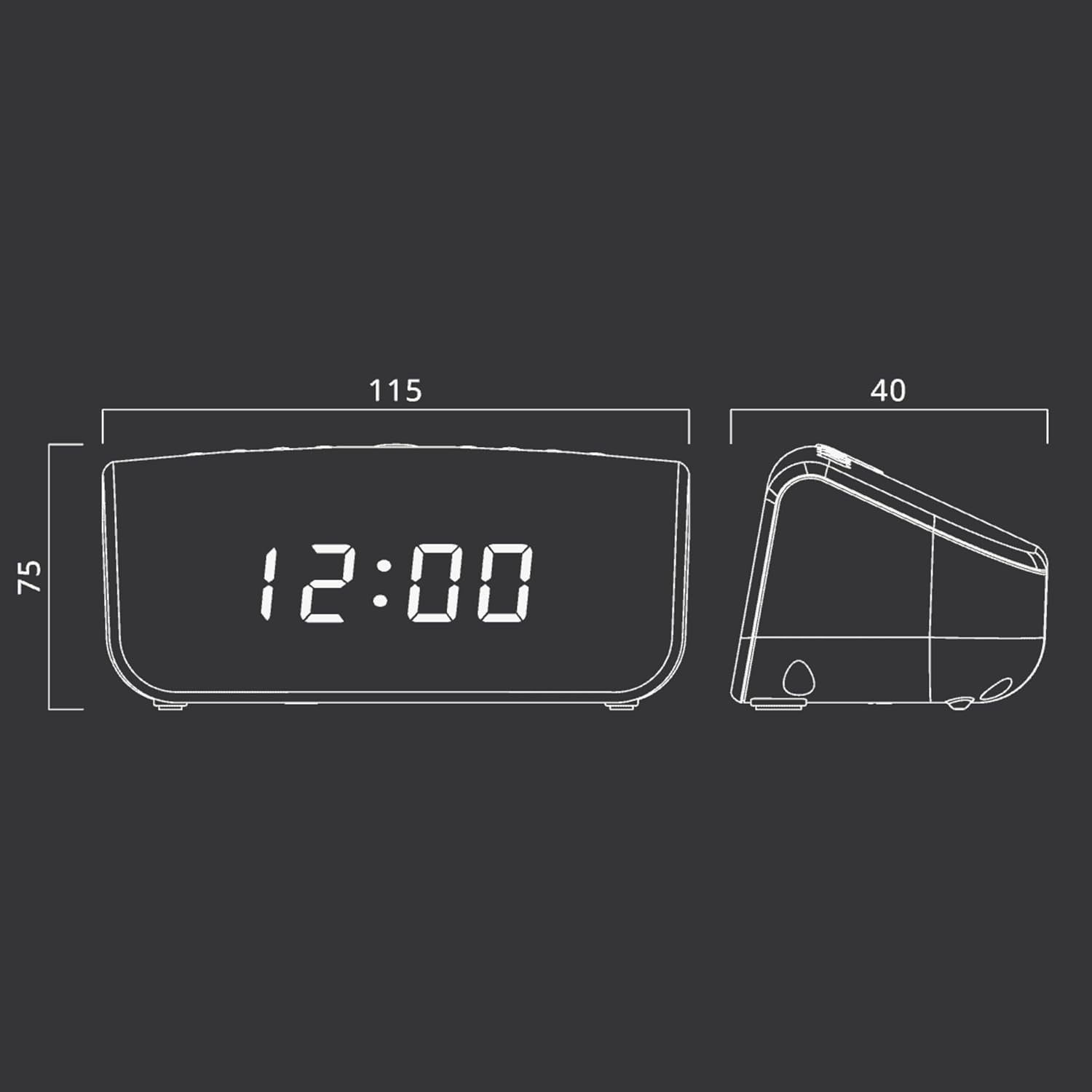
รูปที่ 2: Approximate dimensions of the Muse M-12 CR unit.
การรับประกันและการสนับสนุน
สำหรับข้อมูลการรับประกันและการสนับสนุนทางเทคนิค โปรดดูบัตรรับประกันที่แนบมากับผลิตภัณฑ์ของคุณ หรือเยี่ยมชมเว็บไซต์อย่างเป็นทางการของ Muse webไซต์ โปรดเก็บใบเสร็จรับเงินของคุณไว้เป็นหลักฐานการซื้อสำหรับการเรียกร้องการรับประกันใดๆ
หากต้องการความช่วยเหลือเพิ่มเติม โปรดติดต่อฝ่ายบริการลูกค้าของ Muse


