สินค้าเกินview
Manage two different phone lines from one phone using the VTech DS6151 DECT 6.0 Expandable 2-Line Cordless Phone with Answering System and Caller ID. Stay organized by placing and answering calls on distinct lines, while having access to all your messages in one place. This 2-line phone stores up to 13 minutes of recording time per line of incoming messages, outgoing announcements and memos. Dedicated mailboxes for each line make it easy to keep things separated.

The VTech DS6151 2-Line Cordless Phone system, featuring a handset and base unit, designed for efficient communication in home or small business environments.
คุณสมบัติหลัก
- เทคโนโลยีดิจิทัล DECT 6.0: Ensures interference-free audio, secure transmission, and extended range - ensuring clear, encrypted calls throughout your home, indoors and out.
- Dual Line Support: Manage two distinct phone lines, allowing for call holding, switching, and conferencing.
- ระบบตอบรับอัตโนมัติแบบดิจิตอล: Records up to 13 minutes per line, with dedicated mailboxes for each line.
- หมายเลขผู้โทร/สายเรียกซ้อน: Stores up to 50 calls, displaying names, numbers, dates, and times.
- Handset and Base Intercom: Facilitates easy communication between handsets and the base unit.
- เครื่องช่วยฟังเข้ากันได้: Provides clear, uninterrupted sound for users with hearing aids.
- Conference Hub: Connects lines 1, 2, and outside calls for seamless group conversations.
- ระบบที่ขยายได้: Supports up to 12 handsets using up to two phone jacks (DS6101 handsets sold separately).
- Blue Backlit Keypad and Display: ช่วยเพิ่มทัศนวิสัยในสภาพแสงน้อย
เนื้อหาแพ็คเกจ
ตรวจสอบว่าแพ็คเกจของคุณมีรายการต่อไปนี้:
- Vtech Ds6151 Dect 6.0 2-Line Expandable Cordless Phone With Digital Answering System And Caller Id
- Silver Handset
- 1-Handset Base
- แบตเตอรี่
- Remote Charger
- คู่มือการใช้งาน (เอกสารนี้)
การตั้งค่าเริ่มต้น
การเชื่อมต่อหน่วยฐาน
- Connect the small end of the power adapter to the POWER jack on the back of the telephone base.
- Plug the large end of the power adapter into an electrical outlet not controlled by a wall switch.
- Connect one end of the telephone line cord to the TEL LINE 1 jack on the back of the telephone base.
- ต่อปลายอีกด้านของสายโทรศัพท์เข้ากับเต้ารับโทรศัพท์ที่ผนัง
- If you have a second telephone line, repeat steps 3 and 4 for TEL LINE 2.

The VTech DS6151 base unit of the VTech DS6151, demonstrating the connection points for two separate telephone lines, providing dual-line operation capability.
Handset Battery Installation and Charging
- เปิดฝาปิดช่องใส่แบตเตอรี่ที่ด้านหลังของโทรศัพท์
- Connect the battery pack plug into the jack inside the compartment, ensuring correct polarity.
- Place the battery pack inside the compartment and close the cover.
- Place the handset in the telephone base or charger with the display facing up. The CHARGE light on the handset will illuminate, indicating proper charging.
- Allow the handset to charge for at least 16 hours before initial use. For optimal performance, keep the handset in the charger when not in use.
การตั้งค่าวันที่และเวลา
The date and time are typically set automatically by your Caller ID service. If the date and time are incorrect or not displayed, you may need to set them manually. Refer to the full user guide for detailed instructions on manual date and time settings.
คำแนะนำการใช้งาน
Making and Receiving Calls (2-Line Operation)
The DS6151 supports two distinct telephone lines. You can easily switch between lines or place calls on hold.
- หากต้องการโทรออก ให้กด เส้นที่ 1 or เส้นที่ 2จากนั้นกดหมายเลขดังกล่าว
- หากต้องการรับสายเรียกเข้า ให้กด เส้นที่ 1 or เส้นที่ 2, or any dial key.
- To switch between active calls on different lines, press the corresponding เส้น ปุ่ม.
The VTech DS6151 base and handset, illustrating the capability for 2-line operation, ideal for managing separate business and personal calls.
การใช้ระบบตอบรับอัตโนมัติแบบดิจิทัล
The integrated digital answering system records messages for both lines, with up to 13 minutes of recording time per line.
- หากต้องการเล่นข้อความ ให้กด เล่น/หยุด บนฐานโทรศัพท์
- To access messages for a specific line, use the dedicated mailbox buttons (MAILBOX LINE 1 or MAILBOX LINE 2).
- You can also access and manage messages from the handset.

The VTech DS6151 base unit highlighting its digital answering system, capable of recording up to 13 minutes of messages per line, ensuring no call is missed.
ID ผู้โทรและสายเรียกซ้อน
The phone stores up to 50 Caller ID entries, allowing you to see who is calling before you answer.
- When a call comes in, the caller's information (name, number, date, time) appears on the display.
- กด ตำรวจปราบปราม เพื่ออีกครั้งview บันทึกหมายเลขผู้โทรเข้า (Caller ID log)

The VTech DS6151 handset and base displaying Caller ID information, indicating the phone's ability to store up to 50 incoming call details.
สมุดโทรศัพท์
Store up to 50 contacts in the phonebook for quick dialing.
- To add a new entry, navigate to the Phonebook menu and select "Add New Entry".
- To dial from the phonebook, press ผกก. and scroll to the desired entry, then press เส้นที่ 1 or เส้นที่ 2.

The VTech DS6151 handset and base unit, illustrating the phonebook directory feature which allows storage of up to 50 contacts for easy access.
ฟังก์ชัน Intercom
Communicate instantly between handsets or between a handset and the base unit.
- To initiate an intercom call, press อินที on the handset or base, then select the desired handset.

Two VTech DS6151 handsets demonstrating the intercom feature, allowing for direct communication between units with a single touch.
การประชุมทางโทรศัพท์
Easily connect multiple parties, including both phone lines and an outside call, into a single conversation.
- While on a call, you can add another line or an outside party to create a three-way conference. Refer to the full user guide for specific steps.

An illustration of conference calling with the VTech DS6151, showing how multiple individuals can join a single conversation using the phone's capabilities.
ลำโพงโทรศัพท์
Both the handset and the base unit feature a speakerphone for hands-free conversations.
- หากต้องการเปิดใช้งานลำโพงระหว่างการโทร ให้กดปุ่ม ผู้พูด ปุ่ม.
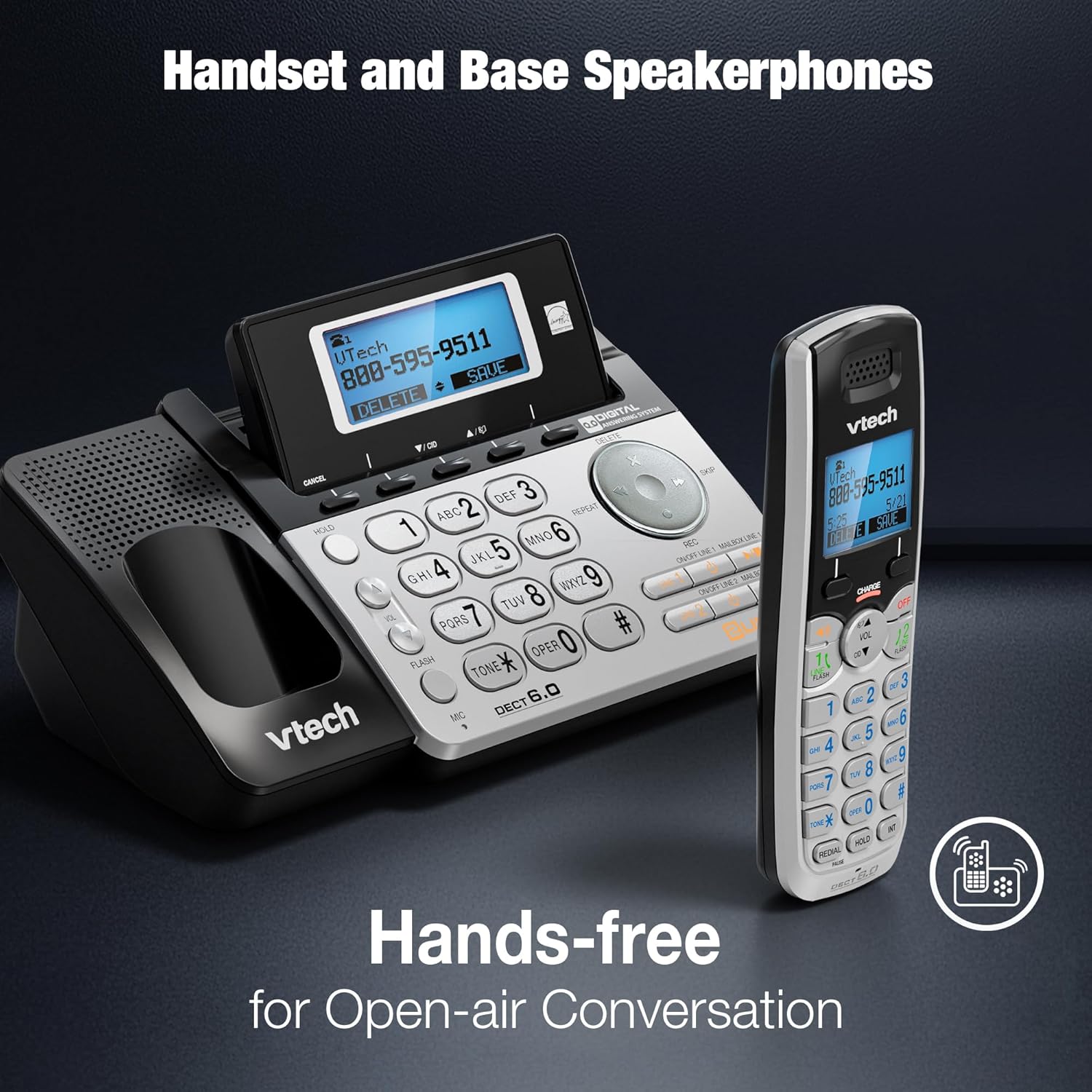
The VTech DS6151 handset and base unit, highlighting their integrated speakerphones for convenient hands-free communication.
แป้นพิมพ์และจอแสดงผลมีไฟส่องสว่างด้านหลัง
The handset features a blue backlit keypad and display, making it easy to see and dial in any lighting condition.

A close-up of the VTech DS6151 handset, showcasing its blue backlit keypad and display for improved visibility in low-light environments.
การดูแลรักษา
- การทำความสะอาด: ทำความสะอาดโทรศัพท์และฐานด้วยผ้านุ่มๆamp ใช้ผ้าเช็ดทำความสะอาดเท่านั้น ห้ามใช้สเปรย์ทำความสะอาดหรือสารเคมีรุนแรง
- การดูแลแบตเตอรี่ For optimal battery life, keep the handset in the charger when not in use. If the phone will not be used for an extended period, remove the battery.
- สภาพแวดล้อม : ควรหลีกเลี่ยงการวางโทรศัพท์ไว้ในที่ที่มีอุณหภูมิสูงหรือต่ำเกินไป แสงแดดโดยตรง หรือความชื้น
การแก้ไขปัญหา
If you experience any issues with your VTech DS6151 phone, please refer to the following table for common problems and solutions.
| ปัญหา | สารละลาย |
|---|---|
| ไม่มีเสียงโทรออก | Ensure the telephone line cord is securely plugged into the phone base and the wall jack. Check if the power adapter is properly connected. |
| ไม่สามารถโทรออกหรือรับสายได้ | Verify that the phone line is active. Check if the handset battery is charged. Ensure the phone is not in "Do Not Disturb" mode. |
| Handset display is blank or "Low Battery". | Place the handset in the charger. Allow at least 16 hours for a full charge. Replace the battery if it no longer holds a charge. |
| เวลาและวันที่ไม่ถูกต้อง | The time and date are usually set by Caller ID. If incorrect, manually set them via the handset menu. |
| คุณภาพเสียงไม่ดีหรือมีสัญญาณรบกวน | Move the handset closer to the base unit. Avoid placing the phone near other electronic devices that may cause interference. Check for loose connections. |
ข้อมูลจำเพาะทางเทคนิค
| คุณสมบัติ | รายละเอียด |
|---|---|
| ขนาดสินค้า | 8.9 x 5.8 x 4.7 นิ้ว |
| น้ำหนักสินค้า | 2.2 ปอนด์ |
| หมายเลขรุ่น | DS6151 |
| แบตเตอรี่ | ต้องใช้แบตเตอรี่เฉพาะผลิตภัณฑ์ 1 ก้อน (รวมอยู่ด้วย) |
| ประเภทโทรศัพท์ | ไร้สาย |
| แหล่งพลังงาน | สายไฟ |
| ประเภทของระบบตอบรับ | ดิจิตอล |
| เทคโนโลยี | DECT6.0 ภาษาไทย |
| สี | เงิน |
| วัสดุ | คริสตัล |
| ผู้ผลิต | วีเทค |
| ประเทศต้นกำเนิด | จีน |

The VTech DS6151 base unit and handset, with key dimensions (length, width, height) indicated for reference.
การรับประกันและการสนับสนุน
For detailed warranty information, please refer to the warranty card included with your product or visit the VTech official webเว็บไซต์.
Additional support and comprehensive user guides are available in PDF format:
หากต้องการความช่วยเหลือเพิ่มเติม โปรดติดต่อฝ่ายบริการลูกค้าของ VTech


